SmarterDiff
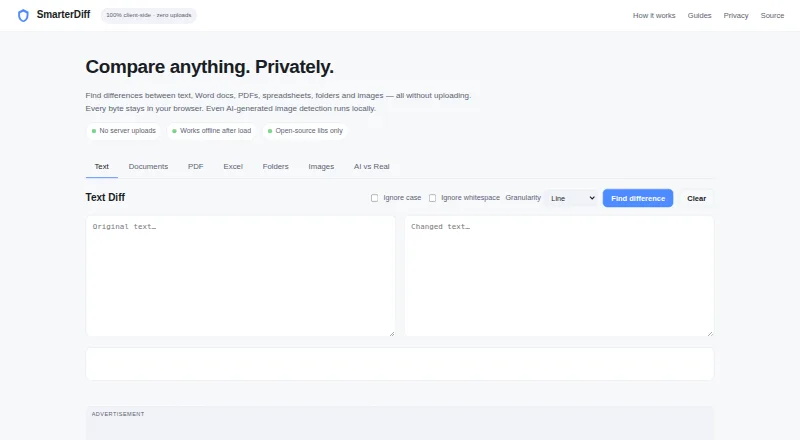
SmarterDiff is a free browser-based tool for comparing text, Word documents, PDFs, spreadsheets, folders, and images without uploading files.
What SmarterDiff is
SmarterDiff is a free browser-based tool for comparing text, Word documents, PDFs, spreadsheets, folders, and images without uploading files. Text comparisons can show line, word, or character differences, with options to ignore case and whitespace. Excel and CSV comparisons check values and formulas; image comparisons use pixel differences and offer overlay, side-by-side, and slider views. It can compare finalized .docx text, but does not include Word tracked-change markup; scanned PDFs without embedded text cannot be text-compared. SmarterDiff says comparisons run in the browser and files or results are not sent to its servers or external services. Comparisons can work offline after the first page load while browser libraries remain cached. File size depends on available memory and browser limits. The tool is a manual, one-off service without workflow automation or integrations. Its free plan is ad-supported, requires no account, and has no artificial limits. Google AdSense may set ad-targeting cookies.
Good
- Compares text, office files, PDFs, folders, and images.
- Text diffs offer line, word, and character modes.
- Files and results stay in the browser, according to the site.
- Can work offline after the first page load.
- Free for personal and commercial use; no account required.
Watch out
- Scanned PDFs without embedded text cannot be text-compared.
- Word tracked-change markup is not compared.
- File size depends on memory and browser limits.
- No workflow automation or integrations.
Who it suits
SmarterDiff may suit legal professionals, financial analysts and auditors, journalists and fact-checkers, or software developers who need manual file comparisons. It is also relevant to people who want comparisons processed in their browser rather than uploaded.
Verdict
SmarterDiff offers a range of manual comparisons in a browser, with offline use after its first page load. Check its document-scope and file-size limits before relying on it for a particular comparison.
Plans and prices
From SmarterDiff's own pricing page, checked 15 Oct 2026.
| Plan | Price | What it gives you |
|---|---|---|
| Free | Free | personal and commercial use · ad-supported · no account · no premium tier · no artificial limits · free forever |
The facts
Each one read from SmarterDiff's own pages, with the date it was checked.
What it does
- Advertising model
- SmarterDiff says advertising pays hosting costs and that Google AdSense may set ad-targeting cookies.checked 15 Oct 2026
- AI image analysis
- The AI image analyzer uses EXIF, JPEG, FFT, and channel-noise signals and describes its result as a heuristic rather than a verdict.checked 29 Sep 2026
- AI image analyzer
- The AI-versus-real-image tool combines EXIF, JPEG, FFT and channel-noise signals as a heuristic score.checked 15 Oct 2026
- Analytics
- Google Analytics is used for page-view and browser metrics but the site says it does not receive file contents or comparison results.checked 15 Oct 2026
- Automation and integrations
- SmarterDiff is described as a manual, one-off browser tool and does not currently offer workflow automation or integrations.checked 29 Sep 2026
- Client-side processing
- Comparisons are processed in browser memory without sending the compared files to a server.checked 15 Oct 2026
- Compliance limitation
- SmarterDiff does not create audit logs, timestamped certificates or formal proof that a comparison occurred.checked 15 Oct 2026
- Dependency: ExifReader
- ExifReader parses image metadata in browsers or Node and is licensed under MPL-2.0.checked 15 Oct 2026
- Dependency: jsdiff
- SmarterDiff uses jsdiff, a JavaScript differencing library released under the BSD-3-Clause license.checked 15 Oct 2026
- Dependency: Mammoth
- Mammoth.js converts DOCX documents to HTML or raw text and is released under BSD-2-Clause.checked 15 Oct 2026
- Dependency: PDF.js
- Mozilla's PDF.js is an open-source HTML5 PDF parser and viewer under Apache 2.0.checked 15 Oct 2026
- Dependency: SheetJS
- SheetJS Community Edition provides spreadsheet parsing under Apache 2.0 and publishes API documentation.checked 15 Oct 2026
- Developer API
- SmarterDiff states that it has no public automation API or workflow integration and recommends CLI tools or jsdiff for automation.checked 15 Oct 2026
- Folder comparison
- Folders are recursively compared using SHA-256 hashes, with identical, modified and one-sided file counts.checked 15 Oct 2026
- Image comparison
- PNG, JPG, WebP, GIF and BMP images can be compared pixel by pixel with overlay, side-by-side and slider views.checked 15 Oct 2026
- Intended users
- The About page identifies legal professionals, financial analysts and auditors, journalists and fact-checkers, and software developers as users.checked 29 Sep 2026
- Limit: automation
- The product is intended for manual one-off comparisons and does not currently provide CI/CD automation or workflow integrations.checked 15 Oct 2026
- Limit: embedding
- SmarterDiff cannot currently be embedded in another website and only supports links to tab URL fragments.checked 15 Oct 2026
- Limit: file size
- There is no fixed published size cap; practical capacity depends on device memory and browser limits.checked 15 Oct 2026
- Limits
- The site says file size is limited by available computer memory and browser limits; scanned PDFs without embedded text cannot be text-compared.checked 29 Sep 2026
- Limit: scanned PDFs
- Image-based scanned PDFs cannot be text-compared because the product has no OCR backend.checked 15 Oct 2026
- Limit: tracked changes
- DOCX comparison uses final text and does not expose Microsoft Word tracked-change markup.checked 15 Oct 2026
- Local processing
- Comparisons run in the browser; the site says file data is not sent to its servers or external services.checked 29 Sep 2026
Where it runs
- Limit: native apps
- The FAQ says there is not yet a desktop or mobile application; use a modern browser instead.checked 15 Oct 2026
The full review of SmarterDiff
SmarterDiff is a free browser tool for comparing text, documents, spreadsheets, folders and images. It suits people who need occasional, manual checks across several file types, especially when they want comparisons to stay on their device. Its breadth is useful, but limits on document scope and browser resources rule it out for some workflows.
Overview
SmarterDiff brings several comparison types together in one browser-based tool. Text, Word documents, PDFs, spreadsheets, folders and images can all be compared without uploading files. The range makes it a convenient choice for individual checks across mixed formats; it is less suitable for recurring team processes because it has no workflow automation or integrations.
Comparisons run locally in the browser, and the site says files and results are not sent to its servers or external services. It also says the tool works offline after the first page load while the browser retains its cached libraries. Google Analytics records page-view metrics, while Google AdSense may set ad-targeting cookies. That distinction matters to privacy-conscious users: comparison data stays local according to the site, but the service is ad-supported and still uses analytics and advertising cookies.
Key features
- Text comparison: Line, word and character modes offer a useful choice between scanning broad edits and locating precise changes. Options to ignore case or whitespace help when those differences are not relevant.
- Spreadsheets: Excel and CSV comparisons check cell values and formulas, highlighting changes with before-and-after values. That is more informative for checking changed data than a simple visual scan.
- Images: Pixel comparisons can be viewed as overlays, side by side or with a slider. These views help make visual differences easier to inspect, but the AI image analyzer should not be treated as a definitive judgment: it uses EXIF, JPEG, FFT and channel-noise signals and describes its output as heuristic.
- Documents and PDFs: PDF and Office-file comparison are supported, including formatting changes. Word comparison covers finalized .docx text, not Word tracked-change markup, so it is a poor fit for reviewing a document's existing revision history. Scanned PDFs without embedded text cannot be text-compared.
- Local and offline use: Processing in the browser and offline use after the initial load are practical advantages when connectivity is unreliable or files should remain on the device. Large comparisons remain subject to available computer memory and browser limits.
Pricing
SmarterDiff's Free plan costs nothing. It is ad-supported and allows personal and commercial use, with no account or artificial limits. That makes it accessible for occasional individual or business comparisons without a subscription, though it does not remove the practical file-size constraints imposed by browser and computer memory.
There is no free trial because the tool is free, and no paid plan is identified. The lack of workflow automation and integrations also means that users who need repeatable, connected review processes will need a different approach.
Platforms
SmarterDiff is deployed on the web. Its supported platform list includes Android, iOS, Linux, macOS and Windows, so it can serve users across common mobile and desktop systems through a browser. Offline comparisons depend on the page and its libraries being cached after the first load.
Who it's for
SmarterDiff is aimed at legal professionals, financial analysts and auditors, journalists and fact-checkers, and software developers. Its varied comparison modes suit people in those fields who need to inspect individual files or changes manually. It is a better match for occasional, self-directed checks than for teams that need automated workflows, integrations, or Word tracked-change review.
Pros and cons
Pros
- Several file types in one tool: Text, Word documents, PDFs, spreadsheets, folders and images can be compared without switching between format-specific services.
- Local processing and cached offline use: Comparisons run in the browser, and the site says file data is not sent to its servers or external services; cached libraries support use offline after the initial load.
- Useful detail for targeted checks: Text modes can isolate line, word or character changes, while spreadsheet comparisons expose changed values and formulas.
- No account or artificial limits: The free plan permits personal and commercial use without registration, making it straightforward to use for one-off work.
Cons
- Browser resources set the practical ceiling: File size depends on available memory and browser limits, which makes the tool a less dependable choice for especially large files.
- Word scope is narrow: It compares finalized .docx text but not tracked-change markup, an important gap for revision-heavy legal or editorial work.
- Scanned PDFs cannot be text-compared: Without embedded text, they fall outside the supported PDF comparison use.
- No automation or integrations: Manual, one-off use is not a fit for teams trying to incorporate comparisons into a recurring workflow.
- Advertising and analytics remain: Google Analytics records page views and AdSense may set targeting cookies, despite the stated local handling of files and results.
Alternatives
Document Comparison Software is a category overview for comparing document tools. For specific alternatives, PDF24 Compare PDF is worth considering when PDF comparison is the priority and a free, no-registration service with no time restrictions fits better. Diffchecker may suit readers who want a freemium option with a trial and a paid Pro + Desktop plan at $15 a month, rather than SmarterDiff's free, manual browser approach.
Differino is a better fit when document sharing and retention terms matter: its free plan allows one comparison, files up to 45 MB, watermarked PDF export, two versions per document and 14-day retention. DocFather Compare Documents is another web option, with a free plan that includes 250 welcome AI credits and file tools for files up to 300 MB. Document Delta may suit someone who needs a no-signup DOCX demo and can work within its 500 KB per-file maximum.
XKit Document Compare is a simpler web alternative for readers seeking a free, unlimited tool with no signup or file restrictions. AFileFix Document Comparison is an option for PDF or DOCX comparisons up to 25 MB per file, with documents over approximately 150 pages potentially truncated. GigAI Document Comparer is another free web alternative.
Verdict
SmarterDiff is a sensible choice for individuals who want one free browser tool for manual comparisons across several file types, with local processing and offline use after the first load. Its strongest case is breadth without a subscription or account. Look elsewhere if you need tracked-change review, large-file certainty, or automated and integrated workflows.
Getting started
- Open https://www.smarterdiff.com/ in a browser.
- Choose the files or content to compare.
- Select a text diff mode or a comparison view suited to the files.
- Use the tool without creating an account.
- After the first page load, continue offline while the browser retains its cached libraries.
Limits worth knowing
The free plan is ad-supported, and comparisons are bounded by available computer memory and browser limits. Scanned PDFs without embedded text cannot be text-compared, and .docx comparison does not include tracked-change markup.
Questions
How much does SmarterDiff cost?
The Free plan is free. It supports personal and commercial use and is ad-supported.
Do I need an account?
No account is required.
Which platforms are listed?
The listed platforms are Android, iOS, Linux, macOS, web, and Windows.
Are files uploaded for comparison?
The site says comparisons run in the browser and file data is not sent to its servers or external services.
Does SmarterDiff offer integrations or automation?
No. It is described as a manual, one-off browser tool without workflow automation or integrations.
What are the comparison limits?
File size depends on computer memory and browser limits. Scanned PDFs without embedded text cannot be text-compared, and Word tracked-change markup is not compared.
Alternatives to SmarterDiff
- 1

Diffchecker
Free planiOSWebAPIExtension8.2From $15 a month - 2

DocFather Compare Documents
Free planiOSWeb7.6From $34.99 a year - 3
i-net PDFC
AndroidiOSWebAPI7.6From $199 a year - 4

Differino
Free planWebAPI7.3€1.99 one-time - 5
PDF24 Compare PDF
Free planAndroidiOSWebLinux7.2Free plan - 6
UltraCompare
LinuxmacOSWindows7.1From $99.95 a year