XKit Document Compare
XKit Document Compare is a free web tool for comparing Word, PDF and text files to identify additions, deletions and modifications.
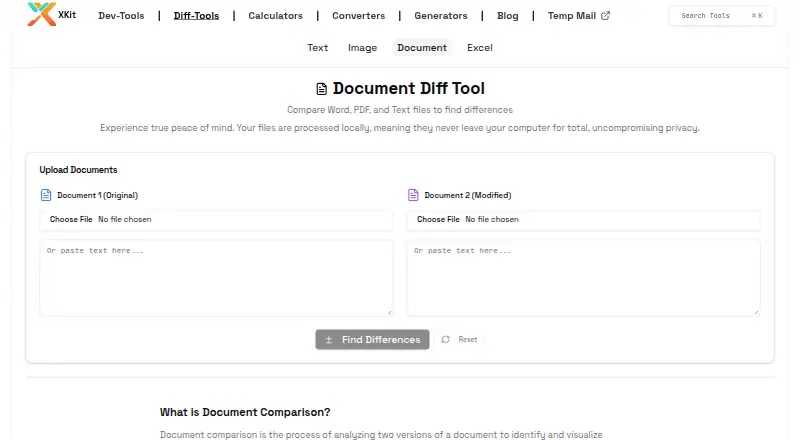
What XKit Document Compare is
XKit Document Compare is a free web tool for comparing Word, PDF and text files to identify additions, deletions and modifications. It presents the original and changed documents side by side, highlighting additions in green and deletions in red. Word-by-word comparison is intended to catch small edits within paragraphs. Users can upload files or paste text, and supported formats are DOCX, DOC, text-based PDF and TXT; documents in different formats can be compared. The product page says Word files and PDFs are processed in the browser using Mammoth.js and PDF.js to extract text, and that files are not uploaded. The privacy policy says inputs, files and processed data are not collected or stored, though anonymous website usage information and cookies may be used. The tool compares text rather than formatting, so font, color, bold and italic changes are not shown, and it does not produce redline output. Scanned or image-only PDFs need OCR before comparison. Tables and lists are extracted as text, which may not preserve their structure, and documents over 100 pages may take longer.
Good
- Free and unlimited, with no signup required.
- Accepts uploads or pasted text.
- Compares DOCX, DOC, text-based PDF and TXT.
- Shows additions and deletions in a side-by-side view.
- Processing happens in the browser; files are not uploaded.
Watch out
- Does not show formatting changes or create redline output.
- Scanned or image-only PDFs require OCR first.
- Tables and lists may lose their original structure.
- Documents over 100 pages may take longer.
Who it suits
XKit Document Compare suits people checking text changes in contracts, policies, academic revisions or other supported documents. It may also help with editing, version tracking, technical documentation, translation verification and proposal comparison.
Verdict
XKit Document Compare focuses on text differences across supported Word, PDF and TXT formats. It is less suitable when formatting changes, redline output or scanned PDFs are central to the review.
Plans and prices
From XKit Document Compare's own pricing page, checked 4 Oct 2026.
| Plan | Price | What it gives you |
|---|---|---|
| Free & Unlimited | Free | No signup required · no file restrictions · completely free |
The facts
Each one read from XKit Document Compare's own pages, with the date it was checked.
What it does
- Comparison detail
- Uses word-by-word comparison to detect small edits within paragraphs.checked 4 Oct 2026
- Comparison view
- Shows the original and modified documents side by side, with additions highlighted green and deletions red.checked 4 Oct 2026
- Formatting limit
- It compares text content and does not display formatting changes such as fonts, colors, bold, or italics.checked 4 Oct 2026
- Input methods
- Users can upload files or paste text directly into the tool.checked 4 Oct 2026
- Integrations
- The product page describes file upload and pasted text input; it does not list third-party integrations.checked 4 Oct 2026
- Large documents
- The page says documents over 100 pages may take longer to process.checked 4 Oct 2026
- Privacy
- The product page says processing happens in the browser and files are not uploaded.checked 4 Oct 2026
- Purpose
- Compares Word, PDF, and text files to identify additions, deletions, and modifications.checked 4 Oct 2026
- Scanned PDF limit
- Scanned or image-only PDFs are unsupported because they lack extractable text; OCR is needed first.checked 4 Oct 2026
- Support
- The site lists [email protected] as its support contact.checked 4 Oct 2026
- Supported formats
- Supports DOCX, DOC, text-based PDF, and TXT files, and can compare documents in different formats.checked 4 Oct 2026
- Table and list limit
- Tables and lists are extracted as text, so their original structure may not be perfectly preserved.checked 4 Oct 2026
- Text extraction
- The page says it uses Mammoth.js for Word files and PDF.js for PDFs to extract text for comparison.checked 4 Oct 2026
- Use cases
- The maker lists contract review, content editing, version tracking, policy updates, academic revisions, technical documentation, translation verification, and proposal comparison.checked 4 Oct 2026
The company
- Founded
- 2023checked 28 Sep 2026
- Maker security statement
- XKit's privacy policy says tool inputs, uploaded files, and processed data are not collected or stored, while anonymous website usage information and cookies may be used.checked 4 Oct 2026
Alternatives to XKit Document Compare
- 1

Diffchecker
Free planiOSWebAPIExtension8.2From $15 a month - 2

DocFather Compare Documents
Free planiOSWeb7.6From $34.99 a year - 3
i-net PDFC
AndroidiOSWebAPI7.6From $199 a year - 4

Differino
Free planWebAPI7.3€1.99 one-time - 5
SmarterDiff
Free planAndroidiOSWebLinux7.3Free plan - 6
PDF24 Compare PDF
Free planAndroidiOSWebLinux7.2Free plan