
DocFather Compare Documents
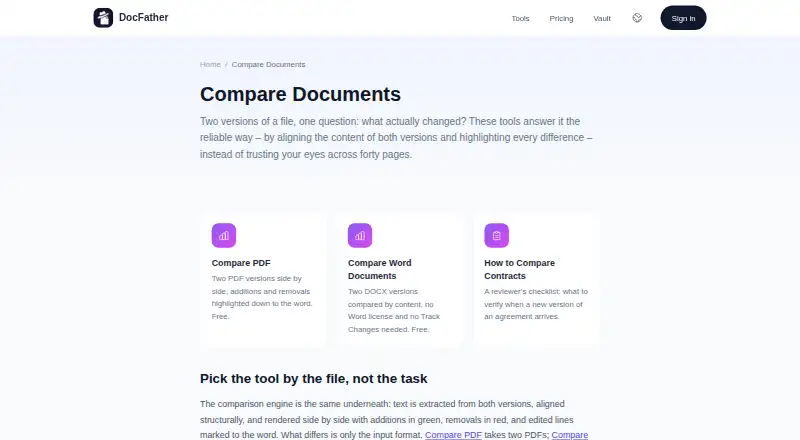
DocFather Compare Documents is a web tool for reviewing content changes between two document versions.
What DocFather Compare Documents is
DocFather Compare Documents is a web tool for reviewing content changes between two document versions. It compares PDF files or DOCX files, aligning their contents so additions appear in green and removals in red, with edited lines marked down to the word. The DOCX comparison does not require a Word license or Track Changes. It can identify changes to paragraphs, sentences, numbers and dates, but it deliberately leaves formatting-only differences out of the comparison. Mixed-format pairs may need to be converted to PDF first, and scanned documents need OCR to add a text layer. The comparison tools are described as free; the pricing page lists free file tools for files up to 300 MB, while the stated maximum file size is 50 MB. New web accounts receive 250 welcome credits, and a 7-day free trial is offered in the iOS app. Web users subscribe directly. Files are uploaded over an encrypted connection and automatically deleted from storage within 24 hours.
Good
- Compares PDF and DOCX files.
- Marks additions green and removals red.
- DOCX comparison needs no Word license or Track Changes.
- Encrypted uploads are deleted within 24 hours.
Watch out
- Formatting-only changes are ignored.
- Scanned documents need OCR first.
- Mixed-format pairs may need conversion to PDF.
- Stated maximum file size is 50 MB.
Who it suits
It suits people who need to compare PDF or DOCX content changes, such as edits to wording, numbers or dates. It is less suited to checking layout changes, or to comparing scanned files that have not had OCR applied.
Verdict
DocFather Compare Documents focuses on word-level content changes across PDF and DOCX files. Check the format and file-size limits first, especially for scans or comparisons where visual formatting matters.
Plans and prices
From DocFather Compare Documents's own pricing page, checked 15 Oct 2026.
| Plan | Price | What it gives you |
|---|---|---|
| Free | Free | File tools up to 300 MB · 250 welcome AI credits · merge, split, compress, rotate, protect, unlock, sign and conversions · no watermarks |
| 2,500-credit top-up | $5.99, paid once | 2,500 credits · Pro subscribers · Single payment |
| 10,000-credit top-up | $21.99, paid once | 10,000 credits · Pro subscribers · Single payment |
| Lite annual | $34.99 a year | 12,000 credits provided upfront · Charged annually |
| Pro annual | $89.99 a year | 30,000 credits provided upfront · top-up packs available · Charged annually |
The facts
Each one read from DocFather Compare Documents's own pages, with the date it was checked.
What it does
- AI engine
- DocFather says its AI tools are powered by Claude.checked 15 Oct 2026
- AI file limits
- The terms state that AI features accept files up to 300 MB and 300 pages, while AI editing is limited to 50 pages.checked 15 Oct 2026
- Difference display
- Added text is shown in green, removed text in red, and edited lines are marked at word level.checked 15 Oct 2026
- Document vault
- The vault stores documents encrypted, indexes their text and lets users ask questions in plain language.checked 15 Oct 2026
- File retention
- Processed files and results are automatically removed from storage within 24 hours.checked 15 Oct 2026
- Formatting limit
- The comparison deliberately ignores changes that affect formatting only.checked 15 Oct 2026
- Mixed formats
- Files in different formats must first be converted to a common format, such as converting Word to PDF.checked 15 Oct 2026
- Mixed formats and scans
- For mixed-format pairs, the page recommends converting Word to PDF first; scanned documents need OCR to add a text layer before comparison.checked 3 Oct 2026
- PDF comparison
- The Compare PDF tool accepts two PDF files and shows additions and removals side by side down to the word.checked 15 Oct 2026
Where it runs
- App Store availability
- Apple lists DocFather as a free iPhone productivity app with in-app purchases.checked 15 Oct 2026
- App Store developer
- Apple identifies Radzhab Radzhabov as the developer and seller.checked 15 Oct 2026
- App Store privacy disclosure
- Apple’s disclosure says the app may link contact information, user content and a user ID to identity, and may collect usage data and crash data not linked to identity.checked 15 Oct 2026
- App Store size
- The listed iPhone app size is 9.2 MB.checked 15 Oct 2026
- Browser operation
- The service runs in a modern browser and says there is nothing to install; an iOS app provides the same tools on a phone.checked 15 Oct 2026
- How changes appear
- Additions are shown in green, removals in red, and edited lines are marked to the word.checked 3 Oct 2026
- iOS requirement
- The app requires iOS 17.6 or later.checked 15 Oct 2026
- Mac compatibility
- Apple lists compatibility with macOS 14.6 or later on Macs using an Apple M1 chip or newer, while marking the app as not verified for macOS.checked 15 Oct 2026
Money
- App Store prices
- Apple lists in-app purchases of $4.99 weekly or $59.99 yearly for Lite and $9.99 weekly or $149.99 yearly for Pro.checked 15 Oct 2026
- Free access
- The comparison tools are presented as free and can be used without an account or watermark.checked 15 Oct 2026
- Free use
- The comparison tools are described as free, and the pricing page says file tools are free for files up to 300 MB.checked 3 Oct 2026
The company
- Company address
- The published registered address is Office 3906, 39/F, The Center, 99 Queen's Road Central, Central, Hong Kong.checked 15 Oct 2026
- Company identity
- DocFather is operated by IT Nest Limited, a private company limited by shares registered in Hong Kong.checked 15 Oct 2026
- Company registration
- The privacy policy gives Hong Kong business registration number 77297048 for IT Nest Limited.checked 15 Oct 2026
- Maker
- DocFather is operated by IT Nest Limited, listed at an address in Hong Kong.checked 3 Oct 2026
The full review of DocFather Compare Documents
DocFather Compare Documents is a web service for finding word-level changes between PDF and DOCX versions. It suits editors, administrators and teams checking revised wording, figures or dates without Word’s Track Changes. The main trade-off is a focused text comparison that does not assess formatting or produce a redline file.
Overview
The service aligns two document versions and presents additions and removals side by side. PDF comparison and DOCX comparison cover the formats many office workflows already use, while DOCX processing does not require a Microsoft Word licence. For textual review, the visual treatment is more useful than reading two files sequentially: additions are green, removals red, and edited lines are marked to the word.
DocFather is a poor fit for a layout proof, however. It deliberately ignores formatting-only changes, so altered fonts, spacing, page design or other styling differences will not be surfaced. It also has no redline output for a deliverable that must be handed back with tracked revisions.
Key features
Word-level comparison
Compare PDF takes two PDFs and exposes changed content beside the corresponding original. Compare Word Documents performs the same job for two DOCX files without requiring Word or Track Changes. Paragraphs, sentences, numbers and dates are within scope, making the tool practical for contract revisions, policy updates and version checks where exact wording matters.
Preparation and limits
Each file has a 50 MB maximum. A mixed PDF-and-DOCX pair should be converted to a common format; DocFather recommends converting Word to PDF first. Scanned pages need OCR to create a text layer, so image-only archives require an extra preparation step and are less convenient than born-digital files.
Security and processing
Files are uploaded over an encrypted connection and automatically deleted from storage within 24 hours. Processing can involve CloudConvert for conversion and compression, Mistral AI for OCR, Anthropic for AI features and DeepL for translation. Those third-party services matter to organisations with strict document-handling rules. Support is available at [email protected].
Pricing
DocFather uses a freemium model. The comparison tools are described as free, and file tools are free for files up to 300 MB on the pricing page, while the comparison entry itself sets a 50 MB maximum per file. New web accounts receive 250 welcome AI credits, and web users subscribe directly.
| Plan | Price | What it includes |
|---|---|---|
| Free | free | 250 welcome AI credits and free file tools for files up to 300 MB |
| 2,500-credit top-up | 5.99 USD once | 2,500 credits; available to Pro subscribers; credits never expire |
| 10,000-credit top-up | 21.99 USD once | 10,000 credits; available to Pro subscribers; credits never expire |
The free tier is the sensible starting point for occasional comparisons, but the welcome-credit allowance concerns AI use rather than establishing a larger comparison quota. Top-ups are single payments, not recurring subscriptions, and cannot be bought unless you are a Pro subscriber. An iOS app offers a 7-day free trial; the web route uses direct subscription.
Platforms
DocFather Compare Documents runs on the web. The iOS app provides the stated seven-day trial, while the comparison workflow itself is browser-based.
Who it's for
Choose it when the question is “what words changed?” in two PDF or DOCX files and you want a quick, licence-free DOCX comparison. It is particularly suitable for reviewing revised clauses, dates, quantities and other textual amendments. Look elsewhere if you need visual proofreading, comparison of scans without OCR preparation, or a formal redline export.
Pros and cons
- Pro: Word-level marking in green and red makes additions, removals and edited lines quick to locate.
- Pro: DOCX comparison works without a Word licence or Track Changes.
- Pro: Encrypted upload and deletion within 24 hours provide a defined retention window.
- Con: Formatting-only changes are ignored, so it cannot validate layout or styling.
- Con: There is no redline output for formal revision workflows.
- Con: Mixed formats and scans need conversion or OCR before comparison, adding preparation work.
- Con: The 50 MB per-file ceiling can exclude very large documents.
Alternatives
See the Document Comparison Software category for more options.
- PDF24 Compare PDF is a fully free choice across Android, iOS, Linux, macOS, web and Windows, with no limits, registration or time restrictions, though it is ad-supported.
- SmarterDiff is free for personal and commercial use on major desktop, mobile and web platforms, with no account or artificial limits, but it is also ad-supported.
- Diffchecker offers a free Basic tier and a $15 a month Pro + Desktop plan; pick it when monthly try limits on the free tier are acceptable or desktop access is important.
- Differino provides a free web/API tier with one comparison, 45 MB files, PDF/DOCX/TXT support and watermarked PDF export, making it preferable when share links or export matter more than DocFather’s 50 MB ceiling.
- Compare Suite is a Windows alternative with a free Light plan for basic file comparison.
- Document Delta offers a no-signup free DOCX demo with a 500 KB per-file limit, suited only to small samples.
- PdfCompare.app is a free web tool with no account, page, daily-file or size ceilings and no watermarks.
- XKit Document Compare is a free web option with no signup and no file restrictions.
Verdict
DocFather Compare Documents is a good choice for browser-based, word-level checking of ordinary PDF and DOCX revisions, especially when avoiding Word licensing is important. Choose another tool when formatting differences, redline delivery, unrestricted file sizes or scan-first workflows are central to the job.
Alternatives to DocFather Compare Documents
- 1

Diffchecker
Free planiOSWebAPIExtension8.2From $15 a month - 2
i-net PDFC
AndroidiOSWebAPI7.6From $199 a year - 3
Differino
Free planWebAPI7.3€1.99 one-time - 4
SmarterDiff
Free planAndroidiOSWebLinux7.3Free plan - 5
PDF24 Compare PDF
Free planAndroidiOSWebLinux7.2Free plan - 6
UltraCompare
LinuxmacOSWindows7.1From $99.95 a year