
Compare Suite
Compare Suite is a Windows file comparison tool for office professionals, software developers, and webmasters.
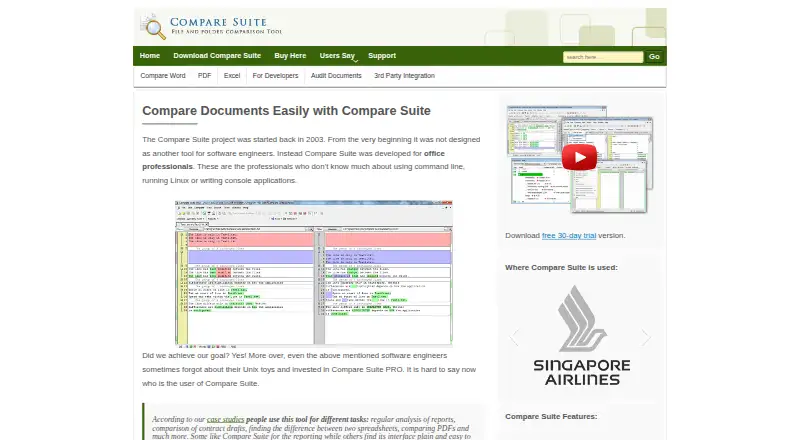
What Compare Suite is
Compare Suite is a Windows file comparison tool for office professionals, software developers, and webmasters. It compares Word, Excel, PowerPoint, PDF, web pages, and plain text files, and can create reports with comments attached to differences. Spreadsheet comparisons can show absolute and percentage changes in numbers and calculate date differences in days. PDF comparison extracts text, so scanned PDFs need OCR before their text can be compared. The tool also compares and synchronizes folders in local or remote locations, compares files over FTP, and checks ZIP or RAR archives without unpacking them. Command-line automation and integrations with third-party document management systems and tools are also listed. The maker says processing is local and opened files stay on the user's PC. A fully functional 30-day evaluation has no functional limitation. Windows 10 and Windows 7 are listed as minimum requirements. Comparing Word and Excel files requires Microsoft Word and Excel, and Office 365 is not supported. AKS-Labs says it was founded in 2000 and is headquartered in Raleigh, North Carolina.
Good
- Compares Word, Excel, PowerPoint, PDF, web, and text files
- Spreadsheet comparison shows numeric and date differences
- Compares and synchronizes local or remote folders
- Local processing keeps opened files on the PC
Watch out
- Scanned PDFs need OCR before text comparison
- Word and Excel comparisons require those Microsoft apps
- Office 365 is not supported
- Minimum system requirements list Windows 7 or 10
Who it suits
Compare Suite suits Windows users who need to compare documents or folders, including office professionals, developers, and webmasters. It may also fit workflows that use FTP, archives, command-line automation, or document-management integrations.
Verdict
Compare Suite covers a wide set of file and folder comparison tasks, with reporting and automation options. Check the Office dependency and scanned-PDF limitation before choosing it for those workflows.
Plans and prices
From Compare Suite's own pricing page, checked 7 Oct 2026.
| Plan | Price | What it gives you |
|---|---|---|
| Light | Free | Basic file comparison · no folder sync, archives, Office formats, FTP, comments, or advanced reports |
| Standard | $70, paid once | No FTP comparison, comments, saved results, or ignoring text/lines · per license |
| Professional | $140, paid once | Includes FTP comparison, comments, saved results, and ignoring text/lines · per license |
The facts
Each one read from Compare Suite's own pages, with the date it was checked.
What it does
- Automation and integrations
- The site describes command-line automation and integration with third-party document management systems and tools.checked 7 Oct 2026
- Document formats
- The site lists comparison support for Word, Excel, PowerPoint, PDF, web pages, and plain text files.checked 7 Oct 2026
- Folder comparison
- The product compares and synchronizes folders, including folders on local or remote locations.checked 7 Oct 2026
- FTP and archives
- The site says Compare Suite can compare files from FTP and compare ZIP or RAR archives without unpacking them.checked 7 Oct 2026
- Local processing
- The maker says Compare Suite processes data locally without web services and that opened files stay on the user's PC.checked 7 Oct 2026
- Office dependency
- The download page says Microsoft Word and Excel must be installed for comparing those document types and says Office 365 is not supported.checked 7 Oct 2026
- PDF limitation
- It extracts text from PDFs for comparison, but scanned PDFs need OCR processing before they can be compared as text.checked 7 Oct 2026
- Purpose
- Compare Suite is a file comparison tool for office professionals, software developers, and webmasters.checked 7 Oct 2026
- Reports and comments
- Users can generate comparison reports and add comments to differences for inclusion in reports.checked 7 Oct 2026
- Spreadsheets
- For spreadsheet comparisons, it can show absolute and percentage differences for changed numbers and calculate date differences in days.checked 7 Oct 2026
- Support and upgrades
- The maker offers priority email support for one year and says registered users can upgrade free for one year after registration.checked 7 Oct 2026
The company
- Founded
- 2000checked 28 Sep 2026
- Headquarters
- Raleigh, North Carolina, USAchecked 28 Sep 2026
- Maker
- AKS-Labs says it was founded in 2000 and is headquartered in Raleigh, USA.checked 7 Oct 2026
Money
- Trial
- The fully functional evaluation version can be used for 30 days with no functional limitation.checked 7 Oct 2026
Where it runs
- Windows requirement
- The download page lists Windows 10 and Windows 7 as minimum system requirements.checked 7 Oct 2026
The full review of Compare Suite
Compare Suite is a Windows desktop comparator for office teams, developers and webmasters who move between documents, text and whole folders. It is strongest when you need reporting, synchronization or repeatable command-line work alongside ordinary diffs. The one-time licenses are attractive for long-term use, but the free tier is narrowly scoped and Office-dependent workflows have important prerequisites.
Overview
Compare Suite combines document comparison, text-oriented merge tools and folder operations in one Windows application. It covers Word, Excel, PowerPoint, PDF, web pages and plain text, so it can serve mixed office and technical workloads without requiring separate utilities. Three-way merge and syntax highlighting make it more capable than a two-file viewer for developers or anyone reconciling parallel revisions.
Processing is local: the maker says opened files remain on the user's PC and the software does not use web services. That is a sensible fit for confidential documents or environments that do not want files uploaded. The product comes from AKS-Labs, founded in 2000 and based in Raleigh, North Carolina.
Key features
Document and spreadsheet comparison
Word, Excel and PowerPoint support puts common office formats alongside PDF, web-page and plain-text comparisons. Spreadsheet results can show absolute and percentage differences for changed numbers and calculate date differences in days. Those measures help reviewers judge the size and timing of a change instead of merely spotting that a cell differs.
PDF handling is text extraction rather than image understanding. Scanned PDFs therefore need OCR before they can be compared as text, making Compare Suite a poor primary choice for archives dominated by scans.
Folders, archives and automation
Local and remote folder comparison includes synchronization, which is useful for keeping two directory trees aligned rather than auditing files one at a time. FTP comparison extends that reach to hosted files, while ZIP and RAR archives can be compared without unpacking them. Command-line automation and integrations with third-party document-management systems and tools give administrators a path to repeatable jobs and broader workflows.
Reports and review workflow
Users can generate comparison reports and attach comments to differences for inclusion in those reports. This is valuable when a comparison must become an auditable review, although comments and several reporting-related capabilities are reserved for higher paid tiers.
Pricing
Compare Suite uses a freemium model with a 30-day, fully functional trial and no feature limitation during evaluation. Paid licenses are one-time purchases billed per license, rather than subscriptions. Registered users receive priority email support for one year and can upgrade free for one year after registration.
| Plan | Price | What it includes |
|---|---|---|
| Light | free | Basic file comparison. It excludes folder synchronization, archives, Office formats, FTP, comments and advanced reports. |
| Standard | $70, paid once | Adds paid comparison capability, but excludes FTP comparison, comments, saved results and the ability to ignore text or lines. |
| Professional | $140, paid once | Includes FTP comparison, comments, saved results and ignoring text or lines. |
Light is suitable only for straightforward file diffs. Standard fits buyers who want the broader desktop tool without FTP or annotated, saved review output. Professional is the practical choice for teams that need those review controls or remote FTP work; its extra cost buys specific workflow features rather than a subscription term.
Platforms
Compare Suite is a Windows desktop application. The download page lists Windows 10 and Windows 7 as minimum requirements. Microsoft Word and Excel must be installed to compare those document types, and Office 365 is not supported, so organizations built around current Microsoft 365 installations should confirm compatibility before committing.
Who it's for
Office professionals benefit from multi-format comparison, spreadsheet deltas and reportable comments. Developers can use plain-text comparison, syntax highlighting and three-way merge, while webmasters gain folder, FTP and archive coverage. It is less suitable for Mac, Linux or mobile users, for scan-heavy PDF operations, and for anyone seeking a genuinely broad free tier.
Pros and cons
- Pros: One tool spans Office files, PDFs, web pages, text, folders and archives.
- Pros: Spreadsheet percentage, absolute and date-difference views add useful business context.
- Pros: Folder synchronization, FTP and command-line options support operational workflows.
- Pros: Local processing keeps opened files on the PC.
- Cons: The free Light plan omits Office formats, folders, archives, FTP, comments and advanced reports.
- Cons: Word and Excel comparisons require installed desktop Office, and Office 365 is unsupported.
- Cons: Scanned PDFs require OCR before text comparison.
- Cons: Standard lacks FTP, comments, saved results and ignore-text controls, pushing demanding users to Professional.
Alternatives
For a wider directory of options, see Document Comparison Software and Diff and Merge Tools.
- PDF24 Compare PDF is free on Android, iOS, Linux, macOS, web and Windows, with no limits, registration or time restrictions.
- SmarterDiff is free for personal and commercial use across desktop, mobile and web, with advertising but no account or artificial limits.
- Diffchecker suits readers wanting Linux, macOS, web and Windows access, with a free limited tier and a $15.00-per-month Pro + Desktop plan.
- Differino is a web/API option whose free tier allows one comparison, 45 MB files and limited retention.
- DocFather Compare Documents is a web service with free welcome AI credits and file tools up to 300 MB.
- Document Delta offers a no-signup free DOCX demo with a 500 KB per-file maximum.
- PdfCompare.app provides free web PDF comparisons without accounts, daily limits, page limits, size ceilings or watermarks.
- XKit Document Compare is a free web tool with no signup or file restrictions.
Verdict
Choose Compare Suite if you work on Windows and need one locally processed application for office documents, text, folders and repeatable comparison tasks. Its strongest reasons to buy are the spreadsheet-aware results, synchronization, reporting and one-time Professional license. Look elsewhere if you need modern Office 365 support, cross-platform access, scan-native PDF comparison or a free plan that covers more than basic file diffs.
Alternatives to Compare Suite
- 1

Diffchecker
Free planiOSWebAPIExtension8.2From $15 a month - 2
Avidemux
Free planOpen sourceWebLinuxmacOSWindows7.3Free plan - 3
Code Compare
Free planAPIExtensionWindows7.3$69.95 one-time - 4

KDiff3
Free planOpen sourceLinuxmacOSWindows7.3Free plan - 5
UltraCompare
LinuxmacOSWindows7.1From $99.95 a year - 6

Diffract
Free planLinuxmacOSWindows6.8$34 one-time