
KDiff3
KDiff3 compares and merges files and folders on Linux, macOS, and Windows.
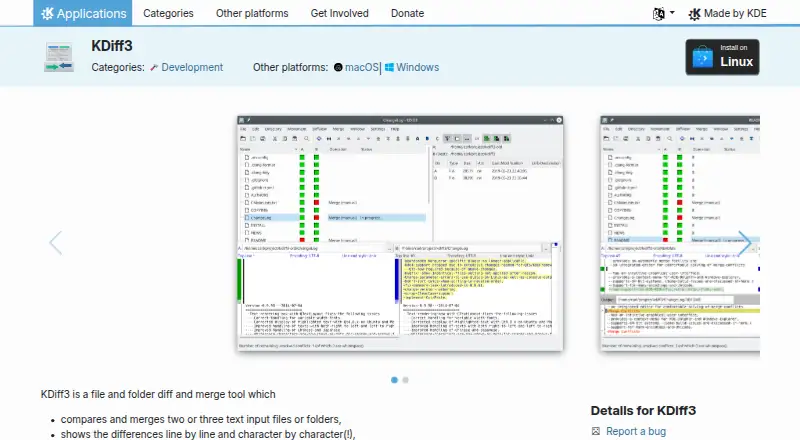
What KDiff3 is
KDiff3 compares and merges files and folders on Linux, macOS, and Windows. It can compare two or three text files or folders, showing differences line by line and character by character. For merge work, it offers automatic merging and an editor for resolving conflicts, including three-way merges. Folder comparison and Git integration are supported. KDiff3 handles Unicode, UTF-8, and other file encodings; users can highlight or hide whitespace and comment changes, and print differences. It also supports version-control keyword and history merging, with network transparency through KIO. The software is free and open source under GPL-2.0-or-later, with a listed price of no cost and no free trial. Linux installation options include Discover or another AppStream store, a distribution package manager, or Flathub. The app page links to a handbook, forum, and bug-reporting page. KDE describes itself as an international community building and distributing free, open-source software since 1996.
Good
- Compares two or three files or folders.
- Includes automatic and three-way merging.
- Supports Git integration and version-control history merging.
- Runs on Linux, macOS, and Windows.
Watch out
- No free trial is listed.
- Syntax highlighting is not supported.
Who it suits
KDiff3 suits developers and other users who need to compare files or folders and resolve merge conflicts across desktop platforms.
Verdict
KDiff3 covers text and folder comparison as well as merge-conflict resolution, with support for multiple encodings and version-control workflows. It is a free, open-source desktop option for users who need these tools across Linux, macOS, or Windows.
Plans and prices
From KDiff3's own pricing page, checked 7 Oct 2026.
| Plan | Price | What it gives you |
|---|---|---|
| Free | Free | Free and open-source software · GPL-2.0-or-later |
| Free open-source KDiff3 | Free | Desktop file and folder comparison and merging · GPL-2.0-or-later |
The facts
Each one read from KDiff3's own pages, with the date it was checked.
What it does
- AlternativeTo criticism
- AlternativeTo user comparisons describe KDiff3 as less lightweight than Meld and focused on a narrower desktop workflow than broader alternatives.checked 15 Oct 2026
- AlternativeTo listing
- AlternativeTo categorizes KDiff3 as a free, open-source diff tool and shows 118 community likes.checked 15 Oct 2026
- Automatic merging
- KDiff3 includes an automatic merge function.checked 15 Oct 2026
- Build requirements
- The current build instructions require Qt 6.7 or newer, KDE Frameworks 6.2 or newer, CMake 3.22 or newer, ECM 6.2 or newer, Boost 1.71 or newer and a C++17-capable compiler.checked 15 Oct 2026
- Command-line interface
- The project documents command-line syntax for two-way and three-way comparisons and output-file merges.checked 15 Oct 2026
- Comparison
- It compares two or three text files or folders and shows differences line by line and character by character.checked 7 Oct 2026
- Conflict editor
- An integrated editor lets users resolve merge conflicts interactively.checked 15 Oct 2026
- Current release
- The KDE application page lists version 1.12.5 released on 2026-07-20.checked 15 Oct 2026
- Documentation depth
- The official handbook covers file and folder workflows, command-line options, editing, printing, configuration, preprocessors, KIO networking, Git usage, troubleshooting questions and licensing.checked 15 Oct 2026
- Encoding support
- KDiff3 supports Unicode, UTF-8 and other file encodings.checked 15 Oct 2026
- Flathub usage
- Flathub reports approximately 543 downloads per month for KDiff3.checked 15 Oct 2026
- Flatpak availability
- Flathub offers KDiff3 as a free desktop-only Flatpak for x86_64 and aarch64 architectures.checked 15 Oct 2026
- Folder merge
- The handbook documents comparing and merging two or three folders, including per-file operations.checked 15 Oct 2026
- Git integration
- The documentation includes instructions for using KDiff3 as Git's diff and merge tool.checked 15 Oct 2026
- Help and support
- The app page links to the KDiff3 Handbook, a forum, and a bug-reporting page.checked 7 Oct 2026
- License
- KDiff3 is distributed under the GNU GPL version 2 or any later version, identified on the product page as GPL-2.0-or-later.checked 15 Oct 2026
- Limit: large binary files
- A SourceForge reviewer reports that large binary files are loaded entirely into memory, causing the program to become unresponsive.checked 15 Oct 2026
- Limit: missing convenience features
- Reviewers request file-list search, summary statistics, direct text input, patch creation and printable difference reports.checked 15 Oct 2026
- Limit: performance and UI bugs
- Archived issue reports mention slow CSV comparisons, high-resolution display problems, crashes, unsaved conflict resolutions and progress indicators stuck at zero.checked 15 Oct 2026
- Line and character diffs
- Its viewer identifies changes at both line and individual-character level.checked 15 Oct 2026
Where it runs
- Linux installation
- Linux users can install through Discover or another AppStream store, a distribution package manager, or Flathub.checked 7 Oct 2026
The company
- Maker
- KDE describes itself as an international community building and distributing free, open-source software since 1996.checked 7 Oct 2026
- Maker company facts
- LinkedIn lists KDE e.V. as founded in 1997, headquartered in Berlin, with 2–10 employees.checked 15 Oct 2026
- Maker legal entity
- KDE e.V. is a registered German nonprofit representing the KDE community in legal and financial matters.checked 15 Oct 2026
The full review of KDiff3
KDiff3 is a desktop tool for comparing text and folders and resolving merge conflicts. It is best suited to developers and other users who need detailed comparisons and three-way merging without paying for a license. Its key trade-off is that it does not provide syntax highlighting.
Overview
KDiff3 compares two or three text files or folders, with differences shown line by line and character by character. That level of detail helps expose small edits, while folder comparison makes it useful for reviewing changes beyond individual files. Automatic merging can handle some conflicts; when decisions are needed, an editor lets users resolve them directly.
Unicode, UTF-8 and other encodings are supported, and users can highlight or hide whitespace and comment changes to focus on relevant edits. KIO network transparency and version-control keyword and history merging extend its reach into connected and version-controlled workflows. It can also print differences. The absence of syntax highlighting makes it less appealing for readers who want code structure emphasized while reviewing.
Key features
- Two- and three-way comparison: Compare files or folders with line- and character-level detail. Three-way comparison is valuable when reconciling parallel changes.
- Automatic and manual merging: Automatic merging can reduce routine work, while the editor provides a way to settle conflicts that require human judgment.
- Encoding and display controls: Support for Unicode, UTF-8 and other encodings helps with varied text files. Highlighting or hiding whitespace and comment changes can reduce distracting differences.
- Version-control and network support: Keyword and history merging and KIO network transparency suit users working with versioned or remotely accessed files.
- Printing: Differences can be printed, useful when a review needs to be shared outside the app.
Pricing
KDiff3 is free, open-source software under GPL-2.0-or-later. The Free plan costs nothing and includes the app's comparison and merging capabilities; there are no paid tiers to weigh against a limited edition. It has no free trial because there is no paid plan to trial.
Platforms
KDiff3 is a desktop app for Linux, macOS and Windows. Linux users can install it through Discover or another AppStream store, a distribution package manager, or Flathub. Nightly installers are intended for testing and come from the latest development branch, so they are aimed at users willing to work with testing builds rather than a standard release.
Who it's for
KDiff3 is a sound choice for developers, maintainers and other desktop users who need to compare folders or reconcile two- and three-way text changes across platforms. Its encoding support, whitespace controls and version-control merging are practical strengths for that work. Readers who rely on syntax highlighting to navigate code should look elsewhere.
Pros and cons
- Pro: Three-way comparison and merging support resolving concurrent edits in one tool.
- Pro: Folder comparison, character-level differences and whitespace controls help pinpoint changes beyond a simple line-level review.
- Pro: Free and open-source availability across Linux, macOS and Windows avoids a paid-plan barrier.
- Con: No syntax highlighting, which can make code-oriented reviews less convenient.
Alternatives
File Comparison Software and Diff and Merge Tools provide broader category lists for comparing options.
- Diffchecker is worth considering if a web option or a freemium plan with a trial better fits, though its free access limits some Pro features by monthly try counts.
- Buddi is another free GPLv2 app for Linux, macOS and Windows, but it is budgeting software rather than a file comparison tool.
- Diffract is a freemium alternative for Linux, macOS and Windows with a free plan and trial.
- Meld is a free GPLv2-or-later option if Linux and Windows support meet your needs.
- WinMerge is a free, open-source file and folder comparison and merge tool if you only need Windows support.
- Code Compare may suit users looking for a freemium Windows or extension option, with a free version and paid Pro features.
- Diffinity is free for personal and commercial use on Windows, and requires .NET 8.0.
- Kompare is a free Linux option.
Verdict
Choose KDiff3 if you need a free desktop app for detailed file and folder comparison, especially three-way merge-conflict resolution across Linux, macOS or Windows. Its combination of encoding support, version-control merging and no-cost open-source licensing is compelling for that workflow. Look elsewhere if syntax highlighting is essential to how you review code.
Getting started
- Open the KDiff3 website.
- Choose Linux, macOS, or Windows as your desktop platform.
- On Linux, install through Discover or another AppStream store.
- Alternatively, install the Linux package through a distribution package manager.
- Linux users can also install KDiff3 from Flathub.
Questions
How much does KDiff3 cost?
The Free plan costs nothing. KDiff3 is free and open-source software.
Which platforms does KDiff3 support?
KDiff3 supports Linux, macOS, and Windows desktop platforms.
Can KDiff3 perform three-way merges?
Yes. It compares two or three files or folders and supports three-way merging with automatic merging and a conflict-resolution editor.
What license does KDiff3 use?
The app page lists the GPL-2.0-or-later license.
Who makes KDiff3?
KDE makes KDiff3. KDE describes itself as an international community building and distributing free, open-source software since 1996.
Does KDiff3 include syntax highlighting?
No. Syntax highlighting is not supported.
Alternatives to KDiff3
- 1

Diffchecker
Free planiOSWebAPIExtension8.2From $15 a month - 2
Avidemux
Free planOpen sourceWebLinuxmacOSWindows7.3Free plan - 3
Code Compare
Free planAPIExtensionWindows7.3$69.95 one-time - 4
UltraCompare
LinuxmacOSWindows7.1From $99.95 a year - 5

Diffract
Free planLinuxmacOSWindows6.8$34 one-time - 6
Beyond Compare
LinuxmacOSWindows6.4$35 one-time