Meld
Meld is a free visual diff and merge tool for comparing files, folders, and version-controlled projects.
What Meld is
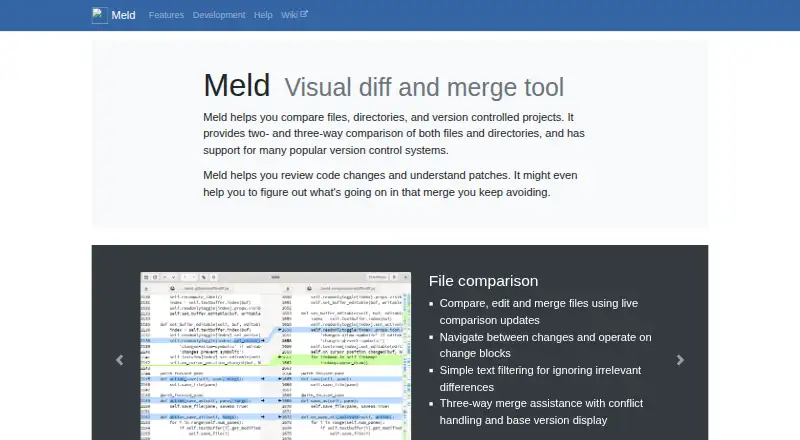
Meld is a free visual diff and merge tool for comparing files, folders, and version-controlled projects. It can show changes as files are edited, help users navigate differences, and assist with three-way merges, including conflict handling and display of the base version. Folder comparison highlights missing or modified files and allows selected files or folders to be ignored. Meld supports Git, Mercurial, Bazaar, and Subversion, including integration with tools such as git mergetool. Users can define regular-expression text filters to ignore matching content, but the filtering feature is incomplete and cannot alter line counts. Meld is available for Linux and Windows: Linux packages are offered through many distributions and Flathub, while Windows users can download an installer. Windows builds do not support automatic updates or portable installs. macOS is not yet supported, although the project lists semi-official builds and installation options through Homebrew, MacPorts, or Fink. The project lists its license as GPLv2 or later, except as noted, and invites users to report problems through an issue tracker or ask questions on a discussion board.
Good
- Free under GPLv2 or later, except as noted.
- Supports Git, Mercurial, Bazaar, and Subversion.
- Three-way merge assistance includes conflict handling.
- Compares folders and identifies missing or modified files.
Watch out
- macOS is not yet supported.
- Windows lacks automatic updates and portable installs.
- Text filtering support is incomplete.
- Binary comparison is not supported.
Who it suits
Meld suits people reviewing code changes or patches who need to compare files or folders and resolve merge conflicts. It is intended for Linux and Windows users; macOS is not yet supported.
Verdict
Meld offers file, folder, and version-control comparisons with useful merge assistance at no charge. Its platform gaps and limited text filtering are worth considering before choosing it.
Plans and prices
From Meld's own pricing page, checked 30 Sep 2026.
| Plan | Price | What it gives you |
|---|---|---|
| Meld | Free | GPLv2 or later |
The facts
Each one read from Meld's own pages, with the date it was checked.
What it does
- Current release
- The official site lists Meld 3.24.0 as the stable release, dated 20 June 2026.checked 30 Sep 2026
- Distribution
- Meld is packaged for most Linux and Unix distributions and is available on Flathub.checked 30 Sep 2026
- File comparison
- It compares, edits, and merges files with live updates, change navigation, text filters, and three-way merge assistance.checked 30 Sep 2026
- Folder comparison
- It identifies missing or modified files across folders and can ignore selected files or folders.checked 30 Sep 2026
- Intended users
- The project describes Meld as useful for reviewing code changes and understanding patches.checked 30 Sep 2026
- Latest stable release
- The page lists Meld 3.24.0 as stable, dated 20 June 2026.checked 30 Sep 2026
- License
- The project lists its license as GPLv2 or later, except as noted.checked 30 Sep 2026
- Maintainers
- The site lists Kai Willadsen, Stephen Kennedy, and Vincent Legoll as primary authors.checked 30 Sep 2026
- Merge assistance
- Three way merge assistance includes conflict handling and display of the base version.checked 30 Sep 2026
- Purpose
- Meld is a visual diff and merge tool for comparing files, directories, and version-controlled projects.checked 30 Sep 2026
- Support
- The project asks users to open an issue for problems and offers a discussion board for questions.checked 30 Sep 2026
- Text filters
- Users can define regular-expression filters to ignore matching text when comparing files; the documentation says filtering support is incomplete and filters cannot change the number of lines.checked 30 Sep 2026
- Version control
- It supports Git, Mercurial, Bazaar, and Subversion, including integration with tools such as git mergetool.checked 30 Sep 2026
Where it runs
- Linux availability
- Meld is packaged for most Linux and Unix distributions and is available on Flathub.checked 30 Sep 2026
- macOS
- The site says macOS is not yet supported, though semi official builds and installation options through Homebrew, MacPorts, or Fink are available.checked 30 Sep 2026
- macOS status
- Meld is not yet supported on macOS, though semi-official builds and installation options through Homebrew, MacPorts, or Fink are listed.checked 30 Sep 2026
- Windows
- Windows users can download an installer, but automatic updates and portable installs are not supported.checked 30 Sep 2026
- Windows availability
- Windows users can download an installer; Meld does not support automatic updates or portable installs.checked 30 Sep 2026
The full review of Meld
Meld is a free visual comparison and merge tool for files, folders, and version-controlled projects. It is best suited to developers reviewing code changes or resolving conflicts on Linux or Windows. Its strongest case is capable three-way merging without a license cost; macOS users and anyone needing binary comparison should look elsewhere.
Overview
Meld brings file diffs, folder checks, and version-control work into one tool. Live updates and navigation between changes help keep code reviews focused, while folder comparisons flag missing or modified files. This makes it a practical choice for understanding patches and following changes across a project, rather than a general-purpose binary comparison utility.
Key features
File and folder comparisons
Meld can compare, edit, and merge files, with live updates and change navigation. Its three-way merge assistance displays the base version and includes conflict-handling tools, giving developers more context when reconciling competing edits than a basic diff view. Folder comparisons identify missing or modified files and allow selected files or folders to be ignored.
Text filters and version control
Regular-expression filters can exclude matching text from file comparisons, which can help when recurring lines distract from substantive edits. Filtering is incomplete, though, and cannot change the number of lines; readers who need more flexible text filtering may find this limiting. Meld supports Git, Mercurial, Bazaar, and Subversion, and integrates with tools such as git mergetool, making it a useful part of an established version-control workflow.
Pricing
Meld is free, with the Meld plan listed as free under GPLv2 or later, except as noted. There is no paid tier to unlock its merge or version-control features, and no free-trial period is needed. That makes it a strong fit for individual developers and teams seeking a no-cost comparison tool, although the free price does not resolve its platform and binary-comparison gaps.
Platforms
Meld supports Linux and Windows. It is packaged for most Linux and Unix distributions and is also available through Flathub. Windows users can download an installer, but automatic updates and portable installs are not supported, so updates require more attention and carrying a self-contained copy is not an option.
Meld is not yet supported on macOS. Semi-official builds and installation options through Homebrew, MacPorts, or Fink exist, but Mac users should not treat those as equivalent to supported platform availability.
Who it's for
Meld suits developers who review code changes, inspect patches, compare project folders, or resolve version-control conflicts—especially those working on Linux or Windows. Its base-version display and conflict tools make it more compelling for merge work than a simple diff viewer. It is a poor fit for macOS-first workflows, binary comparisons, or teams that depend on portable Windows installs or automatic updates.
Pros and cons
- Pros: Free under GPLv2 or later, with no paid feature tier separating users from three-way merge assistance and conflict tools.
- Pros: File and folder comparisons plus support for Git, Mercurial, Bazaar, and Subversion cover several common code-review and project-change tasks.
- Cons: No macOS support, while Windows lacks automatic updates and portable installs.
- Cons: Binary comparison is not supported, and text filters are incomplete and cannot alter line counts.
Alternatives
File Comparison Software and Diff and Merge Tools provide category roundups for readers comparing options. Choose Diffract if you want a free-plan alternative with a trial and support across Linux, macOS, and Windows. Diffchecker is another cross-platform option, including web support; its free Basic plan limits some Pro features and monthly tries, while Pro + Desktop is $15 a month.
Beyond Compare is a paid alternative with a trial and Linux, macOS, and Windows support; its Standard Edition is $35, paid once with no annual renewal fees. The separate Beyond Compare listing gives a Standard plan at $35, paid once for 1–4 users and a Pro plan, for readers weighing its listed license options. WinMerge is a free open-source option for Windows file and folder comparison and merging. SmartSynchronize is a freemium alternative for Linux, macOS, and Windows. P4Merge is a free alternative for Linux, macOS, and Windows.
Verdict
Choose Meld if you want a free, focused tool for comparing files and folders and resolving code conflicts on Linux or Windows. Its three-way merge assistance and version-control support make it especially useful for patch review. Look elsewhere if you need macOS support, binary comparison, or more complete text filtering.
Alternatives to Meld
- 1

Diffchecker
Free planiOSWebAPIExtension8.2From $15 a month - 2
Avidemux
Free planOpen sourceWebLinuxmacOSWindows7.3Free plan - 3
Code Compare
Free planAPIExtensionWindows7.3$69.95 one-time - 4

KDiff3
Free planOpen sourceLinuxmacOSWindows7.3Free plan - 5
UltraCompare
LinuxmacOSWindows7.1From $99.95 a year - 6

Diffract
Free planLinuxmacOSWindows6.8$34 one-time