
Diffchecker
Diffchecker compares text, code, and data, either in a browser or with its desktop app.
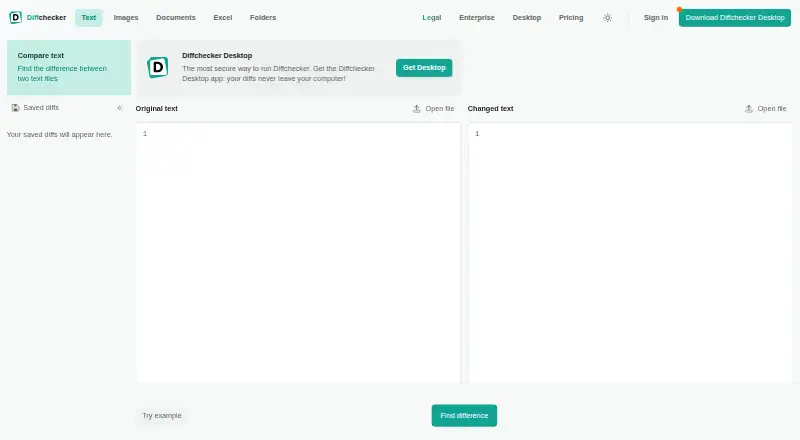
What Diffchecker is
Diffchecker compares text, code, and data, either in a browser or with its desktop app. Text comparisons can appear side by side or in a unified view, with adjustable precision, custom ignore rules, syntax highlighting, real-time editing, and tools to merge changes. Listed comparison options also cover documents, images, spreadsheets, and folders, including OCR, redlines, formula detection, and batch comparison. The free Basic plan has monthly limits on some tools: five uses each for unified view and real-time editing, and ten each for character-level differences and merging. Pro + Desktop costs $15.00 per user per month and includes offline comparisons; Legal is $20.00 per user per month, and Enterprise is $40.00 per user per month with annual billing. Browser comparisons stay in the browser unless saved and shared, while Desktop comparisons run locally. The site says browser traffic is encrypted with TLS and its information security program is ISO/IEC 27001 certified.
Good
- Compares text, code, data, and several other file types.
- Offers side-by-side and unified text views.
- Desktop comparisons run locally and offline.
- Git and Microsoft Word integrations are listed.
Watch out
- Basic limits some features by monthly try counts.
- Very large files take longer to render in a browser.
Who it suits
Diffchecker suits developers, writers, editors, and data or operations teams who need to compare text or other file types. Its desktop app also suits users who need offline comparisons.
Verdict
Diffchecker covers text and code comparisons as well as listed document, image, spreadsheet, and folder workflows. Check the Basic plan’s usage limits and the paid plan details against the features you need.
Plans and prices
From Diffchecker's own pricing page, checked 14 Oct 2026.
| Plan | Price | What it gives you |
|---|---|---|
| API Basic | Free | 50 requests/month · 5 MB maximum request size · No credit card required |
| Basic | Free | Limited access to Pro features · online comparison tools · Free for everyone |
| Pro + Desktop | $15 a month | Ad-free · unlimited Pro features · Windows, Mac, Linux desktop · offline files · Redline · folder and batch comparison · AI summaries · per user/month; cancel anytime |
| Diffchecker Legal | $20 a month | Pro + Desktop features · iManage integration · comparison profiles · per user/month |
| Enterprise | $40 a month | Everything in Pro + Desktop · SAML SSO · iManage integration · comparison profiles · SCIM provisioning · dedicated support · feature requests · per user/month; annual billing only |
| API Standard | $99 a month | 10,000 credits/month · 100 MB maximum request size · per month |
| API Business | $299 a month | 100,000 credits/month · 100 MB maximum request size · per month |
| API Enterprise | Priced on request | Unlimited custom allocation · custom maximum request size · Custom allocation |
The facts
Each one read from Diffchecker's own pages, with the date it was checked.
What it does
- API authentication
- Text API calls accept an API key or an email parameter when no key is used, and return credit usage in headers and JSON.checked 14 Oct 2026
- API capabilities
- The public HTTPS API exposes text, document, image and Excel comparison endpoints with JSON, HTML and DOCX redline outputs.checked 14 Oct 2026
- API credit model
- Credits are metered by input size: one text credit covers 300,000 characters, while PDF, image and DOCX redline rates use pages, pixels or bytes.checked 14 Oct 2026
- API versioning
- API clients can pin the Diffchecker-Version header to avoid automatically receiving breaking changes.checked 14 Oct 2026
- Collaboration
- Saved comparisons can be shared by URL and annotated with inline comments, with an account required for saving.checked 14 Oct 2026
- Comparison features
- Text comparison includes side-by-side and unified views, adjustable diff precision, custom ignore rules, syntax highlighting, real-time editing, and merging changes.checked 29 Sep 2026
- Desktop licensing
- One desktop license can be used simultaneously on three devices by the primary user.checked 14 Oct 2026
- Desktop security
- Diffchecker Desktop operates on the user's computer without interacting with Diffchecker web servers, according to its product page.checked 29 Sep 2026
- Diff precision
- Users can choose smart, word-level or character-level comparison precision.checked 14 Oct 2026
- Documentation depth
- Developer documentation lists endpoint parameters, request bodies, response schemas, status codes, examples and interactive try-it controls.checked 14 Oct 2026
- Document formats
- Document comparison supports DOC, DOCX, PDF and PPTX, including PDF-to-Word comparisons, moved-content detection, formatting changes and OCR for scans.checked 14 Oct 2026
- Enterprise security
- Enterprise advertises SAML SSO, custom integrations, dedicated 24/7 emergency support and no third-party trackers in the desktop app.checked 14 Oct 2026
- File size
- The site states there is no file size limit, while noting that very large files take longer to render in a browser and Desktop is faster because it runs locally.checked 29 Sep 2026
- Ignore rules
- Custom ignore rules can suppress timestamps, build numbers, session IDs or other specified strings.checked 14 Oct 2026
- Image comparison
- Image comparison offers side-by-side, highlight, fade and slider modes plus pixel-level differences and automatic alignment.checked 14 Oct 2026
- iManage setup
- Diffchecker Desktop can connect to an iManage Cloud account through its Preferences menu under Integrations.checked 29 Sep 2026
- Independent limit: product scope
- An independent 2026 comparison describes Diffchecker as strong for cross-format diffs but weak as a full source-control workflow because it lacks repository history and branching.checked 14 Oct 2026
- Independent pricing view
- An independent 2026 comparison characterizes the product as a low-priced cross-format comparer, while noting that tracked-change export and AI summaries require paid tiers.checked 14 Oct 2026
- Integrations
- Published integrations include Git, Microsoft Word and iManage Work; Enterprise also supports SAML identity providers and SCIM provisioning.checked 14 Oct 2026
- Intended users
- The site describes use cases for developers and engineers, writers and editors, and data and operations teams.checked 29 Sep 2026
- Legal entity
- The API agreement identifies the contracting company as Checker Software Inc.checked 14 Oct 2026
Where it runs
- Apple complaint
- The visible App Store reviews report inability to enter text and photo-permission problems on iOS 13.checked 14 Oct 2026
- Desktop app
- Diffchecker Desktop runs comparisons locally and offline on Windows 10/11, macOS/OS X and Linux AppImage.checked 14 Oct 2026
The company
- Company facts
- LinkedIn lists Diffchecker as a privately held software-development company founded in 2011, headquartered in Vancouver, British Columbia, with 11–50 employees.checked 14 Oct 2026
The full review of Diffchecker
Overview
Diffchecker is a comparison tool for text, code, data, and several other file types, with browser and desktop workflows. It suits people who need to inspect or merge changes across different kinds of content, especially developers, editors, and operations teams. Its broad feature set is appealing, but Basic’s monthly try counts make it better for occasional use than regular, high-volume work.
For related options, see Diff and Merge Tools, File Comparison Software, and Document Comparison Software.
Key features
Text and code comparisons
Side-by-side and unified views, adjustable diff precision, custom ignore rules, and syntax highlighting give users control over how differences appear. Real-time editing and change merging make Diffchecker more useful than a read-only viewer when collaborators need to reconcile revisions. Basic users get only five tries per month for unified view and real-time editing, and ten for character-level differences and merging. Those caps are restrictive for recurring work; Pro removes them through full access to its features.
Other files and large comparisons
Diffchecker also supports comparison workflows for documents, images, spreadsheets, and folders. OCR, redlines, formula detection, and batch comparison extend its reach beyond code and prose. The site states there is no file-size limit, but very large files take longer to render in a browser; Desktop runs locally and is faster for those files.
Privacy, integrations, and support
Browser comparisons run in the browser and are not published or shared unless saved and shared. Desktop comparisons run offline on the computer, and the Desktop product page says the app does not interact with Diffchecker web servers. Browser traffic is encrypted with TLS, and Diffchecker says its information security program is certified to ISO/IEC 27001.
Git and a Microsoft Word add-in are listed for Desktop. Legal and Enterprise include iManage integration; Desktop can connect to an iManage Cloud account through Preferences under Integrations. Pro, Desktop, and Legal include priority support, while Enterprise adds dedicated support and a service-level agreement.
Pricing
Basic is free, but monthly try caps on selected features make it a limited option for anyone comparing files routinely. The 14-day Desktop trial requires no credit card, so users can evaluate offline work before paying.
- Basic: free. Limited access to Pro features, with some features restricted by monthly try counts. Best for occasional comparisons.
- Pro + Desktop: $15 a month, billed per user/month. Adds full access to Pro features, Windows, Mac, and Linux desktop apps, and offline comparisons. This is the practical choice for regular individual or team use that does not need legal or enterprise controls.
- Diffchecker Legal: $20 a month, billed per user/month. Includes Pro + Desktop, iManage integration, and profiles for managing comparison settings. It fits legal teams that use iManage and need consistent settings.
- Enterprise: $40 a month, billed per user/month, annual billing only. Includes Pro + Desktop, SAML SSO, iManage integration, SCIM provisioning, and dedicated support. The annual-only term and per-user charge suit organizations needing centralized access and support, not casual users.
Platforms
Diffchecker is available on the web and as a desktop app for Windows, macOS, and Linux. The browser option suits quick comparisons; the desktop app is the better fit for offline work and very large files.
Who it's for
Developers and engineers can use syntax-highlighted code diffs, Git integration, and merging. Writers and editors get text comparisons and document redlines, while data and operations teams can draw on spreadsheet, formula, folder, and batch comparison workflows. Users who need only occasional basic comparisons may find the free plan sufficient; frequent users should account for its monthly caps.
Pros and cons
- Pro: One tool covers text and code alongside document, image, spreadsheet, and folder comparisons, reducing the need to switch tools for different file types.
- Pro: Offline desktop comparisons and local processing are useful for users who need work to stay on their computer.
- Pro: Paid plans scale from full Pro access to iManage, identity management, and dedicated support.
- Con: Basic’s five- and ten-try monthly limits can interrupt regular use of key comparison and merge features.
- Con: Enterprise requires annual billing, which is a less flexible commitment for smaller or short-term needs.
Alternatives
For a free option, SourceGear DiffMerge is available for Linux, macOS, and Windows, with free use. Meld is another free choice for Linux and Windows, distributed under GPLv2 or later. Windows users looking for a free open-source option can consider WinMerge. P4Merge and mergers are also free options for Linux, macOS, and Windows.
Diffract is a freemium alternative with free and trial options for Linux, macOS, and Windows. Code Compare is a freemium alternative for Windows and extension platforms, with free and paid Pro versions. Compare Suite is another freemium option for Windows.
Verdict
Diffchecker is a strong fit for people who need text and code diffs alongside broader file comparisons, particularly when offline desktop work or specialized team integrations matter. The main reason to choose it is that range, backed by adjustable text diffs and merging; the main reason to look elsewhere is Basic’s restrictive quotas or the per-user cost of paid plans for narrower comparison needs.
Getting started
- Open https://www.diffchecker.com/ in a browser.
- Choose the browser comparison route or use a supported desktop platform: Linux, macOS, or Windows.
- Start with the free Basic plan or review the 14-day trial for Desktop, which requires no credit card.
- Choose Pro + Desktop, Diffchecker Legal, or Enterprise if their listed features fit your needs.
- Connect an iManage Cloud account in Diffchecker Desktop through Preferences under Integrations, if using iManage.
Limits worth knowing
Basic allows five tries per month for unified view and real-time editing, and ten tries per month for character-level differences and merge changes. The free plan also has limited access to Pro features.
Questions
Is Diffchecker free?
Yes. Basic is free, with limited access to Pro features and monthly try counts for some features.
How much do the paid plans cost?
Pro + Desktop costs $15 per user/month, Diffchecker Legal costs $20 per user/month, and Enterprise costs $40 per user/month with annual billing.
What platforms does it support?
Diffchecker supports Linux, macOS, web, and Windows.
Can comparisons run offline?
Desktop comparisons run locally on the computer. Pro + Desktop includes offline comparisons.
Does it integrate with other tools?
The pricing page lists Git and a Microsoft Word add-in for Desktop, plus iManage for Diffchecker Legal and Enterprise.
Is there a Desktop trial?
The Desktop product page advertises a 14-day trial with no credit card required.
Alternatives to Diffchecker
- 1
Avidemux
Free planOpen sourceWebLinuxmacOSWindows7.3Free plan - 2
Code Compare
Free planAPIExtensionWindows7.3$69.95 one-time - 3

KDiff3
Free planOpen sourceLinuxmacOSWindows7.3Free plan - 4
UltraCompare
LinuxmacOSWindows7.1From $99.95 a year - 5

Diffract
Free planLinuxmacOSWindows6.8$34 one-time - 6
Beyond Compare
LinuxmacOSWindows6.4$35 one-time