SourceGear DiffMerge
SourceGear DiffMerge is a free desktop tool for visually comparing and merging files and folders on Linux, macOS, and Windows.
What SourceGear DiffMerge is
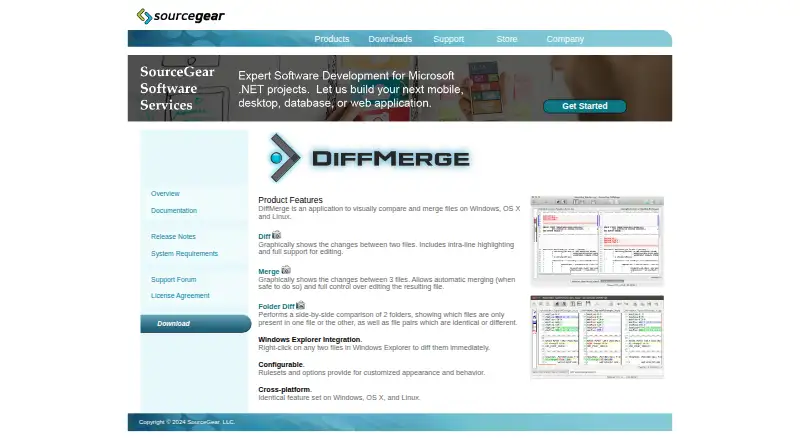
SourceGear DiffMerge is a free desktop tool for visually comparing and merging files and folders on Linux, macOS, and Windows. Its Diff feature displays changes between two files, highlights differences within lines, and supports editing. Merge compares three files and can automatically combine changes when safe. Folder Diff compares two folders side by side and identifies files as identical, equivalent, different, or present in only one folder. Rulesets and options let users customize appearance and behavior, and the program can import files in a wide range of character encodings. Its command-line interface compares files and can write differences in unified or traditional formats. The manual documents integrations with Git, Mercurial, TortoiseSVN, Microsoft TFS, and Microsoft VSS 2005. Windows Explorer integration adds context-menu actions for comparing selected files or folders. The download page lists version 4.2 builds for Windows, MacOS 10.6+, Ubuntu 12.04+, and Fedora 17+. SourceGear support said in February 2026 that it was no longer accepting registrations and was transitioning DiffMerge to an open-source project.
Good
- Compares files with intra-line highlighting and editing support.
- Three-way merge can combine changes automatically when safe.
- Folder comparison identifies identical, different, and missing files.
- Command-line interface can write unified or traditional differences.
- Available builds are listed for Windows, macOS, and Linux.
Watch out
- SourceGear is no longer accepting registrations.
- The download page lists version 4.2 builds.
- Windows Explorer context-menu integration is for Windows.
Who it suits
DiffMerge suits desktop users who need visual file or folder comparisons, three-way merges, or command-line diffs. It may be relevant to teams using the integrations documented in its manual.
Verdict
DiffMerge covers visual file and folder comparisons, three-way merging, and command-line diffs at no charge. Note that SourceGear said it was no longer accepting registrations and was transitioning the project to open source.
Plans and prices
From SourceGear DiffMerge's own pricing page, checked 30 Sep 2026.
| Plan | Price | What it gives you |
|---|---|---|
| DiffMerge | Free | Licensed for use free of charge · registration key previously available for a small fee |
The facts
Each one read from SourceGear DiffMerge's own pages, with the date it was checked.
What it does
- Character encodings
- DiffMerge is Unicode-based and can import files in a wide range of character encodings.checked 30 Sep 2026
- Command line
- The command-line interface can compare files and write differences in unified or traditional formats.checked 30 Sep 2026
- Current registration status
- SourceGear support stated in February 2026 that it was no longer accepting DiffMerge registrations and was transitioning DiffMerge to an open-source project.checked 30 Sep 2026
- Customization
- Rulesets and options customize DiffMerge appearance and behavior.checked 30 Sep 2026
- Downloads
- The official download page lists DiffMerge 4.2 builds for Windows, MacOS 10.6+, Ubuntu 12.04+ and Fedora 17+.checked 30 Sep 2026
- File diff
- Its Diff feature graphically shows changes between two files, with intra-line highlighting and editing support.checked 30 Sep 2026
- Folder comparison
- Folder Diff compares two folders side by side and identifies files that are identical, equivalent, different, or present in only one folder.checked 30 Sep 2026
- Integrations
- The manual documents integration with Git, Mercurial, TortoiseSVN, Microsoft TFS, and Microsoft VSS 2005.checked 30 Sep 2026
- License
- The license agreement states that DiffMerge is protected by copyright and is licensed rather than sold.checked 30 Sep 2026
- Purpose
- DiffMerge visually compares and merges files and folders.checked 30 Sep 2026
- Registration
- The registration page says the software is free to use, registration keys do not expire, and registered users receive product updates and support.checked 30 Sep 2026
- Three-way merge
- Its Merge feature graphically compares three files and supports automatic merging when safe.checked 30 Sep 2026
The company
- Founded
- 1997checked 28 Sep 2026
- Headquarters
- Champaign, Illinois, USAchecked 28 Sep 2026
Where it runs
- Windows integration
- Windows Explorer integration adds context-menu actions for diffing selected files or folders.checked 30 Sep 2026
- Windows requirements
- Windows support requires XP SP3 or newer for 32-bit systems and Vista or newer for 64-bit systems, with 20 MB available disk space.checked 30 Sep 2026
The full review of SourceGear DiffMerge
Overview
SourceGear DiffMerge is a free desktop utility for visually comparing files and folders, with a three-file merge mode. It suits developers and other users who need a focused comparison tool across Linux, macOS, or Windows.
Its useful range is broader than a basic side-by-side viewer: it can highlight changes within lines, edit from the comparison view, classify folder contents, and write command-line diffs. The main caveat is its changing registration status: SourceGear said in February 2026 that it was no longer accepting registrations and was moving the project toward open source.
Key features
File comparison and editing
Diff displays two files graphically, marks changes down to individual lines, and supports editing. That combination is practical when a reviewer needs to understand and correct a difference in one place; it is less suited to users looking for a broader code-review workflow.
Three-way merge
Merge compares three files and can apply changes automatically when it considers that safe. This is the most important distinction from a two-file diff: it helps reconcile parallel versions while leaving ambiguous changes for attention rather than treating every conflict as an automatic choice.
Folder comparison and workflow
Folder Diff places two folders side by side and identifies contents as identical, equivalent, different, or present on only one side. Windows users also get Explorer context-menu actions for selected files and folders. Rulesets and options allow behavior and appearance to be adjusted, while Unicode support and imports for a wide range of character encodings broaden the files it can handle.
Developer integrations and command line
The manual documents integration with Git, Mercurial, TortoiseSVN, Microsoft TFS, and Microsoft VSS 2005. The command-line interface can compare files and output unified or traditional differences, making DiffMerge useful beyond its graphical interface.
Pricing
DiffMerge costs nothing. The free plan is licensed for use without charge; registration keys were previously available for a small fee. SourceGear's registration page says keys do not expire and registered users receive updates and support, but the company said in February 2026 that it was no longer accepting registrations. That makes the current registration and support path a significant consideration for anyone depending on ongoing vendor assistance.
The license agreement says DiffMerge remains protected by copyright and is licensed rather than sold. SourceGear's stated transition toward an open-source project does not change that wording into a published open-source license.
Platforms
DiffMerge is a desktop application for Linux, macOS, and Windows. The download page lists version 4.2 builds for Ubuntu 12.04+, Fedora 17+, and MacOS 10.6+. Windows support requires XP SP3 or newer on 32-bit systems, or Vista or newer on 64-bit systems, plus 20 MB of disk space. The stated Windows Explorer integration is specifically useful to Windows users; the documented version and operating-system requirements also make this an older-generation option for some setups.
Who it's for
DiffMerge is a sensible choice for developers or technically minded users who want free visual file and folder comparison, three-way merging, and command-line output in one desktop tool. Its multiple operating-system builds and documented version-control integrations add flexibility. Look elsewhere if current registration, updates, or support are essential to your workflow, or if you need a product with a clearer ongoing support arrangement.
Pros and cons
- Pros: Three-way comparison with safe automatic merging helps reconcile parallel file versions.
- Pros: Folder classification, editable file diffs, and command-line output cover both inspection and practical change workflows.
- Pros: Linux, macOS, and Windows builds, plus documented integrations with several version-control tools, suit varied developer environments.
- Cons: SourceGear is no longer accepting registrations, so new users cannot rely on the previous registration-key route to updates and support.
- Cons: The stated 4.2 builds target older operating-system releases, which may make the product a poor fit for users seeking a clearly current release path.
Alternatives
Browse all diff and merge tools if you want to compare the category more broadly.
- Diffract is worth considering if you want a freemium alternative with a free trial across Linux, macOS, and Windows.
- WinMerge is a free, open-source Windows option if Windows-only support is sufficient.
- Meld is a free GPLv2-or-later alternative for Linux and Windows.
- Beyond Compare fits readers willing to pay for a trial-based option: its Standard Edition is $35, paid once, with no annual renewal fees, and a licensed user may use it on any number of computers.
- Diffchecker offers a freemium choice across desktop and web, with a Basic plan limited by monthly try counts and a Pro + Desktop plan at $15 a month.
- P4Merge is another free option for Linux, macOS, and Windows.
- Code Compare is a freemium alternative for Windows and extensions, with a free version and paid Pro features.
- mergers is a free option for Linux, macOS, and Windows.
Verdict
Choose DiffMerge if you want a free, cross-platform desktop tool that combines detailed file diffs, folder comparison, three-way merges, and command-line output. Its breadth is compelling at no cost, but the end of new registrations and the transition toward open source make it a less reassuring choice for users who need dependable vendor support or a clearly maintained release path.
Alternatives to SourceGear DiffMerge
- 1

Diffchecker
Free planiOSWebAPIExtension8.2From $15 a month - 2
Avidemux
Free planOpen sourceWebLinuxmacOSWindows7.3Free plan - 3
Code Compare
Free planAPIExtensionWindows7.3$69.95 one-time - 4

KDiff3
Free planOpen sourceLinuxmacOSWindows7.3Free plan - 5
UltraCompare
LinuxmacOSWindows7.1From $99.95 a year - 6

Diffract
Free planLinuxmacOSWindows6.8$34 one-time