
PandaDoc
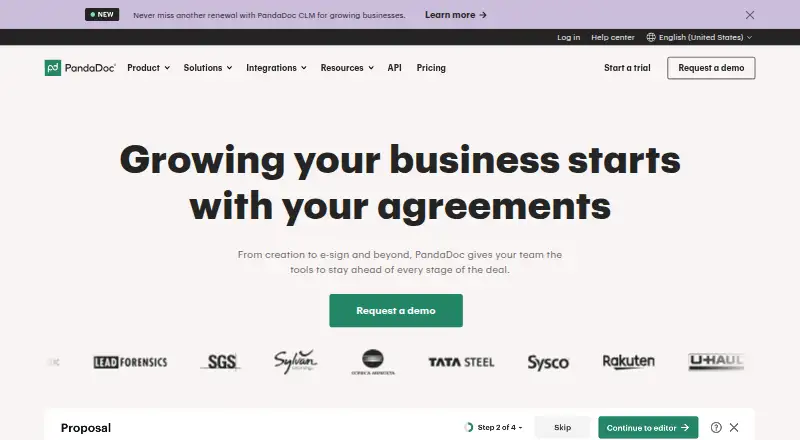
PandaDoc automates proposals, quotes, and contracts, bringing document creation, sending, signing, and tracking into a single workflow.
What PandaDoc is
PandaDoc automates proposals, quotes, and contracts, bringing document creation, sending, signing, and tracking into a single workflow. Templates, rich media, and a drag-and-drop editor support agreement creation, while real-time editing, comments, and approval steps let teams review documents before sending. Recipients can sign electronically, and notifications, reminders, and reporting show when a document is opened, viewed, or completed. Workflows can also include product catalogs, Configure-Price-Quote tools, and payment collection. Integrations include CRM platforms such as Salesforce, HubSpot CRM, and Pipedrive, as well as Stripe, Slack, Canva, and Dropbox; an API and document embedding options are available too. The free plan includes 60 documents per year, up to two recipients per document, unlimited storage, and unlimited users, but downloads are PDF only. PandaDoc offers web, iOS, and Android access, though accounts with the pandadoc.eu domain cannot use its mobile app.
Good
- Templates and drag-and-drop document editing
- Real-time document status notifications and reminders
- Collect payments within document workflows
- Free plan includes unlimited storage and users
- Integrations include Salesforce, HubSpot CRM, and Stripe
Watch out
- Free accounts are limited to 60 documents yearly
- Free plan allows only two recipients per document
- Free downloads are PDF only
- pandadoc.eu accounts cannot use the mobile app
Who it suits
PandaDoc suits teams preparing and routing proposals, quotes, or contracts that need signatures, review steps, tracking, or payments. Its free tier may fit users with modest document volumes and no need for DOCX downloads.
Verdict
PandaDoc combines document authoring, e-signatures, tracking, collaboration, and payment collection in one workflow. Check the free plan’s document and recipient limits, and note its PDF-only downloads.
Plans and prices
From PandaDoc's own pricing page, checked 28 Sep 2026.
| Plan | Price | What it gives you |
|---|---|---|
| Starter | $35 a month | Per user; billed monthly · unlimited documents · billed monthly |
| Business | $65 a month | Per user; billed monthly · unlimited documents · billed monthly |
| Free | Free | 60 documents/year · no credit card required |
| Starter | $19 a month | unlimited document uploads and eSignatures · billed annually |
| Business | $49 a month | CRM integrations · deal rooms · approval workflows · bulk send · billed annually |
| Enterprise | Priced on request | CPQ · workflow automation · SSO · team workspaces · API · notary |
The facts
Each one read from PandaDoc's own pages, with the date it was checked.
What it does
- Analytics and reporting
- Yeschecked 21 Sep 2026
- Available integrations
- Integrations include Salesforce, HubSpot CRM, Pipedrive, Stripe, Slack, Canva, and Dropbox.checked 27 Sep 2026
- Built-in e-signatures
- Yeschecked 21 Sep 2026
- Client activity tracking
- Yeschecked 21 Sep 2026
- Collaboration
- Real-time editing, comments and approval workflows support internal collaboration before delivery.checked 28 Sep 2026
- CRM integrations
- Yeschecked 21 Sep 2026
- Custom branding
- Yeschecked 21 Sep 2026
- Data protection
- PandaDoc says its data is encrypted in transit and stored in a SOC, FISMA and PCI DSS Level 1 compliant cloud.checked 28 Sep 2026
- Developer access
- PandaDoc provides an API, document embedding and developer documentation for integrations.checked 28 Sep 2026
- Document creation
- The platform provides templates, rich media and a drag-and-drop editor for creating agreements.checked 28 Sep 2026
- Document workflow
- PandaDoc supports document creation, signature, payment, collaboration, automation, and analytics.checked 27 Sep 2026
- eSignatures
- PandaDoc provides legally binding eSignatures and states that it is ESIGN, UETA, HIPAA and SOC 2 Type II compliant.checked 28 Sep 2026
- Integrations
- Featured integrations include HubSpot, Salesforce, Pipedrive, monday.com, Stripe, Square, Zapier, Slack and Greenhouse.checked 28 Sep 2026
Where it runs
- Browser support
- Supported desktop browsers include current Safari on Mac, Chrome on Windows and Mac, Firefox on Windows and Mac, and Edge on Windows 10.checked 28 Sep 2026
- Mobile app
- The mobile app can create, view, send, track and sign documents and is available through Google Play and the App Store.checked 28 Sep 2026
The company
- Company name
- The site identifies the company as PandaDoc Inc.checked 27 Sep 2026
- Founded
- 2013checked 23 Sep 2026
- Headquarters
- San Francisco, California, USAchecked 23 Sep 2026
Money
- Free account users
- Free accounts allow unlimited users or seats.checked 27 Sep 2026
- Free document limit
- Free accounts can send 60 documents per year.checked 27 Sep 2026
- Free document storage
- Free accounts include unlimited document storage.checked 27 Sep 2026
- Free download format
- The Free eSign plan allows document downloads as PDF only, not DOCX.checked 27 Sep 2026
- Free plan
- Yeschecked 21 Sep 2026
- Free recipient limit
- Free accounts allow up to 2 recipients per document.checked 27 Sep 2026
The full review of PandaDoc
PandaDoc suits sales and operations teams that need proposals, quotes and contracts to move through a shared document workflow. Its strongest case is combining creation, signatures and payment collection; its free plan’s annual sending cap and PDF-only downloads are meaningful trade-offs.
Overview
PandaDoc brings document creation, delivery, signing and tracking together for proposals, quotes and contracts. It also supports internal collaboration, workflow automation, analytics and payments, so teams can manage more of a transaction without separating each step.
Templates, rich media and a drag-and-drop editor provide ways to assemble agreements, while real-time editing, comments and approvals support review before delivery. Once sent, notifications, reminders and reporting show when a document is opened, viewed or completed. This breadth makes PandaDoc more compelling for teams handling an ongoing flow of customer documents than for occasional signature-only use.
Key features
- Creation and collaboration: Templates and a visual editor help build proposals, quotes and contracts; live editing, comments and approval workflows make internal review part of the process.
- Signatures and tracking: Legally binding e-signatures and signature certificates are paired with activity notifications and reporting. That combination helps teams follow documents through completion rather than simply send them.
- Payments and quoting: Product catalogs, Configure-Price-Quote tools and payment collection can sit inside document workflows, a useful fit when a quote or agreement is also the point of purchase.
- Integrations and API: Connections include Salesforce, HubSpot, Pipedrive, Stripe, Slack, Canva and Dropbox, among others. An API, document embedding and developer documentation support custom integrations.
- Security: PandaDoc states that it is SOC 2 Type 2 certified and E-SIGN, UETA and HIPAA compliant. Security features include two-factor authentication, SSO, GDPR compliance and signature certificates.
- Mobile: The app supports viewing, tracking, creating, signing and uploading documents. Users with pandadoc.eu accounts cannot use it at this time.
Pricing
The Free plan costs nothing and includes 60 documents per year, up to 2 recipients per document, 5 templates, unlimited storage and unlimited users. Its seat and storage allowances are generous for a small team, but the sending cap and recipient limit can constrain customer-facing work; downloads are PDF only, not DOCX.
Starter costs $19 a month (billed annually). It allows unlimited documents and e-signatures, with up to 5 templates. This removes the free plan’s document quota, making it the more practical entry point for regular sending, though the template allowance remains modest. PandaDoc lists 24/7 email and chat support for Free and Starter.
Business costs $49 a month (billed annually) and adds up to 3 rooms alongside unlimited documents and e-signatures and up to 5 templates. It is a fit for teams that need rooms in their document process, but the template cap is unchanged from Starter. Enterprise has custom pricing and includes CPQ, workflow automation, smart content, SSO, team workspaces and API access.
A 14-day trial is described, with up to 50 documents during the trial; business-email trial users can send to up to 5 recipients per document. Check these trial allowances against your expected workload before relying on it for a larger rollout.
Platforms
PandaDoc is available on web, Android, iOS and through an API. Desktop browser support includes current Safari on Mac, Chrome and Firefox on Windows and Mac, and Edge on Windows 10. The mobile app covers a broad set of document tasks, subject to the pandadoc.eu restriction.
Who it's for
PandaDoc is best suited to sales and operations teams that create and send proposals, quotes or contracts frequently and want signatures, tracking, collaboration and payment collection in the same workflow. CRM integrations and API access make it more adaptable for connected sales processes. It is less suited to users who only need basic signatures, or who need more than two recipients per document while staying on the free plan.
Pros and cons
- Pro: Creation, signing, tracking and payment collection share one workflow, useful for teams moving a document from draft to transaction.
- Pro: The free plan has unlimited users and storage, giving a team room to collaborate without per-seat or storage caps on that plan.
- Pro: Integrations and API support provide options for connecting document work to CRM and other tools.
- Con: Free sending is limited to 60 documents per year and two recipients per document, which can be restrictive for active teams.
- Con: Free downloads are PDF only, so users needing DOCX exports must look beyond that plan.
- Con: Paid Starter and Business both allow up to five templates; teams needing more template capacity may need another plan or arrangement.
Alternatives
For a narrower document-generation need, consider Carbone, CraftMyPDF, Documentero, PDF4me Merge & Split, PDFMonkey, Adobe PDF Services API or APITemplate.io. Their stated plans and platform choices can suit users focused on generating or processing documents through web or API tools rather than PandaDoc’s broader signing and payment workflow.
Choose QuoteCloud if quote management is the priority: its Essentials plan includes a product catalogue, document tracking, unlimited documents and e-signatures, while PandaDoc combines those capabilities with broader document creation and workflow functions.
Browse Document Generation Software, Proposal Software, Digital Signature API Software, Proposal Management Software, Document Workflow Software or Quote Management Software to compare options by category.
Verdict
Choose PandaDoc if your team needs proposals, quotes and contracts to move through creation, review, signature and payment in one connected process. Its range of workflow features and integrations is the main reason to choose it; look elsewhere if the free plan’s caps or PDF-only downloads are unacceptable, or if you need only a simpler signature tool.
Getting started
- Visit https://www.pandadoc.com/ and choose the Free plan or a paid plan.
- Use the 14-day trial if you want to evaluate a trial account; trial users can send up to 50 documents.
- Create a proposal, quote, or contract using templates, rich media, or the drag-and-drop editor.
- Invite collaborators to review with editing, comments, or approval workflows.
- Send documents for e-signature, tracking, or payment collection.
- Use the web app, API, or iOS or Android app; pandadoc.eu accounts cannot use the mobile app.
Limits worth knowing
The Free plan allows 60 documents per year and up to two recipients per document, with five templates; free downloads are PDF only. The Starter plan costs $19 a month billed annually and allows up to five templates.
Questions
What are the Free plan limits?
It allows 60 documents per year, up to two recipients per document, and five templates, with unlimited storage and users. Downloads are PDF only.
Is there a trial?
Yes, the trial period is 14 days. Trial users can send up to 50 documents, and business-email trial users can send up to five recipients per document.
Which platforms does PandaDoc support?
It lists web, iOS, Android, and API access. Users with pandadoc.eu accounts cannot use the mobile app.
Does PandaDoc offer integrations?
Yes. Listed integrations include Salesforce, HubSpot CRM, Pipedrive, Stripe, Slack, Canva, and Dropbox; it also provides an API and document embedding.
Who makes PandaDoc?
The company is PandaDoc Inc., founded in 2013 and headquartered in San Francisco, California.
Alternatives to PandaDoc
- 1

Anchor
Free planAndroidiOSWebAPI8.6Free plan - 2

Proposify
iOSWebAPI8.3 - 3

Proposal Expert
Free planWebAPI8.2From €24 a month - 4
Proposal.biz
Free planWeb8.1Free plan - 5
PowerPropose
Free planWeb8.0From £25 a month - 6

Cord
Free planWebAPI8.0From $2,880 a year