MeshCentral
MeshCentral is a free, open-source, self-hosted web system for managing devices remotely.
What MeshCentral is
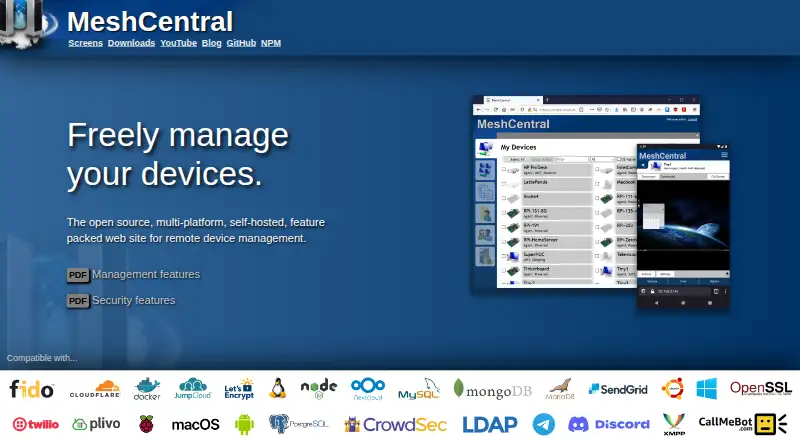
MeshCentral is a free, open-source, self-hosted web system for managing devices remotely. Through a browser, users can access managed computers’ desktops and terminals, and download, upload, rename, or organize files. Support sessions can include text chat and video chat when WebRTC is available. Device management tools include Wake-on-LAN, remote power management, TCP and UDP port forwarding, and activity logs. Multiple users and multitenancy are supported, with permissions available for different device groups. On computers with Intel AMT, management can include remote power-on and BIOS access even when the operating system is unavailable. MeshCentral supports Windows, Linux, macOS, FreeBSD, Android, and web browsers; file transfer, session recording, and mobile apps are available. Installation uses Node.js and npm. A default setup uses the built-in NeDB database, while MongoDB is suggested for advanced users. Listed security options include two-factor authentication, FIDO2 hardware keys, TLS 1.3, and optional database record encryption. It can retrieve configuration settings and secrets from HashiCorp Vault. The project is licensed under Apache 2.0 and offers a free self-hosted plan.
Good
- Provides remote desktop and terminal access.
- Supports file transfer and session recording.
- Offers group-specific user permissions.
- Lists TLS 1.3 and FIDO2 security options.
- Can manage Intel AMT systems when the OS is unavailable.
Watch out
- Installation uses Node.js and npm.
- The default database is NeDB; MongoDB is suggested for advanced users.
- The system is self-hosted.
Who it suits
It suits administrators or support teams who want browser-based access to managed computers and control over their self-hosted deployment. Its multi-user permissions and Intel AMT support may fit device groups needing remote management.
Verdict
MeshCentral provides broad remote access and device-management functions under a free, self-hosted model. Setup involves Node.js and npm, and users should consider its default database choice and security configuration.
Plans and prices
From MeshCentral's own pricing page, checked 8 Oct 2026.
| Plan | Price | What it gives you |
|---|---|---|
| MeshCentral | Free | Open source · self-hosted · public server login available |
The facts
Each one read from MeshCentral's own pages, with the date it was checked.
What it does
- Access mode
- bothchecked 20 Sep 2026
- Capacity
- The installation page says a Raspberry Pi or AWS t3.nano instance can manage up to a few hundred devices.checked 8 Oct 2026
- Deployment
- Installation uses Node.js and npm, and the default setup uses the built-in NeDB database; MongoDB is suggested for advanced users.checked 8 Oct 2026
- File management
- Users can remotely download, upload, rename, and organize files on managed systems.checked 8 Oct 2026
- File transfer
- Yeschecked 20 Sep 2026
- Intel AMT
- Intel AMT support can enable remote power-on, BIOS access, and management when the operating system is unavailable.checked 8 Oct 2026
- License
- The project is licensed under Apache 2.0.checked 8 Oct 2026
- Multi-user
- The product supports multiple users and multitenancy, with different permissions on device groups.checked 8 Oct 2026
- Purpose
- MeshCentral is an open-source, self-hosted web site for remote device management.checked 8 Oct 2026
- Remote access
- It provides browser-based remote desktop and terminal access to managed computers.checked 8 Oct 2026
- Secrets integration
- MeshCentral can retrieve configuration settings and secrets from HashiCorp Vault.checked 8 Oct 2026
- Security
- The security features page lists two-factor authentication, FIDO2 hardware keys, TLS 1.3, and optional database record encryption.checked 8 Oct 2026
- Session recording
- Yeschecked 20 Sep 2026
- Support and community
- The documentation directs users to file issues on GitHub and describes monthly community meetings.checked 8 Oct 2026
- Support sessions
- Remote support sessions can include text chat and, when WebRTC is available, video chat.checked 8 Oct 2026
Where it runs
- Device management
- Features include Wake-on-LAN, remote power management, TCP and UDP port forwarding, and activity logs.checked 8 Oct 2026
- Mobile apps
- Yeschecked 20 Sep 2026
- Platforms
- The server and management agent run on Windows, Linux, macOS, and FreeBSD; Android agent downloads are also listed.checked 8 Oct 2026
- Supported platforms
- Windows,Linux,macOS,FreeBSD,Android,web browserchecked 20 Sep 2026
Money
- Free plan
- Yeschecked 20 Sep 2026
The full review of MeshCentral
MeshCentral is a self-hosted, open-source control center for remotely accessing and administering computers from a browser. It fits IT teams, support groups, and technically capable organizations that want to run their own service rather than rent a managed platform. The broad device controls are unusually complete for a free product, but deployment and ongoing security administration remain your responsibility.
Overview
MeshCentral combines browser-based remote desktop and terminal sessions with practical system administration. Operators can download, upload, rename, and organize files on managed machines, making it suitable for maintenance work as well as one-off support. Support sessions include text chat and can add video chat when WebRTC is available.
Multiple users and multitenancy allow permissions to be divided across device groups. That is valuable for service providers or internal teams with separate customers and responsibilities, provided an administrator is prepared to design and maintain those boundaries. The Apache 2.0 license permits a high degree of control over the deployment, and HashiCorp Vault integration can supply configuration values and secrets.
Key features
Remote access and control
Desktop and terminal access from a web browser cover the core needs of remote support and administration without requiring a dedicated client interface for every operator. Wake-on-LAN and remote power management help recover or maintain systems that are not actively being used. TCP and UDP port forwarding extends access to services behind a managed device, while activity logs provide an operational record.
Files, support, and hardware management
Remote file operations are more useful than screen control alone when the task is moving installers, collecting logs, or tidying directories. Session recording helps preserve a record of support work. Intel AMT support can enable remote power-on, BIOS access, and management even when the operating system is unavailable, although that benefit depends on compatible hardware and configuration.
Security and scale
Two-factor authentication, FIDO2 hardware keys, TLS 1.3, and optional database-record encryption provide strong building blocks for a self-managed service. MeshCentral can retrieve secrets from HashiCorp Vault, which is helpful when credentials should not be embedded in ordinary configuration. The installation guidance indicates that a Raspberry Pi or AWS t3.nano can manage up to a few hundred devices, making modest deployments feasible without dedicated enterprise infrastructure.
Installation uses Node.js and npm. The default setup uses the built-in NeDB database, while MongoDB is suggested for advanced users. That path keeps an initial deployment approachable but leaves database selection, upgrades, hardening, and availability planning to the operator.
Pricing
| Plan | Price | Terms |
|---|---|---|
| MeshCentral | free | Open source; self-hosted; public server login available |
There is no paid tier or device quota stated for the free plan. Its real cost is administrative: you provide the server, configure the database, and secure and maintain the installation. It is therefore a strong fit for organizations with technical ownership, but less attractive to buyers who want vendor-operated uptime and support.
Platforms
MeshCentral supports Windows, Linux, macOS, FreeBSD, Android, and web browsers. The platform listing also includes an API and self-hosted deployment. Its access mode is both, so it can serve operators and managed endpoints across desktop, mobile, and browser environments.
Who it's for
Choose MeshCentral for an internal IT department, homelab, or managed-service operation that needs remote access, file handling, power controls, and segmented user permissions under its own administration. It is especially compelling where Intel AMT, Vault integration, or self-hosting control matter. Look elsewhere if your priority is a turnkey hosted service, minimal server administration, or a vendor responsible for operational maintenance.
Pros and cons
Pros
- Broad remote toolkit: Desktop, terminal, file transfer, chat, recording, port forwarding, and power management cover both support and administration.
- Deep device control: Intel AMT can reach power and BIOS functions when the operating system is unavailable.
- Flexible access model: Multitenancy and device-group permissions support separated teams or customers.
- Strong security options: FIDO2, two-factor authentication, TLS 1.3, encryption, and Vault integration suit security-conscious operators.
Cons
- Self-hosting burden: Node.js, npm, database selection, patching, and hardening are your responsibility.
- Database trade-off: NeDB is the default, while advanced deployments are directed toward MongoDB, adding planning for larger or more demanding installations.
- Variable support video: Video chat depends on WebRTC availability, so it is not as universal as text support.
Alternatives
For a broader managed-service comparison, browse Remote Monitoring and Management Software. If unattended access is the main requirement, see Unattended Remote Access Software; for screen-focused tools, use Remote desktop software; and for support workflows, consult Remote Support Software.
ManageEngine RMM Central is preferable when a freemium product with a free allowance of up to 25 devices and a paid 50-device enterprise tier is a better fit. Naverisk suits buyers seeking a paid platform with a free trial. MSP360 RMM is worth choosing for MSPs needing a no-time-limit community edition for up to 50 endpoints.
Cinch RMM fits small teams wanting a five-user free tier with full platform features. NetLock RMM offers a free community edition for up to 25 devices with unlimited tenants, users, and locations. Level.io is a simpler choice for the first 10 devices, with paid service priced per device. Xcellerate RMM is an alternative for unlimited devices and technicians in a self-hosted community edition. ITarian Remote Desktop is a free option when unlimited administrators and basic remote access are the priority.
Verdict
MeshCentral is an excellent choice for technically capable teams that want free, self-hosted remote management with unusually deep device controls and flexible permissions. Choose it for control, breadth, and hardware-level administration; choose another platform when hosted convenience and outsourced operational responsibility matter more than ownership.
Alternatives to MeshCentral
- 1

DWService
Free planOpen sourceAndroidiOSWebAPI9.2From $40 a year - 2

ManageEngine Remote Access Plus
Free planAndroidiOSWebAPI9.0From $75 a year - 3

Zoho Assist
Free planAndroidiOSWebLinux8.9From $10 a month - 4

HopToDesk
Free planAndroidiOSLinuxmacOS8.8From $159 a year - 5

ThinLinc
Free planAndroidiOSWebLinux8.7From $103 a year - 6

TeamViewer Remote
Free planAndroidiOSWebLinux8.5Free plan