
ManageEngine Remote Access Plus
ManageEngine Remote Access Plus is remote access software for Windows, macOS, Linux, Android, iOS, and web.
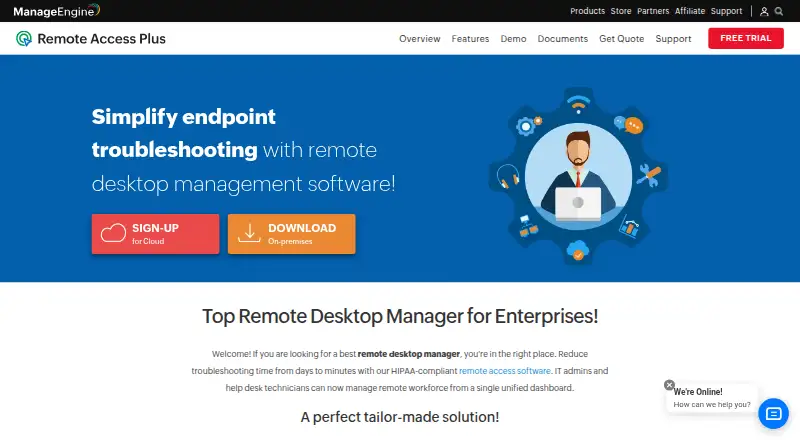
What ManageEngine Remote Access Plus is
ManageEngine Remote Access Plus is remote access software for Windows, macOS, Linux, Android, iOS, and web. It supports both access modes and lists file transfer, session recording, and mobile apps. The free plan covers 10 devices. Standard Cloud Monthly is $10 a month for 25 computers and five technicians, while Standard Cloud Annual is $100 a year for the same capacity. Professional Cloud Monthly costs $15 a month, and Professional Cloud Annual costs $150 a year; both list 25 computers and five technicians. On-premises annual plans are $75 a year for Standard and $95 a year for Professional, each for 25 computers and five technicians. Perpetual license plans are listed at $187 a month for Standard and $237 a month for Professional, with the same stated capacity. The maker is ManageEngine Remote Access Plus, founded in 2002.
Good
- Supports Windows, macOS, Linux, Android, iOS, and web
- Includes file transfer and session recording
- Mobile apps are available
- Free plan covers 10 devices
Watch out
- Standard Cloud Monthly is $10 a month
- Cloud plans list capacity of 25 computers and five technicians
- A 30-day trial is listed
Who it suits
It may suit technicians who need remote access across desktop and mobile platforms, with file transfer and session recording. The free plan is an option for managing up to 10 devices.
Verdict
Remote Access Plus covers a broad set of platforms and includes file transfer and session recording. Review the device and technician limits alongside the cloud or on-premises plan terms.
Plans and prices
From ManageEngine Remote Access Plus's own pricing page, checked 15 Oct 2026.
| Plan | Price | What it gives you |
|---|---|---|
| Free | Free | up to 10 computers with 1 technician |
| Standard - On-Premises Annual | $75 a year | 25 computers · 5 technicians · Annual |
| Standard - On-Premises Perpetual | $187 a month | 25 computers · 5 technicians · Perpetual license |
| Standard - Cloud Monthly | $10 a month | 25 computers · 5 technicians · Monthly |
| Standard - Cloud Annual | $100 a year | 25 computers · 5 technicians · Annual |
| Professional - On-Premises Annual | $95 a year | 25 computers · 5 technicians · Annual |
| Professional - On-Premises Perpetual | $237 a month | 25 computers · 5 technicians · Perpetual license |
| Professional - Cloud Monthly | $15 a month | 25 computers · 5 technicians · Monthly |
| Professional - Cloud Annual | $150 a year | 25 computers · 5 technicians · Annual |
| Standard Cloud | $10 a month | 25 computers · 5 technicians · monthly |
| Professional Cloud | $15 a month | 25 computers · 5 technicians · monthly |
| Standard On-Premises Annual | $75 a year | 25 computers · 5 technicians · annual |
| Professional On-Premises Annual | $95 a year | 25 computers · 5 technicians · annual |
| Standard On-Premises Perpetual | $187, paid once | 25 computers · 5 technicians · perpetual |
The facts
Each one read from ManageEngine Remote Access Plus's own pages, with the date it was checked.
What it does
- Access mode
- bothchecked 20 Sep 2026
- API
- Remote Access Plus Cloud exposes REST APIs for remote offices, computers, agent installation, computer removal and server properties.checked 15 Oct 2026
- API authentication
- The cloud API uses OAuth 2.0, scoped permissions and bearer access tokens that expire after one hour.checked 15 Oct 2026
- API tooling
- The API documentation provides an OpenAPI specification and a Postman collection for testing requests.checked 15 Oct 2026
- Chat
- Technicians and users can communicate with voice, video and text chat during support sessions.checked 15 Oct 2026
- Compliance
- ManageEngine states that the product has controls relevant to HIPAA, PCI DSS, FISMA, NIST, GDPR, FERPA and ISO 27001 use cases.checked 15 Oct 2026
- Deployment
- Remote Access Plus is offered as cloud software or as an on-premises installation with server, agent and web-console components.checked 15 Oct 2026
- Documentation
- The help center covers installation, remote control, tools, reports, session recording, two-factor authentication, SSL, user management and port settings.checked 15 Oct 2026
- File transfer
- Remote File Manager supports folder creation and drag-and-drop file transfers, with encrypted endpoint transfer.checked 15 Oct 2026
- Google Play update
- The Android app was updated July 2, 2026 and added PowerShell actions for managed Windows devices on on-premises servers.checked 15 Oct 2026
- Integrations
- The integrations page describes SLA-oriented endpoint management, centralized asset management, troubleshooting workflows and SIEM audit-log forwarding.checked 15 Oct 2026
- Licence
- The EULA grants evaluation and commercial licences for binary software and does not describe an open-source licence.checked 15 Oct 2026
- Limit: Software Advice
- Reported shortcomings include limited reporting, difficult troubleshooting when agents fail, Linux connection problems, multi-user connection quirks and requests for offline LAN use.checked 15 Oct 2026
- Limit: Trustpilot complaints
- Negative company reviews repeatedly mention slow support, poor communication, licensing or account problems and perceived overcharging.checked 15 Oct 2026
The company
- Company founded
- LinkedIn lists ManageEngine as founded in 2002.checked 15 Oct 2026
- Company headquarters
- LinkedIn lists headquarters in Del Valle, Texas.checked 15 Oct 2026
- Company ownership
- ManageEngine is the enterprise IT-management division of Zoho Corporation.checked 15 Oct 2026
- Company size
- LinkedIn lists 5,001–10,000 employees.checked 15 Oct 2026
- Founded
- 2002checked 28 Sep 2026
Money
- Free plan
- Yeschecked 20 Sep 2026
- Free trial
- The hosted trial supports unlimited computers for 30 days, while the fully functional free version supports up to 25 computers.checked 15 Oct 2026
Where it runs
- Limit: GetApp
- Reviewers report high RAM use that can freeze endpoints, network-related delays or interruptions and slowness in some server-administration scenarios.checked 15 Oct 2026
- Managed devices
- 25checked 20 Sep 2026
- Mobile apps
- Yeschecked 20 Sep 2026
The full review of ManageEngine Remote Access Plus
ManageEngine Remote Access Plus is a remote-access and support product for teams working across computers and mobile devices. It suits small IT and support teams that need a choice of cloud or on-premises deployment. Its broad platform coverage and session tools are appealing, but the paid plans’ 25-computer limit makes scale an important buying constraint.
Overview
Remote Access Plus combines remote access with file transfer and session recording. Support for Windows, macOS, Linux, Android, iOS and the web makes it a practical option for teams managing a mixed environment rather than a single operating system. Mobile apps extend that reach, though the paid allowance of five technicians and 25 computers is aimed at smaller operations.
Key features
- File transfer: Included for moving files during a remote session, so support work need not stop at connecting to a device.
- Session recording: The ability to record sessions gives teams a retained account of remote support activity.
- Cross-platform access: Windows, macOS, Linux, Android, iOS and web support is a meaningful advantage for mixed-device fleets.
- Mobile apps: Apps complement the browser and desktop coverage, useful when support staff need a mobile access option.
Pricing
The Free plan costs nothing and covers 10 devices. It is a reasonable way for a small setup to begin, but it does not match the 25-computer capacity of paid plans. Every paid plan lists 25 computers and five technicians, so the choice is chiefly between Standard and Professional, cloud or on-premises, and monthly or annual billing.
- Standard Cloud Monthly: $10 a month, for teams preferring monthly billing and cloud deployment.
- Standard Cloud Annual: $100 a year, for cloud users willing to pay annually.
- Standard On-Premises Annual: $75 a year, for teams choosing on-premises deployment with annual billing.
- Standard On-Premises Perpetual: $187 a month, billed as a perpetual license; this is the on-premises option for buyers seeking that license term.
- Professional Cloud Monthly: $15 a month, for cloud users who prefer monthly billing.
- Professional Cloud Annual: $150 a year, for cloud deployment with annual billing.
- Professional On-Premises Annual: $95 a year, for on-premises users paying annually.
- Professional On-Premises Perpetual: $237 a month, billed as a perpetual license.
The 30-day trial gives prospective buyers a defined evaluation period. The lower-cost Standard plans may suit teams whose needs fit that tier, while Professional costs more; either way, the same stated computer and technician limits mean the higher price does not buy a larger listed fleet allowance. Teams expecting to exceed 25 computers should look beyond these plans.
Platforms
Remote Access Plus supports Windows, macOS, Linux, Android, iOS and web, with access available in both modes. This breadth makes it relevant to teams supporting desktop and mobile endpoints. Buyers should still weigh the listed capacity against their device count: broad operating-system coverage does not remove the 10-device free-plan cap or the 25-computer paid-plan limit.
Who it's for
This is best suited to small support teams that need to serve several operating systems and value file transfer, session recording, and a choice between cloud and on-premises plans. The free tier fits a limited 10-device setup. Paid tiers fit teams of up to five technicians managing 25 computers. It is a weaker fit for organizations whose fleet already exceeds that paid allowance.
Pros and cons
- Pro: Windows, macOS, Linux, Android, iOS and web coverage suits a varied device environment.
- Pro: File transfer and session recording provide useful capabilities within remote support sessions.
- Pro: Cloud and on-premises plans give teams a deployment choice.
- Con: The free plan is capped at 10 devices, while paid plans list 25 computers and five technicians, which may constrain growth.
- Con: Standard and Professional plans carry the same stated device and technician limits, so the capacity figures alone do not explain the Professional premium.
Alternatives
Consider TeamViewer Remote if personal, non-commercial use is the priority: its free plan is explicitly for that use, and it supports the same broad set of platforms. Zoho Assist is a potential alternative for a smaller free setup, with one technician and five devices on its free plan, compared with Remote Access Plus’s 10-device free allowance.
HopToDesk, Getscreen.me, Jump Desktop, Splashtop, Remote Desktop and Iperius Remote are also options to compare.
Browse our Remote desktop software and Remote Support Software lists for more choices.
Verdict
Choose ManageEngine Remote Access Plus if a small team needs cross-platform remote support with file transfer, session recording, and cloud or on-premises licensing. Its clearest strengths are breadth and deployment choice; its clearest limitation is the 25-computer paid-plan ceiling. Teams with larger fleets should look elsewhere.
Getting started
- Open the ManageEngine Remote Access Plus website
- Choose the free plan or a listed Standard or Professional plan
- Select cloud or on-premises deployment where offered
- Use the 30-day trial if evaluating a paid plan
- Connect supported Windows, macOS, Linux, Android, iOS, or web endpoints
Limits worth knowing
The free plan covers 10 devices. Listed Standard and Professional plans cover 25 computers and five technicians.
Questions
Is there a free plan?
Yes. The Free plan is listed as free and covers 10 devices.
Is a trial available?
Yes. Pricing notes include a 30-day trial.
What does Standard Cloud Monthly cost?
It costs $10 a month and covers 25 computers and five technicians.
Which platforms are supported?
Windows, macOS, Linux, Android, iOS, and the web are listed.
Are cloud and on-premises plans available?
Yes. Standard and Professional plans are listed for cloud and on-premises use.
Alternatives to ManageEngine Remote Access Plus
- 1

DWService
Free planOpen sourceAndroidiOSWebAPI9.2From $40 a year - 2

Zoho Assist
Free planAndroidiOSWebLinux8.9From $10 a month - 3

HopToDesk
Free planAndroidiOSLinuxmacOS8.8From $159 a year - 4

ThinLinc
Free planAndroidiOSWebLinux8.7From $103 a year - 5
TeamViewer Remote
Free planAndroidiOSWebLinux8.5Free plan - 6

Getscreen.me
Free planAndroidWebAPIExtension8.5Free plan