Iperius Remote
Iperius Remote provides remote desktop access and technical assistance for computers and mobile devices.
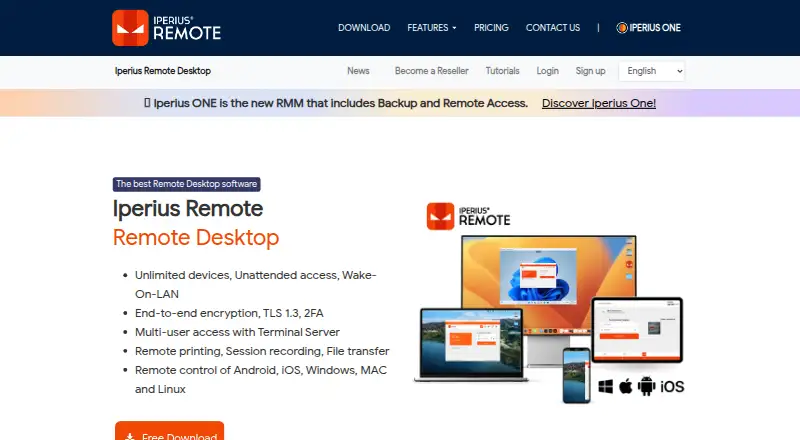
What Iperius Remote is
Iperius Remote provides remote desktop access and technical assistance for computers and mobile devices. It supports Windows, macOS, Linux, iOS and Android, with attended access as well as unattended access installed as a service. Features include file transfer, session recording, multi-user sessions, chat, presentations, screen sharing and multi-monitor support. Administrators can manage device groups, operators, permissions, address books and connection statistics; deployment can use an MSI installer and Windows Group Policies. The maker describes encryption protocols and two-factor authentication, and says its partner data centers are Tier IV and ISO 27001 certified with DDoS protection. A free plan is listed as free for one connection, but it does not support connections to mobile devices. Small costs €8.39/mo billed annually, excluding VAT, for two concurrent connections, unlimited devices and users. Medium costs €19.99/mo billed annually, excluding VAT, for five concurrent connections. The evaluation period is up to 21 calendar days from installation.
Good
- Supports Windows, macOS, Linux, iOS and Android.
- Offers unattended access installed as a service.
- Includes file transfer and session recording.
- Administrators can manage groups, operators and permissions.
- Paid plans allow unlimited devices and users.
Watch out
- Free edition cannot connect to mobile devices.
- Some features may not be available on every platform.
- Small and Medium prices are billed annually and exclude VAT.
Who it suits
Iperius Remote may suit support teams or individuals who need to access computers and mobile devices remotely. Administrators needing device management or unattended access can also consider it, while noting the free edition's mobile restriction.
Verdict
Iperius Remote covers remote assistance, file transfer and collaboration across desktop and mobile platforms, with a free option and paid licensing based on concurrent connections. Check platform availability for specific features and remember that mobile connections require more than the free edition.
Plans and prices
From Iperius Remote's own pricing page, checked 20 Sep 2026.
| Plan | Price | What it gives you |
|---|---|---|
| Pro | — | Business remote desktop and support features · Multiple simultaneous connections · Unlimited computers · Unlimited file and folder transfer · Remote access to mobile devices |
| Free | Free | 1 connection at a time · limited file transfer and connection history · no address book or mobile device connections · advanced features missing |
| Small | €839 a year | 2 concurrent connections · unlimited devices · unlimited users · Month / VAT excluded; billed annually |
| Medium | €1,999 a year | 5 concurrent connections · unlimited devices · unlimited users · Month / VAT excluded; billed annually |
The facts
Each one read from Iperius Remote's own pages, with the date it was checked.
What it does
- Access controls
- Remote clients can restrict permitted actions and filter incoming connections by IP address or Iperius Remote ID.checked 4 Oct 2026
- Access mode
- bothchecked 20 Sep 2026
- Administration
- Administrators can manage device groups, operators, permissions, address books, and connection statistics.checked 4 Oct 2026
- Compatibility limit
- The free edition does not support connections to mobile devices, and some features may not be available on every platform.checked 4 Oct 2026
- Connection model
- Paid licensing is based on concurrent connections and offers unlimited devices and users.checked 4 Oct 2026
- Deployment
- The product supports mass deployment with an MSI installer and Windows Group Policies.checked 4 Oct 2026
- File transfer
- It supports bidirectional file and folder transfers, including copy/paste, drag-and-drop, and DELTA transfer of modified file portions.checked 4 Oct 2026
- Infrastructure
- The maker says its partner data centers are Tier IV and ISO 27001 certified and that its servers have DDoS protection.checked 4 Oct 2026
- Privacy
- The maker says it stores only service-required data and logs, and does not store session audio, video, chat, or file data transmitted between clients.checked 4 Oct 2026
- Remote collaboration
- Features include multi-user sessions, chat, presentations, screen sharing, session recording, and multi-monitor support.checked 4 Oct 2026
- Remote support
- The product provides remote desktop and technical assistance for computers and mobile devices.checked 4 Oct 2026
- Security
- The maker describes end-to-end encryption using DTLS-SRTP with AES, TLS 1.2/1.3, HTTPS, and WSS, along with two-factor authentication.checked 4 Oct 2026
- Session recording
- Yeschecked 20 Sep 2026
- Unattended access
- It can be installed as a service for remote access without action by a user at the remote computer.checked 4 Oct 2026
The company
- Company
- Iperius Remote is published by Enter Srl, which describes itself as a private EU-based company headquartered in Italy.checked 4 Oct 2026
- Headquarters
- Cupra Marittima, Italychecked 28 Sep 2026
Money
- Free plan
- Yeschecked 20 Sep 2026
- Trial
- The EULA allows evaluation use for up to 21 calendar days from installation, with possible extension by written agreement.checked 4 Oct 2026
Where it runs
- Mobile apps
- Yeschecked 20 Sep 2026
- Supported platforms
- Windows,macOS,Linux,iOS,Androidchecked 20 Sep 2026
The full review of Iperius Remote
Iperius Remote is remote-support software for computers and mobile devices, combining attended help, unattended administration and collaborative sessions. It is a strong fit for support teams with many endpoints and occasional multi-operator work. The main trade-off is clear: paid capacity is measured in simultaneous connections, while mobile access is excluded from the free edition.
Overview
Iperius Remote brings remote desktop control, technical assistance and endpoint administration into one service. Its paid licensing allows unlimited devices and users, which is useful when a support organization looks after a broad or changing fleet. The practical bottleneck is concurrency: a plan with two connections cannot serve three operators at the same time, regardless of how many computers are registered.
Unattended access works by installing the software as a service on the remote computer, allowing maintenance when no user is present. For Windows estates, MSI installation and Group Policy support make a centralized rollout more realistic than configuring every machine manually.
Key features
Sessions support screen sharing, chat, presentations, recording, multi-monitor operation and multiple participants, alongside file transfer. That combination suits guided troubleshooting, training and collaborative incident handling better than a tool limited to one operator viewing one screen. Session recording can also provide a record of assistance, while file transfer covers the exchange of support material and fixes.
Administration tools cover device groups, operators, permissions, address books and connection statistics. These controls are valuable for a managed help desk that needs separation of responsibilities and an overview of connection activity. Clients can restrict which actions a remote operator may perform, and incoming connections can be filtered by IP address or Iperius Remote ID, adding useful boundaries for controlled environments.
The maker describes end-to-end protection using DTLS-SRTP with AES, TLS 1.2/1.3, HTTPS and WSS, plus two-factor authentication. It also describes Tier IV, ISO 27001-certified partner data centers and DDoS protection. According to the company, service-required data and logs are stored, while session audio, video, chat and transferred file data are not stored between clients. These measures address common security and privacy concerns, although organizations should still align configuration with their own policies.
Pricing
The Free plan costs nothing and provides one connection. It is suitable for occasional computer support by a single operator, but it cannot connect to mobile devices. Some capabilities may also vary by platform, so a mixed-device support workflow should not assume feature parity.
Small costs €8.39 a month, billed annually, with VAT excluded. It provides two concurrent connections, unlimited devices and unlimited users. This is the sensible entry point for a small support operation that needs mobile access and a modest amount of parallel work; the annual billing commitment and two-connection ceiling are the concessions.
Medium costs €19.99 a month, billed annually, with VAT excluded. Five concurrent connections, unlimited devices and unlimited users make it better for a busier desk where several cases overlap. It costs more but raises the concurrency limit substantially without imposing a device quota.
Pro uses custom pricing. It is aimed at business remote desktop and support deployments, with multiple simultaneous connections, unlimited computers, unlimited file and folder transfer, and remote access to mobile devices. Organizations needing the broadest business feature set should request terms directly rather than treating it as a fixed-price upgrade.
A 21-day evaluation period runs from installation under the EULA, with extension possible by written agreement. Paid licensing is therefore worth sizing against real simultaneous demand before committing to annual billing.
Platforms
Iperius Remote supports Windows, macOS, Linux, iOS and Android, with both desktop and mobile apps. The service offers both attended and unattended access, but the free edition cannot connect to mobile devices and platform-specific feature availability can differ. Check the target platform and required workflow before standardizing on it.
Who it's for
This is a good choice for internal IT teams, managed service providers and support desks that administer many endpoints, need unattended maintenance, or regularly involve multiple participants in a session. Unlimited devices and users on the paid tiers are particularly helpful when the estate is large but simultaneous support demand is predictable.
It is less suitable for a solo user who only needs occasional personal access, since the free plan is limited to one connection and excludes mobile targets, or for teams whose operators all need to work concurrently. Those teams should price the required connection count carefully or consider a different licensing model.
Pros and cons
- Pro: Unlimited devices and users on Small and Medium avoid per-endpoint expansion costs.
- Pro: Unattended service installation, MSI deployment and Group Policy support suit managed fleets.
- Pro: Collaboration features, recording, file transfer and multi-monitor support cover more than basic screen control.
- Pro: Two-factor authentication, action restrictions and connection filters provide meaningful administrative controls.
- Con: Concurrent-connection caps can block parallel work even when many devices and users are licensed.
- Con: The free edition cannot connect to mobile devices.
- Con: Annual billing applies to the published Small and Medium prices, and VAT is excluded.
- Con: Feature availability can differ by platform, complicating mixed-fleet planning.
Alternatives
For a broad directory of options, see Remote Support Software and Remote desktop software.
Choose TeamViewer Remote if free personal, non-commercial use or web access matters; its platform list includes web, and its free plan is explicitly for personal use.
Zoho Assist is a better fit when a free technician account for five devices or a published 10.00 USD-per-month Standard tier matches your scale.
Pick dualmon when a 99.00 USD-per-year Remote Assist plan with 20 user accounts and five unattended devices is the more relevant starting point.
DWService suits readers who specifically want a free, open-source agent.
Consider Getscreen.me when a two-device free tier or self-hosted and API options are priorities.
ManageEngine Remote Access Plus is an alternative for teams whose free allowance of 10 devices fits their needs.
AirDroid Remote Support is worth comparing when one channel, one licensed user and 10 monthly hours cover the requirement.
Choose RustDesk when an open-source remote-access approach and community support are the deciding factors.
Verdict
Iperius Remote is best for support organizations that need unattended administration, collaborative sessions and unlimited registered endpoints, with concurrency planned around a small number of active operators. Its strongest reason to choose it is the combination of fleet-friendly licensing and deployment controls. Look elsewhere if mobile targets are essential on a free plan or if many operators must connect simultaneously without moving to a higher tier.
Alternatives to Iperius Remote
- 1

DWService
Free planOpen sourceAndroidiOSWebAPI9.2From $40 a year - 2

ManageEngine Remote Access Plus
Free planAndroidiOSWebAPI9.0From $75 a year - 3

Zoho Assist
Free planAndroidiOSWebLinux8.9From $10 a month - 4

HopToDesk
Free planAndroidiOSLinuxmacOS8.8From $159 a year - 5

ThinLinc
Free planAndroidiOSWebLinux8.7From $103 a year - 6

TeamViewer Remote
Free planAndroidiOSWebLinux8.5Free plan