
Dotcom-Monitor
Dotcom-Monitor is a website and infrastructure monitoring service from Dotcom-Monitor, a company founded in 1998 and headquartered in Excelsior, Minnesota.
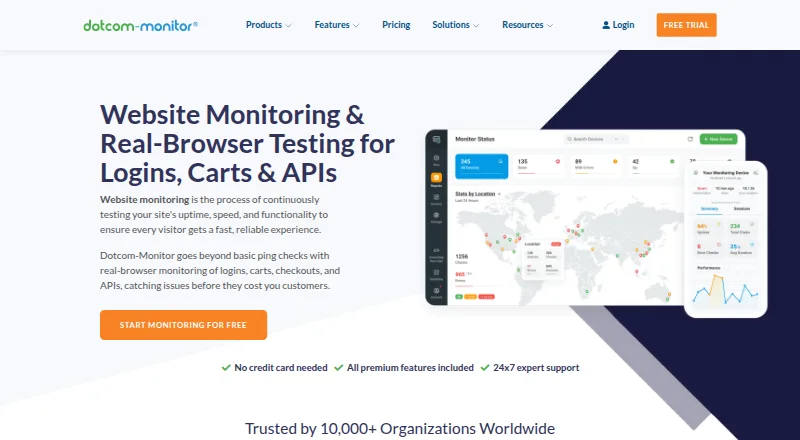
What Dotcom-Monitor is
Dotcom-Monitor is a website and infrastructure monitoring service from Dotcom-Monitor, a company founded in 1998 and headquartered in Excelsior, Minnesota. It tracks websites and servers, monitors keywords, and can alert users when SSL certificates are nearing expiration. Listed alert routes include email, phone call, SMS, SNMP, webhooks, WhatsApp, Slack, PagerDuty, Microsoft Teams, AlertOps, Status.io, and ServiceNow.
The free plan costs $0 and lists up to 25 targets, checks as often as every five minutes, two monitoring locations, email alerts, and seven-day data retention. The subscription plan is $13.33 per month, with pricing that varies by platform, target count, and frequency. Its plan comparison lists up to 100 targets, checks as often as every minute, 25 locations, private agents, and API configuration. Enterprise has custom pricing, unlimited targets, more than 30 locations, SSO and MFA, and 24/7 priority support.
Dotcom-Monitor lists web, Windows, Linux, iOS, and Android availability. Its general monitoring details also list a five-monitor limit, a 15-minute check interval, and 25 monitoring locations. A 30-day trial is listed.
Good
- Free plan lists up to 25 targets and two monitoring locations.
- Monitors SSL expiry, keywords, and servers.
- Alerts include email, SMS, phone calls, and messaging services.
- Listed for web, Windows, Linux, iOS, and Android.
- Subscription comparison includes private agents and API configuration.
Watch out
- Free plan limits alerts to email.
- Free plan retains data for seven days.
- Enterprise pricing is custom.
- Subscription pricing varies by platform, target count, and frequency.
Who it suits
Dotcom-Monitor suits teams that need website or server monitoring, keyword checks, or SSL expiry alerts across multiple targets. Its free plan is an option for those who can work within its listed target, location, alert, and retention limits; larger monitoring needs can look at subscription or enterprise plans.
Verdict
Choose Dotcom-Monitor if you need website or server monitoring with SSL and keyword checks, and its listed alert channels fit your workflow. The free plan offers a starting point, while teams needing unlimited targets, SSO, MFA, or priority support should review the custom-priced enterprise option.
Plans and prices
From Dotcom-Monitor's own pricing page, checked 15 Oct 2026.
| Plan | Price | What it gives you |
|---|---|---|
| Free | Free | up to 25 targets · checks every 5 minutes or slower · 2 global locations · email alerts · 21-day data retention · basic support · forever |
| Subscription | $19.99 a month | up to 100 targets · checks down to 1 minute · 25 global locations · 20+ alert integrations · 1-year retention · standard support · monthly |
| Performance Counters MetricsView | $13.33 a month | 5 counters · 15-minute checks · CPU, memory and custom performance counters · monthly |
| Web Services WebView | $19.99 a month | 10 targets · 5-minute checks · REST, SOAP, GraphQL, Postman and Insomnia monitoring · monthly |
| Web Pages BrowserView | $29.96 a month | 5 pages · checks every 3 hours · real-browser monitoring and Lighthouse audits · monthly |
| Web Applications UserView | $38.95 a month | 5 steps · checks every 3 hours · multi-step EveryStep transactions · monthly |
| Internet Infrastructure ServerView | $40 a month | 5 targets · 15-minute checks · DNS, ports, SSL, ICMP, FTP and SIP monitoring · monthly |
| Enterprise | Priced on request | unlimited targets · 30+ locations and premium locations · 3-year retention · SSO · MFA · departments · 24/7 priority support · purchase-order billing · custom quote |
The facts
Each one read from Dotcom-Monitor's own pages, with the date it was checked.
What it does
- Alert channels
- Email,Phone call,SMS,SNMP,Webhooks,WhatsApp,Slack,PagerDuty,Microsoft Teams,AlertOps,Status.io,ServiceNowchecked 19 Sep 2026
- API assertions and authentication
- The API monitor supports headers, JSONPath and XPath assertions plus API key, Basic, OAuth 2.0, JWT, bearer, AWS Signature v4, NTLM, Kerberos and mTLS authentication.checked 15 Oct 2026
- API authentication
- API access requires creating a Web API integration identifier and can be restricted by IP allowlisting; sessions use a login endpoint and expire after inactivity.checked 15 Oct 2026
- API coverage
- API monitoring supports REST, SOAP, GraphQL and HTTP/S endpoints, with direct Postman and Insomnia collection imports.checked 15 Oct 2026
- Change in September 2026
- The September 2026 changelog records Playwright for .NET integration, allowing MSTest, NUnit and xUnit tests to be imported and run from more than 30 locations.checked 15 Oct 2026
- Check interval
- 15 minuteschecked 19 Sep 2026
- Compliance claims
- The DNS monitoring product page states availability of a 99.99% uptime SLA, SOC 2, GDPR, SSO using SAML/OIDC and private agents.checked 15 Oct 2026
- Documentation depth
- The public knowledge base contains monitoring and load-testing sections, FAQs, setup guides, API endpoint references, troubleshooting and a product change log.checked 15 Oct 2026
- Global network
- Dotcom-Monitor states that it operates 33 monitoring locations in 18 countries across six continents, with 75 IPv4 and 48 IPv6 nodes.checked 15 Oct 2026
- Integrations
- Listed integrations include Azure AD, Slack, Microsoft Teams, PagerDuty, Splunk, Asana, Okta, Pushover, ServiceNow, Salesforce, Trello, Geckoboard, Google Sheets, Zapier and Status.io.checked 15 Oct 2026
- Keyword monitoring
- Yeschecked 19 Sep 2026
- Limit: missing capability
- A recent G2 reviewer requested monitoring for phone numbers, which is not described as a Dotcom-Monitor feature.checked 15 Oct 2026
- Limit: page scope
- The BrowserView documentation says it monitors only explicitly configured pages and does not crawl or audit thousands of URLs.checked 15 Oct 2026
- Limit: pricing
- Independent reviewers on Capterra, G2 and GetApp repeatedly describe the pricing as expensive, complex or difficult to customize.checked 15 Oct 2026
- Limit: user interface
- Capterra reviewers report that the interface can be cumbersome and that the older non-web client GUI looks dated.checked 15 Oct 2026
- Monitoring locations
- 25checked 19 Sep 2026
Where it runs
- Apple app requirements
- The iOS app requires iOS 14 or later; the Mac version requires macOS 11 or later on Apple silicon.checked 15 Oct 2026
- Limit: mobile app reliability
- Google Play reviews include multiple reports of a blank screen when opening the app on Samsung S23 Ultra devices.checked 15 Oct 2026
The company
- Company headquarters
- The company identifies its headquarters as 2500 Shadywood Road, Excelsior, Minnesota, United States.checked 15 Oct 2026
- Company history
- Dotcom-Monitor says it began in 1998, was founded by Vadim and remains privately owned.checked 15 Oct 2026
- Company scale claim
- The company says it has 34 global datacenters, performs more than 10 million monitoring checks per day and detects 200 million errors per year.checked 15 Oct 2026
- Founded
- 1998checked 28 Sep 2026
- Headquarters
- Excelsior, Minnesota, USAchecked 28 Sep 2026
Money
- Free plan
- Yeschecked 19 Sep 2026
The full review of Dotcom-Monitor
Dotcom-Monitor brings website, server, SSL expiry and keyword monitoring together with a wide range of alert routes. It is best suited to teams that need checks delivered into existing incident workflows. Its free plan is a capable starting point, though buyers should weigh the limits of two locations and seven-day retention against the faster, broader coverage on paid plans.
Overview
Founded in 1998 and based in Excelsior, Minnesota, Dotcom-Monitor covers several monitoring needs in one service. Email is available on the free plan; alerts can also reach teams by phone, SMS, SNMP, webhooks, WhatsApp, Slack, PagerDuty, Microsoft Teams, AlertOps, Status.io and ServiceNow. That range gives teams room to route incidents through tools they already use, while the free tier keeps basic monitoring accessible.
The main purchasing wrinkle is that subscription pricing varies by platform, target count and check frequency. The $13.33 per month starting price is an entry point, not a guarantee that every configuration will cost that amount.
Key features
Checks and alert routing
The Free plan allows up to 25 targets, checks as often as every five minutes, two monitoring locations and seven days of data retention, with email alerts. That is enough capacity to cover a small portfolio, but the limited location count offers a narrow view of geographic performance, and a week of history can constrain follow-up on intermittent issues.
The Subscription plan comparison raises the ceiling to 100 targets and checks as often as every minute, with 25 monitoring locations. It also includes private agents and API configuration. Faster checks and wider geographic coverage make this a more serious operational option, although the actual price depends on the platform and configuration.
SSL expiry alerts, keyword monitoring and server monitoring broaden the service beyond basic availability checks. The many alert routes are useful when an incident needs to reach an on-call or service-management workflow. Teams that only need a few simple checks may not need that breadth.
Pricing
| Plan | Price | What it includes | Best fit |
|---|---|---|---|
| Free | free | Up to 25 targets, monitoring as often as every five minutes, two locations, email alerts and seven-day data retention | Small sites and projects that can work within limited geographic coverage and short history |
| Subscription | $13.33 a month | Pricing varies by platform, target count and frequency; up to 100 targets in the plan comparison, checks as often as every minute, 25 locations, private agents and API configuration | Teams that need faster checks, broader location coverage or more targets |
| Enterprise | Custom pricing | Unlimited targets, 30+ locations, SSO, MFA and 24/7 priority support | Organizations that need scale, identity controls or priority support |
A 30-day trial gives buyers a way to assess a paid setup before committing. Free is the clear low-cost choice, but it gives up paid-plan frequency and location coverage. Subscription starts at $13.33 a month, billed monthly; because cost varies with the selected platform, target count and check frequency, teams should budget around their required configuration. Enterprise is the step up for unlimited targets and stronger access and support provisions, with custom pricing.
Platforms
Dotcom-Monitor supports web, Windows, Linux, iOS and Android. This spread suits teams managing services across desktop and mobile environments, while its monitoring focus remains websites, servers and related targets.
Who it's for
Dotcom-Monitor is a good fit for site owners and operations teams that want website and server checks, SSL expiry and keyword monitoring, with alerts routed into established communication or incident tools. The Free plan can serve a modest monitoring setup; Subscription is more appropriate when one-minute checks or broad location coverage matter. Teams requiring unlimited targets, SSO, MFA or priority support should consider Enterprise.
It is less compelling for buyers who need only a couple of monitors and do not need the broader alert integrations or paid-tier location coverage. In that case, compare a simpler monitoring plan against the configuration cost of Dotcom-Monitor.
Pros and cons
- Pros: Free covers up to 25 targets and checks as often as every five minutes, making it a useful starting point for small deployments.
- Pros: Subscription expands coverage to 25 locations and checks as often as every minute, with private agents and API configuration.
- Pros: SSL expiry, keyword and server monitoring sit alongside many alert channels, supporting varied monitoring and incident-routing needs.
- Cons: Free limits users to two locations, email alerts and seven-day retention, which restricts geographic comparison and longer investigations.
- Cons: Subscription pricing varies by platform, target count and frequency, so the starting price may not reflect the cost of a particular setup.
- Cons: Unlimited targets, SSO, MFA and 24/7 priority support require the custom-priced Enterprise plan.
Alternatives
Consider HostTracker if two monitors, two contacts and checks every 30 minutes on its free plan are enough. Choose Checkly if a free Hobby plan with 10 uptime monitors, browser and API check runs, and six locations better matches your needs. GoPinger is another free option, with five monitors, five-minute checks, email and webhook alerts, 30-day retention and one team member.
For an open-source option, OneUptime offers a core platform under Apache 2.0 that can be inspected, modified and self-hosted. Consider Grafana Cloud Application Observability for its free allowance of 2,232 host hours. New Relic Kubernetes Monitoring offers a free plan and a Pro plan at $349 a year for annual commitments, with unlimited full platform users and 100 GB of free data ingest. Dynatrace Kubernetes Monitoring is an alternative with a Kubernetes rate billed at $0.002 per hour per pod. ManageEngine Applications Manager has a free plan for up to five apps or servers.
Browse Synthetic Monitoring, Uptime Monitoring Software, Internet Performance Monitoring Software, Website Monitoring Software, VoIP Monitoring Software or DNS Monitoring Software to compare options by category.
Verdict
Dotcom-Monitor is a strong choice for teams that need website or server checks, SSL and keyword monitoring, plus alerts routed into existing operations tools. Its free plan gives small deployments meaningful target capacity, while paid plans add the faster checks and wider location coverage that support more demanding monitoring. Look elsewhere if you need only basic monitoring at a predictable price, or if the Enterprise features are essential but custom pricing does not fit your budget.
Getting started
- Visit the Dotcom-Monitor website.
- Choose the free plan or review the subscription and enterprise options.
- Use the listed web, Windows, Linux, iOS, or Android platform.
Limits worth knowing
The free plan lists up to 25 targets, two monitoring locations, email alerts, and seven-day data retention. The subscription comparison lists up to 100 targets, while enterprise lists unlimited targets and custom pricing.
Questions
Is Dotcom-Monitor free?
Yes. The free plan is listed at $0 and includes up to 25 targets, two monitoring locations, email alerts, and seven-day data retention.
How much does the subscription plan cost?
The listed starting price is $13.33 per month. Pricing varies by platform, target count, and monitoring frequency.
Which platforms are supported?
Dotcom-Monitor lists web, Windows, Linux, iOS, and Android.
What can it monitor?
Listed monitoring includes websites and servers, keywords, and SSL certificate expiry.
Which alert channels are available?
Listed channels include email, phone call, SMS, SNMP, webhooks, WhatsApp, Slack, PagerDuty, Microsoft Teams, AlertOps, Status.io, and ServiceNow.
What does the enterprise plan include?
Enterprise has custom pricing, unlimited targets, more than 30 monitoring locations, SSO and MFA, and 24/7 priority support.
Alternatives to Dotcom-Monitor
- 1

Distill Web Monitor
Free planAndroidiOSWebAPI8.0From $15 a month - 2
OnWebChange
Free planAndroidiOSWebAPI8.0From €0.89 a month - 3
Visual Sentinel
Free planAndroidiOSWebAPI8.0From $6 a month - 4

Pingdom
AndroidiOSWebAPI7.8From $16.50 a month - 5

UptimeRobot
Free planAndroidiOS7.8From $9 a month - 6
Tallwatch
Free planWebAPILinuxmacOS7.7From $14.99 a month