
UptimeRobot
UptimeRobot monitors websites, servers, and other services, with Android and iOS mobile apps.
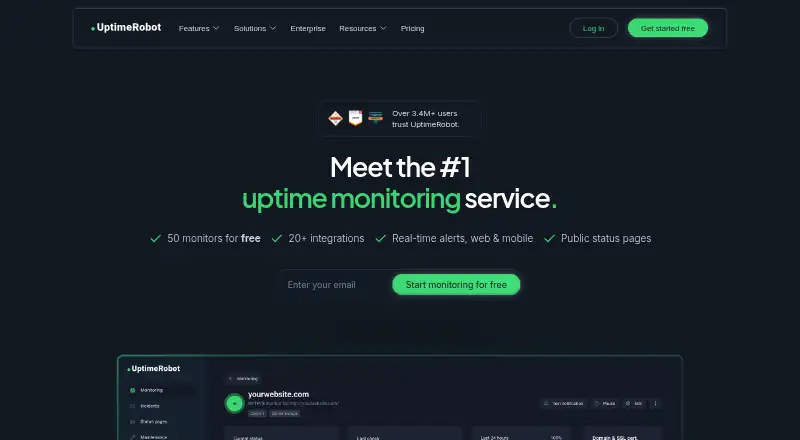
What UptimeRobot is
UptimeRobot monitors websites, servers, and other services, with Android and iOS mobile apps. Its free plan costs nothing and includes 50 monitors, checks every five minutes, several monitor types, and basic status pages. Monitor types listed for that plan include HTTP, port, ping, keyword, API, UDP, DNS, SSL, and domain monitoring. Paid plans can check services more frequently; the Solo plan costs $9 a month when billed annually and lists a 60-second interval. Alert channels include email, SMS, voice calls, mobile push, Slack, Microsoft Teams, Telegram, Discord, Google Chat, Mattermost, PagerDuty, Splunk On-Call, Pushbullet, Pushover, Zapier, and webhooks. UptimeRobot also supports branded real-time status pages with incident and maintenance updates, and role-based team access. The company says it integrates with 20+ services, while the free plan is limited to five integrations. Free registration does not require a credit card. Annual billing is stated to save about 15%; new subscriptions and upgrades have a 14-day money-back guarantee.
Good
- Free plan includes 50 monitors and five-minute checks.
- Supports HTTP, DNS, SSL, keyword, and other monitor types.
- Alerts include email, SMS, mobile push, and webhooks.
- Branded status pages can show incidents and maintenance updates.
Watch out
- Free plan checks every five minutes.
- Free plan is limited to five integrations.
- Solo costs $9 a month when billed annually.
- PayPal is unavailable for new subscriptions.
Who it suits
It suits people and teams who need availability monitoring for websites, servers, or other services, with alerts and status pages. The free plan is described for hobby and non-profit projects; Solo is positioned for freelancers and small sites.
Verdict
UptimeRobot offers a free monitoring plan and paid options with shorter check intervals, expanded integrations, and team features. The free tier has 50 monitors but checks every five minutes and includes only five integrations.
Plans and prices
From UptimeRobot's own pricing page, checked 27 Sep 2026.
| Plan | Price | What it gives you |
|---|---|---|
| Free | Free | Good for hobby and non-profit projects; no credit card required. · 50 monitors · 5-minute monitoring interval · HTTP, port, ping, keyword, API, UDP, DNS, SSL, and domain monitoring · Basic status pages · billed monthly |
| Solo | $9 a month | For freelancers and small sites; 10 monitors tier shown. · 10 monitors · 60-second monitoring interval · All monitor types plus SSL and DNS · Three status pages and own domain · billed annually |
| Team | $35 a month | For small teams running production services. · 100 monitors · 30-second monitoring interval · Three seats included · Webhook, Zapier, and PagerDuty · billed annually |
| Scale | $65 a month | For high-volume, self-serve monitoring; 200 monitors tier shown. · 200 or 500 monitors · 15-second monitoring interval · Five seats included · Unlimited status pages · billed annually |
| Enterprise | Priced on request | For custom scale, compliance and procurement. · Custom monitoring intervals · SSO, audit logs, SLA, and security review options · Custom invoicing · Let’s talk |
| SMS credits 10 | $3, paid once | SMS and voice call credits are added to the account only once. · $3.00/one-time |
The facts
Each one read from UptimeRobot's own pages, with the date it was checked.
What it does
- Alert channels
- Email, SMS, voice call, mobile push, Email-to-SMS and integrations are listed.checked 27 Sep 2026
- Annual savings
- Annual billing saves about 15%.checked 27 Sep 2026
- Check interval
- 1 minutechecked 19 Sep 2026
- GDPR
- UptimeRobot says it is GDPR compliant.checked 27 Sep 2026
- Integrations
- UptimeRobot integrates with 20+ services.checked 27 Sep 2026
- Keyword monitoring
- Yeschecked 19 Sep 2026
- Money back
- 14-day money-back guarantee for new subscriptions and upgrades.checked 27 Sep 2026
- Monitoring locations
- 4checked 19 Sep 2026
- Monitor limit
- 10checked 19 Sep 2026
- No card
- Free registration does not require a credit card.checked 27 Sep 2026
- Paid from
- 12checked 19 Sep 2026
- Paid interval
- Paid plans can check services every minute.checked 27 Sep 2026
- Payment methods
- Accepts major cards and wire transfers; PayPal unavailable for new subscriptions.checked 27 Sep 2026
- PCI payments
- Credit cards are handled on Stripe infrastructure with PCI Service Provider Level 1 certification.checked 27 Sep 2026
- Server monitoring
- Yeschecked 19 Sep 2026
- SOC 2
- UptimeRobot says it is SOC 2 compliant.checked 27 Sep 2026
- SSL expiry alerts
- Yeschecked 19 Sep 2026
- Status pages
- Supports branded real-time status pages with incidents and maintenance updates.checked 27 Sep 2026
Money
- Free integrations
- Free plan has only 5 integrations.checked 27 Sep 2026
- Free interval
- Free monitoring interval is 5 minutes.checked 27 Sep 2026
- Free monitors
- Free plan includes 50 monitors.checked 27 Sep 2026
- Free plan
- Yeschecked 19 Sep 2026
The company
- Headquarters
- Bratislava, Slovakiachecked 28 Sep 2026
Where it runs
- Mobile apps
- Mobile app is available for Android and iOS.checked 27 Sep 2026
The full review of UptimeRobot
Overview
UptimeRobot is a service-monitoring platform for checking websites, APIs, servers and other endpoints. It suits site owners and teams that want a broad mix of monitor types and alert channels, with room to grow from a free account into faster, team-oriented plans.
Its strongest case is breadth: monitoring, incident status pages and many ways to route alerts sit in one service. The trade-off is that the free tier checks less often and limits integrations, while meaningful increases in speed, monitor capacity and collaboration require paid plans.
Key features
- Broad monitoring coverage: HTTP, ports, ping, keywords, APIs, UDP, DNS, SSL and domains are supported, alongside server monitoring. This range can cover routine website checks as well as several infrastructure needs, though the plan determines check speed and capacity.
- Alert routing: Alerts can go to email, SMS, voice call, email-to-SMS and mobile-app push, as well as services including Slack, Microsoft Teams, Telegram, Discord, Google Chat, Mattermost, PagerDuty, Splunk On-Call, Pushbullet, Pushover, Zapier and webhooks. That variety helps fit notifications into different workflows; the free plan includes only five integrations out of the more than 20 supported.
- Status pages and team access: Branded, real-time status pages support incident and maintenance updates. Role-based access lets teams assign roles and control permissions, making the service more suitable for shared operations than a monitor-only utility.
- Security and payments: UptimeRobot says it is SOC 2 and GDPR compliant. Card payments run on Stripe infrastructure with PCI Service Provider Level 1 certification.
Pricing
UptimeRobot uses a freemium model. Free registration requires no credit card, and new subscriptions and upgrades carry a 14-day money-back guarantee. Annual billing saves about 15%; the listed paid prices below are annual-billing rates.
- Free — free: 50 monitors, five-minute checks, HTTP, port, ping, keyword, API, UDP, DNS, SSL and domain monitoring, plus basic status pages. It is a sensible fit for hobby and non-profit projects that can tolerate slower detection. The five-minute interval and five-integration allowance are important limits for production services or teams that depend on several notification tools.
- Solo — $9 a month, billed annually: 10 monitors, 60-second checks, all monitor types plus SSL and DNS, three status pages and a custom domain. This plan targets freelancers and small sites that value faster checks but have modest monitoring needs. Its 10-monitor tier is far below Free’s 50, so moving up buys speed and status-page options rather than more monitors.
- Team — $35 a month, billed annually: 100 monitors, 30-second checks, three seats and Webhook, Zapier and PagerDuty. It is aimed at small teams running production services; the included seats and integrations make it a more practical shared plan than Solo. Checks are faster than Solo’s but not as frequent as Scale’s.
- Scale — $65 a month, billed annually: 200 or 500 monitors, 15-second checks, five seats and unlimited status pages. This is the self-serve option for higher-volume monitoring, particularly where several public status pages or more frequent checks matter. The two monitor tiers are both shown, so buyers should confirm which capacity applies to their selection.
- Enterprise — custom pricing: Custom monitoring intervals, SSO, audit logs, SLA and security-review options, plus custom invoicing. It is the fit for organizations whose scale, compliance or procurement requirements exceed the self-serve plans.
- SMS credits 10 — $3, paid once: A one-time purchase that adds SMS and voice-call credits to the account. This is an add-on rather than a recurring plan.
Platforms
Mobile apps are available for Android and iOS, including mobile-app push as an alert channel. These platforms make the service accessible from phones, while its monitoring covers services rather than just mobile-device activity.
Who it's for
UptimeRobot is a good match for individuals and organizations that want broad endpoint coverage, multiple notification routes and a progression from free monitoring to team plans. Free is most compelling for low-stakes projects; Solo suits small sites that need minute-level checks; Team and Scale make more sense when monitor volume, shared access or status-page needs grow.
It is less compelling for anyone whose production response depends on faster-than-five-minute checks but who also needs many monitors at the lowest tier: the free plan offers the most monitors, while the 10-monitor Solo tier is the entry point for 60-second checks.
Pros and cons
- Pro: The range of monitor types covers websites, APIs, DNS, SSL and servers, reducing the need to split basic monitoring across separate tools.
- Pro: Numerous alert channels and role-based access support different notification workflows and shared team use.
- Pro: The free account needs no card and includes 50 monitors, making it accessible for hobby projects and nonprofits.
- Con: Free checks run only every five minutes and the plan has five integrations, both meaningful constraints when timely alerts or multiple integrations are essential.
- Con: Solo has only 10 monitors despite being a paid step up from Free, so users may need Team for greater capacity.
Alternatives
Consider HostTracker if two monitors and checks every 30 minutes are enough for a free setup, or if its 30-day trial with 100 monitors is a better way to evaluate a larger configuration.
Dotcom-Monitor is another freemium option, with a free plan for up to 25 targets and monitoring as often as every five minutes across two locations.
SolidPing may suit teams seeking a self-hosted option: its free plan includes 100 monitors, five team members and one private-location agent.
Uptimia is an alternative with a free plan and a Basic tier listed at $9 a month, billed annually, with 10 uptime checks and one-minute testing.
Tallwatch offers a free plan with 10 monitors, 60-second checks from three regions, up to three team members and a custom-domain status page.
Cronitor has a free Hacker plan with five monitors, email and Slack alerts, a status page, and a fastest check frequency of five minutes.
Pulsetic provides a free plan with 10 monitors, five-minute checks, three regions and three months of uptime and log history; its Solo plan is listed at $9 a month with annual billing.
Hyperping is another freemium alternative.
For broader category comparisons, browse Website Monitoring Software, Internet Performance Monitoring Software, Uptime Monitoring Software and API Monitoring Tools.
Verdict
Choose UptimeRobot if you want broad monitoring coverage, flexible alert delivery and a clear path from a no-card free account to shared team plans. Its main drawback is the gap between the free plan’s 50 monitors at five-minute intervals and Solo’s 10 monitors at 60 seconds; look elsewhere if your monitor count and response-speed needs do not fit that trade-off.
Alternatives to UptimeRobot
- 1

Dotcom-Monitor
Free planAndroidiOSWebAPI8.9From $13.33 a month - 2

Pingdom
AndroidiOSWebAPI8.4From $16.50 a month - 3

SolidPing
Free planWebAPILinuxSelf-hosted8.2From €5 a month - 4

Uptimia
Free planWeb8.2From $9 a month - 5
HetrixTools
Free planLinuxmacOSWindows8.2From $9.95 a month - 6

openstatus
Free planWebAPILinuxmacOS8.2From $30 a month