Visual Sentinel
Visual Sentinel monitors websites and servers, combining standard availability checks with browser-based visual comparisons.
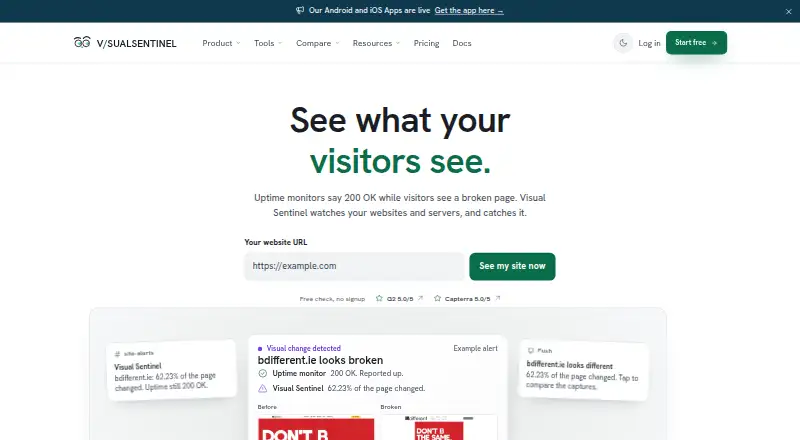
What Visual Sentinel is
Visual Sentinel monitors websites and servers, combining standard availability checks with browser-based visual comparisons. Its monitoring also covers SSL, DNS, performance, content, APIs, endpoints, and servers. For a visual check, it captures a page and compares the image with an earlier baseline. You can exclude changing page elements with CSS selectors and choose how much of the page must change to trigger a flag. When an uptime check fails, the service checks again; it marks a site down only if it fails from every selected region.
Alerts can go to email, Slack, Discord, WhatsApp, Telegram, Microsoft Teams, PagerDuty, OpsGenie, webhooks, Prometheus, and browser push. The REST API manages monitors, incidents, status pages, maintenance windows, reports, and notification channels, with API access on Business and Agency plans. Free provides 3 monitors, checks every 10 minutes, and 1 status page. Paid plans begin with Solo at $6 a month; Starter is $12 a month, Business is $39 a month, and Agency is $149 a month. Business includes scheduled client reports, while Agency adds white-label client reports. Acefina LLC builds and operates the service. Its privacy policy describes TLS 1.3 encryption in transit, AES-256-GCM encryption at rest for sensitive integration credentials and API tokens, and account-data deletion within 30 days after closure.
Good
- Combines uptime, visual, SSL, DNS, performance, content, API, endpoint, and server monitoring.
- Rechecks uptime failures across selected regions before marking a site down.
- CSS selectors can exclude dynamic page elements from visual checks.
- Alerts support email, chat services, incident tools, webhooks, Prometheus, and browser push.
- Free plan includes 3 monitors, 10-minute checks, and 1 status page.
Watch out
- Free plan is limited to 3 monitors and 10-minute checks.
- API access is listed only on Business and Agency.
- Solo allows 1 monitor, 1 server, and 1 visual site.
Who it suits
Visual Sentinel suits site owners and small teams that need uptime checks alongside screenshot-based detection of page changes. Agencies may find its client reporting options useful, particularly the scheduled reports on Business and white-label reports on Agency.
Verdict
Choose Visual Sentinel if you want visual page comparisons alongside uptime and infrastructure monitoring, with a free tier for up to three monitors. Look elsewhere if API access is essential on an entry plan: it is listed only for Business and Agency.
Plans and prices
From Visual Sentinel's own pricing page, checked 15 Oct 2026.
| Plan | Price | What it gives you |
|---|---|---|
| Solo | $6 a month | 1 monitor · 1 visual site · 5-minute uptime checks · 30-minute visual checks · 1 server · $54 billed annually; annual equivalent $4.50/month |
| Starter | $12 a month | 15 monitors · 5 visual sites · 5-minute uptime checks · 15-minute visual checks · 2 servers · $108 billed annually; annual equivalent $9/month |
| Business | $39 a month | 60 monitors · 60 visual sites · 1-minute uptime checks · 15-minute visual checks · 10 servers · API access · $351 billed annually; annual equivalent $29.25/month |
| Free | Free | 3 uptime and SSL monitors · 10-minute checks · no card · $0 forever |
| Agency | $149 a month | 300 monitors · 300 visual sites · 1-minute uptime checks · 15-minute visual checks · 20 servers · 50 team members · white-label reports · $1,341 billed annually; annual equivalent $111.75/month |
| Custom | Priced on request | Custom monitor and server limits · SLA and uptime guarantee · Dedicated account manager · Custom integrations |
The facts
Each one read from Visual Sentinel's own pages, with the date it was checked.
What it does
- Alert channels
- Supported alert destinations include email, Slack, Discord, Telegram, WhatsApp, Microsoft Teams, PagerDuty, Opsgenie, webhooks and browser push.checked 15 Oct 2026
- API
- The public REST API uses scoped organization keys and exposes monitors, incidents, status pages, maintenance windows, reports, notification channels and servers.checked 15 Oct 2026
- API access limit
- The pricing comparison lists API access on Business and Agency, but not Solo or Starter.checked 5 Oct 2026
- API documentation
- The API documentation provides an OpenAPI 3.1 specification, endpoint examples, request authentication guidance and a GitHub mirror.checked 15 Oct 2026
- Client reporting
- Business includes scheduled client reports, while Agency includes white-label client reports.checked 5 Oct 2026
- Community description
- A Reddit product post describes a permanent free tier with three HTTP/SSL monitors, ten-minute US/EU checks and no credit card.checked 15 Oct 2026
- Content monitoring
- Starter and higher plans can extract text from configured CSS selectors and alert when selected content changes.checked 15 Oct 2026
- DNS monitoring
- It keeps six-hour snapshots for selected A, AAAA, CNAME, MX, TXT and NS records and shows observed changes.checked 15 Oct 2026
- Dynamic content
- Users can exclude dynamic page elements by CSS selector and set how much of a page must change before a capture is flagged.checked 5 Oct 2026
- Failure confirmation
- Uptime failures are checked a second time, and a site is marked down only when it fails from all selected regions.checked 5 Oct 2026
- Founder statement
- Rai Ansar said on LinkedIn that the product was built for pages returning 200 OK while checkout, layout or content is broken.checked 15 Oct 2026
- Google Play developer facts
- Google Play lists Acefina LLC as the developer at 30 N Gould St, Sheridan, Wyoming, and says the app encrypts data in transit and permits deletion requests.checked 15 Oct 2026
- Independent listing limitation
- ShipThing describes a learning curve for advanced features and says it found no explicit self-hosting information.checked 15 Oct 2026
- Independent product description
- ShipThing describes visual regression, multi-layer checks, AI incident summaries, infrastructure correlation and more than ten alert channels.checked 15 Oct 2026
- Integrations
- The pricing comparison lists Google Analytics 4, Google Search Console, Cloudflare import and proxy bypass, and server-to-site correlation.checked 15 Oct 2026
- Intended users
- The maker describes the product as serving small teams, agencies, and site owners.checked 5 Oct 2026
- Limit: Capterra notification gap
- Capterra’s feature summary says Visual Sentinel includes alerts and real-time monitoring but does not offer the real-time notification feature prioritized by its category data.checked 15 Oct 2026
- Limit: review evidence
- G2 says there are not enough Visual Sentinel reviews to provide buying insight.checked 15 Oct 2026
- MCP server
- The vendor publishes an MIT-licensed ESM Node 18+ MCP server with 16 tools, five of which work without an API key.checked 15 Oct 2026
- Monitoring
- The service offers uptime, screenshot-based visual comparison, SSL, DNS, performance, content, API, endpoint, and server monitoring.checked 5 Oct 2026
- Notable release
- The changelog lists version 2.173.1 on September 26, 2026, fixing signup-source retention when continuing with Sign in with Apple.checked 15 Oct 2026
The company
- Company
- Visual Sentinel is built and operated by Acefina LLC and was founded by Rai Ansar.checked 15 Oct 2026
- Maker
- Acefina LLC builds and operates Visual Sentinel, which the maker says was founded and built by Rai Ansar.checked 5 Oct 2026
Where it runs
- Mobile app
- The Android app provides monitor, incident and recovery views for websites, APIs and servers and supports push notifications.checked 15 Oct 2026
The full review of Visual Sentinel
Overview
Visual Sentinel combines website and server monitoring with browser-based checks that can catch page changes as well as outages. It is most compelling for site owners and small teams that want visual comparisons alongside infrastructure monitoring; agencies get client-reporting options on higher tiers. The 360-minute check interval is a material drawback for anyone who needs rapid detection.
Key features
Visual checks capture a page in a browser and compare it with an earlier baseline. CSS-selector exclusions let you disregard dynamic elements, and a configurable change threshold helps avoid flagging minor differences. These controls make visual monitoring more practical on pages with expected movement, but they do not overcome the stated six-hour check interval.
Coverage also includes uptime, SSL, DNS, performance, content, API, endpoint, and server monitoring. Uptime failures are checked a second time, and a site is marked down only when it fails from all selected regions. That confirmation can help avoid acting on a transient or region-specific failure. Resolution checks and record-change alerts are supported; propagation checks are not.
Alerts can go to email, Slack, Discord, WhatsApp, Telegram, Microsoft Teams, PagerDuty, OpsGenie, webhooks, Prometheus, or browser push. The REST API can manage monitors, incidents, status pages, maintenance windows, reports, and notification channels, but API access is limited to Business and Agency. That makes the lower-priced tiers a poor fit for teams that need to automate monitoring through the API.
Visual Sentinel says data is encrypted in transit with TLS 1.3 and sensitive integration credentials and API tokens are encrypted at rest with AES-256-GCM. It says it does not sell, trade, or rent personal information and deletes account data within 30 days after account closure. Support messages are answered by a human, typically within 24 hours.
Pricing
The free plan costs nothing forever and includes 3 monitors, 10-minute checks, and 1 status page. It is an inexpensive way to try basic monitoring, but its monitor cap and lack of visual-site, server, or team-member allowances in the plan summary limit its usefulness for broader operations.
Solo costs $6 a month, billed monthly, for 1 monitor, 1 server, 1 visual site, 3 sub-pages per monitor, and 1 team member. It is the smallest paid step for an individual tracking a single site and server, but the one-monitor ceiling leaves little room to grow. Starter costs $12 a month, billed monthly, and raises capacity to 15 monitors, 5 visual sites, 2 servers, 5 sub-pages per monitor, and 1 team member. It suits a solo operator with several properties, though it still offers no extra seat.
Business costs $39 a month, billed monthly, and includes 60 monitors, 60 visual sites, 10 servers, 5 status pages, and 5 team members. Scheduled client reports and API access make it the first suitable tier for teams that need automation or recurring client updates. Agency costs $149 a month, billed monthly, and expands those allowances to 300 monitors, 300 visual sites, 20 servers, 50 status pages, and 50 team members; it adds white-label client reports for agencies managing a larger client portfolio.
A 10-day trial is offered. The free plan's 10-minute checks differ from the stated 360-minute check interval, so buyers should not assume the free cadence applies to paid monitoring.
Platforms
Visual Sentinel is available on web, Android, and iOS, with API access as a platform capability on Business and Agency.
Who it's for
It fits site owners and small teams that value visual page comparisons and want uptime, DNS, SSL, performance, or server monitoring in the same service. Agencies with client-reporting needs have a clear upgrade path. It is less suitable for anyone who needs frequent checks or API access on an entry plan.
Pros and cons
- Pro: Browser screenshots, CSS exclusions, and a change threshold can catch visual problems that basic uptime checks miss while filtering expected page movement.
- Pro: Repeat failure checks and confirmation across selected regions can reduce false outage alerts.
- Pro: The free tier provides 3 monitors and a status page, and the plan ladder adds substantial capacity for teams and agencies.
- Con: The 360-minute check interval is too slow for readers who need prompt alerts about changes or outages.
- Con: API access starts at Business, leaving Solo and Starter without the listed automation capability.
- Con: Solo and Starter each include only 1 team member, so collaboration requires a higher tier.
Alternatives
For broader network monitoring with a free entry point, consider Paessler PRTG Network Monitor, whose Freeware Edition covers up to 100 sensors and about 10 devices; its listed PRTG 500 plan costs $200 a year. Choose it instead if sensor- and device-based coverage matters more than Visual Sentinel's screenshot comparisons.
Dotcom-Monitor has a free plan for up to 25 targets, with monitoring as often as every five minutes across two locations and email alerts. It is a stronger fit when faster checks and multiple monitoring locations matter more than visual comparisons.
Dynatrace Kubernetes Monitoring is the more focused alternative for Kubernetes monitoring, with hourly consumption billed at $0.002 per pod.
StatusDrift offers a free plan with 5 monitors, five-minute checks, one status page, email, Slack, and webhook notifications, plus 90 days of data retention and audit logs. Choose it if frequent checks and a larger free monitor allowance matter more than screenshot-based monitoring.
Checkmate is a free, self-hosted option with all features, no monitor limits, and 12 alert channels; it suits readers who want self-hosting rather than a hosted visual-monitoring service.
DNSai is more specifically suited to domain scanning, with a free plan covering 100 domains and 100 scans per day and a Pro plan at $79 a month.
TLDTrack is a narrower alternative for website uptime and domain- and SSL-expiry alerts, with a free allowance of one website and four extra monitors.
Nagios XI is another monitoring option.
Browse more options in DNS Monitoring Software and Website Monitoring Software.
Verdict
Visual Sentinel is a sensible choice for site owners and small teams that want screenshot-based page comparisons together with uptime and infrastructure monitoring, particularly if the free tier's three monitors are enough to start. Its strongest advantages are the visual controls, broad alert channels, and higher-tier client reporting. Look elsewhere if a six-hour check interval is too slow, or if API access is essential before Business.
Getting started
- Open https://visualsentinel.com/.
- Choose the Free plan or a paid plan; paid plans start at $6 a month.
- Use the web service or its Android or iOS platform.
- Set up monitors for the website, server, or other supported checks you want to track.
- For visual checks, establish a screenshot baseline and configure dynamic-element exclusions or the change threshold.
- Choose alert channels for notifications.
Limits worth knowing
The Free plan allows 3 monitors, checks every 10 minutes, and 1 status page. Solo, the lowest paid plan, allows 1 monitor, 1 server, 1 visual site, 3 sub-pages per monitor, and 1 team member.
Questions
Is Visual Sentinel free?
Yes. Its Free plan costs nothing and is described as free forever; it includes 3 monitors, 10-minute checks, and 1 status page.
What does the lowest paid plan cost?
Solo costs $6 a month, billed monthly. The pricing note also lists a 10-day trial.
Which platforms does Visual Sentinel support?
The listed platforms are Android, iOS, web, and API.
Which plans include API access?
API access is listed on Business and Agency, but not Solo or Starter.
Who makes Visual Sentinel?
Acefina LLC builds and operates it; the maker says it was founded and built by Rai Ansar.
What security and privacy practices does it describe?
Its privacy policy says data is encrypted in transit with TLS 1.3 and sensitive integration credentials and API tokens are encrypted at rest with AES-256-GCM. It also says personal information is not sold, traded, or rented, and account data is deleted within 30 days after closure.
Alternatives to Visual Sentinel
- 1

Dotcom-Monitor
Free planAndroidiOSWebAPI8.3From $13.33 a month - 2

Distill Web Monitor
Free planAndroidiOSWebAPI8.0From $15 a month - 3
OnWebChange
Free planAndroidiOSWebAPI8.0From €0.89 a month - 4

Pingdom
AndroidiOSWebAPI7.8From $16.50 a month - 5

UptimeRobot
Free planAndroidiOS7.8From $9 a month - 6
Tallwatch
Free planWebAPILinuxmacOS7.7From $14.99 a month