
Paessler PRTG Network Monitor
Paessler PRTG Network Monitor monitors systems, devices, traffic, applications, and other infrastructure metrics from an on-premises installation running on …
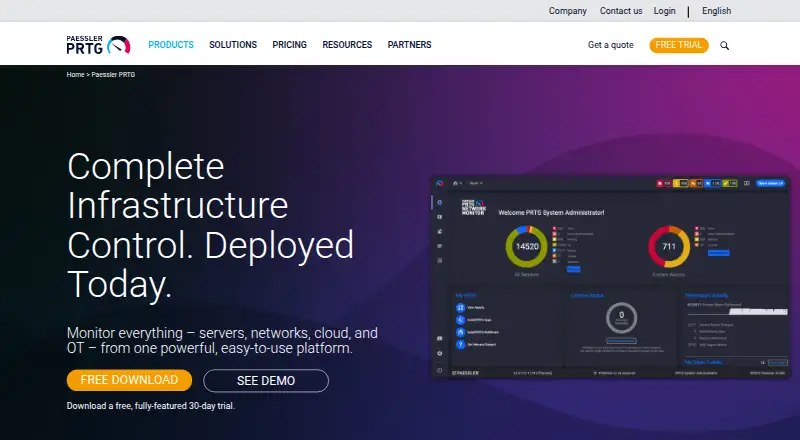
What Paessler PRTG Network Monitor is
Paessler PRTG Network Monitor monitors systems, devices, traffic, applications, and other infrastructure metrics from an on-premises installation running on Windows servers. It includes more than 250 preconfigured sensors, each measuring one or more aspects of a device. Customizable alerts, scheduled reports, distributed monitoring, and live-status dashboards help teams follow infrastructure. Paessler also lists adaptive AI-driven anomaly detection and smart sensor recommendations. Notifications can use email, SMS, webhooks, or mobile; webhooks can connect with Slack and Microsoft Teams. An API provides access to monitoring data and supports custom features. Free iOS and Android apps display monitoring data and send push notifications, but do not support PRTG cluster setups. Paessler describes the product as suited to small and medium IT infrastructures, with features for OT and IoT environments. Each server accepts one license key, so different license sizes cannot be combined on a server.
Good
- Includes more than 250 preconfigured sensors.
- Offers alerts, reports, dashboards, and distributed monitoring.
- Provides an API for monitoring data and custom features.
- Free edition supports up to 100 sensors.
Watch out
- Runs as an on-premises solution on Windows servers.
- Mobile apps do not support cluster setups.
- Different license sizes cannot be combined on one server.
Who it suits
PRTG may suit teams monitoring small or medium IT infrastructures, as well as users with OT or IoT environments. It is an on-premises option for organizations using Windows servers.
Verdict
PRTG offers broad infrastructure monitoring with multiple alert channels and a free sensor-limited edition. Before choosing a paid license, note the single-key-per-server constraint.
Plans and prices
From Paessler PRTG Network Monitor's own pricing page, checked 30 Sep 2026.
| Plan | Price | What it gives you |
|---|---|---|
| Freeware Edition | Free | Up to 100 sensors · About 10 devices |
| PRTG 500 | $200 a month | Up to 500 sensors · About 50 devices · $200 per month paid annually |
| PRTG 1000 | $358 a month | Up to 1,000 sensors · About 100 devices · $358 per month paid annually |
| PRTG 2500 | $742 a month | Up to 2,500 sensors · About 250 devices · $742 per month paid annually |
| PRTG 5000 | $1,300 a month | Up to 5,000 sensors · About 500 devices · $1,300 per month paid annually |
| PRTG 10000 | $1,642 a month | Up to 10,000 sensors · About 1,000 devices · $1,642 per month paid annually |
The facts
Each one read from Paessler PRTG Network Monitor's own pages, with the date it was checked.
What it does
- AI features
- Paessler lists automated anomaly detection using adaptive AI-driven baselines and smart sensor recommendations among PRTG features.checked 30 Sep 2026
- API
- PRTG provides an API for accessing monitoring data and developing custom features.checked 30 Sep 2026
- Compliance
- Paessler's Trust Center lists SOC 2 Type II, ISO 27001, ISO 9001, and GDPR compliance information.checked 30 Sep 2026
- Integrations
- PRTG can send notifications to Slack and Microsoft Teams through webhooks; Paessler also lists compatibility with tools including ServiceNow, Jira Service Management, PagerDuty, and OpsGenie.checked 30 Sep 2026
- Intended users
- Paessler describes PRTG Network Monitor as best suited to small and medium IT infrastructures, with features also for OT and IoT environments.checked 30 Sep 2026
- License limit
- Each PRTG Network Monitor server accepts one license key, so different license sizes cannot be combined on one server.checked 30 Sep 2026
- Monitoring features
- PRTG offers customizable alerts, scheduled reports, distributed monitoring, and dashboards with live status information.checked 30 Sep 2026
- Purpose
- PRTG Network Monitor monitors systems, devices, network traffic, applications, and other infrastructure metrics from an on-premises installation.checked 30 Sep 2026
- Security
- Paessler says PRTG component communications use TLS encryption and its interfaces support local and remote access secured via SSL/TLS.checked 30 Sep 2026
- Sensors
- The product includes more than 250 preconfigured sensors, and a sensor measures one or more aspects of a device.checked 30 Sep 2026
- Support and updates
- PRTG subscriptions include access to the latest version, new features and security improvements, and email support through the support ticket system.checked 30 Sep 2026
Where it runs
- Core platform
- PRTG Network Monitor runs on Windows servers as an on-premises monitoring solution.checked 30 Sep 2026
- Mobile apps
- Free PRTG apps for iOS and Android can display monitoring data and send push notifications, but Paessler says they do not support PRTG cluster setups.checked 30 Sep 2026
The company
- Founded
- 1997checked 28 Sep 2026
- Headquarters
- Nuremberg, Germanychecked 28 Sep 2026
The full review of Paessler PRTG Network Monitor
Overview
Paessler PRTG Network Monitor is self-hosted software for monitoring networks, systems, applications and other infrastructure. It suits small and medium IT teams that want broad coverage from a Windows server installation; the sensor-based licensing model makes the scale of monitoring a central buying decision.
With more than 250 preconfigured sensors, live dashboards, reports and multiple alert channels, PRTG brings varied infrastructure signals into one monitoring setup. It is less suitable if you need cloud-hosted deployment or must combine license sizes on a single server.
Key features
- Sensor-based monitoring: Each sensor measures one or more aspects of a device, covering infrastructure such as systems, network traffic and applications. The 100-sensor free cap and paid tiers let smaller installations start modestly, but teams should estimate sensor needs rather than count devices alone.
- Live visibility and reporting: Dashboards show current status, and scheduled reports help teams review monitoring information over time.
- Alerts and integrations: Customizable alerts can go by email, SMS, webhook or mobile push. Webhooks connect to Slack and Microsoft Teams, while compatibility includes ServiceNow, Jira Service Management, PagerDuty and OpsGenie.
- Distributed monitoring and maps: Distributed monitoring and topology maps support infrastructure spread across environments, while live dashboards provide a consolidated status view.
- AI-assisted monitoring: Paessler lists adaptive AI-driven baselines for anomaly detection and smart sensor recommendations. These features may help surface unusual behavior and guide configuration.
- API and security: An API exposes monitoring data and supports custom features. Component communications use TLS encryption, and interfaces support local and remote access secured via SSL/TLS.
- Mobile access: Free iOS and Android apps display monitoring data and send push notifications. They do not support PRTG cluster setups, a meaningful constraint for teams relying on clusters.
- Updates and support: Subscriptions include the latest version, new features, security improvements and email support through the support ticket system.
Pricing
PRTG uses sensor limits to separate its free and paid editions. The freeware edition costs nothing and supports up to 100 sensors, about 10 devices. That is a useful starting point for a small installation, but it is a tight ceiling for broader coverage.
- PRTG 500: $200 a year (billed $200 per month paid annually); up to 500 sensors, about 50 devices. This is the entry paid tier for a modest infrastructure.
- PRTG 1000: $358 a year (billed $358 per month paid annually); up to 1,000 sensors, about 100 devices.
- PRTG 2500: $742 a year (billed $742 per month paid annually); up to 2,500 sensors, about 250 devices.
- PRTG 5000: $1,300 a year (billed $1,300 per month paid annually); up to 5,000 sensors, about 500 devices.
- PRTG 10000: $1,642 a year (billed $1,642 per month paid annually); up to 10,000 sensors, about 1,000 devices. This tier is aimed at substantially larger monitored environments.
Paid subscriptions include updates, security improvements and email support. A 30-day trial gives teams a limited period to assess the paid product before choosing a tier. Each server accepts only one license key, so license sizes cannot be combined on one server; choose a tier that covers the full sensor requirement.
Platforms
PRTG Network Monitor runs as an on-premises installation on Windows servers. Its listed platforms include web, API, Android, iOS, Linux and macOS; the mobile apps provide a viewing and notification route, not support for PRTG cluster setups. The product is self-hosted rather than a cloud-only service.
Who it's for
PRTG is a strong fit for small and medium IT infrastructures that need to monitor devices, traffic, applications and other infrastructure metrics in one on-premises system. Its distributed monitoring and features for OT and IoT environments also make it relevant to teams overseeing those settings. It is not the natural choice for organizations that cannot operate a Windows server installation or need to merge multiple license keys on one server.
Pros and cons
Pros
- Wide monitoring scope: More than 250 preconfigured sensors cover multiple aspects of infrastructure rather than a single device category.
- Several alert routes: Email, SMS, webhook and mobile push give teams options for receiving notifications.
- Useful operational tooling: Live dashboards, scheduled reports, distributed monitoring, topology maps and an API support both ongoing oversight and custom workflows.
- Free entry point: The 100-sensor edition offers a way to begin without a paid license.
- Security and compliance information: Paessler describes TLS-protected communications and publishes Trust Center information for SOC 2 Type II, ISO 27001, ISO 9001 and GDPR.
Cons
- Windows-server deployment: The core product is on-premises software for Windows servers, so it does not suit teams seeking a cloud-only monitoring service.
- Single license key per server: Different license sizes cannot be combined on one server, limiting flexibility when allocating capacity.
- Sensor caps require planning: The free edition stops at 100 sensors, while paid editions scale by sensor count; device estimates are approximate.
- Mobile cluster limitation: The iOS and Android apps do not support PRTG cluster setups.
Alternatives
Consider these options if another licensing approach, deployment fit or monitoring scope better matches your needs:
- Netdata has a free Community plan capped at five active connected nodes and one active custom dashboard per room, making it worth considering when those limits fit your deployment.
- NetXMS offers a free open-source monitoring solution; its Windows server binaries are limited to 250 nodes, a relevant constraint for Windows-based deployments.
- ManageEngine OpManager has a perpetual free edition for three devices, which may suit a very small installation.
- Centreon distributes its core platform under the Apache open-source license, with GPLv2 applying to some files.
- Checkmk offers a free Community plan with 2,000+ pre-built integrations and support for up to about 100 hosts, alongside community support.
- Core Temp is a narrower alternative for readers focused on hardware temperature monitoring.
- Glances is a free, open-source system monitoring tool; optional features require extra dependencies.
- Pokesensor offers a free plan with core live monitoring features.
For category browsing, see Network Monitoring, Network Performance Monitoring Software, Hardware Monitoring Software, DNS Monitoring Software, File Integrity Monitoring Software and Container Monitoring.
Verdict
Choose PRTG if you manage a small or medium infrastructure and want broad, sensor-based monitoring, multiple alert channels and a self-hosted Windows deployment. Its main advantage is the range of infrastructure coverage and operational tools in one product; look elsewhere if cloud hosting or flexible license-key combinations are essential.
Getting started
- Visit https://www.paessler.com/prtg.
- Choose the free edition or a paid plan; a 30-day trial is also available.
- Run the core monitoring solution on a Windows server.
- Use sensors to monitor devices and infrastructure metrics.
- Configure alerts, reports, dashboards, or API access as needed.
Limits worth knowing
The free edition supports up to 100 sensors, while PRTG 500 supports up to 500 sensors and about 50 devices. Mobile apps do not support PRTG cluster setups, and each server accepts one license key, so license sizes cannot be combined.
Questions
Is there a free plan?
Yes. The Freeware Edition costs nothing and supports up to 100 sensors, or about 10 devices.
How much do paid plans cost?
PRTG 500 is $200 per month paid annually. Other listed plans range from PRTG 1000 at $358 per month paid annually to PRTG 10000 at $1,642 per month paid annually.
What platforms does PRTG support?
Listed platforms include Android, iOS, Linux, macOS, self-hosted, web, and Windows. The core PRTG Network Monitor runs on Windows servers.
Can PRTG send alerts to collaboration tools?
It can send notifications to Slack and Microsoft Teams through webhooks. Listed alert channels also include email, SMS, and mobile.
Does PRTG have an API?
Yes. The API provides access to monitoring data and can be used to develop custom features.
Can multiple license sizes be used on one server?
No. Each PRTG Network Monitor server accepts one license key, so different license sizes cannot be combined on a server.
Alternatives to Paessler PRTG Network Monitor
- 1

Dotcom-Monitor
Free planAndroidiOSWebAPI8.3From $13.33 a month - 2

Nagios XI
Free planWebAPILinuxmacOS8.1$2,595 one-time - 3
TLDTrack
Free planAndroidiOSWebAPI8.0From $11 a month - 4
Visual Sentinel
Free planAndroidiOSWebAPI8.0From $6 a month - 5

Domain Monitor
Free planAndroidWebAPI7.6From £6.39 a month - 6
StatusDrift
Free planAndroidiOSWebAPI7.3From $12,129 a month