Glances
Glances is a free, open-source tool for viewing real-time system statistics and running processes across platforms.
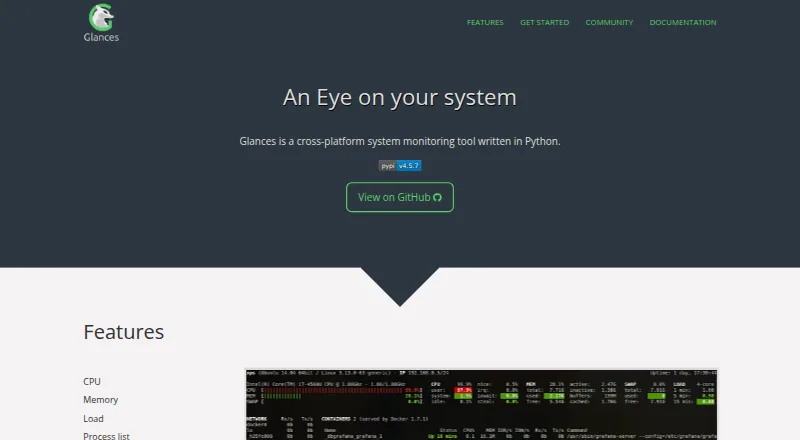
What Glances is
Glances is a free, open-source tool for viewing real-time system statistics and running processes across platforms. Its monitoring covers CPU, memory, system load, processes, network, disk I/O, sensors, filesystems, containers, alerts, and uptime. In client/server mode, users can monitor remotely through a terminal, web interface, or API. The built-in web interface allows monitoring from a device with a browser. Statistics can be exported to CSV or JSON, databases such as InfluxDB and Prometheus, brokers such as RabbitMQ and Kafka, or a REST endpoint. The project documents support for Docker and Podman, and its README describes Docker and LXC container monitoring. Installation options include pip, pipx, Homebrew, Linux and FreeBSD packages, and Docker images. Glances 4 requires Python 3.10 or higher; its default installation omits web interface dependencies, with separate extras for features such as web, GPU, containers, exports, and MCP. Version 4.5.1 and higher can provide an MCP server for AI assistants. The project distributes Glances under the LGPL version 3 license.
Good
- Monitors processes and a broad set of system metrics.
- Remote monitoring via terminal, web interface, or API.
- Exports statistics to files, databases, brokers, or REST.
- Documents Docker and Podman monitoring.
Watch out
- Glances 4 requires Python 3.10 or higher.
- Web interface dependencies are not included by default.
- Optional features require extra dependencies.
Who it suits
Glances suits users who want system and process monitoring across Linux, macOS, Windows, Android, and other listed platforms. It is useful for remote monitoring or exporting statistics, provided they account for its Python requirement and optional dependencies.
Verdict
Glances offers cross-platform monitoring, remote access, and several export options at no cost. Users should plan for the Python version requirement and add dependencies for optional features they need.
Plans and prices
From Glances's own pricing page, checked 29 Sep 2026.
| Plan | Price | What it gives you |
|---|---|---|
| Glances | Free | Open source system monitoring tool; optional features require extra dependencies |
| Open-source Glances | Free | self-hosted monitoring; optional features require extra dependencies |
The facts
Each one read from Glances's own pages, with the date it was checked.
What it does
- AI integration
- Glances 4.5.1 and higher can provide an MCP server for AI assistants.checked 29 Sep 2026
- Alerts
- Glances includes monitoring alerts and configurable thresholds.checked 15 Oct 2026
- APIs
- Glances provides XML-RPC and RESTful JSON APIs, and its Web server mode exposes a REST API.checked 29 Sep 2026
- Containers
- The project documents monitoring support for Docker and Podman, and describes Docker and LXC container monitoring in its README.checked 29 Sep 2026
- Container support
- The official feature list names Docker and Podman container monitoring.checked 15 Oct 2026
- CPU monitoring
- The product displays CPU utilization information.checked 15 Oct 2026
- Creator
- The project identifies Nicolas Hennion as its creator and maintainer, with development by a contributor community.checked 15 Oct 2026
- Deployment
- Glances can be installed with pip, pipx, Homebrew or Linux and FreeBSD packages, and Docker images are available.checked 29 Sep 2026
- Disk monitoring
- Glances measures disk I/O.checked 15 Oct 2026
- Documentation depth
- Official documentation covers installation, quickstart, configuration, command reference, plugins, exports, APIs, and MCP usage.checked 15 Oct 2026
- Exports
- Statistics can be exported to CSV and JSON files, databases including InfluxDB and Prometheus, brokers including RabbitMQ and Kafka, or a REST endpoint.checked 29 Sep 2026
- Exports and integrations
- Supported export destinations include CSV, JSON, InfluxDB, ElasticSearch, PostgreSQL/TimeScale, Cassandra, ClickHouse, CouchDB, OpenTSDB, Prometheus, StatsD, Riemann, Graphite, RabbitMQ/ActiveMQ, NATS, ZeroMQ, Kafka, and REST.checked 15 Oct 2026
- Extensibility
- The project uses an open plugin and export-module architecture intended for developer extensions.checked 15 Oct 2026
- Filesystem and RAID
- Filesystem and RAID information are included among the monitored data.checked 15 Oct 2026
- Hardware sensors
- Sensor readings such as temperatures and fan speeds are supported.checked 15 Oct 2026
- Installation
- The documented installation paths include pip, pipx, uvx, operating-system packages, and optional extras such as web or all.checked 15 Oct 2026
- Latest release
- PyPI lists Glances 4.5.8 as released on October 11, 2026.checked 15 Oct 2026
- License
- Glances is distributed under the GNU LGPL version 3, expressed on PyPI as LGPL-3.0-only.checked 15 Oct 2026
- Limit: process control
- Glances does not let users renice or kill processes, so process management requires another tool.checked 15 Oct 2026
- Limit: process-list navigation
- The process view shows only the top processes that fit on screen and lacks scrolling or reverse-sort controls.checked 15 Oct 2026
- Limit: Python weight
- A Linux comparison guide says Python makes Glances heavier than htop and that some plugins need additional Python packages.checked 15 Oct 2026
- Limit: resource overhead
- An Opensource.com test reported typical CPU use of about 10% to 20%, with up to 40% of one CPU on a large active system.checked 15 Oct 2026
- Limit: web security default
- The Linux comparison guide warns that the web interface has no password unless the operator configures one.checked 15 Oct 2026
- Load monitoring
- The interface includes system load metrics.checked 15 Oct 2026
The full review of Glances
Overview
Glances is an open-source system monitor for live statistics and running processes across Linux, macOS, Windows and other environments. It suits administrators and technically minded users who want to inspect machines remotely or feed metrics into other tools. Its breadth is appealing, though optional capabilities mean installation can take more work than the headline feature set suggests.
Key features
Machine and process monitoring
Glances brings CPU, memory, load, processes, network, disk I/O, sensors, filesystems, containers, alerts and uptime into one monitor. That range makes it useful for a quick view of whole-system health as well as process activity. It can discover servers automatically and use script or command actions for alerts, which suits users who want monitoring to trigger local responses. It is an agent-based monitor, rather than a hosted service.
Remote access and integrations
Client/server mode lets users inspect a remote machine from a terminal, browser or API. The built-in Web interface is useful when a browser is more convenient than a terminal, while XML-RPC and RESTful JSON APIs support programmatic access. Statistics can be exported to CSV or JSON, databases such as InfluxDB and Prometheus, brokers such as RabbitMQ and Kafka, or a REST endpoint. Docker and Podman monitoring are documented, with Docker and LXC also described in the project README. Version 4.5.1 and later can provide an MCP server for AI assistants.
Setup and maintenance
Installation options include pip, pipx, Homebrew, Linux and FreeBSD packages, and Docker images. Glances 4 requires Python 3.10 or later; older Python versions are not supported by version 4 and later. The Web interface and other optional features are not included in the default installation and require separate dependencies, so users should expect to install only the extras they need. Version 4.x is supported for security updates; versions below 4.0 are unsupported. Help is available through the manual, official Reddit forum and GitHub Discussions.
Pricing
Glances is free and open source under the LGPL version 3 license. Its free plan includes the system-monitoring tool, with no trial period to manage. There are no paid tiers or plan-based seat and quota limits in the stated pricing. The trade-off is practical rather than financial: optional features require their own dependencies, and the Python 3.10 requirement can rule out older environments.
Platforms
Glances supports GNU/Linux, FreeBSD, macOS (OS X) and Windows, with Android, Web, API and self-hosted availability also listed. This breadth is useful for mixed environments, though the Python requirement and optional dependencies still shape deployment. Users can monitor remotely through client/server mode, and the project documents Docker and Podman container monitoring.
Who it's for
Glances is a strong fit for administrators and power users who want a free, cross-platform view of machine and process health, especially when remote access, container visibility or exporting metrics matters. Its APIs and multiple output targets also suit teams integrating monitoring data into existing workflows. It is a less natural choice for someone seeking a turnkey browser dashboard without dependency setup, or for machines that cannot meet the Python version requirement.
Pros and cons
- Pro: Broad system coverage combines process, hardware, network, filesystem and container monitoring, reducing the need to switch between separate views.
- Pro: Terminal, Web and API access make remote monitoring adaptable to different workflows.
- Pro: CSV, JSON, database, broker and REST exports give users several ways to reuse statistics.
- Con: Python 3.10 or later is required for version 4, excluding older Python environments.
- Con: The default install omits Web and other optional feature dependencies, so enabling the capabilities you want takes extra setup.
- Con: Versions below 4.0 no longer receive security updates, making version choice important for maintained deployments.
Alternatives
For process-focused comparisons, see Process Monitoring Software; for machine-component monitoring, browse Hardware Monitoring Software. Users prioritizing container options can also consult Container Monitoring.
PM2 is worth considering when process management is the priority: its free Runtime plan is an open-source process manager with a real-time Web interface, while Glances covers wider system metrics and offers multiple export paths. Supervisor is another free option for readers comparing software in the process-monitoring space.
Process Lasso suits Windows users comparing a Windows-only freemium option; its single-PC monthly plan is $4.95 a month, while Glances supports more operating systems and is free. Owlette is a paid alternative with a free plan, for readers comparing another web-oriented monitoring option; Glances has a broader stated platform range and no paid plan.
runit is a free alternative for readers seeking software in the Linux and macOS self-hosted category. AppControl is a free Windows-only alternative for readers comparing Windows software. System Informer is another free Windows option. Ambih Monitor is a Windows freemium alternative for readers comparing that platform.
Verdict
Choose Glances if you want a free, open-source monitor that spans system health, processes and remote access, with flexible ways to export its data. Its breadth is the main reason to choose it; dependency setup and the Python 3.10 floor are the main reasons to look elsewhere, particularly when a simpler install or older runtime matters more than cross-platform reach.
Getting started
- Choose an installation route: pip, pipx, Homebrew, Linux or FreeBSD package, or Docker image.
- Install Glances on a supported system; Glances 4 requires Python 3.10 or later.
- Add the optional dependencies needed for Web, GPU, container, export, or MCP features.
- Use the terminal, Web interface, or API for monitoring; client/server mode supports remote access.
Limits worth knowing
Glances is free. Glances 4 requires Python 3.10 or later, and the default installation leaves out Web interface dependencies; several other capabilities are provided through optional dependencies.
Questions
How much does Glances cost?
Glances is free and has a free plan.
Which platforms does it support?
Listed platforms include Android, Linux, macOS, Windows, Web, API, and self-hosted deployments; supported operating systems also include FreeBSD.
Can it monitor systems remotely?
Yes. Client/server mode supports remote monitoring through a terminal, Web interface, or API.
Is Glances open source?
Yes. The project distributes it under the LGPL version 3 license.
How can I install it?
Install options include pip, pipx, Homebrew, Linux and FreeBSD packages, and Docker images.
What does Glances 4 require?
Glances 4 requires Python 3.10 or later.
Alternatives to Glances
- 1

PM2
Free planOpen sourceWebAPILinuxmacOS8.1From $79 a month - 2
Process Lasso
Free planWindows7.4From $14.97 a year - 3

Ambih Monitor
Free planWindows7.2From $55 a year - 4
runit
Free planOpen sourceLinuxmacOSSelf-hosted7.0Free plan - 5
Remote Process Explorer
Free planWindows6.4$149.95 one-time - 6

Autoruns
Free planWindows6.3Free plan