Supervisor
Supervisor is a free client/server system for monitoring and controlling processes on UNIX-like operating systems.
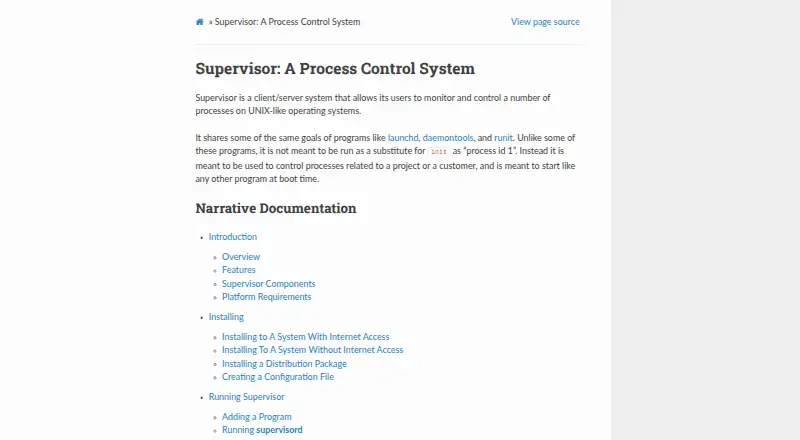
What Supervisor is
Supervisor is a free client/server system for monitoring and controlling processes on UNIX-like operating systems. It can start processes, report their status, and restart them after crashes. Administrators configure per-process behavior in an INI-style file, including failed-process restarts and automatic log rotation. Processes can have priorities and be grouped for coordinated start or stop operations. Supervisor provides a command-line client, an optional browser interface, and an XML-RPC interface; the browser view can control and display process status when its HTTP server is enabled. Authentication can be required for commands over UNIX-domain or TCP sockets. Its event-notification protocol can be used by programs written in any language, and it offers extension points for Python developers. Supervisor can be installed with pip or from a downloaded distribution, including on systems without internet access. It is intended for project- or customer-related processes, not as a replacement for init as process ID 1. It runs on supported UNIX-like systems and does not run under Windows.
Good
- Restarts processes after crashes
- Groups processes for coordinated start and stop operations
- Offers command-line, browser, and XML-RPC interfaces
- Can be installed from a downloaded distribution
Watch out
- Does not run under Windows
- Configuration files may contain unencrypted credentials
- Arbitrary configured paths can create symlink-attack vulnerabilities
Who it suits
Supervisor suits system administrators managing project- or customer-related processes on UNIX-like systems. It is not intended to replace init as process ID 1.
Verdict
Supervisor offers process monitoring, restart controls, and several management interfaces for UNIX-like systems. Protect its configuration files and account for the documented path-related security risk.
The facts
Each one read from Supervisor's own pages, with the date it was checked.
What it does
- Authentication
- The server can require client authentication credentials before allowing commands over its UNIX-domain or TCP socket.checked 30 Sep 2026
- Configuration
- Supervisor uses an INI-style configuration file with per-process options such as restarting failed processes and automatic log rotation.checked 30 Sep 2026
- Crash recovery
- Supervisord can automatically restart processes when they crash.checked 30 Sep 2026
- Events and extensibility
- Supervisor provides an event-notification protocol, an XML-RPC control interface and extension points for Python developers.checked 30 Sep 2026
- Events and extensions
- Its event notification protocol can be used by programs written in any language, and it includes extension points for Python developers.checked 30 Sep 2026
- Grouped control
- Processes can be assigned priorities and grouped so related processes can be started or stopped together.checked 30 Sep 2026
- Installation
- Supervisor can be installed with pip or from a downloaded distribution, including on systems without internet access.checked 30 Sep 2026
- Integrations
- The project lists third-party tools and libraries, including Puppet modules, Nagios and Icinga plugins, and clients for its XML-RPC interface.checked 30 Sep 2026
- Intended audience
- PyPI classifies Supervisor for system administrators and POSIX systems.checked 30 Sep 2026
- Intended use
- Supervisor is intended to control processes related to a project or customer and is not intended to replace init as process ID 1.checked 30 Sep 2026
- Interfaces
- Supervisor provides a command-line client, an optional browser-based interface, and an XML-RPC interface for control.checked 30 Sep 2026
- License
- PyPI lists Supervisor as using a BSD-derived license.checked 30 Sep 2026
- Management interfaces
- Supervisor provides centralized local or remote command-line and web interfaces for starting, stopping and monitoring processes.checked 30 Sep 2026
- Process grouping
- Processes can be assigned priorities and grouped so they can be started or stopped as a unit.checked 30 Sep 2026
- Process management
- It can start processes, restart them after crashes, and report their status.checked 30 Sep 2026
- Purpose
- Supervisor is a client/server system for controlling processes on UNIX-like operating systems.checked 30 Sep 2026
- Security
- The documentation warns that configuration files may contain unencrypted credentials and should be protected with appropriate filesystem permissions.checked 30 Sep 2026
- Security limitation
- The runtime security guidance warns that arbitrary configured paths can create vulnerabilities such as symlink attacks.checked 30 Sep 2026
- Support
- The project directs users to its GitHub issues page to report bugs or other errors.checked 30 Sep 2026
- Supported systems
- Supervisor is tested on Linux, Mac OS X, Solaris and FreeBSD and does not run under Windows.checked 30 Sep 2026
- Third-party ecosystem
- The official documentation lists third-party dashboards, plugins, event listeners and configuration libraries for Supervisor.checked 30 Sep 2026
- Web interface
- A sparse browser-based interface can display and control process status when the HTTP server is enabled.checked 30 Sep 2026
Where it runs
- Platforms
- The documentation says Supervisor will not run on Windows and lists Linux, Mac OS X, Solaris, and FreeBSD among tested or supported systems.checked 30 Sep 2026
Alternatives to Supervisor
- 1

PM2
Free planOpen sourceWebAPILinuxmacOS8.1From $79 a month - 2
Glances
Free planOpen sourceAndroidWebAPILinux8.0Free plan - 3
Process Lasso
Free planWindows7.4From $14.97 a year - 4

Ambih Monitor
Free planWindows7.2From $55 a year - 5
runit
Free planOpen sourceLinuxmacOSSelf-hosted7.0Free plan - 6
Remote Process Explorer
Free planWindows6.4$149.95 one-time