
DocuGenerate
DocuGenerate creates PDFs from document templates and supplied data, replacing merge tags with the provided values.
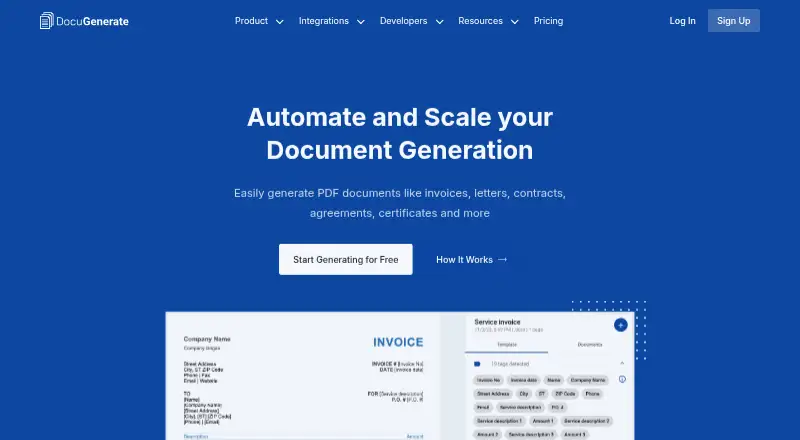
What DocuGenerate is
DocuGenerate creates PDFs from document templates and supplied data, replacing merge tags with the provided values. Templates can be uploaded as DOCX, DOC, ODT, TXT, or SQL files; listed data formats include JSON, XLSX, XLS, ODS, CSV, and TSV. Merge tags can insert images, tables, lists, conditional content, and QR codes. A REST API and integrations access are included on every plan, including Free, with listed connections such as Zapier, Make, n8n, Pipedream, Bubble, Coda, Power Apps, Xano, and Backendless. Usage counts generated documents rather than pages, so a 100-page report counts as one document. The Free plan costs nothing and includes 20 documents per month and two templates. The Plus plan is $19/month and includes 500 documents per month, batch generation, and two concurrent documents; additional documents are billed at $0.04 each. Monthly usage resets on the first day without rollover. The maker says input data used to generate documents is transient and not stored, while generated files remain stored until deleted.
Good
- Free plan includes 20 documents per month
- API and integrations access on every plan
- Merge tags support images, tables, lists, conditions, and QR codes
- Counts generated documents rather than pages
Watch out
- Free includes only two templates
- Monthly usage resets without rollover
- Plus overage documents cost $0.04 each
Who it suits
DocuGenerate suits people or teams that need to produce PDFs from reusable templates and structured data. Its API access on every plan may fit workflows that use integrations or programmatic document generation.
Verdict
DocuGenerate offers template-based PDF generation with data inputs, merge features, and API access, including on the free tier. Check document allowances, template counts, and overage rates before choosing a plan.
Plans and prices
From DocuGenerate's own pricing page, checked 4 Oct 2026.
| Plan | Price | What it gives you |
|---|---|---|
| Free | Free | 20 free docs/month · 2 templates · full API and integrations · single document generation · 1 concurrent document · no credit card required · $0/month |
| Plus | $19 a month | 500 docs/month included · 5 templates · full API and integrations · batch generation · $0.04 per additional document · 2 concurrent documents · $19/month |
| Premium | $59 a month | 2,000 docs/month included · 20 templates · full API and integrations · batch generation · $0.03 per additional document · 10 concurrent documents · 2 team members included · template version history · $59/month |
| Business | $199 a month | 10,000 docs/month included · 100+ templates · full API and integrations · batch generation · $0.02 per additional document · 20+ concurrent documents · 5 team members included · template version history · custom fonts · priority support · $199/month |
| Enterprise | Priced on request | Volume pricing · higher limits · dev and prod accounts · signed DPA and SLA · security questionnaires · dedicated support · Custom |
The facts
Each one read from DocuGenerate's own pages, with the date it was checked.
What it does
- API
- DocuGenerate provides a REST API, and every plan, including Free, includes API and integrations access.checked 4 Oct 2026
- Compliance
- The pricing page states that DocuGenerate is GDPR compliant and offers multiple processing and storage regions, including the European Union.checked 4 Oct 2026
- Data formats
- The site lists JSON, XLSX, XLS, ODS and CSV as supported data formats.checked 4 Oct 2026
- Document counting
- Usage counts generated documents rather than their pages, so a 100-page report counts as one document.checked 4 Oct 2026
- Integrations
- The maker lists Zapier, Make, n8n and Pipedream, plus connectors or plugins for Bubble, Coda, Power Apps, Xano and Backendless.checked 4 Oct 2026
- Overage and reset
- Paid-plan overage documents are billed at each plan's stated rate, and monthly usage resets on the first day of each month without rollover.checked 4 Oct 2026
- Privacy
- The privacy policy says data used to generate documents is transient and is not stored, while generated documents are stored until deleted.checked 4 Oct 2026
- Regional processing
- The maker lists processing and storage regions in the United States, European Union, United Kingdom and Australia.checked 4 Oct 2026
- Storage
- Generated documents remain stored until the user deletes them; the privacy policy says deleted files are physically removed from cloud storage.checked 4 Oct 2026
- Support
- Business includes priority support, while Enterprise includes dedicated support; the site provides [email protected] as a contact address.checked 4 Oct 2026
- Template features
- Merge tags can insert images, tables, lists, conditions and QR codes into templates.checked 4 Oct 2026
- Template formats
- Templates can be uploaded as DOCX, DOC, ODT, TXT or SQL files.checked 4 Oct 2026
- What it does
- DocuGenerate generates PDF documents from Word templates and JSON or spreadsheet data by replacing merge tags with supplied values.checked 4 Oct 2026
The full review of DocuGenerate
DocuGenerate turns Word-based templates and structured data into PDFs, with API access for teams that need document generation inside a workflow. It suits developers and operations teams producing repeatable, data-driven documents; its appeal is broad format support, while low template and concurrency limits make plan choice important.
Overview
Supply a DOCX, DOC, ODT, TXT or SQL template and data in formats including JSON, spreadsheets or form data. DocuGenerate replaces merge tags with supplied values to create PDFs. Its document-based usage count is favorable for long reports: a 100-page output uses one document allowance, not 100.
Generated files stay in storage until deleted, and the privacy policy says deleted files are physically removed from cloud storage. Data used to generate a document is transient and is not stored. Processing and storage regions include the United States, European Union, United Kingdom and Australia; the pricing page states GDPR compliance.
Key features
Flexible templates and data
Merge tags can place images, tables, lists, conditional content and QR codes into templates. Support for JSON, XLSX, XLS, ODS and CSV data gives teams several common input options; TSV and form data are also among the stated inputs. This breadth is useful when documents need more than simple text substitution, though the workflow remains centered on template-driven PDF generation.
API and integrations on every plan
The REST API and integrations are included even on Free, alongside batch generation on paid plans. Listed connections include Zapier, Make, n8n and Pipedream, plus connectors or plugins for Bubble, Coda, Power Apps, Xano and Backendless. That makes the free tier a meaningful way to assess an integration workflow, although its single-document generation and one-concurrent-document limits restrict throughput.
Pricing
Monthly allowances reset on the first day of each month and do not roll over. Paid-plan overages are charged at the stated per-document rate, so a busy month can cost more than the base subscription.
| Plan | Price | Included and limits |
|---|---|---|
| Free | free | 20 documents/month, 2 templates, full API and integrations, single-document generation, 1 concurrent document; no credit card required. |
| Plus | $19 a month | 500 documents/month, 5 templates, batch generation, 2 concurrent documents, and $0.04 per additional document. |
| Premium | $59 a month | 2,000 documents/month, 20 templates, 10 concurrent documents, 2 team members, template version history, and $0.03 per additional document. |
| Business | $199 a month | 10,000 documents/month, 100+ templates, 20+ concurrent documents, 5 team members, version history, custom fonts, priority support, and $0.02 per additional document. |
| Enterprise | Custom pricing | Volume pricing, higher limits, development and production accounts, signed DPA and SLA, security questionnaires, and dedicated support. |
Free is a low-risk fit for occasional output or integration evaluation, but two templates and one concurrent document leave little room for a growing workflow. Plus is the entry point for batch jobs and a 500-document monthly workload; it still has only five templates and two concurrent documents. Premium is the more practical step for teams with a larger template library, parallel jobs or two collaborators. Business raises capacity substantially and adds custom fonts and priority support, making it the clearest fit for sustained team use. Enterprise is for organizations needing higher limits and formal support or contractual provisions.
Platforms
DocuGenerate is available on the web and through its API. The REST API is part of every plan, including Free, so API use does not by itself require a paid tier.
Who it's for
Choose DocuGenerate if your documents follow reusable templates and your source data is structured, especially when you need API or automation-platform connections. The document-based quota also suits users whose outputs are long but relatively few. It is less compelling for workflows that need many templates, several simultaneous jobs or multiple team members on a tight budget: those constraints rise only across paid tiers.
Pros and cons
- Useful input and template coverage: multiple document-template and spreadsheet formats accommodate varied data pipelines.
- Rich merge tags: tables, lists, images, conditions and QR codes support more complex generated documents than plain text replacement.
- API on Free: teams can begin with API and integration access without a subscription, though volume and concurrency are sharply capped.
- Long documents conserve quota: usage counts documents rather than pages, which benefits report-heavy outputs.
- Tier limits affect workflow shape: Free permits one concurrent document, while team seats and version history arrive only on higher plans.
- Overages require attention: monthly quotas do not roll over, and additional documents incur plan-specific charges.
Alternatives
For a broader category comparison, see Document Automation Software and PDF Creation Software.
- Adobe PDF Services API may suit readers whose main need is a PDF API and who can work within its 500-transaction free tier or obtain a custom quote for paid plans.
- Docassemble is a free, self-hosted option for readers willing to manage hosting, which typically costs $10–$40 per month or more depending on needs.
- Docmosis is a paid alternative with a free trial; its Cloud Professional plan is $49 a month for 4,000+ pages/month, one user and one environment.
- TemplateDocs is another freemium API-and-web option, with a free tier that includes 50 credits, two seats, five templates and five workflows.
- DocPayload offers a free starter tier capped at five documents, with basic templates, email support and 2GB storage.
- PandaDoc may be worth considering for readers who want a freemium product spanning web, mobile and API, with a 60-document yearly allowance described for its free plan.
- DocMake is a freemium API-and-web alternative whose free plan includes 1,000 documents/month and unlimited templates.
- SmartCOMM is a paid web-based alternative.
Verdict
DocuGenerate is a strong fit for developers and teams generating recurring PDFs from structured data, particularly when API access, varied merge content and page-independent quotas matter. Its free API access and straightforward capacity ladder make it easy to start; look elsewhere if your workflow needs generous template counts, concurrency or collaboration without moving into a higher-priced plan.