Anvil PDF Generation API
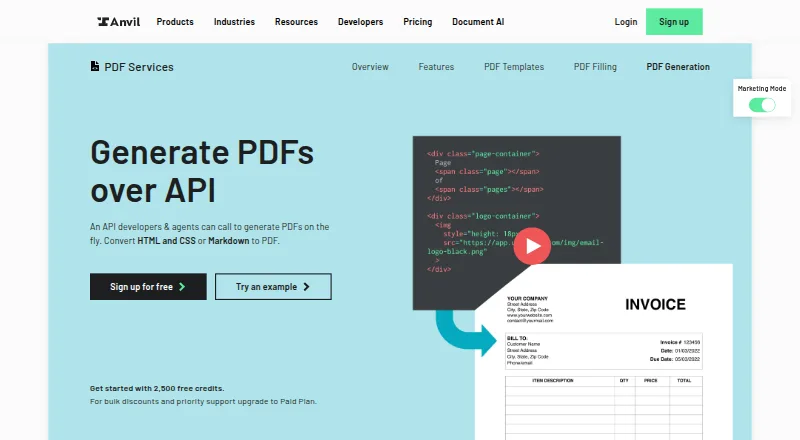
Anvil PDF Generation API creates PDFs on demand from HTML and CSS or Markdown.
What Anvil PDF Generation API is
Anvil PDF Generation API creates PDFs on demand from HTML and CSS or Markdown. Developers can set page dimensions and margins, use custom TTF fonts, add headers, footers and page numbers, and create fillable forms or variable-length documents. Markdown conversion has a default theme, with the option to supply CSS. Anvil lists SDKs for C#/.NET, JavaScript, Python and TypeScript; Go, Java, PHP and Ruby are marked coming soon. A Zapier integration can automate paperwork workflows, including filling a PDF or starting or pre-filling a Workflow. The cloud API lists SOC 2 and HIPAA compliance, with email support. Free mode is UI-only, and API key access requires a credit card or upgrade. Test mode is free and unlimited on every plan, but test documents are watermarked and use demo signatures. API PDF fill or generation costs $0.10 per use; enabling metered usage with a valid card provides 2,500 starter credits. Custom fonts must be TTF; OTF and WOFF are unsupported.
Good
- Converts HTML, CSS and Markdown to PDF
- Supports fillable forms and variable-length documents
- SDKs listed for four languages
- Free unlimited test mode on every plan
- Zapier integration supports paperwork workflows
Watch out
- Free plan is UI-only; API key access requires a card or upgrade
- API fill or generation costs $0.10 per use
- Custom fonts must be TTF
- Test documents are watermarked and use demo signatures
Who it suits
The API is presented for developers and agents who need to generate or fill PDFs from HTML, CSS or Markdown. Technical teams handling high PDF volumes may also consider the listed AI Pack.
Verdict
Anvil combines PDF generation and form capabilities with programmatic access and workflow integration. Review its metered API pricing, access requirements and TTF-only custom font support before choosing it.
Plans and prices
From Anvil PDF Generation API's own pricing page, checked 29 Sep 2026.
| Plan | Price | What it gives you |
|---|---|---|
| Free | Free | 2 users · UI only; add a credit card or upgrade for API key access · 2,500 PDF fill/generation starter credits after enabling metered usage |
| AI Pack | $99 a month | 5 users · programmatic Document AI · 50 pages per AI-tagged PDF · higher rate limit (40/s) · $99/mo |
| Product Pack | $425 a month | 5 users · includes AI Pack features · white labeling · advanced signing features · $425/mo |
| Enterprise | Priced on request | Custom · Unlimited users · SSO · HIPAA, DPA · priority support · customer success · Custom |
| PDF fill / generation over API | $0.10, paid once | Pay-as-you-go; paid API use requires a valid credit card · Metered integrated/API usage · 2,500 starter credits · bulk quantities start at 25,000+ · $0.10 per PDF Fill/Generation |
The facts
Each one read from Anvil PDF Generation API's own pages, with the date it was checked.
The company
- Company
- Anvil Foundry, Inc. lists its principal place of business in San Francisco, California; Anvil's AI information page says it launched in July 2018.checked 29 Sep 2026
What it does
- Compliance
- Anvil states it is SOC 2 Type II, GDPR/DPA, and HIPAA compliant and maintains Business Associate Agreements.checked 29 Sep 2026
- Deployment
- cloudchecked 24 Sep 2026
- Font limitation
- Custom fonts must be TTF; OTF and WOFF are not supported at this time.checked 29 Sep 2026
- HTML and CSS
- HTML-to-PDF supports full CSS, custom fonts in TTF format, page headers and footers, and fillable forms.checked 29 Sep 2026
- Integration
- The product page describes a Zapier integration for automating paperwork workflows, including filling a PDF and starting or pre-filling a Workflow.checked 29 Sep 2026
- Integrations
- Zapierchecked 24 Sep 2026
- Intended users
- The product is presented as an API for developers and agents, and the pricing page describes the AI Pack for technical teams working with high PDF volumes.checked 29 Sep 2026
- Key features
- Generate PDFs from HTML and CSS · Generate PDFs from Markdown, including tables and images · Set PDF page dimensions and margins · Add page headers, footers, and page numbers · Use custom TTF fonts · Generate dynamic, variable-length documents · Create PDFs with fillable form fields · Fill reusable PDF templates with supplied datachecked 24 Sep 2026
- Markdown
- Markdown-to-PDF uses a default theme, and callers can provide their own CSS.checked 29 Sep 2026
- SDKs
- Anvil lists PDF Generation SDKs for C#/.NET, JavaScript, Python, and TypeScript; Go, Java, PHP, and Ruby are marked coming soon.checked 29 Sep 2026
- Security
- Anvil says it encrypts signed documents with a 2048 RSA private key stored in a secure Hardware Security Module, which its developers cannot access.checked 29 Sep 2026
- Support
- Standard support is available by email at [email protected], while the pricing page lists priority support for Enterprise.checked 29 Sep 2026
- Usage pricing
- PDF fill or generation over API is priced at $0.10 per use, with 2,500 starter credits after enabling metered usage with a valid credit card.checked 29 Sep 2026
- What it does
- The API generates PDFs on demand by converting HTML and CSS or Markdown to PDF.checked 29 Sep 2026
Money
- Free testing
- Test mode is free and unlimited on every plan; test requests do not count against quotas or incur charges, and test documents are watermarked and use demo signatures.checked 29 Sep 2026
The full review of Anvil PDF Generation API
Overview
Anvil PDF Generation API turns HTML, CSS, Markdown, and JSON data into PDFs for applications and automated paperwork. It is best suited to developers who need both document generation and form workflows in one service. Its strongest case is flexible, dynamic output; per-use API charges and a narrow custom-font format may complicate adoption.
Key features
HTML-to-PDF gives developers control over CSS, page dimensions, margins, headers, footers, page numbers, and fillable form fields. That makes it a good fit for branded or variable-length documents rather than simple printouts. Custom fonts must be TTF: OTF and WOFF are not supported, which can force font changes in an existing design system.
Markdown offers a more structured route, including tables and images. It starts with a default theme, though callers can supply CSS to adapt the presentation. Support for dynamic, variable-length documents and JSON data is useful when output changes with each request, while reusable forms can serve recurring paperwork.
SDKs are available for C#/.NET, JavaScript, Python, and TypeScript; Go, Java, PHP, and Ruby are marked as coming soon. Zapier can connect PDF filling with paperwork workflows, including starting or pre-filling an Anvil Workflow. Anvil lists SOC 2 and HIPAA compliance. It says signed documents are encrypted using a 2048 RSA private key kept in a secure Hardware Security Module that its developers cannot access.
Pricing
The Free plan costs nothing and supports two users, but is UI-only until a credit card is added or the account is upgraded to enable API key access. Enabling metered usage with a valid credit card provides 2,500 starter credits. API PDF fill or generation then costs $0.10, paid once; paid API use requires a valid credit card, and bulk quantities start at 25,000+.
The AI Pack is $99 a month, billed $99/mo, for five users. It adds programmatic Document AI, a limit of 50 pages per AI-tagged PDF, and a higher rate limit of 40/s. It is the relevant step up for technical teams handling high PDF volumes, but it does not replace the per-use charge for PDF filling or generation.
The Product Pack is $425 a month, billed $425/mo, for five users. It includes AI Pack features, white labeling, and advanced signing features, making the higher price relevant when those capabilities matter. Enterprise has custom pricing and unlimited users, with SSO, HIPAA, DPA, priority support, and customer success.
Every plan includes free, unlimited test mode. Test requests do not count toward quotas or incur charges, but generated documents are watermarked and use demo signatures, so this is for evaluation rather than production output. There is no free trial.
Platforms
Anvil is a cloud service with API and web access. Email support is available, and Zapier provides an integration path for paperwork automation.
Who it's for
Choose Anvil if you are building an application or automated workflow that needs configurable PDF output, fillable forms, and programmatic access. It is less suitable if your design depends on OTF or WOFF fonts, or if you want API access without a credit card and metered billing.
Pros and cons
- Pros: HTML/CSS layout controls, Markdown input, JSON data, and variable-length documents cover several generation needs in one API.
- Pros: Unlimited free test mode lets teams exercise requests without consuming quotas or incurring charges.
- Pros: Fillable forms, reusable forms, Zapier, and listed SOC 2 and HIPAA compliance make it relevant to paperwork workflows.
- Cons: Production API use is metered at $0.10, paid once and requires a valid credit card.
- Cons: Free-plan API access requires adding a card or upgrading, despite the plan's two-user allowance.
- Cons: Custom fonts are limited to TTF, and test documents carry watermarks and demo signatures.
Alternatives
For a broader comparison, browse Document Template Management Software and PDF Creation Software.
Consider Docxtemplater if you want an open-source option with a free tier or need its broader platform coverage, including self-hosted and mobile environments. Carbone is another freemium option, with a free trial and self-hosted platform support. Documentero may suit teams that want a stated free allowance of 50 documents, three templates, and unlimited pages and fields. Legito is worth considering when document lifecycle management, customizable workflows, approvals, and electronic signatures are the priority.
PDFMonkey offers a free tier capped at 20 documents per month, with one-day retention and a 30-second generation limit. Docassemble is a free, self-hosted alternative, though hosting typically costs $10–$40 per month or more depending on performance, availability, and support needs. Fluent by Apryse is a paid option whose entry-level packages start at $1,500, with pricing varying by features, document volume, and deployment. Marq is web-only and has a free plan limited to one user, 25 MB of cloud storage, and three projects.
Verdict
Anvil is a strong fit for developers who need on-demand PDFs, fillable forms, and automated paperwork in a single cloud API. Its free test mode lowers evaluation risk, but production usage is metered and the Free plan gates API keys behind a card or upgrade. Look elsewhere if you need OTF or WOFF fonts, or prefer a self-hosted or flat-cost approach.
Getting started
- Visit https://www.useanvil.com/products/pdf-generation-api/.
- Use the Free plan for UI access, or add a credit card or upgrade for API key access.
- Choose an available SDK for C#/.NET, JavaScript, Python, or TypeScript, or use the API.
- Enable metered usage with a valid credit card to access API use and 2,500 starter credits.
- Use free test mode to send unlimited test requests; test documents are watermarked and use demo signatures.
Limits worth knowing
The Free plan allows two users and UI access only; API key access requires a credit card or upgrade. API fill or generation costs $0.10 per use, with 2,500 starter credits after enabling metered usage with a valid card. The AI Pack costs $99.00 per month and includes five users and 50 pages per AI-tagged PDF.
Questions
Is there a free plan?
Yes. The Free plan is free for two users and UI-only access. Free, unlimited test mode is available on every plan.
How much does API PDF generation cost?
API PDF fill or generation is $0.10 per use. Enabling metered usage with a valid credit card provides 2,500 starter credits.
Which platforms and SDKs are available?
The service is listed for API and web. SDKs are available for C#/.NET, JavaScript, Python, and TypeScript; Go, Java, PHP, and Ruby are marked coming soon.
Can it create fillable PDFs?
Yes. HTML and CSS conversion supports fillable forms, and the API can fill reusable PDFs.
What integrations are listed?
Zapier is listed. It can automate paperwork workflows, including filling PDFs and starting or pre-filling a Workflow.
Which fonts can I use?
Custom fonts must be TTF. OTF and WOFF are not supported.