DocRaptor
DocRaptor is a cloud REST API that converts HTML, CSS, and JavaScript into PDF and XLS documents using the Prince PDF converter.
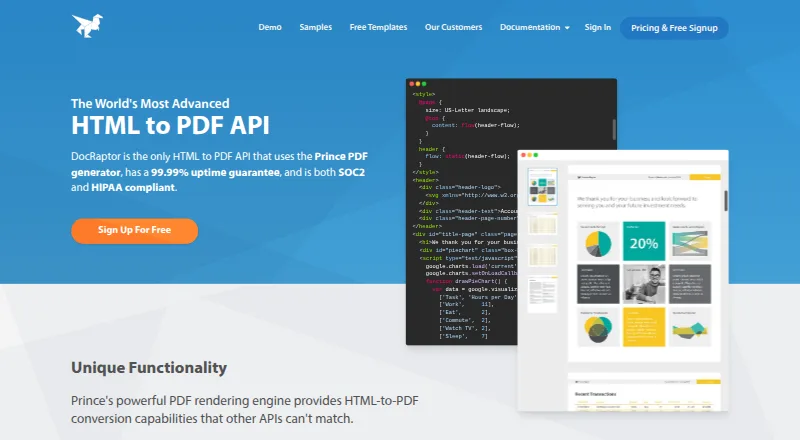
What DocRaptor is
DocRaptor is a cloud REST API that converts HTML, CSS, and JavaScript into PDF and XLS documents using the Prince PDF converter. It can create PDF forms and accessible PDFs, and supports mixed page sizes, styles, headers, and footers within one PDF. Other listed rendering features include page floats, PDF-specific JavaScript, bookmarks, crop marks, CMYK output, and printer’s marks. Accounts include unlimited watermarked test documents, and a public test key is available without signing up. The service converts HTML to PDF or XLS/XLSX; it does not support Zip files or other file formats. DocRaptor says it has no document input or output size limits and charges the same regardless of document size or generation time. Its Free plan is free and includes 5 documents per month. Basic costs $15 a month for 125 documents, with per-document overages; higher monthly plans are also listed. The maker says data is encrypted in transit and at rest, and document retention can be configured to permanently delete documents after retrieval. Libraries and examples are listed for several programming languages and frameworks.
Good
- Converts HTML, CSS, and JavaScript to PDF and XLS.
- Creates fillable and accessible PDFs.
- Supports mixed page sizes, styles, headers, and footers.
- Free plan includes 5 documents per month.
- Offers a public test key without signup.
Watch out
- Free plan is limited to 5 documents per month.
- Does not support Zip files or other formats.
- Paid plans have per-document overages.
Who it suits
DocRaptor suits developers who need an API for generating PDF or XLS documents from HTML content or a URL. Its watermarked test documents and public test key let users try document generation without signing up.
Verdict
DocRaptor is an API-oriented option for generating PDF and XLS documents from web content, with PDF layout and form features. Check the monthly document allowance and overage terms against expected usage.
Plans and prices
From DocRaptor's own pricing page, checked 2 Oct 2026.
| Plan | Price | What it gives you |
|---|---|---|
| Basic | $15 a month | Price shown per month · Monthly usage plan · per-document overages · 125 documents per month |
| Professional | $29 a month | Price shown per month · Monthly usage plan · per-document overages · 325 documents per month |
| Premium | $75 a month | Price shown per month · Monthly usage plan · per-document overages · 1,250 documents per month |
| Max | $149 a month | Price shown per month · Monthly usage plan · per-document overages · 5,000 documents per month |
| Bronze | $399 a month | Price shown per month · Monthly usage plan · per-document overages · 15,000 documents per month |
| Silver | $1,000 a month | Price shown per month · Monthly usage plan · per-document overages · 40,000 documents per month |
| Enterprise | Priced on request | Contact us for an estimate · Customized pricing plan · contact for estimate · Unlimited documents |
| Free | Free | No overage · document hosting not included · 5 documents per month |
The facts
Each one read from DocRaptor's own pages, with the date it was checked.
The company
- Company history
- The About page says DocRaptor began in 2010 and joined Artifex Software in October 2025.checked 2 Oct 2026
- Founded
- 2010checked 28 Sep 2026
What it does
- Compliance
- The security page states DocRaptor is SOC 2 Type II compliant, GDPR compliant, and offers HIPAA compliance on paid plans when account settings are updated and a BAA is executed.checked 2 Oct 2026
- Deployment
- cloudchecked 23 Sep 2026
- Developer libraries
- The maker lists libraries and examples for C#, Java, JavaScript, jQuery, .NET, Node, PHP, Python, Rails, and Ruby.checked 2 Oct 2026
- Formats
- The service converts HTML to PDF or XLS/XLSX and says it does not support Zip files or other file formats.checked 2 Oct 2026
- Infrastructure
- DocRaptor says its infrastructure is hosted on Amazon Web Services and access is restricted to required personnel using secure multifactor authentication.checked 2 Oct 2026
- Integrations
- The integrations documentation links to guides for Drupal, Kotive, and Zapier.checked 2 Oct 2026
- Key features
- Convert HTML content or a URL into PDF documents · Convert raw HTML forms into PDF forms · Create tagged accessible PDFs · Set page sizes, styles, headers, and footers within one PDF · Generate PDFs asynchronously or in parallel · Add PDF bookmarks, encryption, and password protection · Host generated documents at a public URL · Convert HTML or XML into XLS/XLSX documentschecked 23 Sep 2026
- Limits
- DocRaptor states that it has no document input or output size limits and charges the same regardless of document size or generation time.checked 2 Oct 2026
- PDF features
- It supports mixed page sizes, styles, headers and footers within one PDF, plus PDF forms and accessible PDFs.checked 2 Oct 2026
- Product
- DocRaptor is a REST API that converts HTML, CSS, and JavaScript into PDF and XLS documents using the Prince PDF converter.checked 2 Oct 2026
- Rendering
- Features include page floats, PDF-specific JavaScript, bookmarks, crop marks, CMYK output, and printer's marks.checked 2 Oct 2026
- Security
- The maker says data is encrypted in transit and at rest with TLS and AES 256-bit encryption, and document retention can be configured to permanently delete documents after retrieval.checked 2 Oct 2026
- Support
- The maker offers email or chat support and lists support hours as Monday through Friday, 10am–6pm EST.checked 2 Oct 2026
Money
- Free testing
- Accounts include unlimited watermarked test documents, and the public test key can be used without signing up.checked 2 Oct 2026
The full review of DocRaptor
DocRaptor is a cloud API for turning web content into PDFs and spreadsheets, best suited to developers building document generation into an application. Its rendering controls and generous testing are compelling, but its limited formats and monthly document quotas make plan fit important.
Overview
Built around the Prince PDF converter, DocRaptor accepts HTML content or HTML/XML from a URL and produces PDF or XLS/XLSX files. It is a focused generation service, not a general file converter: ZIP and other formats are outside its scope. API and web access, plus libraries and examples for C#, Java, JavaScript, jQuery, .NET, Node, PHP, Rails and Ruby, give development teams several integration paths.
Accounts include unlimited watermarked test documents, and the public test key can be used without an account. That makes it possible to assess rendering before choosing a paid quota, although watermarks rule out using test output as a finished document. DocRaptor says it has no input or output size limits and charges the same regardless of document size or generation time, which is useful for large or complex jobs.
The service has operated since 2010 and joined Artifex Software in October 2025. It runs in the cloud, supports Zapier, Salesforce, Tray and Kotive, and offers email and chat support.
Key features
DocRaptor gives developers detailed control over PDF output: one document can mix page sizes and styles, and use headers and footers. It can create fillable forms and tagged accessible PDFs, and supports bookmarks, encryption and password protection. Page floats, PDF-specific JavaScript, crop marks, CMYK output and printer’s marks make it a stronger fit for carefully composed or print-oriented documents than a simple conversion endpoint.
Asynchronous and parallel generation support bulk workflows without making every job a serial request. The API also converts HTML to spreadsheets in XLS and XLSX, but the narrow input and output range is a real constraint if a workflow must process other file types.
DocRaptor says data is encrypted in transit and at rest using TLS and AES 256-bit encryption. Document retention can be configured to permanently delete files after retrieval; its infrastructure is hosted on Amazon Web Services, with access restricted to required personnel using multifactor authentication. It also states compliance with SOC 2, GDPR and HIPAA.
Pricing
The free plan costs nothing, is billed monthly, and allows 5 documents per month. The unlimited watermarked test documents are useful for development, but the five-document monthly allowance is too small for a sustained production workload.
Paid plans are monthly usage plans with per-document overages. Basic is $15 a month for 125 documents, a sensible starting point for low-volume production. Professional is $29 a month for 325 documents; Premium is $75 a month for 1,250; Max is $149 a month for 5,000; Bronze is $399 a month for 15,000; and Silver is $1,000 a month for 40,000. Each step buys a larger allowance, so estimate normal volume and account for overages rather than treating the headline quota as a hard ceiling.
Enterprise includes unlimited documents with custom pricing; contact the company for an estimate. It is the plan to consider when the listed monthly quotas do not suit expected volume. No seat limits are given for these plans.
Platforms
DocRaptor is available through an API and the web, with cloud deployment. This suits teams connecting generation to an application or using the web interface, rather than readers seeking a native desktop or mobile app.
Who it's for
DocRaptor fits developers and businesses that need repeatable PDF generation from HTML, want detailed control of page layout, or need accessible or fillable PDFs. Its parallel processing and tiered monthly quotas also make it worth considering for document-heavy workflows. It is less suitable for occasional users who need a broad file converter, or teams that cannot predict document volume and want to avoid per-document overages.
Pros and cons
- Pros: Fine-grained PDF layout, form and print controls support polished, structured output.
- Pros: Unlimited watermarked tests and a public test key let developers evaluate rendering before committing.
- Pros: No stated document size limits, with pricing independent of size and generation time, suits demanding jobs.
- Cons: Only HTML-based input and PDF or XLS/XLSX output are supported, limiting its role in mixed-format workflows.
- Cons: Paid quotas have per-document overages, so usage beyond the allowance affects cost.
- Cons: The free plan's five-document monthly allowance is modest for production use.
Alternatives
For a free, broad-platform option with no limits, registration or time restrictions, consider PDF24 Compare PDF instead. Carbone is another freemium option with API access and a free trial; consider it if you want to compare its cloud, self-hosted and desktop platform choices. ReportLab offers a free commercial-use open-source core library and a free trial, so it is worth comparing if an open-source library suits your approach. WeasyPrint is free and open source, with API and self-hosted platform options, making it an alternative for teams seeking open-source software.
Anvil PDF Generation API has a free plan with two users and UI-only access; API key access requires adding a credit card or upgrading. CraftMyPDF offers 50 PDFs or images per month, three templates and REST API access on its free plan, with Zapier, Make.com and Bubble.io integrations. PDF4me Merge & Split has a limited-call free API tier and a 500-call one-time pack for 25.00 USD. PDFMonkey has a free plan for 20 documents per month, but includes one-day retention and a 30-second generation limit.
Browse more options in PDF Creation Software and PDF API Software.
Verdict
Choose DocRaptor if your application generates PDFs from web content and you need precise layout, form, accessibility or print controls. Its testing options and size-independent pricing are useful advantages; look elsewhere if you need broader file conversion or cannot manage monthly quotas and per-document overages.
Getting started
- Open the DocRaptor website
- Use the public test key or create an account
- Choose the Free plan or a paid monthly plan
- Send HTML content or a URL through the REST API
- Select PDF or XLS/XLSX output and configure document options
- Integrate with a listed library or service such as Zapier
Limits worth knowing
The Free plan is free and includes 5 documents per month. Basic costs $15 a month for 125 documents per month, with per-document overages; higher plans provide larger monthly quotas.
Questions
Is there a free plan?
Yes. The Free plan costs nothing and includes 5 documents per month. Unlimited watermarked test documents are available, and a public test key works without signing up.
What does DocRaptor cost after Free?
The Basic plan costs $15 a month for 125 documents per month. Professional is $29 a month for 325 documents, with higher monthly plans also listed.
Which formats can it produce?
It converts HTML to PDF or XLS/XLSX. Zip files and other formats are not supported.
Does it provide an API?
Yes. DocRaptor is a cloud REST API, with libraries and examples for several programming languages.
Can it create forms and accessible PDFs?
Yes. It supports PDF forms, fillable forms, and tagged accessible PDFs.
Which integrations are listed?
Listed integrations are Zapier, Salesforce, Tray, and Kotive.