DocPayload
DocPayload generates PDF and DOCX documents from a JSON definition, with SVG also available as an API output.
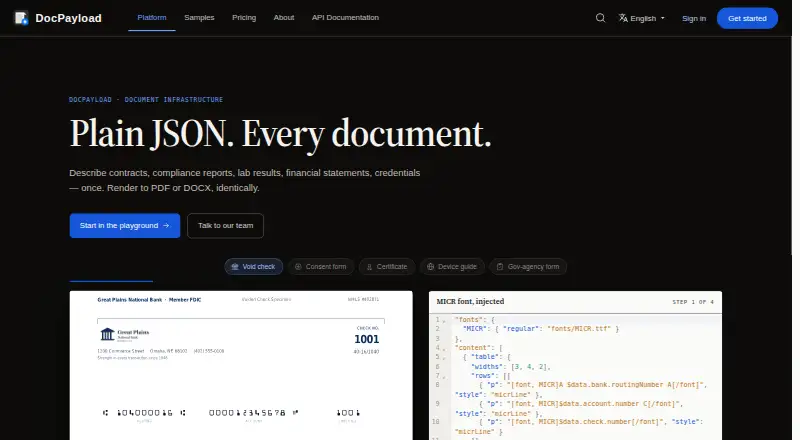
What DocPayload is
DocPayload generates PDF and DOCX documents from a JSON definition, with SVG also available as an API output. Inputs can include JSON payloads, stored templates, data objects, arrays, and data files. Listed document elements include barcodes, AcroForm fields, watermarks, vector charts, signatures, and encryption. Its API uses standard HTTP requests, so an application that can send JSON by POST can connect without a language-specific SDK. Generated documents can be returned synchronously, emailed, or delivered to an endpoint through webhooks with signed payloads and retries. The product supports more than 100 scripts, including CJK, Devanagari, Thai, Arabic, and Hebrew. Deployment choices include web and API access, self-hosting, VPC, and regional deployments in the US, EU, Canada, and UAE; the company says data remains in the selected region. Listed plans include a free Starter tier limited to five documents, Pay-as-you-go at $0.50 per rendered page, and Enterprise at $79.00 per month. Paid plans include a 14-day trial.
Good
- Generates PDF, DOCX, and SVG outputs.
- Uses HTTP requests without a language-specific SDK.
- Supports more than 100 scripts.
- Offers self-hosted, VPC, and regional deployments.
Watch out
- Free Starter plan is limited to five documents.
- Pay-as-you-go is billed per rendered page.
- Enterprise plan costs $79.00 per month.
Who it suits
DocPayload suits developers and teams generating documents from structured data who need API-based delivery or deployment options. Its listed compliance and regional choices may be relevant for regulated workflows.
Verdict
DocPayload provides a JSON-driven document generation workflow with several delivery and deployment options. Review the Starter limit and pay-per-page model, as well as the plan that fits your output needs.
Plans and prices
From DocPayload's own pricing page, checked 15 Oct 2026.
| Plan | Price | What it gives you |
|---|---|---|
| Starter | Free | up to 5 documents · basic templates · email support · 2GB storage |
| Pay-as-you-go | $0.50, paid once | unlimited documents · advanced templates · team collaboration · priority support · volume discounts · $10 free credits · per rendered page/document; PDF and DOCX pages count separately |
| Enterprise | $79 a month | everything in Pay-as-you-go · custom templates · advanced workflows · 24/7 phone support · unlimited storage · full API access · SSO · custom integrations · monthly per user |
The facts
Each one read from DocPayload's own pages, with the date it was checked.
What it does
- API endpoint
- The API uses HTTP POST requests under https://api.docpayload.com/v1 and accepts JSON bodies with bearer authentication.checked 15 Oct 2026
- API outputs
- The API can render a document definition as PDF, DOCX, or SVG.checked 2 Oct 2026
- API versioning
- The current API version is v1, with future breaking versions planned to remain available during a deprecation period with notice.checked 15 Oct 2026
- Audit trail
- Each render is recorded with source hash, schema version, fixture digest, renderer version and approver identity in a tamper-evident archive.checked 15 Oct 2026
- Barcodes
- The platform advertises support for 63 barcode symbologies.checked 15 Oct 2026
- Changelog event
- In July 2026 the canvas shapes syntax was replaced by an SVG-based structure and old generation endpoint names were removed or renamed.checked 15 Oct 2026
- Compliance claims
- The site lists HIPAA support with BAA availability, eIDAS/PAdES signatures, PDF/A output and Canadian PIPEDA, Law 25 and FINTRAC support.checked 15 Oct 2026
- Data residency
- DocPayload says data remains in the selected region for its listed regional deployments.checked 15 Oct 2026
- Declarative authoring
- Documents are described with JSON for layout, styles, content, headers, footers and related properties.checked 15 Oct 2026
- Delivery
- Documents can be returned synchronously, emailed, or sent to an endpoint through a webhook with signed payloads and retries.checked 2 Oct 2026
- Delivery modes
- Generated files can be returned synchronously, emailed, or delivered to a webhook with signatures and retry backoff.checked 15 Oct 2026
- Documentation depth
- Documentation includes quickstarts, a published schema, API reference, feature pages, tutorials and a changelog.checked 15 Oct 2026
- Document features
- The product lists barcodes, AcroForm fields, watermarks, vector charts, signatures, and encryption among its document features.checked 2 Oct 2026
- Document generation
- DocPayload uses one JSON definition to generate PDF and DOCX documents.checked 2 Oct 2026
- Forms
- AcroForm fields can be embedded in generated documents.checked 15 Oct 2026
- Integration
- DocPayload uses standard HTTP requests and says any stack that can POST JSON can use its API; it does not require a language-specific SDK.checked 2 Oct 2026
- Languages
- DocPayload says it supports CJK, Devanagari, Thai, Arabic, Hebrew, and more than 100 scripts.checked 2 Oct 2026
- Legal name
- The API documentation footer identifies the copyright holder as DocPayload Inc.checked 15 Oct 2026
The company
- Company
- DocPayload lists its office in Quebec City, Canada, and identifies itself as DocPayload Inc.; the opened company page does not state a founding year.checked 2 Oct 2026
- Company clients
- The company says it began with three developers and now serves more than 500 enterprise clients worldwide.checked 15 Oct 2026
- Company location
- DocPayload lists an office at 6311 Avenue Costebelle, Quebec City, Canada.checked 15 Oct 2026
- Founded year
- The company pages do not state a founding year.checked 15 Oct 2026
- Headquarters
- Quebec City, Canadachecked 28 Sep 2026
Money
- Free allowance
- Starter is limited to up to 5 documents, and the pricing FAQ says Pay-as-you-go starts with $10 in free credits.checked 2 Oct 2026
The full review of DocPayload
DocPayload is an API-first document generation service for teams that turn structured data into business documents. It is strongest for developers and regulated operations that need multiple output formats, controlled deployment regions, and traceable rendering. The main decision is whether its five-document free allowance and per-page billing match your volume.
Overview
A single JSON definition can generate PDF and DOCX files, while the API also renders SVG. Templates use JSON payloads, stored templates, data objects, arrays, and data files, with conditional logic for varying content. This is a practical foundation for repeatable, data-driven production, but it is less suited to teams primarily seeking a visual, nontechnical authoring environment.
Integration relies on standard HTTP requests, so any stack capable of posting JSON can connect without a language-specific SDK. Results can be returned synchronously, emailed, or sent to an endpoint through webhooks with signed payloads and retries. That gives developers several delivery patterns without locking them into one application architecture.
Key features
The document feature set covers barcodes, AcroForm fields, watermarks, vector charts, signatures, and encryption. Support for CJK, Devanagari, Thai, Arabic, Hebrew, and more than 100 scripts makes it a credible option for multilingual output rather than a service focused only on Latin-script documents.
Governance features are unusually substantial for an API product. Each render is recorded with source, schema, fixture, renderer, and approver information in a tamper-evident archive, giving teams a defensible audit history. The service lists end-to-end encryption, regular backups, and SOC 2 compliance. HIPAA support with a BAA, eIDAS/PAdES signatures, PDF/A output, and Canadian regulatory frameworks address workflows where document handling and signing need formal controls.
Deployment can be placed in the US, EU, Canada, or UAE, with self-hosted and VPC options; data remains in the selected region. That breadth helps organizations with residency requirements, although it also makes architecture and plan selection part of the buying decision.
Pricing
The freemium structure is easy to start but has a sharp distinction between experimentation and sustained production.
| Plan | Price | What it includes |
|---|---|---|
| Starter | free | Up to 5 documents, basic templates, email support, and 2GB storage; no credit card required. |
| Pay-as-you-go | $0.50, paid once | Billed per rendered page with no monthly fees; unlimited documents, advanced templates, team collaboration, priority support, 100GB storage, and volume discounts. |
| Enterprise | $79 a month | Billed monthly; everything in Pay-as-you-go plus custom templates, advanced workflows, 24/7 phone support, unlimited storage, full API access, SSO, and custom integrations. |
Starter is useful for a small proof of concept, but five documents is too restrictive for ongoing operations. Pay-as-you-go suits variable or moderate workloads that prefer no subscription commitment, though per-rendered-page charges require careful forecasting for long documents. Enterprise is the fit for teams needing SSO, unlimited storage, custom integration work, and phone support; the monthly commitment is harder to justify for occasional use. Paid plans include a 14-day free trial, and Pay-as-you-go starts with $10 in free credits.
Platforms
DocPayload is available through its web interface and API, with self-hosted deployment also offered. VPC and regional deployments extend the choice for organizations that cannot place document data in a shared environment. Its code-based template editor and HTTP integration favor engineering-led implementation.
Who it's for
Choose DocPayload when your product or internal system already handles structured data and needs reliable PDF, DOCX, or SVG generation. It is particularly well matched to multilingual, regulated, or geographically constrained workflows where audit trails, signatures, encryption, and regional hosting matter. A small team wanting occasional documents without development work should look elsewhere, as the workflow is centered on API calls and template code.
Pros and cons
- Pros: One JSON-driven definition supports PDF, DOCX, and SVG, reducing format-specific pipelines.
- Pros: Signed, retrying webhooks and synchronous or email delivery fit varied production architectures.
- Pros: Broad script support and compliance-oriented controls serve international and regulated documents.
- Pros: Self-hosted, VPC, and regional options provide meaningful data-residency flexibility.
- Cons: Starter allows only up to five documents, limiting free evaluation beyond a narrow pilot.
- Cons: Pay-as-you-go billing is per rendered page, so document length directly affects operating cost.
- Cons: The code-based, API-led approach is not the natural choice for nontechnical document authors.
Alternatives
PandaDoc is the better pick for teams wanting web, Android, and iOS access alongside API integration, with a free plan allowing 60 documents per year and two recipients per document.
PDF4me Merge & Split fits narrower PDF-processing needs, offering a free API tier and a one-time Pack 500 priced at 25.00 USD for 500 API calls.
S-Docs is the alternative when Salesforce-oriented document and e-signature usage is central; its free Salesforce plan includes unlimited templates, up to 150 documents, and up to 50 e-Signatures.
TemplateDocs suits smaller teams seeking a conventional seat-and-credit structure, with a free plan covering 50 credits, two seats, five templates, and five workflows.
Docassemble is a free, self-hosted option when avoiding software fees is more important than using a managed service.
DocuGenerate is preferable for a simpler managed API with 20 free documents per month, two templates, and one concurrent document on its free plan.
Motifuse DocForge is an alternative for batch-style cloud tasks with limits such as 3 completed tasks per account and up to 100 templates on its free tier.
DocMake is worth considering for higher free monthly volume, offering 1,000 documents per month, unlimited templates, and API access on its free plan.
Document Automation Software provides a broader category comparison when you are still weighing workflow styles.
Verdict
DocPayload is a strong choice for engineering teams embedding multilingual, auditable document generation into existing systems, especially where regional hosting and compliance controls are decisive. Choose it for flexible delivery and deployment rather than a visual editing experience; look elsewhere if your workload is small, page volume is unpredictable, or nontechnical users need to author documents directly.
Alternatives to DocPayload
- 1

PandaDoc
Free planAndroidiOSWebAPI8.2From $19 a month - 2

S-Docs
Free planiOSWebAPI7.9From $25 a month - 3

Docassemble
Free planOpen sourceWebAPILinuxmacOS7.8Free plan - 4

Proposify
iOSWebAPI7.5 - 5
Motifuse DocForge
Free planWebAPI7.3From $29 a month - 6

Ignition
WebAPI7.1From $39 a month