
Collavate
Collavate is a document review and approval service built on Google Workspace.
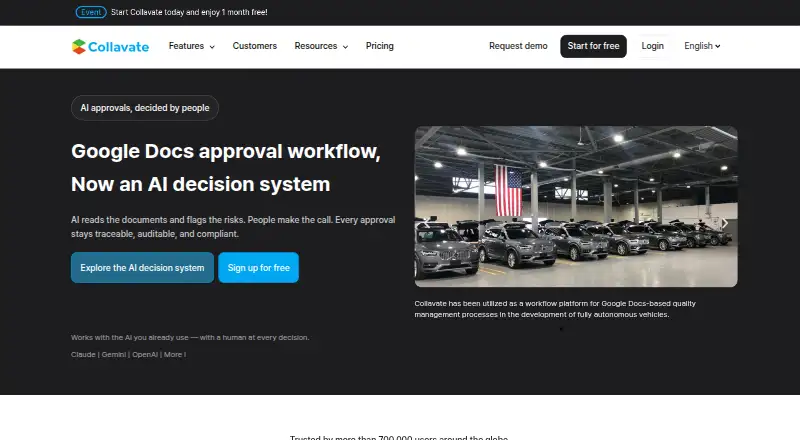
What Collavate is
Collavate is a document review and approval service built on Google Workspace. Users can request approval on the original document instead of duplicating it, with sequential, parallel, and cross-team workflows. Document permissions adjust at each approval stage to support external collaboration. Existing documents can be turned into templates, and a company seal can be appended after approval. Each request can have a linked post for messages, mentions, reactions, and attachments. For Workspace administrators, Collavate can import a directory and move submitted documents into an admin-owned Google Drive folder. Listed integrations include Google Drive, Google Docs, Google Sheets, Google Chat, and Slack. Collavate says its AI uses Google's Gemini model and is not trained on customer data. The Basic plan is free, with token purchases as needed; Business costs $300.00 per month with a 12-month commitment and includes 6,000 monthly tokens and SLA coverage for up to 200 users. A 30-day free trial is available without a credit card.
Good
- Approvals work on the original document
- Supports sequential, parallel, and cross-team routing
- Automatically adjusts permissions during approval
- 30-day trial requires no credit card
- Integrates with Google Workspace apps and Slack
Watch out
- No free plan without token purchases
- Business requires a 12-month commitment
- Business costs $300.00 per month
Who it suits
It suits teams using Google Workspace that need document approvals, including cross-team or external reviews. The free Basic plan may suit users willing to buy tokens as needed.
Verdict
Collavate is geared toward document approval tied to Google Workspace, with tools for routing, communication, and document administration. Check token needs and commitment terms when choosing a plan.
Plans and prices
From Collavate's own pricing page, checked 7 Oct 2026.
| Plan | Price | What it gives you |
|---|---|---|
| Basic | Free | No monthly fee · buy tokens as needed · Google Docs extension approval · linear or parallel approval · approval deadline |
| Business | $300 a month | SLA coverage for up to 200 users · 6,000 tokens per month · online 1:1 onboarding · Monthly billing with a 12-month commitment. |
| Enterprise | Priced on request | Premium onboarding · priority support · API integration + full feature access · Flexible Enterprise Contract Plan |
The facts
Each one read from Collavate's own pages, with the date it was checked.
What it does
- AI
- Collavate says its AI uses Google’s Gemini model and does not train on customer data.checked 7 Oct 2026
- Communication
- Approval-related communications can be recorded in a post linked to each approval, with mentions, reactions, and attachments.checked 7 Oct 2026
- Enterprise deployment
- The pricing page says dedicated-server or GCP-based deployment is available for Enterprise customers and above.checked 7 Oct 2026
- External collaboration
- The service automatically adjusts document permissions at each approval stage for external collaboration.checked 7 Oct 2026
- Google Workspace administration
- Collavate can import a Google Workspace directory with one click and move submitted documents to an admin-owned Google Drive folder.checked 7 Oct 2026
- Integrations
- The product lists Google Drive, Google Docs, Google Sheets, Google Chat, and Slack integrations.checked 7 Oct 2026
- Intended users
- The company describes Collavate as serving teams of all sizes and says more than 20,000 organizations have used it.checked 7 Oct 2026
- Product
- Collavate is a document review and approval solution built on Google Workspace, combining approval workflows with AI.checked 7 Oct 2026
- Security
- The homepage displays GDPR, CCPA, and CASA security or privacy badges.checked 7 Oct 2026
- Templates and seals
- Users can turn existing documents into templates and automatically append a company seal after approval.checked 7 Oct 2026
- Token usage
- Token use varies with attachments, reviewer count, and workflow actions; the pricing FAQ says a typical approval request uses around 10 tokens on average.checked 7 Oct 2026
- Workflow
- Users can request approval directly on the original document without duplicating files.checked 7 Oct 2026
Where it runs
- Approval options
- Approval workflows support sequential, parallel, and cross-team approvals.checked 7 Oct 2026
The company
- Founded
- 2013checked 28 Sep 2026
Money
- Trial
- The site offers a 30-day free trial without requiring a credit card.checked 7 Oct 2026
The full review of Collavate
Collavate is an approval workflow layer for Google Workspace documents, best suited to teams that need structured sign-off across departments or with outside reviewers. Its core advantage is routing approvals around the original file; the main trade-off is a $300 monthly Business plan with a 12-month commitment and token allowance to manage.
Overview
Approval requests stay with the original document, avoiding a separate review copy. Teams can route sign-off sequentially, in parallel, or across teams, while permissions adjust at each stage for external collaboration. That combination suits organizations with repeatable review paths; it is less compelling for occasional approvals or teams that do not center their work in Google Workspace.
Collavate connects with Google Drive, Docs, Sheets, and Chat, plus Slack. It can import a Workspace directory and move submitted documents into an admin-owned Drive folder, giving administrators a way to keep approval files in managed storage. The product also includes document generation, electronic signatures, automated notifications, and an audit trail.
Key features
Workflow and communication
Sequential and parallel routing handle common approval patterns, while cross-team approval supports broader sign-off chains. Communication attached to each approval can include posts, mentions, reactions, and attachments, keeping discussion close to the request instead of splitting it across unrelated channels.
Teams can turn existing documents into templates and automatically append a company seal after approval. These tools are useful for repeatable paperwork, though the product’s appeal remains strongest when that paperwork already lives in Google Workspace.
AI and security
Collavate says its AI uses Google’s Gemini model and does not train on customer data. Its homepage displays GDPR, CCPA, and CASA security or privacy badges. These are relevant assurances for organizations considering AI in approval workflows, but they do not change the practical need to assess whether the service meets a team’s own compliance requirements.
Pricing
The Basic plan is free, with no monthly fee, and lets users buy tokens as needed. It includes Google Docs extension approval, linear or parallel approval, and approval deadlines. That makes it a low-commitment way to handle limited workflows, but token purchases mean usage is not unlimited, and Basic does not include the Business plan’s stated SLA coverage or onboarding.
Business costs $300 a month, billed monthly with a 12-month commitment. It includes SLA coverage for up to 200 users, 6,000 tokens per month, and online 1:1 onboarding. The user ceiling is clear, but the token allowance makes workflow volume a budgeting consideration: use varies with attachments, reviewer count, and workflow actions, and a typical approval request averages around 10 tokens. Teams with heavier or attachment-rich workflows should estimate usage before committing.
Enterprise has custom pricing under a flexible enterprise contract. It adds premium onboarding, priority support, API integration, and full feature access; dedicated-server or GCP-based deployment is available for Enterprise customers and above. This is the option for organizations needing deployment choice or a broader feature set, while the lack of a fixed price calls for a direct quote. A 30-day free trial requires no credit card.
Platforms
Collavate is available on Android, iOS, macOS, Windows, and the web, with an API and extension also listed. Its integrations center on Google Workspace, with Slack also supported.
Who it's for
Collavate is a strong fit for teams already using Google Workspace that need approvals tied to source documents, controlled external access, and administrative handling of submitted files. Its stated reach across organizations of different sizes suggests it is not limited to large enterprises, but the paid Business commitment and token accounting make the free Basic plan the more sensible starting point for lighter needs.
It is a weaker choice for teams seeking a broadly independent document platform or a predictable low-cost paid plan without a year commitment. Collavate says more than 20,000 organizations have used it, but the decisive questions for a buyer are whether Workspace is the right foundation and whether approval volume fits the token model.
Pros and cons
- Pro: Requests stay attached to original documents, reducing the need to manage separate review copies.
- Pro: Sequential, parallel, and cross-team routing, plus stage-based permission changes, support varied internal and external approval paths.
- Pro: Workspace directory import and admin-owned Drive storage align approvals with existing Google administration.
- Con: Business costs $300 a month and requires a 12-month commitment, a substantial constraint for seasonal or occasional use.
- Con: Business usage is capped at 6,000 monthly tokens, and actual consumption depends on reviewers, attachments, and workflow actions.
- Con: The product’s integrations and file administration make it a less natural fit for teams centered on a different document ecosystem.
Alternatives
Document Workflow Software is a useful category page for comparing workflow options. Consider PandaDoc instead if a free plan with a 60-document yearly allowance and two recipients per document better suits a modest document-signing workload. Dropbox Sign offers a free plan with three signature requests per month, so it is a more natural alternative when signing volume is small and tightly bounded.
Jotform may suit teams whose needs center on forms: its free Starter plan includes five forms and 100 monthly submissions. airSlate WorkFlow (now altaFlow) has a free plan with 10 credits per month, which may be preferable for a low-volume workflow trial. Contractbook is another option to compare for contract management, with a free Essential plan limited to one user, 100 signed contracts per year, and five templates.
DocuWare is worth considering for document management, with cloud plans sized at four users and 20 GB or 15 users and 50 GB. Folderit offers a paid Mini plan at $65 a month, billed monthly, for five users and 150 GB of storage. M-Files is an alternative for organizations seeking native Microsoft 365 experiences through its Essentials plan.
Verdict
Choose Collavate if your team works in Google Workspace and needs approvals that stay with original files, flexible routing, and managed access for external reviewers. Basic provides a no-fee way to begin, while Business adds onboarding and SLA coverage for up to 200 users. Look elsewhere if a year-long commitment or token-based usage is a poor fit, or if your document workflow is built around another ecosystem.
Getting started
- Visit https://collavate.com/ to begin.
- Start the 30-day free trial without providing a credit card, or choose the Basic plan at $0.00.
- Use the Google Docs extension for approval on the Basic plan, or select Business for its included 6,000 monthly tokens and onboarding.
- Connect the listed Google Workspace services or Slack as needed.
- For Enterprise and above, consider the available dedicated-server or GCP-based deployment.
Limits worth knowing
Basic requires token purchases as needed. Business includes 6,000 tokens per month and SLA coverage for up to 200 users; token consumption varies with attachments, reviewer count, and workflow actions, with a typical request averaging around 10 tokens.
Questions
Does Collavate have a free plan?
No. Basic costs 0.00 USD, with no monthly fee, and requires token purchases as needed.
How much does Business cost?
Business is $300.00 per month with a 12-month commitment.
Is there a free trial?
Yes. Collavate offers a 30-day free trial without requiring a credit card.
Which platforms are listed?
Android, API, extension, iOS, macOS, web, and Windows.
Which integrations does Collavate list?
Google Drive, Google Docs, Google Sheets, Google Chat, and Slack.
What deployment options does Enterprise offer?
The pricing page says dedicated-server or GCP-based deployment is available for Enterprise customers and above.
Alternatives to Collavate
- 1

Zoho Sign
Free planAndroidiOSWebAPI8.3From $10 a month - 2
Dropbox Sign
Free planAndroidiOSWebAPI8.2Free plan - 3

Jotform
Free planAndroidiOSWeb8.2From $39 a month - 4

PandaDoc
Free planAndroidiOSWebAPI8.2From $19 a month - 5

airSlate WorkFlow (now altaFlow)
Free planAndroidiOSWebAPI8.1From $399 a month - 6

DocuWare
AndroidiOSWebAPI7.9From £1,060 a month