
Axonator
Axonator is a no-code, mobile-first platform for automating field workflows.
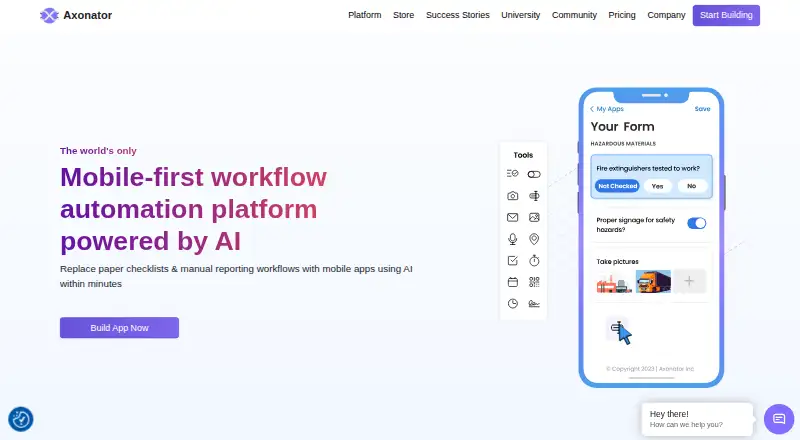
What Axonator is
Axonator is a no-code, mobile-first platform for automating field workflows. It provides mobile forms and workflow tools for collecting field data, along with report and dashboard builders for presenting operational information. Its Commando AI can create forms and suggest fields from prompts, and convert spreadsheets or PDF reports into mobile checklists. Named integrations include Salesforce, QuickBooks, IBM Maximo, and SAP; other connections can use API keys and workflow configuration. The mobile app is available for iOS and Android, where workforce users can submit forms and complete or reject assigned tasks. Axonator highlights quality control, safety, maintenance, and production crews as intended teams. The Basic plan allows one app builder, five app users, one app per account, unlimited forms, and 200 fields across forms. Pro costs $29 a month and requires at least three users; Enterprise costs $49 a month and requires at least ten users. A free plan and free trial are listed.
Good
- Mobile forms support field-data collection.
- Commando AI can turn spreadsheets into mobile checklists.
- Named integrations include Salesforce, QuickBooks, IBM Maximo, and SAP.
- Security features include SSO and multifactor authentication.
- Mobile users can complete or reject assigned tasks.
Watch out
- Pro requires at least three users.
- Enterprise requires at least ten users.
- Free, Pro, and Enterprise have daily submission caps.
- Basic is limited to one app per account.
Who it suits
Axonator may suit field teams in quality control, safety, maintenance, or production that need mobile forms and workflow automation. Its web, iOS, and Android availability may also fit teams working across devices.
Verdict
Axonator brings forms, workflow tools, reporting, and mobile task handling together for field operations. Check user minimums and submission limits when comparing its plans.
Plans and prices
From Axonator's own pricing page, checked 19 Oct 2026.
| Plan | Price | What it gives you |
|---|---|---|
| Pro Plan | $29 a month | Minimum 3 users · Unlimited forms · 200 fields shown on plan card · 3 apps/account · 200 submissions/day · 5 exports/day · External API calls · Email and Zoom support · per user/month |
| Enterprise Plan | $49 a month | Minimum 10 users · Unlimited forms · 500 fields shown on plan card · 5 apps/account · 1,500 submissions/day · 10 exports/day · External API calls · Email and Zoom support · Dedicated account manager · per user/month |
| Basic | Free | Maximum 6 users (1 App Builder, 5 App Users) · Unlimited forms · 200 fields across all forms · 1 app per account · 50 submissions/day · 1 export/day |
The facts
Each one read from Axonator's own pages, with the date it was checked.
What it does
- Additional location
- The official documentation footer lists Pune, Maharashtra, India as another location.checked 19 Oct 2026
- AI builder
- Commando AI can generate forms, suggest fields and convert spreadsheets or PDFs into mobile checklists.checked 19 Oct 2026
- API
- Workflows can call REST APIs and Axonator provides an API key based method for third-party connections.checked 19 Oct 2026
- API data flow
- The API supports pushing data to and pulling data from external systems, including compatible legacy systems.checked 19 Oct 2026
- Backup
- Axonator says its incremental backups are encrypted using AES-256 and can be restored on request within the retention period.checked 11 Oct 2026
- Conditional logic
- Yeschecked 22 Sep 2026
- Data views
- The web application supports list, map and board views for form data.checked 19 Oct 2026
- Documentation
- The knowledge base covers builders, mobile and web containers, workflows, reporting, dashboards, integrations, permissions, offline mode and app versioning.checked 19 Oct 2026
- Documentation gap
- The help center marks several troubleshooting, glossary, dashboard and video tutorial areas as articles coming soon.checked 19 Oct 2026
- Field capture
- Supported mobile capture includes photos, audio, GPS locations, maps, QR or barcodes and signatures.checked 19 Oct 2026
- Forms and workflows
- The platform provides mobile forms and workflow tools for collecting field data and automating processes.checked 11 Oct 2026
- Google Play distribution
- The Android listing shows 5K+ downloads and an Everyone content rating.checked 19 Oct 2026
- Integrations
- Official integration examples include Salesforce, SAP, IBM Maximo, QuickBooks, Google Sheets, Google Drive, Office 365, Zapier and Airtable.checked 19 Oct 2026
- Intended users
- Axonator highlights quality control, safety, maintenance, and production crews as teams its mobile-first platform serves.checked 11 Oct 2026
- Limit: concurrent builder edits
- When multiple users edit the App Builder, only the most recently saved and published component version is visible to everyone.checked 19 Oct 2026
- Limit: custom feature scope
- Axonator says users cannot create entirely new builder feature types beyond its mobile form, workflow, template and analytical report builders.checked 19 Oct 2026
Where it runs
- AI app building
- Its Commando AI can create forms and suggest form fields from prompts, and convert spreadsheets or PDF reports into mobile checklists.checked 11 Oct 2026
- iOS requirements
- The App Store listing requires iOS 13 or later, iPadOS 13 or later, macOS 11 with Apple silicon for Mac, or visionOS 1.0 or later.checked 19 Oct 2026
The company
- Company founding
- LinkedIn lists Axonator Inc as founded in 2011.checked 19 Oct 2026
- Company history
- Axonator says its journey started in 2011.checked 11 Oct 2026
- Company size
- LinkedIn lists Axonator Inc as a privately held company with 51–200 employees.checked 19 Oct 2026
- Founded
- 2011checked 28 Sep 2026
- Headquarters
- LinkedIn lists headquarters in Austin, Texas, United States.checked 19 Oct 2026
Money
- Free plan
- Yeschecked 22 Sep 2026
The full review of Axonator
Axonator is a no-code, mobile-first system for turning field forms into managed workflows and operational reports. It fits quality, safety, maintenance and production teams whose staff work on phones and need structured approvals, task handling and dashboards. The main question is whether its per-user minimums and submission quotas match your operation.
Overview
Axonator combines mobile data capture, process automation and reporting instead of treating forms as isolated questionnaires. Teams can build forms, apply conditional logic, route work for approval and convert the resulting data into reports and dashboards. That combination is well suited to recurring inspections, service records and production checks where a submission must trigger a next step.
The iOS and Android apps let workers submit forms and complete or reject assigned tasks, while web access supports administration and analysis. File uploads, templates and a 200-response limit add structure to collection. The platform’s security measures include 256-bit SSL, encrypted cloud databases, logical customer-data separation, single sign-on, multifactor authentication and role-based access controls. Encrypted AES-256 incremental backups can be restored on request during the retention period.
Key features
- Forms and workflows: Conditional logic, approvals, templates and file uploads support multi-step field processes. Unlimited forms on the paid tiers are useful for organizations managing separate checklists across teams, and mobile users can accept or reject assigned work rather than merely submit data.
- Reports and dashboards: Report and dashboard builders turn operational submissions into analytics views. This is more useful for supervisors tracking field activity than a basic form tool with no operational reporting layer.
- Commando AI: Prompts can generate forms or suggest fields, while spreadsheets and PDF reports can be converted into mobile checklists. That can shorten initial setup, but the resulting apps still need to fit your approval and quota requirements.
- Integrations: Named connections include Salesforce, QuickBooks, IBM Maximo and SAP. Other third-party links can use API keys and workflow configuration, giving established systems a route into field processes.
- Mobile workforce: Native Android and iOS apps cover submissions and assigned-task decisions, with browser access for the wider platform. This split suits distributed crews better than a desktop-only workflow.
Pricing
Axonator uses a freemium model. A free tier is available, and paid pricing starts at $29/user/month. A free trial is also offered.
| Plan | Price and terms | What you get |
|---|---|---|
| Basic | Custom pricing | Maximum 6 users, 1 app builder, 5 app users, unlimited forms, 200 fields across all forms, 1 app per account and 50 daily submissions. Free-tier users receive email support. |
| Pro Plan | $29 a month, billed $29/user/month; minimum 3 users | Unlimited forms, 3 apps, 200 submissions per day, 400 fields across forms, 5 data exports per day and email plus Zoom support. |
| Enterprise Plan | $49 a month, billed $49/user/month; minimum 10 users | Unlimited forms, 5 apps, 1,500 submissions per day, 2,000 fields across forms, 10 data exports per day and email plus Zoom support. |
Basic is aimed at a small deployment, but its five app users, one app and 50-submission daily ceiling leave little room for multiple crews. Pro is the practical starting point for teams of at least three that need several apps and moderate throughput. Enterprise costs more and requires ten users, yet its higher submission, field and export allowances make it the safer fit for large or busy operations. The per-user billing and minimum seats make both paid tiers less attractive for a very small team.
Platforms
Axonator runs on Android, iOS and the web. Field staff get mobile submission and task handling, while browser users can build, configure and review workflows and reports.
Who it's for
Quality-control, safety, maintenance and production crews are the clearest audience. It is a strong match when inspections or work orders need conditional forms, approvals, attachments and management dashboards in one system. A small group with occasional collection, or an operation likely to exceed its daily cap, should compare alternatives before committing.
Pros and cons
Pros
- Field-focused workflow: Mobile forms, assigned-task decisions and approvals connect collection to action.
- Broad operational coverage: Forms, dashboards, AI-assisted app creation and named enterprise integrations reduce the need to assemble separate tools.
- Serious access controls: SSO, multifactor authentication, role controls and encrypted backups address governed business use.
Cons
- Minimum seats: Pro requires three users and Enterprise ten, which can raise the entry cost for small teams.
- Usage ceilings: Daily submissions and export limits can constrain high-volume operations, especially on Free and Pro.
- Basic is narrow: One app, five app users and 200 total fields limit expansion despite unlimited forms.
Alternatives
For broader form-building choices, compare Form Builder Software. Teams prioritizing process orchestration can review Workflow automation tools.
- Microsoft PowerPoint suits users wanting a familiar freemium office tool across desktop, mobile and web.
- Typeform is a better fit for lightweight forms when the free plan’s 10 responses per month is sufficient.
- Google Drive fits teams primarily needing shared storage, with up to 15 GB included on free Google accounts.
- uCalc is aimed at calculators and form-like tools, including a community tier for eligible small organizations.
- Jotform suits straightforward form publishing; its Starter tier includes five forms and 100 monthly submissions.
- Forminit offers a free tier with one form, 100 monthly submissions and 100 MB storage.
- Formlets is a web-only option with one free published form and unlimited responses.
- Paperform is another freemium web and API option for individuals and small teams.
Verdict
Choose Axonator when field crews need forms, approvals, assigned tasks and operational reporting in a mobile-first system, particularly alongside Salesforce, SAP, QuickBooks or IBM Maximo. Look elsewhere if you have fewer than the paid-tier minimum users, need volumes beyond the daily caps or only require simple forms without workflow automation.
Alternatives to Axonator
- 1

Typeform
Free planAndroidiOSWebAPI8.4From $39 a month - 2

HubSpot Marketing Hub
Free planAndroidiOSWebAPI8.3Free plan - 3
FormTitan
Free planAndroidiOSWebAPI8.2From $150 a month - 4

Jotform
Free planAndroidiOSWeb8.2From $39 a month - 5
Forminit
Free planAndroidiOSWebAPI8.1Free plan - 6

OpnForm
Free planOpen sourceWebAPISelf-hosted7.9From $25 a month