
Artguru Background Remover
Artguru Background Remover removes an image background and creates a transparent PNG.
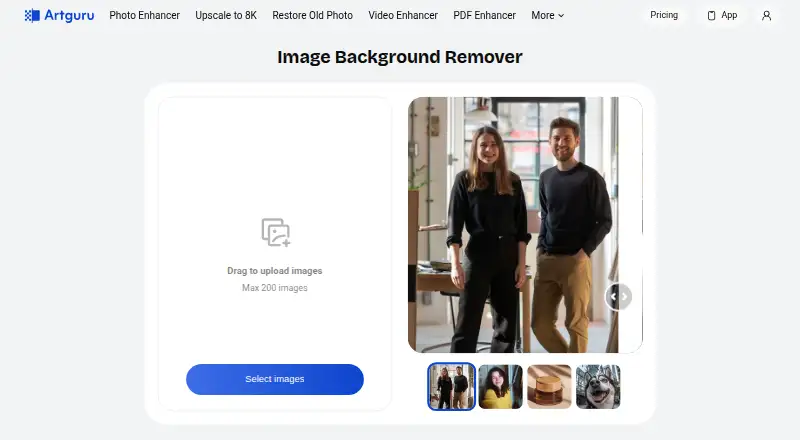
What Artguru Background Remover is
Artguru Background Remover removes an image background and creates a transparent PNG. It identifies the main subject, and its product page says the tool handles detailed edges such as wisps of hair and animal fur. Uploads can be JPG, PNG, or WEBP. After removal, users can select a solid color or upload an image as the replacement background. The uploader allows up to 200 images, while batch removal is listed as a Pro feature. The service is available on Android, iOS, and the web, and the product describes use for e-commerce product photos, social media graphics, and presentation portraits without requiring editing experience. Background removal uses one credit per image, listed as $0.01 per image. New users get free credits, with standard downloads up to 1024×1024 px; Pro includes more credits, original-quality downloads, and batch removal, but no Pro price is listed. Credits expire at the end of the subscription cycle and do not roll over. The privacy policy says uploaded inputs may be used to improve AI models, and that such training use cannot be reversed once incorporated.
Good
- Accepts JPG, PNG, and WEBP uploads.
- Can replace removed backgrounds with colors or custom images.
- Handles detailed edges such as hair and animal fur.
- Available on Android, iOS, and web.
Watch out
- Free downloads are limited to 1024×1024 px.
- Credits expire and do not roll over.
- Uploaded inputs may be used to improve AI models.
- Batch background removal is a Pro feature.
Who it suits
Artguru suits people preparing product photos, social media graphics, or presentation portraits who want background removal without editing experience. It is available on mobile and web, with a free-credit option and paid usage.
Verdict
Artguru combines background removal with replacement options and supports several image formats. Before uploading, consider the stated model-improvement use of inputs and the credit expiry terms.
Plans and prices
From Artguru Background Remover's own pricing page, checked 20 Sep 2026.
| Plan | Price | What it gives you |
|---|---|---|
| Background removal usage | $0.01 a month | Background removal costs 1 credit per image |
| Free | Free | daily credits reset every 24 hours · ads · watermarked downloads |
| Free plan | Free | New users get free credits · standard downloads up to 1024×1024 px |
| Mini | $4.99 a month | 400 credits/month · no ads · no watermark · priority queue · monthly |
| Standard | $9.99 a month | 1,000 credits/month · no ads · no watermark · batch processing · monthly |
| Artguru Monthly | $9.99 a month | in-app subscription · monthly |
| Credit Pack | $10, paid once | 1,000 credits · no subscription · one-time |
| Artguru Annual Subscription | $39.99 a year | in-app subscription · annual |
| Artguru Annual Pro | $59.99 a year | in-app subscription · annual |
| Artguru Pro | — | More credits · original-quality downloads · batch background removal |
The facts
Each one read from Artguru Background Remover's own pages, with the date it was checked.
What it does
- API availability
- Artguru offers an HTTP Open API authenticated with an x-api-key header.checked 14 Oct 2026
- API SDKs
- API reference pages provide request examples for cURL, Python, Java, Node.js, Go, PHP, Ruby and HTTP.checked 14 Oct 2026
- API workflow
- The documented API flow uploads an image, starts a generation task, polls task status and reads a generated URL.checked 14 Oct 2026
- Background editing
- After removal, users can choose a solid color or upload a custom image as the new background.checked 7 Oct 2026
- Background removal
- The AI identifies the main subject and removes the background in seconds, producing a transparent PNG.checked 7 Oct 2026
- Background replacement
- After removal, users can choose a solid color or upload a custom replacement background.checked 14 Oct 2026
- Batch limit
- The uploader allows up to 200 images, and batch background removal is listed as a Pro feature.checked 7 Oct 2026
- Batch processing
- Yeschecked 20 Sep 2026
- Batch removal
- The web interface allows up to 200 images to be selected, while batch background removal is included in the Pro plan.checked 14 Oct 2026
- Commercial-use restriction
- Commercial use is granted only for outputs covered by qualifying paid plans or purchases; free-tier outputs are limited to personal non-commercial use.checked 14 Oct 2026
- Credit expiry
- Subscription and add-on credits expire at the end of the current subscription cycle and do not roll over.checked 14 Oct 2026
- Data deletion
- The policy says users can clear data or delete their account, with associated personal information typically deleted or anonymized within 30 days, subject to exceptions.checked 7 Oct 2026
- Data location
- The privacy policy says most collected information is stored and processed on servers in the United States, though it may also be accessed or processed in other regions.checked 7 Oct 2026
- Documentation depth
- The developer site includes quickstart material, authentication, endpoint reference, task polling, credits, usage and capability modes.checked 14 Oct 2026
- Edge handling
- Artguru says its machine-learning model handles difficult edges such as loose hair and animal fur.checked 14 Oct 2026
- Independent hands-on background result
- Postunreel reports a test preserving about 90% of curly-hair strands, with minor clipping at the temple.checked 14 Oct 2026
- Independent hands-on limit
- GeniusFirms reports that complex or open-ended requests are less predictable and that professional work may require checking faces and results.checked 14 Oct 2026
- Input-data use
- Uploaded images and prompts may be used to provide features and, where applicable, improve or train AI models.checked 14 Oct 2026
The company
- Company size
- LinkedIn lists an ArtGuru company profile with 11–50 employees and a 2020 founding year.checked 14 Oct 2026
- Founded
- A Hong Kong company directory lists Cygnus Space (Hong Kong) Company Limited as incorporated on 19 July 2022.checked 14 Oct 2026
- Headquarters
- Hong Kongchecked 28 Sep 2026
- Headquarters address
- Google Play lists the developer address as Rm A 12/F ZJ 300, 300 Lockhart Road, Wan Chai, Hong Kong.checked 14 Oct 2026
Money
- Credit cost
- Background removal costs one credit per image, shown as $0.01 per image on the pricing page.checked 14 Oct 2026
- Free plan
- Nochecked 20 Sep 2026
The full review of Artguru Background Remover
Artguru Background Remover is a focused tool for separating subjects from photos and replacing their backgrounds. It fits sellers, social-media creators, and presenters who want a straightforward workflow rather than a full editor. The main trade-off is between its useful replacement and batch options and its download, credit-expiry, and privacy conditions.
Overview
Upload a JPG, PNG, or WEBP file and the AI identifies the main subject, removes the surrounding background, and returns a transparent PNG in seconds. You can retain transparency, apply a solid color, or upload a custom image as the replacement. That makes Artguru practical for product listings, social graphics, and presentation portraits, including for people without editing experience.
Artguru says its machine-learning system handles intricate edges such as loose hair and animal fur. This is particularly relevant to portraits and pet or fashion imagery, although it remains a stated capability rather than a promise of perfect edges on every source image.
The service is made by Artguru, headquartered in Hong Kong, and offers optional sign-in through Google, Apple, Facebook, or VK. Support is provided by email at [email protected].
Key features
Removal and replacement
The transparent-PNG output keeps the cutout reusable in other designs, while the built-in solid-color and custom-image choices let users complete a simple background change without moving to another application. This focused scope suits routine visual preparation; it is not a substitute for a broader photo editor.
Batch processing
The uploader accepts up to 200 images, a useful ceiling for catalog or campaign work. Actual batch background removal is reserved for Artguru Pro, so the 200-image allowance should not be read as a free-plan batch entitlement.
Privacy and retention
Uploaded inputs may be used to improve AI models, and that training use is irreversible once incorporated into a model. Subscription media is retained for one year, while free-trial media is retained for 24 hours. Users can clear data or delete an account; associated personal information is typically deleted or anonymized within 30 days, subject to exceptions. Most collected information is stored and processed on servers in the United States, with possible access or processing in other regions. These terms deserve attention before uploading confidential client, personal, or unreleased commercial images.
Pricing
Artguru charges one credit per background removal, shown as $0.01 per image. The usage plan is priced at $0.01 a month, making occasional single-image work inexpensive, but credits expire at the end of the current subscription cycle and do not roll over. That limits the value of buying more credits than you can use promptly.
The Free plan costs $0.00 per free and gives new users free credits, with standard downloads up to 1024×1024 pixels. It is suitable for trying the workflow or producing modest web graphics, but the resolution cap can rule it out for larger product assets or print-oriented work.
Artguru Pro has custom pricing. It adds more credits, original-quality downloads, and batch background removal, so it is the relevant tier for regular catalogs and users who cannot accept the free plan's standard-resolution ceiling. The paid terms should be checked carefully for expected volume because unused credits expire with the subscription cycle.
Platforms
Artguru runs on the web and has Android and iOS apps. The cross-platform choice suits users who move between desktop uploads and mobile content creation, while the web version is the natural fit for larger batches and catalog work.
Who it's for
Choose Artguru for e-commerce product photos, social-media graphics, or presentation portraits when background removal and replacement are the central jobs. It is also a sensible trial option for non-editors because the workflow goes from upload to transparent or replaced background in one service.
Look elsewhere if you need uncapped high-resolution output on a free tier, durable credit balances, or assurance that uploads will not contribute to model improvement. Its Pro batch option is better suited to recurring volume than the free plan.
Pros and cons
Pros
- Transparent PNG output: Keeps cutouts flexible for later layouts.
- Background replacement: Solid colors and custom images cover common finishing tasks in the same workflow.
- Broad input support: JPG, PNG, and WEBP uploads handle common source files.
- Large batch allowance: Up to 200 images can be staged, with batch removal available in Pro.
- Low per-image rate: Removal is priced at $0.01 per image.
Cons
- Free resolution limit: Standard downloads stop at 1024×1024 pixels.
- Expiring credits: Unused credits do not roll over after the subscription cycle.
- Model-improvement use: Inputs may be used for training, with irreversible incorporation.
- Retention and regional processing: Media can remain for up to a year on subscriptions and information may be processed in the US or elsewhere.
- Pro required for batch removal: High-volume workflows need the custom-priced tier.
Alternatives
For a wider shortlist, see Image Background Removal Software and AI Background Removers.
- Cutout.Pro is a freemium, multi-platform option with an 80-credit subscription at $5.00 per month.
- Slazzer offers a free-forever plan with two credits and personal-use evaluation.
- Removal.AI sells one-time credit bundles, including three credits for $1.89.
- unbagrnd is free with no usage limits and no paid tiers.
- AI Ease provides several basic features free across Android, iOS, and web.
- Erase.bg starts with three free credits and three personal-use downloads.
- Pixelcut has a free tier with limited background removal and watermark-free export.
- Magic Studio Background Remover allows one image at a time on its free plan.
Verdict
Artguru is a good choice for individuals and small businesses that need quick cutouts, simple background replacement, and occasional low-cost processing across web and mobile. Choose it for the focused workflow and Pro batch option; choose another service if free high-resolution output, non-expiring credits, or stricter limits on model-training use matter more than convenience.
Alternatives to Artguru Background Remover
- 1

Pixelcut
Free planAndroidiOSWebAPI9.1From $8 a month - 2

Photoroom
Free planAndroidiOSWebAPI9.1From $7.50 a month - 3
Cutout.Pro
Free planAndroidiOSWebAPI9.0From $5 a month - 4

BackgroundRemover
Free planOpen sourceWebAPILinuxmacOS9.0From $108 a year - 5

Erase.bg
Free planAndroidiOSWebAPI8.9Free plan - 6
PhotoKit Background Remover
Free planAndroidiOSWebAPI8.4From $29.99 a year