
Pixelcut
Pixelcut is an AI photo and video editor focused on product photography, with tools for background removal, upscaling, retouching, product shots, ads, and vi…
What Pixelcut is
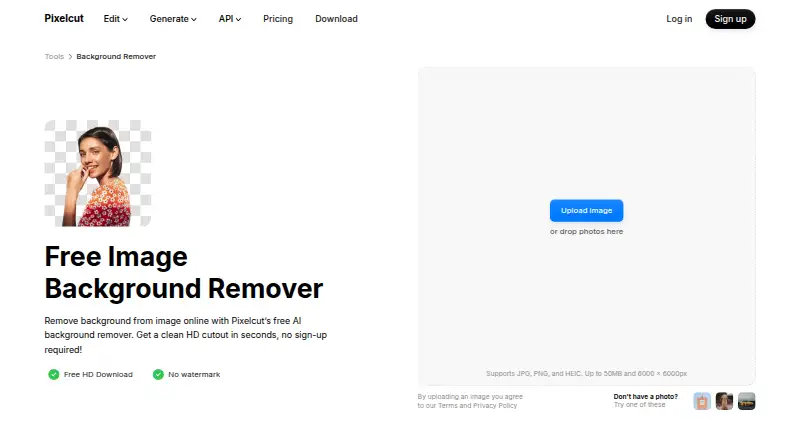
Pixelcut is an AI photo and video editor focused on product photography, with tools for background removal, upscaling, retouching, product shots, ads, and video. Its online background remover provides free HD downloads without a watermark or sign-up. The web tool accepts JPG, PNG, and HEIC images up to 50 MB and 6000 × 6000 pixels. Pixelcut can also expand images, use generative fill for retouching, generate shadows, and batch edit hundreds of files. Its background-removal page says bulk processing can handle up to 10,000 images in one batch with ZIP export. The API charges 5 credits per image, shown as $0.05 per image; it accepts PNG or JPEG inputs and offers transparent PNG, alpha-mask, or ZIP outputs. Pixelcut is available on Android, iOS, and web, with API access. Its free plan lists limited background removal and upscaling, with exports that have no watermark. Pixelcut describes its audience as sellers, creators, and brands working on product photography, e-commerce catalogs, ads, and social content.
Good
- Online background removal offers free HD downloads.
- No watermark or sign-up for those downloads.
- Batch background removal handles up to 10,000 images.
- API supports PNG and JPEG inputs.
- Available on Android, iOS, and web.
Watch out
- Free plan has limited background removal.
- Free plan has limited upscaling.
- API background removal costs $0.05 per image.
Who it suits
Pixelcut suits sellers, creators, and brands making product photos, e-commerce catalogs, ads, or social content. Its batch processing and API may also suit users handling many images or integrating background removal into a workflow.
Verdict
Pixelcut combines product-focused editing with background removal, batch processing, and API access. Its online background remover offers free HD downloads, while its free plan lists limits on background removal and upscaling.
Plans and prices
From Pixelcut's own pricing page, checked 15 Oct 2026.
| Plan | Price | What it gives you |
|---|---|---|
| Free | Free | Limited background removal · Limited upscale · Free export without watermark · per month, billed yearly |
| Pro | $8 a month | 600 AI credits monthly · All AI models · Unlimited background removal and upscale · 3-person team · 1,000 batch exports/month · Commercial license · billed yearly; page shows $10 and $8 |
| Business | $24 a month | 3,600 AI credits monthly · All AI models · Unlimited background removal and upscale · 10-person team · 2,000 batch exports/month · Commercial license · billed yearly; page shows $30 and $24 |
| API credits | $10 a month | 1,000 credits · Background removal 5 credits/operation · Upscaler 10 credits/operation · Generate Background 10 credits/operation · Try-On 10 credits/operation · Outpaint 10 credits/operation · flat monthly rate; $0.01 per credit |
| API Enterprise | Priced on request | Volume pricing for more than 1 million credits per month |
The facts
Each one read from Pixelcut's own pages, with the date it was checked.
What it does
- AI actors
- AI Actors are described as maintaining character and brand understanding across generated images and videos.checked 15 Oct 2026
- AI shadows
- Pixelcut includes AI-generated shadows intended to create realistic product imagery.checked 15 Oct 2026
- API access
- Yeschecked 23 Sep 2026
- API availability
- Pixelcut offers developer API access through developer.pixelcut.ai for integrating its tools into external workflows.checked 15 Oct 2026
- API commercial use
- Pixelcut permits commercial API use but prohibits using the API to create training data for users’ own models.checked 15 Oct 2026
- API image rights
- The API page says customers retain copyright in images processed through the API.checked 15 Oct 2026
- API integration
- The background-removal API costs 5 credits per image, shown as $0.05 per image, and supports PNG or JPEG inputs with transparent PNG, alpha-mask, or ZIP outputs.checked 30 Sep 2026
- API operations
- The public API lists background removal, image upscaling, generated backgrounds, try-on and outpaint operations.checked 15 Oct 2026
- Background generation
- After cutout, users can choose AI-generated photorealistic scenes or search millions of backdrops.checked 15 Oct 2026
- Background removal
- The web remover accepts JPG, PNG and HEIC files up to 50MB and 6000×6000 pixels, with no sign-up required.checked 15 Oct 2026
- Background removal controls
- Automatic subject detection can be refined with a manual brush, and results can be downloaded as transparent PNGs.checked 15 Oct 2026
- Batch background removal
- The background-remover page says bulk processing can handle up to 10,000 images in one batch and export them as a ZIP.checked 30 Sep 2026
- Batch editing
- The product page says batch editing can process edits across hundreds of files, while the background-remover page describes batches up to 10,000 images.checked 15 Oct 2026
- Batch processing
- Yeschecked 23 Sep 2026
- Cancellation
- Pixelcut says subscriptions can be canceled at any time.checked 30 Sep 2026
- Commercial use
- Yeschecked 23 Sep 2026
- Developer documentation
- Pixelcut says its developer documentation covers authentication, every endpoint, credits and a published OpenAPI specification.checked 15 Oct 2026
- Editing features
- Pixelcut says its AI can remove backgrounds, upscale images up to 16×, expand images, retouch with generative fill, generate shadows, and batch edit hundreds of files.checked 30 Sep 2026
- Expand tool
- Its proprietary Expand feature extends images beyond the original frame edges.checked 15 Oct 2026
- Export formats
- PNG; API additionally supports JPEG input,alpha mask,and foreground-plus-alpha-mask ZIP outputchecked 23 Sep 2026
The company
- Company facts
- Pixelcut’s own About page names Pixelcut Inc., founded in 2020 by Dominique Yahyavi and Prasanth Veerina, headquartered in Oakland, California.checked 15 Oct 2026
- Company size
- LinkedIn’s Pixa profile lists the company as privately held, founded in 2020, with 11–50 employees.checked 15 Oct 2026
- Conflicting company listing
- A separate LinkedIn page named PixelCut describes a 2012-founded Bratislava company with 2–10 employees and PaintCode as its first product.checked 15 Oct 2026
Money
- Free background removal
- The online background remover offers free HD downloads without a watermark or sign-up.checked 30 Sep 2026
The full review of Pixelcut
Overview
Pixelcut is an AI photo and video editor aimed at product imagery, with tools for preparing images as well as creating promotional content. It is best suited to sellers, creators, and brands working with product photos or catalogs. Its strongest case is combining background cleanup with large-batch processing and API access; readers who only need occasional edits can start with free HD background removal.
Key features
Background editing and image cleanup
Pixelcut removes or replaces backgrounds, upscales images by up to 16×, expands image canvases, retouches with generative fill, and generates shadows. That mix suits catalog work where a clean cutout, consistent backdrop, or small image repair is more useful than a general-purpose editor. The web remover accepts JPG, PNG, and HEIC files up to 50 MB and 6000 × 6000 pixels, a practical ceiling for many product images but one to consider for larger source files.
Batch processing
Pixelcut supports editing hundreds of files, while its background-removal page describes batches of up to 10,000 images exported as a ZIP. That capacity can save repetitive work for large catalogs. Paid plans have monthly batch-export quotas, however, so teams with sustained volume should compare those caps with their workflow before committing.
API and privacy
The background-removal API costs 5 credits per image, shown as $0.05 per image. It accepts PNG or JPEG input and can return transparent PNGs, alpha masks, or ZIP files containing foreground and alpha-mask outputs. Pixelcut also lists Claude and ComfyUI integrations and says the API can connect to creative software and image-processing workflows. Its API page says images are deleted after processing, not retained or used to train models, and encrypted in transit; saved project images are also encrypted and restricted to the user unless sharing is permitted.
Pricing
Pixelcut uses a freemium model. The Free plan costs nothing, billed per month or yearly, and includes free export without a watermark, but background removal and upscaling are limited. That makes it a sensible way to try the workflow, although the online remover separately offers free HD downloads without a sign-up.
Pro has custom pricing and includes 600 AI credits monthly, 3 team members, and 1,000 batch exports monthly. It is the natural step for a small team needing regular batch work, but the export quota may constrain larger catalogs. Business also has custom pricing, with 3,600 monthly credits, 10 team members, and 2,000 monthly batch exports; the higher allowance and seat count better fit a larger operation, though the export cap still matters for very high throughput. Paid plans start at 8 /mo. Subscriptions can be canceled at any time.
Platforms
Pixelcut is available on Android, iOS, and the web, with API access for integrated workflows. Its support is offered by email, with replies usually arriving within one business day, and its help center covers the web, iOS, and Android apps.
Who it's for
Pixelcut is a strong fit for online sellers and brand teams producing product photography, e-commerce catalogs, ads, or social content. Batch removal and API outputs make it more compelling for repeatable catalog workflows than for someone who just wants a one-off cutout. Commercial use is supported.
Pros and cons
- Pro: Free HD background-removal downloads have no watermark or sign-up requirement, lowering the barrier to occasional use.
- Pro: Batches can reach 10,000 background removals and export as ZIP, useful for catalog-scale cleanup.
- Pro: API output options include transparent PNG, alpha masks, and ZIP packages, supporting automated image pipelines.
- Con: The Free plan limits background removal and upscaling, so heavier editing may require a paid tier.
- Con: Pro and Business prices are custom, making monthly costs harder to compare upfront.
- Con: Even Business has a 2,000 monthly batch-export quota, which may not cover consistently high-volume work.
Alternatives
For a broader AI product photography generators comparison, consider the category list. Pixelcut's direct alternatives include Photoroom, whose Pro and Max plans specify monthly AI-credit and export allowances, and Artboard, which publishes Pro pricing at $24 a month with 500 credits per month, priority generation, HD and 4K exports, marketplace presets, a commercial license, and no watermark.
Wink AI Video Generator is worth considering for AI video generation, with a free tier and a Standard plan at $9.99 a month. Morzai offers a free tier across a web app and browser extension. Tagshop AI has a free tier and a $29 a month Starter plan with 50 monthly credits and up to five videos. Claid offers API and web access with a free trial. GreenOnion AI has a Creator plan at $19 a month with 60 credits. Mokker AI includes a free plan with 20 photos once and access to its studio and templates.
Readers comparing specific tasks can also browse AI image expanders, AI background removers, video background removal software, AI cartoon generators, and AI background generators.
Verdict
Choose Pixelcut if product imagery is a recurring job and you value background removal that scales from a free single-image tool to bulk processing and API workflows. Its specialized editing range and commercial-use support are useful for sellers and content teams. Look elsewhere if you need predictable published subscription pricing or a free plan without editing caps.
Getting started
- Open Pixelcut’s background remover at https://www.pixelcut.ai/background-remover.
- Upload a JPG, PNG, or HEIC image within the stated web size limits.
- Download an HD result without a watermark or sign-up, or use Pixelcut on Android or iOS.
- For automated workflows, use the API; background removal costs 5 credits per image, shown as $0.05 per image.
- Review the Free, Pro, and Business plan options for their stated allowances.
Limits worth knowing
The Free plan has limited background removal and limited upscaling. Pro includes 600 AI credits monthly, 3 team members, and 1,000 batch exports monthly; Business includes 3,600 AI credits monthly, 10 team members, and 2,000 batch exports monthly.
Questions
Is Pixelcut free?
Yes. Its Free plan costs nothing and includes limited background removal and upscaling, with free exports without a watermark.
Do I need to sign up to remove a background?
The online background remover offers free HD downloads without a watermark or sign-up.
Which platforms does Pixelcut support?
Pixelcut is available on Android, iOS, and web, and it offers API access.
How much does API background removal cost?
It costs 5 credits per image, shown as $0.05 per image.
What does the API accept and return?
It accepts PNG or JPEG inputs and supports transparent PNG, alpha-mask, or ZIP outputs.
Can I use Pixelcut for commercial work?
Yes. Commercial use is supported.
Alternatives to Pixelcut
- 1

Photoroom
Free planAndroidiOSWebAPI9.1From $7.50 a month - 2
Cutout.Pro
Free planAndroidiOSWebAPI9.0From $5 a month - 3

BackgroundRemover
Free planOpen sourceWebAPILinuxmacOS9.0From $108 a year - 4

Erase.bg
Free planAndroidiOSWebAPI8.9Free plan - 5

Artguru Background Remover
Free planAndroidiOSWebAPI8.5From $39.99 a year - 6
PhotoKit Background Remover
Free planAndroidiOSWebAPI8.4From $29.99 a year