
BackgroundRemover
BackgroundRemover uses AI to remove backgrounds from images and videos.
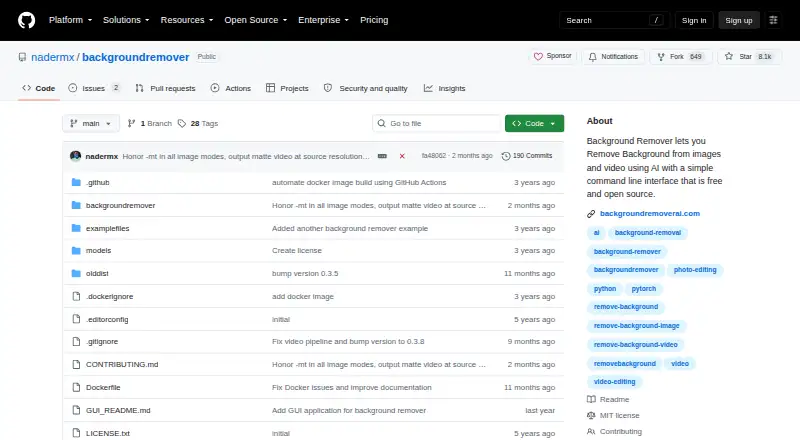
What BackgroundRemover is
BackgroundRemover uses AI to remove backgrounds from images and videos. It is open-source software that can be installed locally for free with pip or from source, and it also offers a hosted REST API and a local HTTP API server. Image tools include alpha matting, mask output, and replacement backgrounds using a color or image. For video, it can produce transparent MOV, matte key, and GIF output, or composite over an image or video. Models include u2net for general subjects, u2net_human_seg for people, and u2netp for faster processing. Its command-line tool lists JPG, JPEG, PNG, HEIC, and HEIF images, plus MP4, MOV, WebM, OGG, and GIF video. It detects an available GPU and falls back to CPU if needed. The hosted Free plan costs nothing and allows one standard-resolution transparent PNG image per day, with short videos, ads, and no batch processing. Pro (annual) is $9 a year; Pro (monthly) is $12 a month. Both include full-resolution HD downloads, batch uploading, and no processing limit.
Good
- Open-source software can be installed locally for free.
- Image backgrounds can be replaced with a color or image.
- Video output includes transparent MOV, matte key, and GIF.
- Hosted REST API supports image and video processing.
- GPU detection includes CPU fallback.
Watch out
- Free plan allows one image per day.
- Free downloads are standard-resolution transparent PNGs.
- Free plan includes ads and no batch processing.
- Pro (monthly) is $12 a month.
Who it suits
BackgroundRemover suits people working with portraits, product photos, or e-commerce images, as well as developers seeking hosted or local API access. Its model choices and image and video options may fit users with different removal and compositing needs.
Verdict
BackgroundRemover combines local software, hosted access, and image and video background tools. Check the free plan's daily image limit and output restrictions against your workflow before choosing a paid plan.
Plans and prices
From BackgroundRemover's own pricing page, checked 21 Oct 2026.
| Plan | Price | What it gives you |
|---|---|---|
| Free | Free | 1 image per day · AI removal · transparent PNG · standard resolution · no batch processing · short videos only · ads · free forever |
| API credits | $1, paid once | 1 credit = 1 image or video · volume discounts up to 70% off · contact for more than 100,000 credits · 1,000 credits; Total: US$ 10.00 |
| Pro (monthly) | $12 a month | Full-resolution HD downloads · no limit · batch uploading · files up to 100GB · priority queue · no ads · per user / month |
| Pro monthly | $12 a month | HD downloads · no ads · unlimited processing · batch uploads · files up to 100GB · priority queue · API access · per user / month |
| Pro (annual) | $108 a year | Full-resolution HD downloads · no limit · batch uploading · files up to 100GB · priority queue · no ads · per user / month; US$ 108.0 billed annually |
| Pro annual | $108 a year | HD downloads · no ads · unlimited processing · batch uploads · files up to 100GB · priority queue · API access · US$108.0 billed annually |
The facts
Each one read from BackgroundRemover's own pages, with the date it was checked.
What it does
- Alpha matting
- Alpha-matting controls expose foreground and background thresholds, erosion size and processing base size for edge refinement.checked 21 Oct 2026
- API access
- Yeschecked 23 Sep 2026
- API SDK examples
- API documentation includes Python, cURL, PHP, JavaScript and C# request examples.checked 21 Oct 2026
- Background replacement
- Outputs can use transparency, a custom RGB color or a supplied background image.checked 21 Oct 2026
- Batch processing
- Folder mode processes supported images or videos in bulk and writes results to an output folder.checked 21 Oct 2026
- Developer integration
- The hosted REST API supports image and video background removal and provides examples in Python, PHP, JavaScript, and C#.checked 8 Oct 2026
- Docker limitation
- Video Docker runs may need at least 2GB shared memory or --ipc=host to avoid multiprocessing errors.checked 21 Oct 2026
- Documentation depth
- Independent HysenLabs documentation classifies it as an MIT Python CLI/library and explains models, Docker shared memory and GPU setup.checked 21 Oct 2026
- Export formats
- PNG output documented; input support includes JPG,JPEG,PNG,HEIC,HEIFchecked 23 Sep 2026
- Formats
- The command-line tool lists JPG, JPEG, PNG, HEIC, and HEIF image formats and MP4, MOV, WebM, OGG, and GIF video formats.checked 8 Oct 2026
- GPU acceleration
- The tool automatically detects an available GPU and falls back to CPU if a GPU is unavailable or errors occur.checked 8 Oct 2026
- GPU behavior
- GPU acceleration is automatic when available, with CPU fallback; PyPI documentation says GPU can be 5–10 times faster.checked 21 Oct 2026
- Homebrew availability
- Workbrew's Homebrew catalog lists version 0.4.5, MIT licensing and the command brew install backgroundremover.checked 21 Oct 2026
- Hosted REST API
- The hosted API uses an Authorization API key, conversion and results endpoints, and supports image and video jobs.checked 21 Oct 2026
- Hosted web tool
- BackgroundRemoverAI.com offers browser-based image and video background removal with transparent downloads.checked 21 Oct 2026
- Image formats
- The CLI accepts JPG, JPEG, PNG, HEIC and HEIF images, with HEIC/HEIF requiring pillow-heif.checked 21 Oct 2026
- Image options
- Image processing supports alpha matting, mask output, and replacing the background with a color or image.checked 8 Oct 2026
- Licence
- The repository is distributed under the MIT License, allowing commercial use, modification and redistribution with notices retained.checked 21 Oct 2026
- Limit: hosted failures
- A Reddit discussion records reports of video jobs returning errors or 404s when no object was detected in the first five seconds, with an hourly retry limit mentioned by the maker.checked 21 Oct 2026
- Limit: model quality
- A GitHub user reported dark or low-contrast subject regions being partially erased and contours performing worse than remove.bg; the maintainer attributed the ceiling to U2Net.checked 21 Oct 2026
- Limit: newer models pending
- The maintainer said stronger models such as BiRefNet and ISNet were tracked but not yet supported in the referenced issue.checked 21 Oct 2026
- Local API
- The software can run as a local HTTP API server with image upload and URL processing.checked 8 Oct 2026
The company
- Company identity
- The project site says it was made by Johnathan Nader and describes BackgroundRemoverAI.com as an open-source project built on U2Net.checked 21 Oct 2026
Money
- Free plan
- Yeschecked 23 Sep 2026
The full review of BackgroundRemover
Overview
BackgroundRemover uses AI to remove backgrounds from still images and video, with options to run it on your own machine or use hosted access. It suits developers and people handling recurring or mixed image-and-video work. Its broad processing options are compelling, while the free web plan is tightly capped.
Key features
Image and video tools
Images can be processed with alpha matting or as masks, and their backgrounds can be replaced with a color or another image. Three models address different needs: u2net for general subjects, u2net_human_seg for people, and u2netp for faster processing. That range makes the tool adaptable to portraits and product images without requiring every job to use the same model.
Video output includes transparent MOV, matte key, GIF, or a composite over an image or video. The command-line tool supports JPG, JPEG, PNG, HEIC, and HEIF images, plus MP4, MOV, WebM, OGG, and GIF video; PNG output is documented for images. This breadth is useful for workflows that extend beyond standard image cutouts.
Processing and integration
Batch processing is supported, and the tool detects an available GPU automatically, falling back to CPU if none is available or an error occurs. Users can install the open-source project locally for free with pip or from source. It also runs as a local HTTP API server, accepting uploads or URLs.
The hosted REST API handles image and video background removal, with examples in Python, PHP, JavaScript, and C#. That makes it practical to connect the service to existing applications, though the credit plan charges for each image or video and large purchases require contacting the provider.
For hosted file handling, uploaded files are deleted after two hours, converted files after 24 hours, and conversion IP addresses after one hour. The site says files are processed securely and automatically deleted; the stated deletion periods give users a clearer sense of retention, though they should still consider whether hosted processing fits their privacy requirements.
Pricing
The free plan costs nothing, billed free forever. It allows one image per day, transparent PNG downloads at standard resolution, and short videos, but excludes batch processing and includes ads. It is suitable for occasional, low-volume image use; the daily cap and resolution limit make it a poor fit for regular production work.
API credits cost $1, paid once, billed as 1,000 credits for a total of US$ 10.00. One credit covers one image or video, volume discounts reach up to 70% off, and purchases above 100,000 credits require contact. This pay-as-you-go option suits developers with variable usage, but ongoing or heavy use may be less predictable than a subscription.
Pro (annual) costs $9 a year, billed per user / month, with US$ 108.0 billed annually. Pro (monthly) costs $12 a month, also billed per user / month. Both offer full-resolution HD downloads, no limit, batch uploading, files up to 100GB, a priority queue, and no ads. Annual billing lowers the monthly equivalent but commits the user to US$ 108.0 billed annually; monthly billing costs more per month and allows a shorter commitment. New subscribers have a 7-day money-back guarantee and can contact support within seven days to request a refund.
Platforms
BackgroundRemover supports API, Linux, macOS, self-hosted, web, and Windows use. Local installation and a local HTTP API server give technically comfortable users control over where they run processing, while hosted access offers a simpler route for those who do not want to install the project.
Who it's for
It is a strong fit for developers integrating background removal, and for people who routinely process portraits, product photos, e-commerce images, or video. The choice of local, self-hosted, API, and web access helps accommodate different workflows. Someone needing only an occasional image should first consider whether one standard-resolution image per day is enough; users needing HD output, batches, or larger files will need Pro.
Pros and cons
- Pro: Image and video workflows share one tool, with multiple output types and support for several common and less common input formats.
- Pro: Free local installation, a local API server, and a hosted REST API give developers several ways to integrate or run processing.
- Pro: Pro includes batch uploads, HD downloads, files up to 100GB, and no usage limit, addressing the free tier’s main constraints.
- Con: The free web plan’s one-image daily cap, standard resolution, ads, and lack of batch processing restrict it to light use.
- Con: API credits are counted per image or video, so costs can rise with usage; larger orders require contacting the provider.
- Con: The annual Pro option bills US$ 108.0 annually, so its lower monthly equivalent comes with a yearly payment commitment.
Alternatives
Choose Robust Video Matting if you want a free, GPL-3.0 project with pretrained models and source code, and its Android, API, iOS, Linux, self-hosted, or web platforms suit your workflow.
Cutout.Pro is a freemium alternative with Android and iOS support and a subscription offering 80 credits/month for $5 a month; consider it if those platforms or that allowance better match your needs.
Bria Video Background Removal offers a free tier with 100 generations, cloud-only deployment, a 10 requests/minute limit, queue-based latency, and Discord community support; choose it if those terms fit your video workflow.
Pixelcut has a free tier with limited background removal and upscale, plus free exports without a watermark; it may suit users who want those tools on Android or iOS.
VCam is another freemium option, with a free Starter plan for up to three workspace members, up to 500MB storage, and a watermark.
EZ-CorridorKey is a free desktop app for Linux, macOS, and Windows, with donations welcome.
Knockout API offers a recurring free allowance of 30 images per month across its API and web platforms; consider it if that monthly image quota matches your integration needs.
Transparent Background is a free open-source Python package with GUI and webcam support for Linux, macOS, and Windows.
For more options, browse Video Background Removal Software, Green Screen Software, AI Video Background Removers, or AI Background Removers.
Verdict
BackgroundRemover is best for developers and regular image or video users who value local control, batch work, and flexible output choices. Its free local project and broad integrations make it a capable starting point, but the free hosted tier is too limited for sustained work; choose Pro for regular high-volume processing, and look elsewhere if your needs are occasional and the one-image daily cap is too restrictive.
Getting started
- Open https://github.com/nadermx/backgroundremover
- Install locally with pip or from source code
- Use the web service or hosted REST API
- Run the local HTTP API server for uploads and URL processing
- Choose Free, API credits, Pro (annual), or Pro (monthly)
- Provide supported image or video files
Limits worth knowing
The Free plan permits one image per day, standard-resolution transparent PNG downloads, short videos, and no batch processing. Pro plans offer unlimited processing, HD downloads, batch uploads, files up to 100GB, priority queue access, and no ads.
Questions
Is BackgroundRemover free?
The open-source project can be installed locally for free. Its Free plan costs nothing and includes ads.
What does the Free plan include?
It allows one image per day, standard-resolution transparent PNG downloads, and short videos, without batch processing.
What are the paid plan prices?
API credits cost $1, paid once, billed as 1,000 credits with a listed total of US$ 10.00. Pro (annual) costs $9 a year, billed at US$ 108.0 annually, and Pro (monthly) costs $12 a month.
Which formats are supported?
Images include JPG, JPEG, PNG, HEIC, and HEIF. Videos include MP4, MOV, WebM, OGG, and GIF.
Does it offer an API?
Yes. A hosted REST API handles image and video background removal, and a local HTTP API server supports uploads and URL processing.
Is it open source?
Yes. BackgroundRemover is open source and can be installed locally from pip or source code.
Alternatives to BackgroundRemover
- 1

Photoroom
Free planAndroidiOSWebAPI8.3From $7.50 a month - 2

Pixelcut
Free planAndroidiOSWebAPI8.3From $8 a month - 3
Cutout.Pro
Free planAndroidiOSWebAPI8.2From $5 a month - 4

Erase.bg
Free planAndroidiOSWebAPI8.2Free plan - 5

NSS Background Remover Platform
Free planAndroidiOSWebAPI7.4Free plan - 6
ChromaCam
Free planAPImacOSWindows7.3From $24.99 a year