Robust Video Matting
Robust Video Matting is a free project for separating people from video backgrounds.
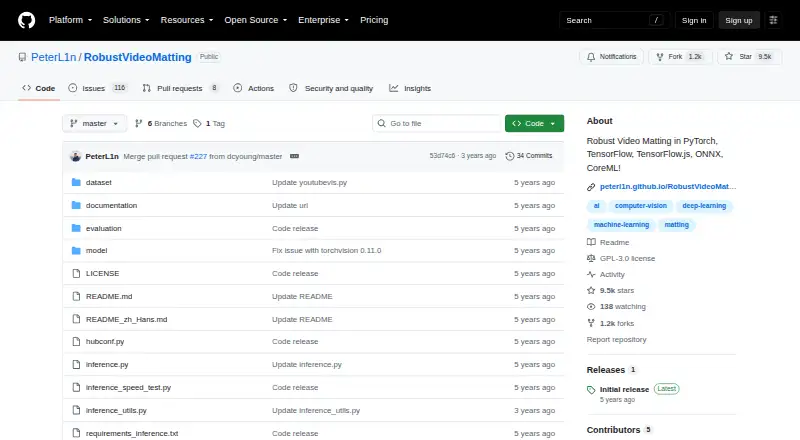
What Robust Video Matting is
Robust Video Matting is a free project for separating people from video backgrounds. It processes frames with a recurrent neural network that carries temporal memory, and the project says it can perform matting in real time without additional inputs. A browser webcam demo runs the model live and can visualize recurrent states. For file workflows, its conversion API accepts a video or image sequence and can produce a composited video or PNG sequence, with optional alpha and foreground outputs. Models or exports are available for PyTorch, TorchHub, TorchScript, ONNX, TensorFlow, TensorFlow.js, and CoreML. The project recommends MobileNetv3 for most uses; ResNet50 is a larger option with small performance improvements. It reports GPU performance figures, but cautions that file conversion is much slower than tensor throughput because the script does not use hardware video encoding or decoding or parallel tensor transfers. CoreML models require iOS 13 or later and do not support dynamic resolution. The repository links a Colab demo for testing videos with a free GPU, along with training and evaluation documentation. The code is released under GPL-3.0.
Good
- Can perform matting in real time without additional inputs.
- Conversion accepts videos or image sequences.
- Can output composited video or PNG sequences.
- Provides models or exports for multiple frameworks.
- Includes a Colab demo with a free GPU.
Watch out
- File conversion runs much slower than tensor throughput.
- CoreML requires iOS 13 or later.
- CoreML does not support dynamic resolution.
- Code is licensed under GPL-3.0.
Who it suits
This project may suit developers who need human video matting, model exports for different frameworks, or a browser webcam demo. Its Colab demo offers a way to test videos using a free GPU.
Verdict
Robust Video Matting offers several model formats and both live-demo and file-conversion workflows. Keep the slower conversion script and CoreML resolution limits in mind when choosing an implementation.
Plans and prices
From Robust Video Matting's own pricing page, checked 9 Oct 2026.
| Plan | Price | What it gives you |
|---|---|---|
| Robust Video Matting | Free | GPL-3.0 · pretrained models and source code |
The facts
Each one read from Robust Video Matting's own pages, with the date it was checked.
Where it runs
- Browser demo
- The webcam demo runs the model live in a browser and can visualize recurrent states.checked 9 Oct 2026
- iOS requirement
- The provided CoreML models require iOS 13 or later, and CoreML does not support dynamic resolution.checked 9 Oct 2026
What it does
- Colab demo
- The Colab demo lets users test the model on their own videos with a free GPU.checked 9 Oct 2026
- Compatibility limits
- CoreML does not support dynamic resolution, and the provided ONNX models use opset 12 and are tested with CPU and CUDA backends.checked 9 Oct 2026
- Examples and training
- The repository provides a Colab demo for testing videos with a free GPU and links to training and evaluation documentation.checked 9 Oct 2026
- Frameworks
- The project provides model implementations or exports for PyTorch, TorchScript, ONNX, TensorFlow, TensorFlow.js, and CoreML.checked 9 Oct 2026
- License
- The repository states that the code is released under the GPL-3.0 license.checked 9 Oct 2026
- Mobile support
- CoreML models require iOS 13 or later, and the README links a third-party NCNN C++ Android project.checked 9 Oct 2026
- Model choices
- The project recommends MobileNetv3 for most use cases and describes ResNet50 as a larger variant with small performance improvements.checked 9 Oct 2026
- Model formats
- The project provides models for PyTorch, TorchHub, TorchScript, ONNX, TensorFlow, TensorFlow.js, and CoreML.checked 9 Oct 2026
- Model variants
- MobileNetv3 is recommended for most use cases, while ResNet50 is larger with small performance improvements.checked 9 Oct 2026
- No additional inputs
- The project says it can perform matting in real time on videos without additional inputs.checked 9 Oct 2026
- Performance
- The README reports 172 FPS for HD and 154 FPS for 4K on an RTX 3090 using FP16, with batch size 1 and frame chunk 1.checked 9 Oct 2026
- Performance limitation
- The project cautions that its video conversion script is expected to run much slower than the reported tensor throughput because it does not use hardware video encoding or decoding or parallel tensor transfers.checked 9 Oct 2026
- Project origin
- The repository says the project was developed at ByteDance Inc.checked 9 Oct 2026
- Purpose
- Robust Video Matting is designed for human video matting and uses a recurrent neural network with temporal memory to process video frames.checked 9 Oct 2026
- Real-time performance
- The README reports 4K at 76 FPS and HD at 104 FPS on an Nvidia GTX 1080 Ti GPU.checked 9 Oct 2026
- Real-time processing
- The project says it can perform matting in real time without additional inputs.checked 9 Oct 2026
- Support and guidance
- The README links inference and training documentation for usage, training, and evaluation instructions.checked 9 Oct 2026
- Video conversion
- The provided conversion API accepts a video file or image sequence and can output a composited video or PNG sequence, with optional alpha and foreground outputs.checked 9 Oct 2026
The full review of Robust Video Matting
Robust Video Matting is a free, open-source project for separating people from video backgrounds. It best suits developers and technically confident creators who want to run or integrate a matting model; its real-time, no-input approach is compelling, while file conversion carries a practical speed penalty.
Overview
A recurrent neural network uses temporal memory across frames to perform human matting without additional inputs. That design is useful for continuous footage and live capture, where preparing guidance for each frame would get in the way. Background replacement is supported up to 4K, but this is a focused matting project rather than a general video editor.
The repository includes source code and pretrained models under GPL-3.0, with training and evaluation documentation for teams that want to adapt or integrate the model. The license makes the software free, though teams distributing it as part of another product should account for GPL-3.0 obligations. The project was developed at ByteDance Inc.
Key features
- Live matting: The project says it can process video in real time without extra inputs. A browser webcam demo lets users see it running live and visualize recurrent states, making it a useful starting point for evaluating the model.
- Two model sizes: MobileNetv3 is recommended for most uses. ResNet50 is larger and brings small performance improvements, so it is best reserved for cases where those gains justify the larger model.
- Broad model support: Implementations or exports cover PyTorch, TorchHub, TorchScript, ONNX, TensorFlow, TensorFlow.js, and CoreML. This gives developers several deployment paths, though compatibility depends on the target runtime: the ONNX models use opset 12 and are tested with CPU and CUDA backends.
- File conversion: The conversion API accepts a video or image sequence and can produce a composited video or PNG sequence, with optional alpha and foreground outputs. The provided conversion script is expected to run much slower than the headline model throughput because it lacks hardware video encoding and decoding and parallel tensor transfers.
- Try it on your footage: A Colab demo lets users test their own videos using a free GPU, while linked inference and training guides cover usage, training, and evaluation.
The README reports 172 FPS at HD and 154 FPS at 4K on an RTX 3090 with FP16, batch size 1, and frame chunk 1; it also reports 104 FPS at HD and 76 FPS at 4K on a GTX 1080 Ti. Those figures describe model processing, not the slower end-to-end conversion script, so they should not be treated as a promise of export speed.
Pricing
The Robust Video Matting plan costs nothing and includes GPL-3.0 source code and pretrained models. There is no paid tier or usage quota described for this project. The free software is a strong fit for developers who can run it in their own environment, but it does not come with a packaged consumer editing workflow.
Platforms
The project is marked for Android, API, iOS, Linux, self-hosted use, and web. CoreML models require iOS 13 or later, and CoreML does not support dynamic resolution, which can constrain iOS workflows. Android support is linked through a third-party NCNN C++ project, so it is a separate implementation path rather than one of the listed model exports.
Who it's for
Choose Robust Video Matting if you need human-focused video separation, want to integrate a model into software, or prefer a free self-hosted approach with several framework options. It also suits technically confident creators willing to use Colab or conversion tooling. Look elsewhere if you need a turnkey editing app, predictable fast batch exports, or flexible resolution handling on iOS.
Pros and cons
- Pro: Free source code and pretrained models under GPL-3.0 make experimentation and self-hosted use accessible.
- Pro: Real-time matting without additional inputs and support up to 4K suit live and high-resolution workflows.
- Pro: Multiple model formats, plus both webcam and file demos, offer several ways to evaluate or integrate the project.
- Con: The conversion script runs much slower than the reported tensor speeds, limiting the value of those figures for export planning.
- Con: CoreML's fixed-resolution limitation and iOS 13 minimum narrow compatibility for some Apple-device workflows.
- Con: Android relies on a third-party NCNN project, which adds another implementation to assess.
Alternatives
Video Background Removal Software and AI Video Background Removers are category roundups for comparing other options.
- Cutout.Pro is a freemium option across mobile, desktop, web, and API platforms; its monthly plan starts at $5 a month for 80 credits/month. Choose it if you prefer a paid credit plan to running an open-source model.
- BackgroundRemover is free and open source, with local installation through pip or source code. Choose it if you want a locally installable background-removal project rather than a video matting workflow.
- Bria Video Background Removal offers a free cloud plan with 100 generations, a 10 requests/minute limit, queue-based latency, and Discord community support. Choose it if a cloud API workflow and bounded free generation quota suit your needs.
- Pixelcut has a free tier with limited background removal and free exports without a watermark. Choose it if you want a consumer-oriented mobile or web option with limited free removal.
- VCam offers a free starter plan with a watermark, up to 500MB storage, and three workspace members. Choose it if those workspace and storage limits fit your needs.
- EZ-CorridorKey is a free desktop app for Linux, macOS, Windows, and self-hosted use. Choose it if a desktop workflow fits better.
- Knockout API has a recurring free tier capped at 30 images per month. Choose it if your workload is image-based and fits that quota.
- Transparent Background is a free open-source Python package with GUI and webcam support. Choose it if you want a Python-based background tool with those interfaces.
Verdict
Robust Video Matting is a strong choice for developers and technically capable creators who need free, human-focused matting with real-time processing and model exports for several frameworks. Its main advantage is the combination of no-input video matting and flexible integration; look elsewhere if you need a polished editing app or rely on the provided script for fast file conversion.
Getting started
- Open the project repository on GitHub
- Choose a model format such as PyTorch, ONNX, TensorFlow, or CoreML
- Select MobileNetv3 for most uses or ResNet50 for a larger variant
- Run the browser webcam demo or use the conversion API
- Provide a video file or image sequence for conversion
- Use the Colab demo with its free GPU for video testing
Limits worth knowing
CoreML models require iOS 13 or later and cannot handle dynamic resolution. The conversion script is expected to run much slower than tensor-throughput results because it does not use hardware video encoding or decoding or parallel tensor transfers.
Questions
Is Robust Video Matting free?
Yes. The project is free and released under the GPL-3.0 license, with pretrained models and source code.
Which platforms and formats are available?
Listed platforms include Android, API, iOS, Linux, self-hosted, and web. Models are provided for PyTorch, TorchHub, TorchScript, ONNX, TensorFlow, TensorFlow.js, and CoreML.
What does the conversion API accept?
It accepts a video file or an image sequence and can return a composited video or PNG sequence, optionally with alpha and foreground outputs.
What model should most users choose?
The project recommends MobileNetv3 for most use cases. ResNet50 is larger and offers small performance improvements.
Can it run on iOS?
CoreML models require iOS 13 or later. CoreML does not support dynamic resolution.
Who developed the project?
The repository says Robust Video Matting was developed at ByteDance Inc.
Alternatives to Robust Video Matting
- 1

BackgroundRemover
Free planOpen sourceWebAPILinuxmacOS8.3From $108 a year - 2

Pixelcut
Free planAndroidiOSWebAPI8.3From $8 a month - 3
Cutout.Pro
Free planAndroidiOSWebAPI8.2From $5 a month - 4

Picsart Video Background Removal API
Free planAndroidiOSWebAPI8.0From $10.50 a month - 5

VCam
Free planWebmacOSSelf-hostedWindows7.8Free plan - 6

Fotor
Free planAndroidiOSWebAPI7.5Free plan