Knockout API
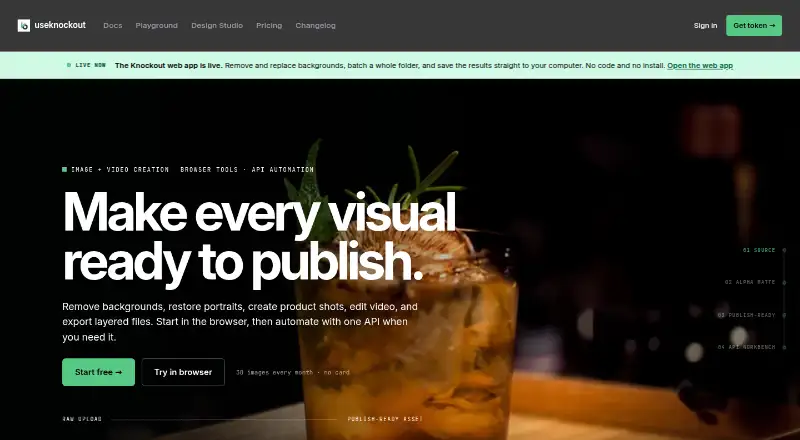
Knockout API provides image and video processing through a browser app and API.
What Knockout API is
Knockout API provides image and video processing through a browser app and API. Its documented image tools cover background removal and replacement, batch processing, masking, smart crop, stickers, outlines, shadows, and inpainting. The API also includes upscaling, portrait restoration, colorization, and object removal. Video background removal runs asynchronously, with job polling to check progress. In its browser Canvas, users can build layered designs with text and effects, then save canvases and cutouts to a free account. Developers can connect through REST, any HTTP client, or official Node, React, Python, and CLI options. Knockout says it manages GPU processing, endpoints, usage records, credentials, teams, and billing, with infrastructure powered by Modal. Its privacy policy says uploaded images are handled in GPU worker memory, not retained after the response, and not used to train models. Free usage allows 30 images per month and 60 requests per minute; paid tiers allow 600 requests per minute with no monthly cap. Pricing lists Pay-as-you-go at $0.02 a month and Plus at $10 a month.
Good
- Browser Canvas supports layered designs with text and effects.
- Image tools include masking, inpainting, and smart crop.
- API offers Node, React, Python, and CLI options.
- Uploaded images are not retained after the response.
- Free plan includes 30 images per month.
Watch out
- Free usage is limited to 30 images monthly.
- First background-removal request after idle can take longer.
- Video removal is asynchronous and requires job polling.
Who it suits
Knockout suits developers who need image or video processing through an API, as well as users making layered designs in a browser. Its listed plans address evaluation and side projects through to production workloads.
Verdict
Knockout combines browser-based design tools with a broad image and video API. Check the monthly image allowance, per-minute request limits, and plan-specific support before choosing a tier.
Plans and prices
From Knockout API's own pricing page, checked 29 Sep 2026.
| Plan | Price | What it gives you |
|---|---|---|
| Free | Free | 30 images every month · no card · /remove, /remove-url, /mask, /compare, /preview · community support |
| Pay-as-you-go | $0.02 a month | All endpoints · PSD export $0.10/image · video background removal $0.10/output sec · email support · Metered usage billed monthly |
| Knockout Plus | $10 a month | 250 images included, then $0.02/image · layered PSD export included · video background removal $0.08/output sec · edge despill and saved presets · custom watermarks, resize and compression · Monthly |
| Volume | Priced on request | 100k+ images/mo · negotiated SLA available · Slack support · usage dashboard · Negotiated per-image rate |
The facts
Each one read from Knockout API's own pages, with the date it was checked.
What it does
- Audience
- The site positions Free for evaluation, side projects, and open-source work; Pay-as-you-go for side projects and early startups; Plus for designers, agencies, and power users; and Volume for production workloads.checked 29 Sep 2026
- Compliance
- The privacy policy says users in the EU/EEA have additional rights under GDPR and can contact the company about them.checked 29 Sep 2026
- Design Studio
- The browser Canvas supports layered designs with text and effects, and users can save canvases and cutouts to a free account.checked 29 Sep 2026
- Enhancement
- The API includes image upscaling, portrait restoration, colorization, and object removal.checked 29 Sep 2026
- Image handling
- The privacy policy says uploaded images are processed in GPU worker memory, not stored after the response, and not used for model training.checked 29 Sep 2026
- Image tools
- Its documented tools include background removal and replacement, batch processing, masking, smart crop, stickers, outlines, shadows, and inpainting.checked 29 Sep 2026
- Integrations
- Official client options include Node, React, Python, and CLI, alongside REST and any HTTP client.checked 29 Sep 2026
- Operations
- The service says it handles GPU processing, endpoint updates, usage records, credentials, teams, and billing, with GPU infrastructure powered by Modal.checked 29 Sep 2026
- Performance
- The site says warm background-removal calls are around 200ms for a 1024×1024 image, while a first request after idle can take longer as capacity starts.checked 29 Sep 2026
- Purpose
- Knockout provides image and video processing tools through a browser app and API.checked 29 Sep 2026
- Security
- The privacy policy says API tokens are SHA-256 hashed, passwords are managed by Supabase Auth using bcrypt, and traffic is encrypted via TLS.checked 29 Sep 2026
- Support
- The site lists community support for Free, email support for Pay-as-you-go, and Slack support for Volume.checked 29 Sep 2026
- Usage limits
- The docs list free usage at 60 requests per minute and 30 images each month, while paid tiers have a 600-request-per-minute limit and no monthly cap.checked 29 Sep 2026
- Video
- The API supports asynchronous video background removal with job polling.checked 29 Sep 2026
Money
- Free plan
- Yeschecked 20 Sep 2026
The full review of Knockout API
Overview
Knockout API combines browser-based image design with image and video processing through an API. It suits developers who need those tools in an application, as well as designers who want a browser Canvas for layered compositions.
Its range is a strength, but the right tier depends on image volume: Free is capped at 30 images a month, while Plus includes 250 and Volume targets 100,000 or more.
Key features
Image tools cover background removal and replacement, blur, foreground isolation, masking, smart crop, batch processing, stickers, outlines, shadows and inpainting. The API also handles upscaling, portrait restoration, colorization and object removal. That breadth makes Knockout more useful than a single-purpose background-removal endpoint for teams building varied image workflows.
Video background removal runs asynchronously, with job polling rather than an immediate finished result. It supports MP4, MOV, AVI, WebM and MKV, clips up to 30 minutes, transparent export and resolutions up to 1080p. The stated warm-call speed for background removal is around 200ms for a 1024×1024 image; a first request after idle can take longer while capacity starts. That distinction matters for applications where latency is visible to users.
The browser Canvas supports layered designs with text and effects, and free accounts can save canvases and cutouts. Developers can use REST or HTTP directly, or official Node, React, Python and CLI options. Knockout manages GPU processing, endpoint updates, usage records, credentials, teams and billing; its GPU infrastructure is powered by Modal.
The privacy policy says uploaded images are processed in GPU worker memory, not stored after the response and not used for model training. It also describes SHA-256-hashed API tokens, Supabase Auth with bcrypt-managed passwords, and TLS-encrypted traffic. EU/EEA users have additional GDPR rights and can contact the company about them.
Pricing
Free costs nothing, recurring, with no expiring signup grant. It allows 30 images a month and 60 requests per minute, with community support. That is enough for evaluation, side projects and open-source work, but the monthly image cap rules it out for sustained production use.
Pay-as-you-go costs $0.02 a month, with metered usage billed monthly. It includes all endpoints, email support and video background removal at $0.10/output second; PSD export is an add-on. The paid request limit is 600 per minute, with no monthly image cap. This is the more flexible fit for side projects and early startups, though video costs can add up with longer outputs.
Knockout Plus costs $10 a month, billed monthly, and includes 250 images a month. It is positioned for designers, agencies and power users. That fixed allowance is a clearer fit when usage is predictable, but its monthly quota is lower than an uncapped paid tier.
Volume has custom pricing and is intended for production workloads of 100,000 or more images per month. Free offers community support, Pay-as-you-go email support, and Volume Slack support. Compare the included quota and support channel with expected usage before choosing.
Platforms
Knockout is available as a web app and API. The browser Canvas serves design work; the API and client options suit software integrations and automated processing.
Who it's for
Choose Knockout if you need several image-processing functions and video background removal from one service, or want to combine API processing with a browser-based design canvas. Free is aimed at evaluation, side projects and open-source work; Pay-as-you-go suits early-stage projects needing uncapped monthly image volume; Plus fits a 250-image monthly workflow; and Volume is aimed at high-volume production.
Look elsewhere if you need a free tier for regular high-volume use, higher-than-1080p video output, or a guaranteed fast first call after idle. The free plan's 30-image cap and the stated cold-start delay are material constraints.
Pros and cons
- Pros: A broad image toolkit plus asynchronous video background removal can cover several processing needs through one API.
- Pros: Node, React, Python and CLI clients sit alongside REST and generic HTTP access, giving developers multiple integration routes.
- Pros: The policy says images are not retained after the response or used for model training, a useful privacy assurance for uploaded assets.
- Cons: Free is limited to 30 images a month, so it is for evaluation and small projects rather than ongoing image-heavy use.
- Cons: Video output tops out at 1080p, and the first call after idle can take longer than a warm call.
- Cons: Pay-as-you-go video is charged at $0.10/output second, making output duration a direct cost factor.
Alternatives
For a free video-removal workflow with a stated 60-second clip limit and transparent WebM export, consider BGRemove.video; it allows three successful removals per 24-hour window. If you want a free Linux CLI, Video Background Remover CLI is another option, though long animated GIFs can become large. For a free web option, RVM-Web is available across web, Windows, macOS and Linux.
Bria Video Background Removal is worth considering if its free 100 generations, cloud-only deployment, 10 requests per minute and queue-based latency suit your needs. For a one-time $6 purchase of 6,000 credits, about four minutes of standard processing and output up to 4K, consider unbg.video.
For broader background-removal browsing, see Green Screen Software, AI Background Removers, AI Video Background Removers and API Mocking Tools. Other listed alternatives include Cutout.Pro, BackgroundRemover.video and Molyin Video Background Remover.
Verdict
Knockout API is a strong fit for developers and creative teams that want broad image processing, video background removal and a browser Canvas in one service. Its main advantage is that range, backed by multiple integration options; its main drawback is the gap between the small Free allowance and the needs of sustained production. Choose it when its 1080p ceiling, quotas and usage-based video cost fit your workflow. Look elsewhere when free volume or higher-resolution video is the priority.
Alternatives to Knockout API
- 1

Pixelcut
Free planAndroidiOSWebAPI9.1From $8 a month - 2

Photoroom
Free planAndroidiOSWebAPI9.1From $7.50 a month - 3
Cutout.Pro
Free planAndroidiOSWebAPI9.0From $5 a month - 4

BackgroundRemover
Free planOpen sourceWebAPILinuxmacOS9.0From $108 a year - 5

Erase.bg
Free planAndroidiOSWebAPI8.9Free plan - 6
Artguru Background Remover
Free planAndroidiOSWebAPI8.6From $39.99 a year