
BGRemove.video
BGRemove.video is a web tool for removing video backgrounds and creating transparent clips.
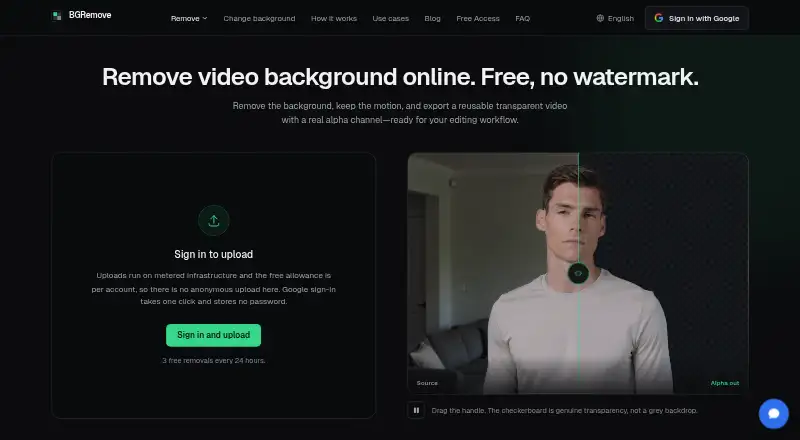
What BGRemove.video is
BGRemove.video is a web tool for removing video backgrounds and creating transparent clips. Upload an MP4, MOV, WebM, M4V, or GIF of up to 60 seconds; the service uses AI to follow subjects between frames, aiming to limit flicker and keep edges steady as they move. It exports transparent WebM with VP9 alpha and keeps the original video dimensions. You can also put a solid color, blur, image, or video behind a processed clip and export an MP4 without using another removal allowance. The free plan costs nothing and allows three successful removals in each 24-hour window, with files up to 2 GB and 60 seconds; exports have no watermark. Files are processed in the EU and retained for 24 hours unless deleted sooner. Google is the sole sign-in option. The maker says uploads are not used to train its or its processing provider’s models. Delicate or obscured subjects, including glass, smoke, fine mesh, overlapping subjects that shift depth, and very dark footage, may be difficult to process.
Good
- Exports transparent WebM with VP9 alpha.
- Preserves source video dimensions.
- Background edits can export as MP4 without another removal.
- Free exports have no watermark.
- Files can be deleted immediately.
Watch out
- Three successful removals per 24-hour window.
- Uploads are limited to 60 seconds.
- Google is the only sign-in option.
- No manual edge or second-pass refinement.
Who it suits
It suits creators and editors working with social clips, product footage, client work, or reusable transparent assets. It is web-based and offers a free allowance for short clips.
Verdict
BGRemove.video combines transparent video export with basic background replacement on a free plan. Its short clip limit and lack of manual refinement matter for footage the automated process struggles with.
Plans and prices
From BGRemove.video's own pricing page, checked 30 Sep 2026.
| Plan | Price | What it gives you |
|---|---|---|
| Free | Free | 3 successful video removals per 24-hour window · videos up to 60 seconds and 2 GB · transparent WebM with VP9 alpha · no watermark · files retained for 24 hours |
| Free Access | Free | 3 successful removals per 24-hour window · videos up to 60 seconds · 2 GB upload · transparent VP9 WebM · no watermark · files kept 24 hours |
The facts
Each one read from BGRemove.video's own pages, with the date it was checked.
What it does
- Alpha output
- The service exports transparent WebM using VP9 alpha and keeps the uploaded video's dimensions.checked 21 Oct 2026
- API status
- The September 2026 changelog says earlier translated pages incorrectly advertised API access and that the feature was never built.checked 21 Oct 2026
- Aspect-ratio handling
- Vertical and square videos retain their original aspect ratio without cropping or padding.checked 21 Oct 2026
- Availability caveat
- The terms do not promise uninterrupted service and say outages at the third-party processing provider can affect BGRemove.checked 21 Oct 2026
- Background-change quota
- Changing the background of an already processed clip is free and unlimited and does not consume another removal.checked 21 Oct 2026
- Background editing
- Users can add a solid color, blur, image, or video behind a processed clip and export an MP4 for free without using another removal allowance.checked 30 Sep 2026
- Background replacement
- Finished clips can receive a solid color, blur, image, or video background and be exported as MP4.checked 21 Oct 2026
- Clip length limit
- Each uploaded video may be at most 60 seconds long.checked 21 Oct 2026
- Daily allowance
- Each signed-in account receives up to three successful background removals in a rolling 24-hour window.checked 21 Oct 2026
- Difficult footage
- Glass, smoke, fine mesh, depth-changing overlaps, and severely underexposed footage are identified as difficult cases.checked 21 Oct 2026
- External codec limit
- MDN reports that VP9 is open and royalty-free but Safari does not support alpha transparency in VP9 video.checked 21 Oct 2026
- External compatibility guidance
- Bannersnack recommends WebM VP9 alpha for Chrome, Firefox, and Edge and HEVC-alpha or ProRes 4444 MOV for Safari.checked 21 Oct 2026
- External delivery guidance
- ExportAlpha's October 9, 2026 guide says cross-browser delivery generally requires HEVC-alpha for Safari and WebM VP9 alpha for Chrome, Firefox, and Edge.checked 21 Oct 2026
- External editor compatibility
- Apple's Final Cut Pro supported-media list includes MOV and MP4 containers but does not list WebM as a native container.checked 21 Oct 2026
- External WebKit issue
- WebKit bug 275908, still marked NEW and modified 19 May 2026, reports VP9 transparency playing with a grey background instead of transparent.checked 21 Oct 2026
- Failed jobs
- A failed processing job does not consume the account's allowance.checked 21 Oct 2026
- File retention
- Uploaded footage and generated transparent results are retained for 24 hours and can be deleted sooner from the library.checked 21 Oct 2026
- Input formats
- Uploads may be MP4, MOV, WebM, M4V, or GIF.checked 21 Oct 2026
- Inputs
- It accepts MP4, MOV, WebM, M4V, and GIF uploads up to 60 seconds long.checked 30 Sep 2026
- Intended users
- The maker presents the service for creators and editors working with social clips, product footage, client work, and reusable transparent assets.checked 30 Sep 2026
- Limitations
- The FAQ identifies glass, smoke, fine mesh, overlapping subjects that swap depth, and severely underexposed footage as difficult cases.checked 30 Sep 2026
Where it runs
- External browser testing
- A 2026 independent test found VP9 WebM alpha preserved transparency in Chrome, Firefox, and Edge on Linux, while Safari WebM alpha appeared grey according to WebKit documentation.checked 21 Oct 2026
- External platform limitation
- Vatom documentation says Safari will not display WebM transparency, while Chrome, Firefox, Opera, and Edge are supported for VP9 WebM alpha.checked 21 Oct 2026
The company
- License and ownership
- The terms assign the service interface, code, and branding to BGRemove and grant users no ownership rights in them.checked 21 Oct 2026
The full review of BGRemove.video
Overview
BGRemove.video is a web app for removing video backgrounds and exporting transparent footage. It is best suited to creators and editors who need short social, product, or client clips without a paid plan. Its appeal is a useful free workflow from removal to replacement; its main constraint is that difficult edges cannot be corrected manually.
Key features
AI temporal matting follows subjects across frames to reduce flicker and preserve steady edges in motion. Transparent exports use WebM with VP9 alpha and retain the source dimensions, making the service a good fit when a project accepts that format. It also lets users place a solid color, blur, image, or video behind a processed clip, then export an MP4 without consuming another removal allowance.
Uploads support MP4, MOV, WebM, M4V, and GIF. The free plan accepts clips up to 60 seconds and 2 GB. Glass, smoke, fine mesh, subjects that overlap and swap depth, and severely underexposed footage are challenging cases. Because there is no manual edge refinement or second-pass mode, users who need precise control over a flawed matte should look elsewhere.
Google is the sole sign-in option, and the service says it does not receive Google passwords. The maker says footage is not used to train its models or its processing provider’s models. Its privacy policy states that traffic uses TLS, footage is encrypted at rest, and production access is restricted to operators who need it. Files are processed in the EU and retained for 24 hours; users can delete them sooner.
Pricing
The Free plan costs nothing and includes three successful video removals per 24-hour window, clips up to 60 seconds and 2 GB, transparent WebM with VP9 alpha, and no watermark. Files are retained for 24 hours. There is no free trial because the service is already free. The quota suits occasional clip work, but regular production may run into the three-removal daily ceiling. Background replacement and MP4 export do not use another removal allowance, which makes follow-up edits less costly in quota terms.
Platforms
BGRemove.video runs on the web, so it does not require a desktop installation. It accepts five common video and animation formats, but transparent output is WebM with VP9 alpha; check that your editing workflow supports it before relying on that export.
Who it's for
Choose it for short-form social content, product footage, client clips, or reusable transparent assets when a free, browser-based process and automated results are enough.
Pros and cons
- Pros: Three successful removals per day are available at no cost, with no watermark, and transparent exports preserve the source dimensions.
- Pros: Background color, blur, image, and video options support a complete replacement workflow without spending another removal allowance.
- Pros: The service states a 24-hour retention period, immediate deletion on request, and safeguards including TLS and encryption at rest.
- Cons: The daily quota and 60-second clip limit rule it out for heavier or longer jobs.
- Cons: Automated matting can struggle with several difficult subjects, and there is no manual or second-pass correction.
- Cons: Google is the only sign-in method, and transparent export is limited to WebM with VP9 alpha.
Alternatives
EZ-CorridorKey is a free full desktop app for Linux, macOS, and Windows, with self-hosted availability; choose it if you want a desktop tool rather than a web service.
Bria Video Background Removal offers 100 free generations, a free trial, and API, desktop, web, and self-hosted platforms. Its free tier is cloud-only, limited to 10 requests per minute, uses queue-based processing, and includes Discord community support; consider it when those deployment options or its generation allowance suit your workflow.
Transparent Background is a free open-source Python package with GUI and webcam support; it is an option for users who prefer a package-based tool.
BackgroundRemover.video is a paid web and API alternative with one-time-purchase plans, including Quick Try at $5.99 a month and Starter at $9.99 a month.
Cutout.Pro is a freemium option available on web, mobile, desktop, and API platforms, with a subscription listed at $5 a month for 80 credits per month.
Video Background Remover CLI is a free Linux tool that requires Python 3.10 or later and downloads models on first run; it may suit users comfortable with a command-line workflow.
FuzzPuppy Video Background Remover is another free web alternative.
VCam is a freemium option for macOS, Windows, and web, with a free Starter plan limited to three Workspace members, 500 MB of storage, and a watermark.
For a broader comparison, browse Video Background Removal Software, AI Video Background Removers, or Green Screen Software.
Verdict
BGRemove.video is a sensible free choice for creators who need a few short transparent clips and background replacements, especially when WebM with VP9 alpha fits their workflow. The no-watermark export and replacement tools make its modest quota useful. Look elsewhere for longer or frequent jobs, or whenever a difficult matte needs manual refinement.
Alternatives to BGRemove.video
- 1

BackgroundRemover
Free planOpen sourceWebAPILinuxmacOS8.3From $108 a year - 2

Photoroom
Free planAndroidiOSWebAPI8.3From $7.50 a month - 3

Pixelcut
Free planAndroidiOSWebAPI8.3From $8 a month - 4
Cutout.Pro
Free planAndroidiOSWebAPI8.2From $5 a month - 5

Erase.bg
Free planAndroidiOSWebAPI8.2Free plan - 6

NSS Background Remover Platform
Free planAndroidiOSWebAPI7.4Free plan