Cutout.Pro background removal review
Batch background removal, replacement scenes and credit-based HD exports.
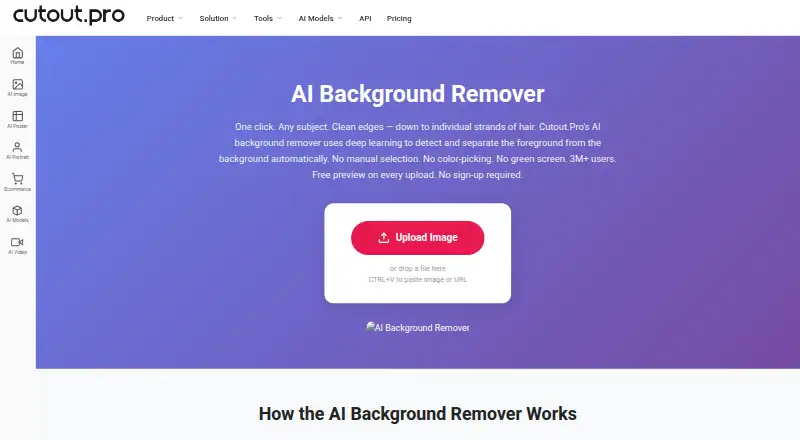
What Cutout.Pro is
Cutout.Pro is available as apps and a web service for removing image backgrounds. It handles common image files, supports replacement backgrounds and manual Erase & Restore corrections, and offers folder batching on Windows and Mac plus API access. You can view a free preview before using credits for HD downloads. Android, iOS, Windows, Mac and Linux apps are available.
Good
- Apps and web access cover Android, iOS, Windows, Mac and Linux
- Watermark-free preview available without an account
- Folder batching on Windows and Mac
- API access plus replacement backgrounds
- Manual Erase & Restore brush
Watch out
- HD downloads use credits
- Files cannot exceed 15 MB or 4096 × 4096 pixels
- Exports are limited to PNG and JPG
- Credits purchased through the Shopify App cannot be refunded
Who it suits
People removing backgrounds across phone, desktop and web; Users needing batch folders or API access; Buyers who want to preview results before paying
Skip it if
You need formats other than PNG or JPG; You regularly work with images above 4096 × 4096 pixels; You want unlimited HD downloads without credits
Verdict
Cutout.Pro is a practical choice for background removal when you want several platform options and a way to process folders on Windows or Mac. Its preview system lowers the barrier to trying it, and API access may suit software projects. Credit accounting is the main consideration: HD downloads consume credits, and the listed pay-as-you-go plans are still shown with monthly prices. Check the file limits, export formats and refund terms before buying, especially if you use the Shopify App.
Plans and prices
From Cutout.Pro's own pricing page, checked 23 Sep 2026.
| Plan | Price | What it gives you |
|---|---|---|
| Subscription — 80 credits/month | $5 a month | 80 credits/month · billed monthly |
| Subscription — 170 credits/month | $9.90 a month | 170 credits/month · billed monthly |
| Subscription — 300 credits/month | $16.90 a month | 300 credits/month · billed monthly |
| Subscription — 550 credits/month | $29 a month | 550 credits/month · billed monthly |
| Subscription — 1000 credits/month | $49 a month | 1000 credits/month · billed monthly |
| Subscription — 1450 credits/month | $69 a month | 1450 credits/month · billed monthly |
| Pay as you go — 30 credits | $4.99 a month | 30 credits |
| Pay as you go — 300 credits | $39 a month | 300 credits |
| Pay as you go — 900 credits | $79 a month | 900 credits |
| Pay as you go — 3000 credits | $199 a month | 3000 credits |
| Pay as you go — 30000 credits | $1,399 a month | 30000 credits |
| Pay as you go — 5000000 credits | $37,500 a month | 5000000 credits |
| Subscription 80 credits | — | 80 credits/month · ₹246.50 per month |
| Free Account | Free | Free previews forever; 5 free credits |
| Subscription Custom | Priced on request | Custom subscription pricing |
| Pay as you go 30000 credits | — | Credits available for use forever · ₹118915.00 one-time |
| Pay as you go 3000 credits | — | Credits available for use forever · ₹16915.00 one-time |
| Pay as you go 300 credits | — | Credits available for use forever · ₹2465.00 one-time |
| Pay as you go 30 credits | — | Credits available for use forever · ₹254.15 one-time |
| Pay as you go 900 credits | — | Credits available for use forever · ₹6715.00 one-time |
| Pay as you go Custom | Priced on request | Custom pay-as-you-go pricing |
| Subscription 1000 credits | — | 1000 credits/month · ₹4165.00 per month |
| Subscription 1450 credits | — | 1450 credits/month · ₹5865.00 per month |
| Subscription 170 credits | — | 170 credits/month · ₹586.50 per month |
The facts
Each one read from Cutout.Pro's own pages, with the date it was checked.
What it does
- API access
- Yeschecked 23 Sep 2026
- Batch processing
- Yeschecked 23 Sep 2026
- Credit-based pricing
- Buy credits in volume packages and use them at your own pace.checked 27 Sep 2026
- Credit usage
- One credit equals one HD image download.checked 27 Sep 2026
- Desktop batch processing
- The Windows and Mac desktop app supports batch processing across folders.checked 27 Sep 2026
- Export formats
- PNG,JPGchecked 23 Sep 2026
- Image privacy
- Images are processed securely, deleted automatically, and not stored or shared.checked 27 Sep 2026
- Input formats
- Supported inputs are JPG, PNG, WEBP, and BMP.checked 27 Sep 2026
- Manual refinement
- An Erase & Restore brush can correct missed background or clipped foreground areas.checked 27 Sep 2026
- Maximum file size
- The maximum file size is 15 MB.checked 27 Sep 2026
- Maximum output resolution
- 4096checked 23 Sep 2026
- Maximum resolution
- Maximum resolution is 4096 × 4096 pixels.checked 27 Sep 2026
- Monthly image allowance
- 80checked 23 Sep 2026
- Paid from
- 5checked 23 Sep 2026
- Refund guarantee
- Main-platform credit purchases have a 14-day refund guarantee.checked 27 Sep 2026
- Replacement backgrounds
- Yeschecked 23 Sep 2026
- Shopify refunds
- Credits purchased through the Shopify App are non-refundable.checked 27 Sep 2026
The company
- Company founded
- Cutout.Pro was founded in 2018.checked 27 Sep 2026
- Founded
- 2018checked 28 Sep 2026
- Headquarters
- Kowloon, Hong Kongchecked 28 Sep 2026
Money
- Free plan
- Yeschecked 23 Sep 2026
- Free preview
- Every upload gets a low-resolution, watermark-free preview without an account or credits.checked 27 Sep 2026
- Free signup credits
- New accounts receive 5 credits and do not require a credit card.checked 27 Sep 2026
Where it runs
- Supported platforms
- The service is compatible with iOS, Android, Mac, Windows, Linux, and web.checked 27 Sep 2026
The full review of Cutout.Pro
The gist
Cutout.Pro is a background-removal service for people who need clean cutouts, replacement backgrounds or multiple image edits. It suits individuals and teams that want browser, mobile, desktop or API access rather than one platform only.
The service is made by Cutout.Pro, founded in 2018 and based in Kowloon, Hong Kong.
On Android
An Android app is available for the background-removal service. It is also offered on iOS, the web, Windows, Mac and Linux, with API access for software integrations.
The Windows and Mac desktop apps can run folder-based batches.
What it does
Cutout.Pro accepts JPG, PNG, WEBP and BMP images up to 15 MB and 4096 × 4096 pixels each. It removes the background, lets you add a replacement background, and exports PNG or JPG files.
An Erase & Restore brush can fix areas where the background was missed or the foreground was clipped. Batch processing is available on Windows and Mac, and an API is available.
Uploads receive a small, watermark-free preview even when you are not signed in and have no credits. One credit covers one HD image download. Processing is secure; files are deleted automatically and are neither stored nor shared.
Standouts
Support spans Android, iOS, web, Windows, Mac and Linux, and the desktop apps can handle folders of images.
You can inspect the free preview before paying, and a new account includes five credits without asking for a credit card.
Trade-offs
HD downloads use credits, and the free plan is limited. The maximum image size is 4096 × 4096 pixels and the maximum file size is 15 MB.
Subscription credits may carry forward, up to a ceiling of five times the monthly allowance. Main-platform credit purchases have a 14-day refund guarantee, while Shopify App credit purchases cannot be refunded.
Output is limited to PNG and JPG.
Pricing
A free tier is available.
Each HD image download deducts one credit. A new account starts with five credits, and every upload receives a free low-resolution preview.
Verdict
Cutout.Pro suits background removal across Android, desktop and web, especially when API access or folder-based batches are important. Its free preview and starter credits let you check results before committing.
Look elsewhere if you need output formats beyond PNG and JPG, images larger than 4096 × 4096 pixels, or a plan without credit limits.
Getting started
- Open the Cutout.Pro background-remover website.
- Upload a JPG, PNG, WEBP, or BMP image up to 15 MB for a free preview.
- Create an account to receive five credits without a credit card.
- Use a credit to download an HD image, or choose a listed subscription or pay-as-you-go package.
- Install the Windows or Mac desktop app for folder batch processing, or use the service on a supported platform.
Limits worth knowing
The free preview is low resolution; an HD download uses one credit. New accounts receive five credits, while the listed 80-credit monthly subscription costs $5 a month.
Questions
Is Cutout.Pro available on Android?
Yes. Cutout.Pro supports Android, along with iOS, web, Windows, Mac and Linux.
Can I try it without signing up?
You can view a low-resolution preview of an upload without an account or credits; opening an account adds five credits and requires no credit card.
Which image file types are accepted?
The service accepts JPG, PNG, WEBP and BMP files. The limits are 15 MB per file and 4096 × 4096 pixels.
How does Cutout.Pro charge for HD images?
An HD image download costs one credit. Plans include monthly subscriptions and pay-as-you-go credit packages.
Does it support batch processing?
Yes. The Windows and Mac desktop apps can process batches across folders.
Are uploaded images stored?
Files are handled securely, removed automatically, and not retained or shared.
Can I get a refund for credits?
Credits bought on the main platform come with a 14-day refund guarantee. Purchases through the Shopify App are not refundable.
Alternatives to Cutout.Pro
- 1

Krea Enhancer
Free planiOSWebAPISelf-hosted8.4Free plan - 2

Bigjpg
Free planAndroidiOSWebAPI8.4$6 one-time - 3
Phot.AI
Free planAndroidiOSWebAPI8.4From $9 a month - 4

Pixelcut
Free planAndroidiOSWebAPI8.4From $8 a month - 5
Upscal
Free planiOSmacOSWindows8.3Free plan - 6

Topaz Gigapixel
AndroidiOSWebAPI8.2From $149 a year