
Krea Enhancer
Krea Enhancer is an AI image tool for sharpening detail, improving clarity, and enlarging blurry, pixelated, or low-resolution pictures.
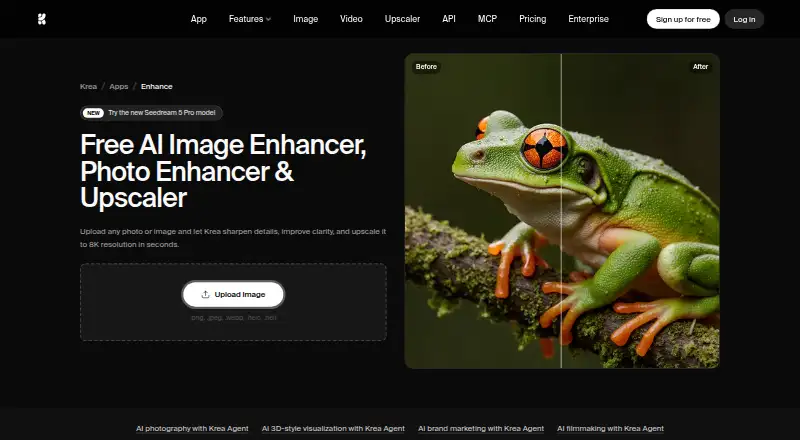
What Krea Enhancer is
Krea Enhancer is an AI image tool for sharpening detail, improving clarity, and enlarging blurry, pixelated, or low-resolution pictures. It accepts PNG, JPEG, WebP, HEIC, and HEIF files, and supports batch processing as well as API access. The workflow is direct: upload an image, enhance it, then download the result. Krea names portraits, landscapes, product photos, old family pictures, and screenshots as suitable examples. Its Enhancer page describes enlargement to 8K in seconds, while paid Basic and higher plans list upscaling up to 22K, including paid upscalers such as Topaz Standard. Online enhancement is available without signing up or entering a credit card, although free use is limited. The Free plan includes 100 compute units per day and basic upscaling to 2K. Monthly plans range from Basic at $9 a month to Business at $200 a month, with Enterprise support options also listed. Plugins are available for Photoshop, After Effects, Premiere Pro, DaVinci Resolve, and Blender. Krea says it is SOC 2 compliant. Enhanced images may be used commercially, including in photography, marketing materials, and professional projects.
Good
- AI enhancement sharpens and clarifies low-resolution images
- Accepts PNG, JPEG, WebP, HEIC, and HEIF
- Batch processing and API access are available
- Free online use needs no sign-up or credit card
- Plugins support Photoshop, After Effects, Premiere Pro, DaVinci Resolve, and Blender
Watch out
- Free basic upscaling is limited to 2K
- Free enhancements have a limited number of uses
- Paid plans charge monthly fees
Who it suits
Krea Enhancer suits people restoring or enlarging portraits, landscapes, product images, family photos, and screenshots. It also fits developers and creative teams needing batch processing, API access, editor plugins, or commercial image use.
Verdict
Pick Krea Enhancer if you need AI sharpening, enlargement, batch work, or API access across common image formats. The free route is useful for limited 2K upscaling, while larger output and higher allowances require paid plans. Teams needing enterprise controls should review the Business and Enterprise provisions.
Plans and prices
From Krea Enhancer's own pricing page, checked 15 Oct 2026.
| Plan | Price | What it gives you |
|---|---|---|
| Free | Free | limited LoRA training up to 50 images · image upscaling up to 2K · image concurrency 1 · 100 units/day |
| Basic | $5 a month | 5,000 units/month · image upscaling up to 22K · Yearly plan; page also shows $9 |
| Pro | $21 a month | 20,000 units/month · 257 Nano Banana 2 generations · 83 Seedance 2.0 videos · upscaling up to 22K · image concurrency 8 · video concurrency 4 · annual price shown; regular $35/month |
| Max | $63 a month | 60,000 units/month · 771 Nano Banana 2 generations · 250 Seedance 2.0 videos · upscaling up to 22K · unlimited image concurrency · video concurrency 8 · LoRA training up to 2,000 images · annual price shown; regular $105/month |
| Business | $160 a month | 80,000 units/month · 1,028 Nano Banana 2 generations · 333 Seedance 2.0 videos · up to 50 seats · SAML SSO · private Node Apps · unlimited image and video concurrency · annual price shown; regular $200/month |
| Maker self-hosted model license | $1,000 a month | self-hosting · fine-tuning and LoRA · up to 10,000 images/month · one domain · 10 licensed users · download weights and code · per model |
| Enterprise | Priced on request | custom seat count · private Node Apps · custom terms · SAML SSO · priority support with SLA · per-member spend limits · IP indemnification · custom pricing |
The facts
Each one read from Krea Enhancer's own pages, with the date it was checked.
What it does
- 3D generation
- Krea describes text-to-3D and image-to-3D model creation for game and product workflows.checked 15 Oct 2026
- API access
- Yeschecked 20 Sep 2026
- API documentation
- Krea says its API documentation guides a basic generation request in about five minutes and includes live endpoint schemas in a playground.checked 15 Oct 2026
- Batch processing
- Krea advertises parallel processing of multiple image-upscaling jobs.checked 15 Oct 2026
- Business controls
- The Business plan lists workspace roles and permissions, model access controls, and up to 50 included seats.checked 10 Oct 2026
- Commercial API output
- Krea states that API outputs are licensed for commercial use, subject to partner-model terms where applicable.checked 15 Oct 2026
- Commercial use
- The Enhancer FAQ says enhanced images may be used for commercial purposes, including photography, marketing materials, and professional projects.checked 10 Oct 2026
- Custom training
- Users can train custom LoRA styles, characters or objects from uploaded images.checked 15 Oct 2026
- Documentation depth
- The Krea 2 repository includes prompting and safety guides plus ComfyUI, SGLang, Hugging Face Diffusers, Ostris and Kohya references.checked 15 Oct 2026
- Enhancer
- The Enhancer reconstructs details in blurry or pixelated images and supports image upscaling to 4K, 8K and 16K.checked 15 Oct 2026
- Enterprise support
- The Enterprise plan lists priority support with an SLA and Slack Connect.checked 10 Oct 2026
- Image editing
- Krea offers retouching, inpainting, compositing and region-specific prompting on an open canvas.checked 15 Oct 2026
- Image generation
- The iOS listing describes text and reference-image generation with models including Flux, Ideogram and Imagen 3.checked 15 Oct 2026
- Input formats
- The upload page lists PNG, JPEG, WebP, HEIC, and HEIF formats.checked 10 Oct 2026
- Integrations
- The API site provides an MCP endpoint and setup command for Claude Code, and lists integrations with Codex, OpenClaw, Cursor and Hermes.checked 15 Oct 2026
- License
- Krea 2 weights use the Krea 2 Community License rather than a standard open-source license; the official inference repository itself is Apache-2.0.checked 15 Oct 2026
Money
- API billing
- API usage is billed separately from Pro, Max and team subscriptions.checked 15 Oct 2026
- Free plan
- Yeschecked 20 Sep 2026
- Free upscaling limit
- The pricing page says the Free plan's basic image upscaling is limited to 2K resolution.checked 10 Oct 2026
- Free use
- The page says users can enhance images online for free without signing up or providing a credit card, with a limited number of free enhancements.checked 10 Oct 2026
- Limit: billing complaints
- BBB lists three complaints in the last three years, including disputed recurring charges and a subscription-refund access dispute.checked 15 Oct 2026
Where it runs
- App Builder
- The platform can turn Node workflows into reusable or shareable apps.checked 15 Oct 2026
The company
- Company facts
- LinkedIn lists Krea as privately held, headquartered in San Francisco, with a stated company size of 11–50 employees.checked 15 Oct 2026
- Founded and funding
- Fobi reports Krea was founded in 2022 in San Francisco and has raised $83M, most recently a $47M Series B in 2025 at a $500M valuation.checked 15 Oct 2026
The full review of Krea Enhancer
Krea Enhancer is an AI image-improvement service for sharpening soft detail, clearing up blur and enlarging low-resolution files. It is a strong fit for creators, marketers and developers who need batch work, integrations or an API rather than a single desktop utility. The deciding trade-off is straightforward: serious resolution and volume quickly move you from the constrained free tier to a monthly compute allowance.
Overview
The core workflow is deliberately direct: upload an image, enhance it and download the result. That simplicity suits occasional corrections as well as production pipelines, while support for PNG, JPEG, WebP, HEIC and HEIF covers common camera, phone and web files. Krea names portraits, landscapes, product photography, old family pictures and screenshots as typical uses, so the service spans personal restoration and commercial content work.
Krea states that enhanced images can be used commercially, including for photography, marketing materials and professional projects. Its SOC 2 compliance is relevant to organizations with security requirements; the complete report is provided through the Trust Center under NDA.
Key features
AI sharpening and enlargement target blurry, pixelated and otherwise low-resolution images. Krea says the Enhancer can reach 8K in seconds. Paid Basic and higher plans separately advertise image upscaling to 22K, including paid upscalers such as Topaz Standard. Those are distinct capability claims, so buyers should confirm which plan and upscaler their intended output requires instead of treating 8K and 22K as interchangeable promises.
Batch processing matters when a folder of product shots, scans or screenshots needs consistent treatment; it is more practical than repeatedly handling files one at a time. API access supports automation and service integration, while plugins for Photoshop, After Effects, Premiere Pro, DaVinci Resolve and Blender let creative teams keep enhancement closer to existing editing workflows. The free online route needs no sign-up or credit card, but only a limited number of enhancements are available.
Pricing
Krea uses a freemium, monthly-billed compute model. Free costs free and supplies 100 compute units per day. It is a sensible way to assess output or handle light personal work, but basic image upscaling is capped at 2K and the daily allowance limits repeated or high-volume jobs.
| Plan | Price | Allowance and notable terms |
|---|---|---|
| Free | free, billed monthly | 100 compute units per day; basic upscaling limited to 2K |
| Basic | $9 a month, billed monthly | 5,000 compute units per month; upscaling up to 22K |
| Pro | $35 a month, billed monthly | 20,000 compute units per month; upscaling up to 22K |
| Max | $105 a month, billed monthly | 60,000 compute units per month; upscaling up to 22K |
| Business | $200 a month, billed monthly | 80,000 compute units per month; up to 50 seats, workspace roles and permissions, and model-access controls |
| Enterprise | Custom pricing | Priority support with an SLA, per-member spend limits and audit logs; Slack Connect is included |
Basic is the practical upgrade for individuals who outgrow 2K or need a predictable monthly pool. Pro and Max suit heavier recurring production, with the higher fees buying substantially more compute rather than a different basic workflow. Business is aimed at managed teams, where seats and permission controls justify the premium; Enterprise is the choice when contractual support and governance outweigh a published price.
Platforms
Krea Enhancer is offered on the web and iOS, with API access for software-driven use. Its editing-suite plugins extend that reach into Photoshop, After Effects, Premiere Pro, DaVinci Resolve and Blender.
Who it's for
Choose it for mixed image libraries, commercial deliverables, batch enhancement or an automated pipeline that benefits from broad format support. It is less suitable for users who only need occasional 2K enlargements and do not want a recurring subscription, or for teams that require governance but cannot justify Business or custom Enterprise pricing.
Pros and cons
- Pros: broad PNG, JPEG, WebP, HEIC and HEIF support; batch processing and API access; commercial-use permission; integrations across major creative applications; a no-card free entry point.
- Cons: free basic upscaling stops at 2K; free enhancements and compute are limited; 22K output requires a paid plan; monthly allowances can be excessive for sporadic users; Enterprise pricing is custom.
Alternatives
NextGenUp is the better pick for a completely free, open-source MIT-licensed workflow with no subscription or watermark, including self-hosting. Choose Bigjpg instead if you need Android, desktop and mobile coverage alongside an API, accepting its free-plan limits of 20 pictures per month, slower speed, shared servers, 5MB uploads and 4x enlargement.
Real-ESRGAN suits users seeking a free, open-source upscaler across desktop, web and self-hosted environments. SupaRes is an alternative API service with a free one-time quota of 10 processing credits, 64 megapixels and one user. LetsEnhance offers API access and 10 sign-up credits without a card, with 24-megapixel input, 50MB files and 8-megapixel output on its free tier.
PixelPanda Image Upscaler is worth considering for one-time, non-subscription credit purchases. Adima Image Upscaler Pro targets Windows and Android users wanting batch upscale and GPU/CPU support. PicWish Image Upscaler is another API-based option with limited free non-HD downloads and paid HD access.
Browse the Image Upscaling Software list for more choices.
Verdict
Pick Krea Enhancer when you need a polished AI enhancement workflow that can scale from browser edits to batches, creative-suite plugins and API automation, with commercial use permitted. Look elsewhere if your priority is unrestricted free use, local open-source control or occasional enlargements that do not justify monthly compute commitments.
Getting started
- Open https://www.krea.ai/enhancer
- Choose a PNG, JPEG, WebP, HEIC, or HEIF image
- Upload the image to the Enhancer
- Run the enhancement and download the result
- Use the free online option without signing up or providing a credit card
Limits worth knowing
The Free plan provides 100 compute units per day, a limited number of free enhancements, and basic upscaling only to 2K. Basic includes 5,000 compute units per month, while higher plans raise the monthly allowance and paid upscaling can reach 22K.
Questions
Is there a free plan?
Yes. Free online enhancements are available without signing up or entering a credit card, with limited use. The Free plan includes 100 compute units per day.
What does the Free plan upscale to?
The Free plan's basic image upscaling is limited to 2K resolution.
Which platforms are supported?
Krea lists API, iOS, and web access.
Can enhanced images be used commercially?
Yes. The FAQ says enhanced images may be used for photography, marketing materials, and professional projects.
Does it integrate with creative software?
Krea lists plugins for Photoshop, After Effects, Premiere Pro, DaVinci Resolve, and Blender.
Alternatives to Krea Enhancer
- 1
Cutout.Pro
Free planAndroidiOSWebAPI8.5From $5 a month - 2

Bigjpg
Free planAndroidiOSWebAPI8.4$6 one-time - 3
Phot.AI
Free planAndroidiOSWebAPI8.4From $9 a month - 4

Pixelcut
Free planAndroidiOSWebAPI8.4From $8 a month - 5
Upscal
Free planiOSmacOSWindows8.3Free plan - 6

Topaz Gigapixel
AndroidiOSWebAPI8.2From $149 a year