
NextGenUp
NextGenUp is a free image and video upscaler for macOS, Windows 10/11 and Linux, with a self-hosted web app option.
What NextGenUp is
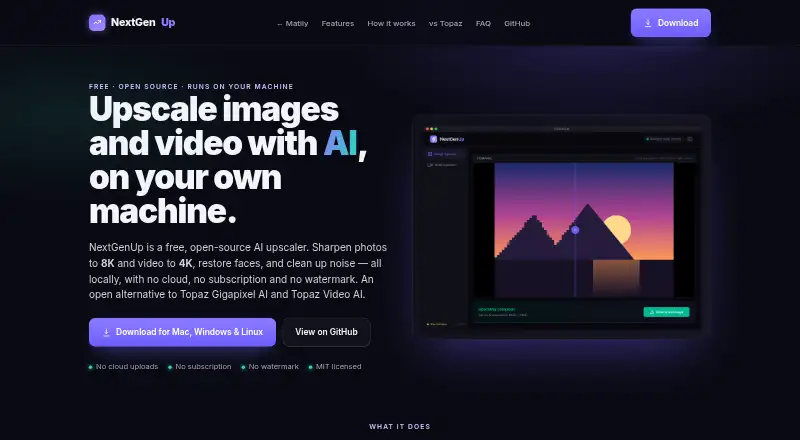
NextGenUp is a free image and video upscaler for macOS, Windows 10/11 and Linux, with a self-hosted web app option. It processes files on the user's hardware, so files stay on the computer rather than being uploaded for cloud processing. Images can be enlarged to 8K with Quick, Quality, Enhance or Ultra modes; video upscaling reaches 4K with basic and professional AI modes. Enhance works differently: it reduces noise and blur without changing the image's resolution. GFPGAN v1.4 restores detail in detected faces, while Real-ESRGAN handles super-resolution. Processing uses the CPU by default and switches to GPU acceleration when available. In supported browsers, the web app can use WebGPU on Chrome or Edge 113 and later. The MIT-licensed software requires no subscription, watermark or account. There is no trial limit. Web files are limited to 2 GB, and older processed files are removed automatically after 24 hours.
Good
- Free with no subscription, watermark or account.
- Image upscaling reaches 8K; video reaches 4K.
- Enhance reduces noise and blur without enlargement.
- Local processing keeps files on the computer.
Watch out
- Web files are limited to 2 GB.
- Older processed files are cleaned up after 24 hours.
- Video upscaling is limited to 4K.
Who it suits
NextGenUp suits people who want to upscale or clean up images and video on their own hardware. It may also suit users who need face restoration or a self-hosted web option.
Verdict
NextGenUp offers local image and video enhancement across desktop platforms and a self-hosted web option. Check the web file limit and cleanup window if you plan to process files there.
Plans and prices
From NextGenUp's own pricing page, checked 20 Sep 2026.
| Plan | Price | What it gives you |
|---|---|---|
| Free | Free | Open-source MIT license · No subscription · No watermark · No account required · Completely free; no trial limit or subscription |
| NextGenUp Free | Free | No trial limit, subscription, watermark, or account required. |
The facts
Each one read from NextGenUp's own pages, with the date it was checked.
What it does
- Batch processing
- Users can queue a folder of images and export the results together as a ZIP file.checked 27 Sep 2026
- Enhance mode
- Enhance mode removes noise and blur at the original resolution without enlarging.checked 27 Sep 2026
- Face restoration
- GFPGAN v1.4 detects faces and restores detail that generic upscaling misses.checked 27 Sep 2026
- GPU support
- CPU is used by default; GPU acceleration is automatic when available, with WebGPU in supported browsers.checked 27 Sep 2026
- Image upscaling
- Images can be upscaled to 8K using Quick, Quality, Enhance, or Ultra modes.checked 27 Sep 2026
- Licensing and certification
- The project is MIT licensed and fully auditable on GitHub; no encryption certification is stated.checked 27 Sep 2026
- Local processing
- Models, FFmpeg, and the server run on the user's hardware; files never leave the computer.checked 27 Sep 2026
- Models and runtime
- Uses Real-ESRGAN, GFPGAN v1.4, YuNet, ONNX Runtime, FFmpeg, and Tauri.checked 27 Sep 2026
- Pricing model
- Free and open source with no subscription or watermark.checked 27 Sep 2026
- Privacy and security
- Processing is local, with no cloud uploads, external processing calls, tracking, telemetry, or analytics.checked 27 Sep 2026
- Support channels
- Support is provided through GitHub stars, issues, pull requests, email, and LinkedIn.checked 27 Sep 2026
- Video upscaling
- Video can be upscaled to 4K with basic and professional AI modes.checked 27 Sep 2026
Where it runs
- Browser support
- The browser app can use WebGPU on Chrome or Edge 113 and later.checked 27 Sep 2026
- Desktop app
- Desktop apps bundle the engine, FFmpeg, and models inside the application.checked 27 Sep 2026
- Supported platforms
- macOS, Windows 10/11, Linux, and a self-hosted web app accessible on a network device.checked 27 Sep 2026
The company
- Company facts
- Matily is a non-profit software studio based in Salt Lake City, founded and maintained by Ripon Chandra Malo.checked 27 Sep 2026
Money
- Free plan
- Yeschecked 20 Sep 2026
- Free tier limits
- No trial limit; web files are limited to 2 GB and older processed files auto-clean after 24 hours.checked 27 Sep 2026
- Trial and refund
- There is no trial limit; the page does not state a refund policy.checked 27 Sep 2026
The full review of NextGenUp
Overview
NextGenUp is a free tool for people who want to enhance images or video on hardware they control. It is strongest for privacy-conscious users who can work within its web limits or run the desktop app.
Its combination of local processing, batch support and image and video enhancement is compelling at no cost. The main compromise is practical: performance depends on the user's hardware, and the web option caps files at 2 GB and removes older processed files after 24 hours.
Key features
Image modes cover both enlargement and cleanup. Quick, Quality and Ultra upscale images to 8K, while Enhance targets noise and blur without changing the original resolution. That makes the latter useful when an image needs cleanup rather than a larger output. GFPGAN v1.4 detects faces and restores detail, addressing a common weakness of general-purpose upscaling. PNG is the supported output format.
For video, basic and professional AI modes upscale to 4K. Batch processing is useful for larger jobs, but there is no frame interpolation; choose another tool if generating smoother motion is central to your workflow.
Models, FFmpeg and the server run on the user's hardware, so files do not leave the computer for processing. CPU is used by default, with automatic GPU acceleration when available. Supported browsers can use WebGPU in Chrome or Edge 113 and later. The project uses Real-ESRGAN, GFPGAN v1.4, YuNet, ONNX Runtime, FFmpeg and Tauri.
Pricing
NextGenUp's Free plan costs nothing. There is no subscription, watermark, account requirement or trial limit, and the MIT license makes the software open source. There are no paid tiers or seat and quota charges to weigh against the free option.
The web app's limits still matter: files are capped at 2 GB, and older processed files are automatically cleaned up after 24 hours. Those constraints matter for users who need longer access to web-processed files; desktop or self-hosted use is the better fit for local control. No refund policy is stated.
Platforms
Desktop apps support macOS, Windows 10/11 and Linux. A self-hosted web app can be accessed from a device on the same network, while the browser app can use WebGPU in Chrome or Edge 113 and later. Local processing is a strong fit for private files, but users should expect the available hardware to shape processing speed.
Who it's for
NextGenUp suits people who want no-cost image and video enhancement without sending files to a cloud service, especially users comfortable installing a desktop app or setting up a self-hosted web app. Its batch processing and face restoration add practical value for collections with mixed content. It is less suitable for people who need frame interpolation, a different output format, or web processing with files larger than 2 GB.
Pros and cons
- Pro: Local processing keeps files on the user's computer rather than uploading them for enhancement.
- Pro: The free MIT-licensed software has no subscription, watermark, account requirement or trial limit.
- Pro: Image cleanup, face restoration, batch processing and video upscaling cover several common enhancement jobs.
- Con: Web files cannot exceed 2 GB, and older processed files are cleared after 24 hours.
- Con: Video upscaling reaches 4K, but there is no frame interpolation for users seeking generated in-between frames.
- Con: CPU is the default; users without available GPU acceleration may find local processing less suited to demanding workloads.
Alternatives
Bigjpg is worth considering for readers who want a freemium option across mobile, desktop and web platforms; its free plan allows 20 pictures per month, but uses slow shared-server processing and caps uploads at 5 MB.
Real-ESRGAN is another free, open-source option for readers who want that model across desktop, web or self-hosted platforms.
LetsEnhance may suit API users who want a credit-based freemium service; its free plan provides 10 credits, with 24-megapixel input, a 50 MB input cap and 8-megapixel output.
PixelPanda Image Upscaler is an API, browser-extension and web alternative with one-time credit purchases rather than subscriptions.
PicWish Image Upscaler is an API alternative with limited non-HD downloads per day on its free plan and daily HD downloads for most online features on its Pro plan.
SupaRes is an API alternative whose free plan offers 10 processing credits, 64 megapixels and one user.
Upscale.media is an API alternative with a free monthly allowance of three credits and three downloads.
Krea Enhancer is an API alternative with 100 compute units per day on its free plan.
For more options, browse Image Upscaling Software, Video Upscaling Software, AI Video Upscalers or AI Image Upscalers.
Verdict
Choose NextGenUp if you want free, local enhancement for images and video, with no account or subscription and an auditable MIT-licensed project. Look elsewhere if you need frame interpolation or expect the web app to retain large files beyond its 24-hour cleanup window.
Getting started
- Visit the NextGenUp website.
- Choose macOS, Windows 10/11, Linux, or the self-hosted web app.
- For browser use, open the web app in Chrome or Edge 113 or later to use WebGPU when supported.
- Process images or video locally; no account or subscription is required.
Limits worth knowing
Web files are limited to 2 GB, and older processed files are automatically removed after 24 hours. Video upscaling reaches up to 4K; image upscaling reaches up to 8K.
Questions
How much does NextGenUp cost?
The Free plan costs nothing, with no subscription.
Does it require an account?
No. The listed Free plan requires no account, watermark, or subscription.
Which platforms does it support?
It supports macOS, Windows 10/11, Linux, and a self-hosted web app accessible on a network device.
Is NextGenUp open source?
Yes. The project is MIT licensed and auditable on GitHub.
What can it upscale?
Images can be upscaled to 8K and video to 4K. The listed output format is PNG.
What are the web app limits?
Web files are limited to 2 GB, and older processed files are automatically removed after 24 hours.
Alternatives to NextGenUp
- 1
Cutout.Pro
Free planAndroidiOSWebAPI8.5From $5 a month - 2

Krea Enhancer
Free planiOSWebAPISelf-hosted8.4Free plan - 3

Bigjpg
Free planAndroidiOSWebAPI8.4$6 one-time - 4
Phot.AI
Free planAndroidiOSWebAPI8.4From $9 a month - 5

Pixelcut
Free planAndroidiOSWebAPI8.4From $8 a month - 6
Upscal
Free planiOSmacOSWindows8.3Free plan