
Fotor
Fotor is a visual editing platform for making product visuals and marketing videos, with photo editing, AI generation, and graphic design tools.
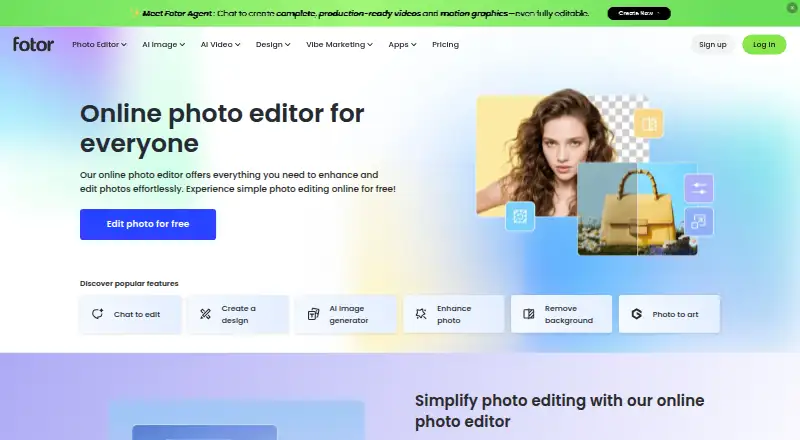
What Fotor is
Fotor is a visual editing platform for making product visuals and marketing videos, with photo editing, AI generation, and graphic design tools. Its online editor handles cropping, resizing, image enhancement, portrait retouching, background removal, unblurring, filters, object removal, upscaling, and restoration. Text-to-image generation, AI headshots, and AI face generation add creation options, while customizable templates, stickers, clipart, fonts, and text effects support design work. For businesses, Fotor describes tools for product images, model visuals, multi-scene listings, product videos, ads, and social media assets. Batch editing, layers, masking, cloud sync, and AI retouching are listed capabilities. The editor is browser-based and also available on Windows, Mac, iOS, and Android; the site links to an API offering. A free plan is listed, with Basic providing limited free credits, one concurrent generation, 50 AI Agent chats, one task, 512MB of cloud storage, and standard JPG, PNG, and PDF export. Fotor says prompts and images are sent to a chosen third-party model provider, and AIGC inputs and outputs remain on US AWS servers until deletion or account termination.
Good
- Photo editor includes object removal and restoration.
- AI tools generate images, headshots, and faces.
- Design suite offers templates, assets, fonts, and effects.
- Batch editing, layers, masking, and cloud sync are listed.
- Available on web, Windows, Mac, iOS, and Android.
Watch out
- Basic has limited free credits.
- Basic includes 512MB of cloud storage.
- Prompts and images go to the selected model provider.
- AIGC data remains on US AWS servers until deletion or account termination.
Who it suits
Fotor suits individuals who want browser-based photo editing and design tools, as well as businesses creating product and marketing visuals. Its free Basic plan may suit users who can work within the listed generation and storage allowances.
Verdict
Fotor combines photo editing, AI generation, and design tools, with a free Basic plan and several supported platforms. Consider the listed storage limits and how its AI data handling fits your needs.
Plans and prices
From Fotor's own pricing page, checked 20 Sep 2026.
| Plan | Price | What it gives you |
|---|---|---|
| Fotor Basic | Free | 1 concurrent generation · 50 AI Agent chats · 1 AI Agent task · 30-day creation storage · 512MB cloud storage · Free forever |
| Fotor Pro | Priced on request | 10 concurrent generations · 2,000 AI Agent chats · 2 AI Agent tasks · 2GB cloud storage |
| Fotor Pro | — | 10 concurrent generations · 2,000 AI Agent chats · 2 AI Agent tasks · 2GB cloud storage |
| Fotor Pro+ | — | 30 concurrent generations · 4,000 AI Agent chats · 5 AI Agent tasks · 100GB cloud storage |
| Fotor Pro+ | Priced on request | 30 concurrent generations · 4,000 AI Agent chats · 5 AI Agent tasks · 100GB cloud storage |
| Basic | Free | Limited free credits · 1 concurrent generation · 50 AI Agent chats · 1 AI Agent task · 512MB cloud storage · 100 project folders · Normal JPG/PNG/PDF export · Free forever |
| Max | — | 50 concurrent generations · 10,000 AI Agent chats · 10 AI Agent tasks · 500GB cloud storage · Billed annually |
| Pro | — | 10 concurrent generations · 2,000 AI Agent chats · 2 AI Agent tasks · 2GB cloud storage · Billed annually |
| Pro+ | — | 30 concurrent generations · 4,000 AI Agent chats · 5 AI Agent tasks · 100GB cloud storage · Billed annually |
The facts
Each one read from Fotor's own pages, with the date it was checked.
What it does
- AI data sharing
- Fotor says prompts and images are sent to a selected third-party model provider when users choose that engine, and says face data is used only for AI Avatar features and not to train other AI products.checked 2 Oct 2026
- AI generation
- Fotor offers text-to-image generation, AI headshots, and AI face generation.checked 2 Oct 2026
- AI model integrations
- Fotor's privacy policy says its app integrates third-party generation models including Veo, Nano Banana, Kling, Seedance, Hailuo, FLUX, Wan, Qwen, Midjourney, Seedream, Classic, and Pixverse.checked 2 Oct 2026
- AI retouching
- Yeschecked 20 Sep 2026
- API
- Fotor links to an API offering for content-centric businesses from its site footer.checked 2 Oct 2026
- Batch editing
- Fotor's homepage says its batch photo editor edits photos in bulk.checked 2 Oct 2026
- Cloud sync
- Yeschecked 20 Sep 2026
- Commercial visuals
- Fotor says businesses can create product visuals such as enhanced product images, model visuals, multi-scene listings, and product videos, plus marketing assets for ads and social media.checked 2 Oct 2026
- Graphic design
- The design suite includes customizable templates, millions of stickers and clipart assets, and thousands of fonts and text effects.checked 2 Oct 2026
- Layer editing
- Yeschecked 20 Sep 2026
- Masking tools
- Yeschecked 20 Sep 2026
- Photo editing
- Its online photo editor supports cropping, resizing, enhancement, portrait retouching, background removal, unblurring, filters, object removal, upscaling, and restoration.checked 2 Oct 2026
- Privacy and storage
- Fotor says personal information is encrypted and securely stored where the service is hosted, and that AIGC inputs and outputs are stored on AWS servers in the USA until the user deletes them or the account ends.checked 2 Oct 2026
- Product
- Fotor describes itself as an AI vibe marketing platform and a visual editing platform for creating product visuals and marketing videos.checked 2 Oct 2026
- Support
- Fotor provides a Help Center for support.checked 2 Oct 2026
Money
- Free plan
- Yeschecked 20 Sep 2026
Where it runs
- Platform
- multi-platformchecked 20 Sep 2026
- Supported devices
- Fotor says its photo editor is available on Windows, Mac, iOS, and Android, and identifies the editor as online and browser-based.checked 2 Oct 2026
The full review of Fotor
Overview
Fotor brings photo editing, AI image creation, and graphic design together in a browser-based editor, with apps for desktop and mobile devices. It suits people making both polished images and promotional graphics, though its free plan’s small storage allowance and capped AI use make it a better starting point than an unlimited workspace.
Key features
Photo editing and design
Fotor covers routine edits such as cropping and resizing alongside portrait retouching, background and object removal, enhancement, unblurring, upscaling, and restoration. Batch editing, layers, masking, cloud sync, and AI retouching add useful breadth for people moving beyond one-off adjustments. The design suite extends the editor into composed graphics with customizable templates, stickers, clipart, fonts, and text effects. That range is a practical fit for users who want image work and promotional layouts in one service; the available facts do not establish how deeply its layer and masking workflows compare with dedicated editors.
AI creation and commercial visuals
Text-to-image generation, AI headshots, and AI face generation sit alongside tools for product imagery and marketing content. Fotor describes business uses including enhanced product images, model visuals, multi-scene listings, product videos, and ad or social assets. These capabilities make it relevant to small teams producing varied creative material, but its generation quotas and storage limits matter if it is expected to serve as a high-volume production hub.
Fotor integrates third-party generation models, including Veo, Nano Banana, Kling, Seedance, Hailuo, FLUX, Wan, Qwen, Midjourney, Seedream, Classic, and Pixverse. Prompts and images are sent to the selected provider when a user chooses that engine. Fotor says face data is used only for AI Avatar features and not to train other AI products; AIGC inputs and outputs are stored on AWS servers in the USA until deleted by the user or the account ends. Users handling sensitive imagery should weigh those practices before uploading.
Pricing
Fotor has a free tier and multiple paid tiers with custom pricing. Basic and Fotor Basic are both shown as free, billed Free forever. Basic includes limited free credits, one concurrent generation, 50 AI Agent chats, one AI Agent task, 512MB cloud storage, 100 project folders, and normal JPG, PNG, and PDF export. Fotor Basic has the same generation, chat, task, and storage caps, plus 30-day creation storage. That is enough to explore the service or handle occasional work, but limited credits and 512MB of storage constrain sustained creation and archiving.
Pro is custom pricing and is shown as billed annually. It raises the allowance to 10 concurrent generations, 2,000 AI Agent chats, two AI Agent tasks, and 2GB of cloud storage. This is the more suitable step for regular individual use, although the storage increase remains modest for a growing image library.
Pro+ is custom pricing. One plan listing gives it 30 concurrent generations, 4,000 AI Agent chats, five AI Agent tasks, and 100GB of storage; another specifies annual billing with the same allowances. Max is custom pricing, billed annually, and provides 50 concurrent generations, 10,000 chats, 10 tasks, and 500GB of storage. Those larger quotas suit heavier generation and storage needs, but the price must be weighed against actual usage. Basic, Pro, Pro+, and Max are plan names used in the published tiers; compare their stated terms carefully, especially the annual billing attached to paid plans.
Platforms
Fotor’s editor is online and browser-based, and apps are available for Windows, Mac, iOS, and Android. The platform list also includes an API, which Fotor links for content-centric businesses. This gives users several access routes, but it does not establish that every feature is available on every platform. A Help Center is provided for support.
Who it's for
Fotor is a good fit for individuals, creators, and businesses that want photo corrections, AI-generated imagery, and designed marketing assets under one roof. Its templates and product-visual tools are especially relevant to promotional work, while batch editing and cloud sync can help with repeated image tasks. It is less compelling for users who need generous free storage, predictable paid-plan prices, or do not want selected AI prompts and images shared with third-party model providers.
Pros and cons
- Pros: Editing, design, and AI generation share one service, reducing the need to switch between tools for common visual tasks.
- Pros: Product visuals, listings, videos, and marketing assets make the feature set relevant to commercial creative work.
- Pros: Windows, Mac, iOS, Android, browser access, and an API cover a broad range of working setups.
- Cons: The free tiers cap storage at 512MB and limit credits and AI activity, which can become restrictive for ongoing projects.
- Cons: Paid plans use custom pricing, so buyers cannot compare their cost from the stated plan terms alone.
- Cons: AI prompts and images go to the chosen third-party provider, and AIGC content remains on US AWS servers until deletion or account end.
Alternatives
Photopea is worth considering if broad platform coverage matters: it supports web, mobile, desktop, Linux, and self-hosted use, with free editor access. PhotoDirector is another freemium option, with a free limited-feature plan and Windows and macOS support. Choose Evoto AI if its paid annual plans fit your needs: Starter is $89 a year for 800 credits and two devices, while Basic is $149 a year. PhotoQuill offers a free tier with five credits per day and ten bonus credits, plus a $9.90 a month Lite plan with 2,000 monthly credits. Pixlr is a freemium alternative with a Plus tier listing one concurrent AI generation and 80 monthly AI credits, and a Premium tier with four concurrent generations and 1,000 monthly credits.
For a more focused comparison, browse AI Photo Editors or Photo Editing Software. For specific design tasks, see Podcast Cover Maker Software, Video Thumbnail Makers, Album Cover Maker Software, and AI Image Expanders. Other choices include VSCO, BeFunky, and Airbrush.
Verdict
Choose Fotor if you want one multi-platform service for photo editing, AI imagery, and marketing design, and its generation quotas and storage fit your workload. Its breadth is the strongest reason to use it; look elsewhere if transparent paid pricing, more generous free storage, or tighter control over AI data sharing is the priority.
Alternatives to Fotor
- 1
Avidemux
Free planOpen sourceWebLinuxmacOSWindows7.3Free plan - 2

ColorForge
Free planAndroidiOSWebLinux7.3Free plan - 3
Luminance HDR
Free planOpen sourceLinuxmacOSSelf-hostedWindows7.3Free plan - 4
Photomatix Pro
iOSWebAPILinux6.8From $19 a month - 5
SNS-HDR
Free planmacOSWindows6.8€30 one-time - 6
MergeHDR
Free planiOSmacOS6.7From $9.99 a year