
BeFunky
BeFunky is a photo editor, collage maker, and graphic design tool for Android, iOS, and web.
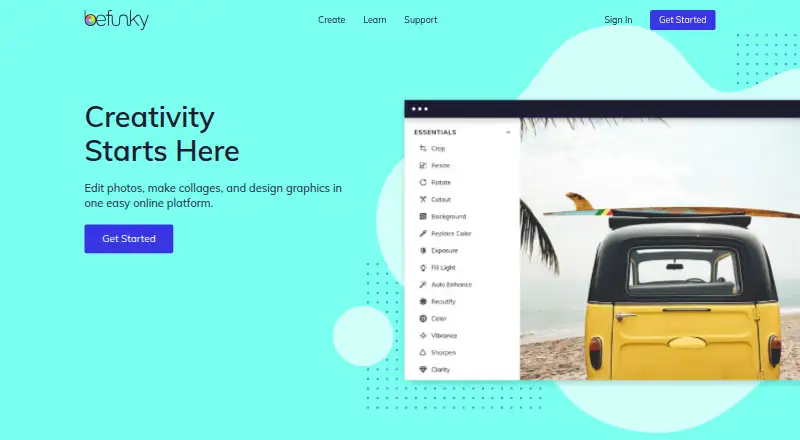
What BeFunky is
BeFunky is a photo editor, collage maker, and graphic design tool for Android, iOS, and web. Its photo editing tools include cropping, resizing, touch-ups, effects, frames, enhancement, digital art effects, batch editing, and watermarks. AI tools can remove backgrounds, erase objects, upscale images, replace skies, deblur pictures, and restore old photos. For collages, it offers layouts, patterns, customizable graphics, and text editing. Its graphic design area provides templates and makers for items such as invitations, banners, cards, social media graphics, flyers, posters, brochures, business cards, infographics, and postcards. BeFunky says its design platform includes more than one million free stock photos. It can also connect to Google Drive, Google Photos, and Dropbox for stored image files. Users can start without paying or creating an account, with access to more than 100 digital effects. Some web tools, including processing-intensive batch tools, may not be available in the mobile app. The Free plan costs nothing; Plus is $6.99 a month, billed annually at $83.88.
Good
- Available on Android, iOS, and web.
- AI tools include background removal and old-photo restoration.
- Includes collage layouts, patterns, and text editing.
- Free access includes more than 100 digital effects.
Watch out
- Some web features are unavailable in the mobile app.
- Batch Tools may not be available on mobile devices.
- Plus costs $6.99 a month, billed annually.
Who it suits
BeFunky suits people who want photo editing, collage creation, and design tools across mobile and web. It may also work for users who want to begin without an account or payment.
Verdict
BeFunky brings photo editing, collage creation, and graphic design together, with free access available without an account. Check the mobile limits if you rely on web features or batch processing.
Plans and prices
From BeFunky's own pricing page, checked 28 Sep 2026.
| Plan | Price | What it gives you |
|---|---|---|
| BeFunky Free | Free | basic photo editing tools · limited templates and assets · export without subscription |
| BeFunky Plus | — | premium editing and design tools · advanced AI editing controls · premium effects, templates, assets and text tools · basic bulk editing · $83.88 billed annually |
| BeFunky Pro | — | Batch AI tools · batch background removal · 5,000 Batch AI credits monthly · priority image processing · priority support · $149.88 billed annually |
The facts
Each one read from BeFunky's own pages, with the date it was checked.
What it does
- Account integrations
- A free BeFunky account can link to Google Drive, Google Photos, and Dropbox for stored image files.checked 28 Sep 2026
- AI editing
- Its AI tools include background removal, object erasing, image upscaling, sky replacement, deblurring, and old-photo restoration.checked 28 Sep 2026
- AI retouching
- Yeschecked 20 Sep 2026
- Batch editing
- Yeschecked 20 Sep 2026
- Cloud sync
- Yeschecked 20 Sep 2026
- Collage creation
- The Collage Maker provides Collage Wizard, Pinterest layouts, customizable graphics, patterns, layouts, and text editing.checked 28 Sep 2026
- Core product
- BeFunky lets users edit photos, customize collages, and create graphic designs from a smartphone, tablet, or computer.checked 28 Sep 2026
- Data rights
- Users can delete their account and associated personal data through the account page with email verification, or contact support for help.checked 28 Sep 2026
- Google API data
- BeFunky says Google Workspace API data is not used for advertising, marketing, promotion, or training AI or machine-learning models.checked 28 Sep 2026
- Google Drive integration
- Users can connect BeFunky Photo Editor through Google Workspace Marketplace and open Drive images with Google Drive's Open with menu.checked 28 Sep 2026
- Graphic design
- The Graphic Designer offers templates and makers for invitations, banners, cards, YouTube art, social media graphics, flyers, posters, brochures, business cards, infographics, and postcards.checked 28 Sep 2026
- Image privacy
- Uploaded photographs and graphics are private by default and are not public without the user's consent unless the user opts in to make them public.checked 28 Sep 2026
- Intended users
- BeFunky’s mission is to make it easy for anyone to create beautiful photographs and professional-quality designs without special skills or technical expertise.checked 28 Sep 2026
- Layer editing
- Yeschecked 20 Sep 2026
- Masking tools
- Yeschecked 20 Sep 2026
- Mobile limits
- Some web features are unavailable in the mobile app, and processing-intensive tools such as Batch Tools may not be available on mobile devices.checked 28 Sep 2026
- Paid from
- 6.99checked 20 Sep 2026
- Payment security
- BeFunky says it does not store payment-card details and that its payment processors adhere to PCI-DSS requirements.checked 28 Sep 2026
- Photo editing
- The Photo Editor includes cropping, resizing, touch-up tools, photo effects, frames, enhancement, digital art effects, batch editing, and watermarks.checked 28 Sep 2026
- Stock library
- BeFunky says its design platform includes more than one million free stock photos.checked 28 Sep 2026
The company
- Founded
- 2007checked 28 Sep 2026
Money
- Free access
- BeFunky can be used without payment or an account, including access to a library of more than 100 digital effects.checked 28 Sep 2026
- Free plan
- Yeschecked 20 Sep 2026
Where it runs
- Platform
- multi-platformchecked 20 Sep 2026
The full review of BeFunky
Overview
BeFunky brings photo editing, collage-making, and graphic design tools to phones, tablets, and computers. It suits people who want these creative jobs in one app, particularly casual creators and small projects. The free entry point is useful, but Plus is needed for premium tools and some web features do not carry over to mobile.
Key features
The Photo Editor combines cropping, resizing, touch-ups, effects, frames, enhancement, digital-art effects, watermarks, and batch editing. Layers and masking add flexibility for more involved edits; batch tools can save time on repeated work, but processing-intensive options may be unavailable on phones and tablets.
AI tools cover background removal, object erasing, upscaling, sky replacement, deblurring, and old-photo restoration. That breadth makes BeFunky more than a basic effects editor, though advanced AI controls are reserved for Plus.
The Collage Maker pairs a Collage Wizard with Pinterest layouts, patterns, customizable graphics, and text editing. Graphic-design templates and makers cover invitations, banners, cards, YouTube art, social graphics, flyers, posters, brochures, business cards, infographics, and postcards. More than one million free stock photos give users a substantial image source for those designs.
BeFunky works without payment or an account, including access to more than 100 digital effects. A free account can link Google Drive, Google Photos, and Dropbox; Drive images can also be opened in the editor through Google Workspace Marketplace. Uploaded images are private by default, and BeFunky says Google Workspace API data is not used for advertising or AI-model training. Users can delete accounts and associated personal data through the account page with email verification, or ask support for help. BeFunky says it does not retain payment-card details and its processors meet PCI-DSS requirements.
Pricing
BeFunky Free costs nothing. It includes basic photo-editing tools, limited templates and assets, and export without a subscription. It is a sensible starting point for occasional edits, but the restricted design library and lack of premium tools limit sustained design work.
BeFunky Plus costs $6.99 a month, billed $83.88 billed annually. It adds premium editing and design tools, advanced AI controls, basic bulk editing, and premium effects, templates, assets, and text tools. This is the clearest fit for regular users who need those upgrades; basic bulk editing is not the same offer as a large monthly AI-credit allowance.
BeFunky Pro has custom pricing and includes 5,000 Batch AI credits per month. It is aimed at users whose batch AI workload makes that quota relevant; the stated credit allowance alone does not establish whether it is a better fit than Plus for other work.
Platforms
BeFunky supports Android, iOS, and web. The app is not feature-identical across platforms: some web features and processing-intensive tools such as Batch Tools may be missing on mobile. Users who depend on batch processing or specific web tools should plan to work in a browser rather than assume a phone or tablet can handle the same tasks.
Who it's for
BeFunky is a good match for people who want a shared toolkit for photo touch-ups, collages, and a wide range of static design formats, without needing specialist technical skills. It is less suitable for users who need every web capability on mobile or rely on intensive batch work from a phone.
Pros and cons
- Pro: Photo editing, collages, and many design formats sit in one service, reducing the need to switch tools for small creative projects.
- Pro: Free access without an account and more than 100 effects make it possible to try basic editing before committing.
- Pro: Drive, Photos, and Dropbox connections help account holders work with stored images.
- Con: Free users get limited templates and assets, while premium tools and advanced AI controls require Plus.
- Con: Mobile apps lack some web features and may not support processing-intensive batch tools, a meaningful constraint for mobile-first workflows.
Alternatives
For a design-led alternative, Canva has a free plan and trial, with its free offer including a core design editor and templates and content library. Choose it when that design-and-template emphasis is a better fit than BeFunky's mix of photo editing and collages.
CapCut is another freemium option, with mobile-focused editing, free templates, and cloud storage in its Standard plan; it is worth considering when mobile-focused editing is the priority.
For video, thumbnails, posters, photo editing, and AI photo editing, compare the relevant Video Thumbnail Makers, Poster Design Software, Photo Editing Software, and AI Photo Editors lists.
Kapwing, Renderforest Slideshow Maker, vidIQ, Visme, Piktochart, and Adobe Express Video are other options to compare.
Verdict
Choose BeFunky if you want accessible photo editing, collage creation, and broad template-based design in one freemium service. Its strongest case is that breadth, backed by free access and useful AI tools; look elsewhere if you need consistent mobile access to web features or dependable batch processing on a mobile device.
Getting started
- Open https://www.befunky.com/ in a web browser, or use the Android or iOS app.
- Start without an account or payment, or create a free BeFunky account.
- Choose the Photo Editor, Collage Maker, or Graphic Designer for your project.
- Connect Google Drive, Google Photos, or Dropbox with a free account if you want to access stored image files.
- Connect Photo Editor through Google Workspace Marketplace to open Drive images with Google Drive's Open with menu.
- Choose Plus for premium editing and design tools, advanced AI controls, and basic bulk editing.
Limits worth knowing
The Free plan provides basic photo editing tools, limited templates and assets, and export without a subscription. The paid Plus plan costs $6.99 a month, billed annually at 83.88 USD; some web features and processing-intensive tools may be unavailable in the mobile app.
Questions
Is BeFunky free?
Yes. It can be used without payment or an account, including access to more than 100 digital effects. Its Free plan includes basic photo editing tools, limited templates and assets, and export without a subscription.
How much does BeFunky Plus cost?
Plus costs $6.99 a month, billed annually at 83.88 USD.
Which platforms can I use BeFunky on?
BeFunky is available on Android, iOS, and the web.
Can BeFunky connect to cloud storage?
A free BeFunky account can link to Google Drive, Google Photos, and Dropbox for stored image files. Photo Editor can also connect through Google Workspace Marketplace to open Drive images from Google Drive's Open with menu.
What does BeFunky Plus add?
Plus includes premium editing and design tools, advanced AI editing controls, basic bulk editing, and premium effects, templates, assets, and text tools.
Are uploaded images public?
Uploaded photographs and graphics are private by default and are not made public without consent unless the user opts in.
Alternatives to BeFunky
- 1

Picsart
Free planAndroidiOSWebAPI9.0From $10.50 a month - 2

Photoroom
Free planAndroidiOSWebAPI9.0From $7.50 a month - 3
PhotoPad
Free planAndroidiOSWebExtension8.8Free plan - 4

Adobe Photoshop
AndroidiOSWebmacOS8.7 - 5

Adobe Lightroom
AndroidiOSWebmacOS8.7 - 6

Photopea
Free planAndroidiOSWebLinux8.6From $450 a year