Canva
Canva is a design platform for making presentations, social content, videos, print materials, photo edits, websites, and PDFs.
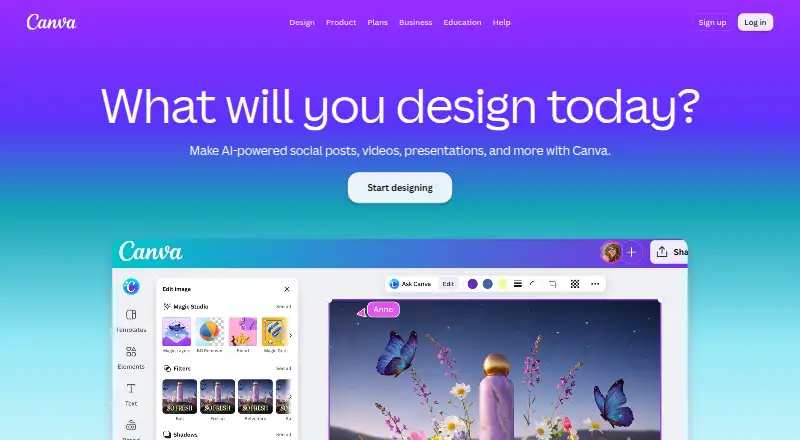
What Canva is
Canva is a design platform for making presentations, social content, videos, print materials, photo edits, websites, and PDFs. It combines templates, illustration tools, brand kits, and collaboration, with exports including PDF, JPG, PNG, SVG, and PPT. Its AI tools include Magic Layers, Magic Eraser, Background Remover, Magic Write, and image generation. The Free plan costs nothing and includes the core editor, templates and content, and basic collaboration and exports. It provides 1.6M+ templates and 4.7M+ photos, videos, graphics, and audio, plus one Brand Kit with three colours, 5GB of storage, and up to 20 Standard or Premium AI uses. AI allowance is pooled across listed tools and resets monthly; higher-tier tools consume more. Canva offers desktop downloads for Windows and Mac, and mobile apps. Business adds team administration, approvals, permissions, and brand controls. Eligible nonprofits can receive a free premium subscription for one team of up to 50 users. Canva was founded in 2013 and is headquartered in Sydney, Australia.
Good
- Free plan includes 1.6M+ templates.
- Exports include PDF, JPG, PNG, SVG, and PPT.
- AI tools include background removal and image generation.
- Desktop downloads are available for Windows and Mac.
- Eligible nonprofits can receive a free subscription for up to 50 users.
Watch out
- Free plan has 5GB of storage.
- Free plan includes one Brand Kit with three colours.
- Free plan allows up to 20 Standard or Premium AI uses.
Who it suits
Canva suits people creating presentations, social content, or other visual materials who want templates and editing tools. Its collaboration and brand controls also suit teams working with shared designs.
Verdict
Canva brings design, AI tools, exports, and collaboration together across a broad set of visual formats. The free plan has defined storage, Brand Kit, and AI-use limits.
Plans and prices
From Canva's own pricing page, checked 27 Sep 2026.
| Plan | Price | What it gives you |
|---|---|---|
| Free | Free | No cost plan for one person · Core design editor · Templates and content library · Basic collaboration and exports · ₹ 0 /year for one person |
| Pro | — | Daily and weekly plan options; free trial available · 1 TB cloud storage · ₹ 4,000 /year for one person |
| Business | — | Free trial available; contact sales · Team collaboration · Brand management · Higher usage and administration controls · ₹ 6,800 /year per person |
| Enterprise | Priced on request | Contact sales; no free trial offered · Organization-wide administration · Advanced security and support |
| Pro Lite | — | Free trial available · ₹ 1,590 /year for one person |
The facts
Each one read from Canva's own pages, with the date it was checked.
What it does
- AI allowance
- AI usage is pooled across listed tools and resets monthly; higher-tier tools use more allowance.checked 27 Sep 2026
- AI features
- AI features include Magic Layers, Magic Eraser, Background Remover, Magic Write, and AI image generation.checked 27 Sep 2026
- Brand kit
- Yeschecked 23 Sep 2026
- Enterprise security
- Enterprise includes SSO, SCIM, audit logs, admin controls, and custom apps and integrations.checked 27 Sep 2026
- Illustration tools
- Yeschecked 23 Sep 2026
- Nonprofit access
- Eligible nonprofits can receive a free subscription with premium features for one team of up to 50 users.checked 27 Sep 2026
- Offline mode
- Canva Offline is listed as a new feature for Free, Pro Lite, Pro, and Business plans.checked 27 Sep 2026
- Presentation design
- Yeschecked 23 Sep 2026
- Real-time collaboration
- The comparison lists real-time collaboration, comments, task assignment, and link sharing.checked 27 Sep 2026
- Security certifications
- The comparison lists MFA, ISO 27001 certification and compliance, and SOC 2 Type II.checked 27 Sep 2026
- Support options
- Support includes a Help Assistant, support tickets, live chat, elevated priority, and dedicated case management.checked 27 Sep 2026
- Template library
- Yeschecked 23 Sep 2026
Where it runs
- Apps integrations
- Canva provides an Apps Marketplace, Apps SDK access, REST API for custom apps, and ad-platform publishing.checked 27 Sep 2026
- Desktop app
- Yeschecked 23 Sep 2026
- Desktop platforms
- Canva offers free downloads for Windows and Mac.checked 27 Sep 2026
- Mobile app
- Yeschecked 23 Sep 2026
Money
- Enterprise trial
- Canva Enterprise does not offer a free trial, but sales can provide a demo.checked 27 Sep 2026
- Free plan
- Yeschecked 23 Sep 2026
- Free plan content
- Free includes 1.6M+ templates and 4.7M+ photos, videos, graphics, and audio.checked 27 Sep 2026
- Free plan limits
- Includes 1 Brand Kit with 3 colours, 5GB storage, and up to 20 Standard or Premium AI uses.checked 27 Sep 2026
- Trial billing
- Business trial users can invite team members and are not billed during the trial period.checked 27 Sep 2026
The company
- Founded
- 2013checked 23 Sep 2026
- Headquarters
- Sydney, Australiachecked 23 Sep 2026
- Team administration
- Business includes collaboration and team admin tools, approvals, brand kits, and permissions.checked 27 Sep 2026
The full review of Canva
Overview
Canva is a visual design platform made by Canva, a company founded in 2013 and based in Sydney, New South Wales, Australia. It brings several types of creative work into one product, including presentations, social media graphics, video, print, photo editing, websites and PDF editing. The mix of templates, editing tools and collaboration options can suit both individual projects and team workflows.
The service uses a freemium model. Its Free plan costs nothing, is billed at ₹ 0 /year for one person, and is described as a no-cost plan for one person. The plan includes a core design editor, templates and content, basic collaboration and exports. Canva also lists a 30-day trial, while the Pro, Business and Enterprise plan prices are not listed here.
The content library includes 1.6M+ templates and 4.7M+ photos, videos, graphics and audio on Free. Canva also provides an Apps Marketplace, Apps SDK access, a REST API for custom apps and ad-platform publishing. For people comparing particular design workflows, Canva is relevant to Print Design Template Libraries, Social Media Post Maker Software, AI Graphic Design Software and AI Presentation Software.
Key features
Canva's breadth is its defining practical trait: one account can cover designs for screens, documents and print rather than a single output type. Presentation support spans standard presentations, slideshows, pitch decks, multimedia presentations and keynote presentations. It also offers custom dimensions, custom fonts, logo templates, AI logo generation and print-ready export.
AI tools named for the platform include Magic Layers, Magic Eraser, Background Remover, Magic Write and AI image generation. Users can start from text prompts or provide files in CSV, DOC, DOCX, XLS, XLSX, TXT, MD, PDF, JPG or PNG formats. Export formats include PDF, JPG, PNG, SVG and PPT, with vector and transparent exports available. AI usage is pooled across listed tools and resets monthly; higher-tier tools consume more of that allowance.
Brand and team features scale with the plan. Free includes one Brand Kit with three colours; Pro lists five Brand Kits, while Business lists 100 Brand Kits, approvals and advanced brand controls. Business also adds collaboration and team administration, permissions and higher AI access. Enterprise lists 1,000 Brand Kits, custom apps and integrations, SSO, SCIM, audit logs and admin controls.
Security and support are also part of Canva's broader offering. The comparison lists MFA, ISO 27001 certification and compliance, and SOC 2 Type II. Support options include a Help Assistant, support tickets, live chat, elevated priority and dedicated case management. Canva Offline is listed as a new feature for Free, Pro Lite, Pro and Business.
Pricing
The Free plan has no charge and is described as billed ₹ 0 /year for one person, with a listed price of no cost. Its stated limits include 5GB storage, one Brand Kit with three colours and up to 20 Standard or Premium AI uses. Free also includes the core editor, basic collaboration and exports.
Canva lists a 30-day trial. Business trial users can invite team members and are not billed during the trial period. Enterprise does not offer a free trial, though sales can provide a demo.
| Plan | Listed details |
|---|---|
| Free | free; billed ₹ 0 /year for one person; 5GB storage and up to 20 Standard or Premium AI uses. |
| Pro | Price not listed; one user, 3.6M+ templates, five Brand Kits, 100GB cloud storage and 10x more AI than Canva Free. |
| Business | Price not listed; collaboration and administration, 100 Brand Kits and approvals, higher AI access, 500GB cloud storage and advanced brand controls. |
| Enterprise | Billed Contact sales; 1,000 Brand Kits and 1TB cloud storage. |
A separate paid-from figure is 1590 /user/mo. Since prices are not listed for Pro and Business, that figure does not establish their individual prices.
Platforms
Canva lists macOS and Windows among its platforms and offers free desktop downloads for Mac and Windows. The product also has a mobile app, although specific mobile operating systems are not listed here. Its output options include PDF, JPG, PNG, SVG and PPT, covering common image, vector, document and presentation exports.
Who it's for
Canva may suit people who need a flexible editor for presentations, social content, print pieces, video or other visual materials, especially when starting from templates is useful. Its collaboration and brand controls also make it relevant to teams managing shared designs, approvals and consistent branding. Individual plan details matter: Free is limited to one Brand Kit, 5GB storage and up to 20 Standard or Premium AI uses, while the higher tiers list larger storage allocations and expanded team controls.
Eligible nonprofits can receive a free subscription with premium features for one team of up to 50 users. That makes the nonprofit offer a distinct option for qualifying organizations, separate from the general plan descriptions.
Pros and cons
- Pros: Broad coverage across presentations, social, video, print, photo editing, websites and PDFs; large free template and media libraries; multiple export formats; collaboration, brand and administrative features across plans.
- Cons: Free has defined storage, Brand Kit and AI-use limits; AI allowance is shared across tools and higher-tier tools use more of it; Pro and Business prices are not listed here; Enterprise requires contacting sales and has no free trial.
Alternatives
For print-focused work, compare Canva with PRINTgenie, Avery Design & Print and the Postcard Maker Software category. For video-oriented creative work, see Adobe Express Video. For postcard and direct-mail workflows, Mailjoy, Postable, Postalytics, PostGrid Address Verification and QuantumDigital are listed alternatives.
Readers focused on social creative can also browse Social Media Design Software, while those prioritizing template libraries can explore the Print Design Template Libraries category.
Verdict
Canva is a broad design option for people who want templates, content assets, editing and exports within the same platform, with AI tools and collaborative brand management available as well. The free plan offers substantial library access but has clear storage, Brand Kit and AI-use limits. Teams should weigh the additional controls and storage listed for Business or Enterprise against the fact that Pro and Business prices are not provided here and Enterprise is sold through sales.
Getting started
- Open Canva at https://www.canva.com/.
- Choose the Free plan or review the listed Pro and Business plans.
- Download the desktop app for Windows or Mac, or use the mobile app.
- Start with a presentation, template, or another supported visual format.
- Export in a supported format such as PDF, JPG, PNG, SVG, or PPT.
Limits worth knowing
The Free plan includes 5GB of storage, one Brand Kit with three colours, and up to 20 Standard or Premium AI uses. AI allowance is pooled across listed tools, resets monthly, and higher-tier tools use more allowance.
Questions
Is Canva free?
Yes. The Free plan is listed as free and includes a core design editor, templates and content, and basic collaboration and exports.
What platforms does Canva support?
The listed platforms are macOS and Windows. Canva also offers desktop downloads for Windows and Mac, plus a mobile app.
What does the Free plan include?
It includes 1.6M+ templates, 4.7M+ photos, videos, graphics, and audio, one Brand Kit with three colours, 5GB of storage, and up to 20 Standard or Premium AI uses.
What can I export from Canva?
Listed export formats are PDF, JPG, PNG, SVG, and PPT.
Does Canva offer a free trial?
A 30-day trial is listed. Business trial users can invite team members and are not billed during the trial; Enterprise does not offer a free trial, though sales can provide a demo.
Who makes Canva?
Canva is made by Canva, founded in 2013 and headquartered in Sydney, Australia.
Alternatives to Canva
- 1

Adobe Express Video
Free planAndroidiOSWebAPI8.4Free plan - 2

Postalytics
Free planAndroidiOSWebAPI8.0From $199 a month - 3
MyPostcard
AndroidiOSWebAPI7.1€3.49 one-time - 4

MailerBot
WebAPILinuxmacOS7.0From $99 a month - 5

Lob Address Verification
Free planWebAPI6.8From $260 a month - 6

PicMonkey
AndroidiOSWeb6.6From $7.99 a month