
Kapwing
Kapwing is a cloud-based video editor accessed through a browser on Mac, Windows, Chromebook, and mobile devices.
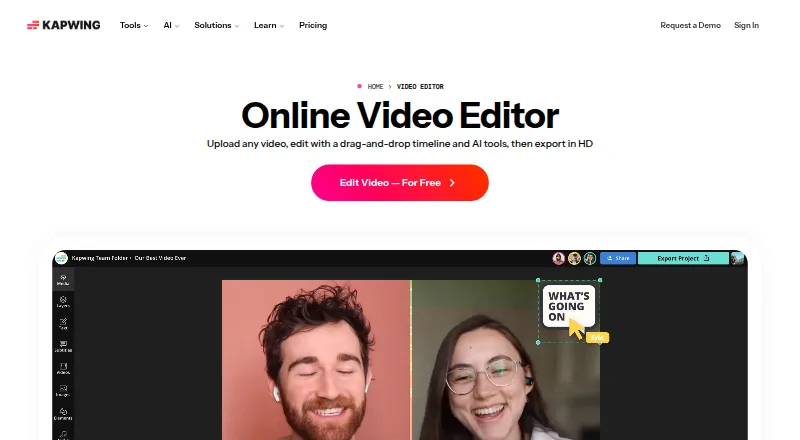
What Kapwing is
Kapwing is a cloud-based video editor accessed through a browser on Mac, Windows, Chromebook, and mobile devices. Users can edit video sections by changing an automatically generated transcript, and Smart Cut removes silences. Projects can be created, edited, and exported at up to 4K resolution on supported plans. Users can bring material into a project by pasting URLs from TikTok, YouTube, Twitter, and other internet sources. The service supports subtitles, dubbing, and lip-sync technology in more than 100 languages. Pro users can use Brand Kit for palettes, logos, fonts, and templates. The Free plan includes 10 credits, exports of up to four minutes at 720p, and 5 GB of cloud storage. Pro costs $16 per month billed annually, per member, and includes 1,000 monthly credits, 4K export, a 120-minute export limit, a 6 GB upload limit, 100 GB of cloud storage, and watermark-free exports. Kapwing does not offer a desktop or mobile app.
Good
- Edits video sections through an auto-generated transcript.
- Smart Cut removes silences.
- Supports more than 100 languages.
- Supported plans export up to 4K.
Watch out
- Free plan exports are limited to four minutes.
- Free plan export resolution is 720p.
- No desktop or mobile app is offered.
Who it suits
Kapwing suits people who want to edit videos in a browser, including users working with transcripts, silence removal, or multilingual subtitles and dubbing. Teams can use its collaboration features.
Verdict
Kapwing offers browser-based editing with transcript tools, silence removal, and multilingual features. The Free plan has limits on credits, export length, and resolution; Pro is $16 per month billed annually.
Plans and prices
From Kapwing's own pricing page, checked 20 Sep 2026.
| Plan | Price | What it gives you |
|---|---|---|
| Free | Free | 10 credits · 4 minutes export length · 720p · It's Free! |
| Pro | $16 a month | Per member, per month; includes 1,000 credits/month and no Kapwing watermark. · 1,000 credits per month · 6 GB upload limit · 4K export · 120 minutes export length · 100 GB cloud storage · billed annually |
| Business | $50 a month | Per member, per month; includes 4,000 credits/month and additional team features. · 4,000 credits per month · 6 GB upload limit · 4K export · 120 minutes export length · 500 GB cloud storage · billed annually |
| Enterprise | Priced on request | Custom credits, billing, storage, support, onboarding, and SAML single sign-on. · Custom credits · Custom cloud storage |
The facts
Each one read from Kapwing's own pages, with the date it was checked.
What it does
- 4K export
- Yeschecked 20 Sep 2026
- Brand management
- Pro users can use Brand Kit for color palettes, logos, fonts, and templates.checked 28 Sep 2026
- Content integrations
- Users can paste URLs from TikTok, YouTube, Twitter, and other internet sources into projects.checked 28 Sep 2026
- Creator usage
- Kapwing says 35 million creators use it and 100,000 videos are created every day.checked 28 Sep 2026
- Customer support
- Enterprise includes priority customer support and a dedicated account manager.checked 28 Sep 2026
- Export resolution
- Projects can be created, edited, and exported in up to 4K resolution on supported plans.checked 28 Sep 2026
- Included cloud storage
- 100checked 20 Sep 2026
- Language support
- Kapwing supports more than 100 languages through subtitles, dubbing, and lip-sync technology.checked 28 Sep 2026
- Paid from
- 16checked 20 Sep 2026
- Silence removal
- Smart Cut automatically removes silences from videos.checked 28 Sep 2026
- Text-based editing
- Users can edit video sections by editing an auto-generated transcript.checked 28 Sep 2026
Where it runs
- Browser access
- Kapwing is cloud based and available on any device through the browser.checked 28 Sep 2026
- Desktop app
- Nochecked 20 Sep 2026
- Mobile app
- Nochecked 20 Sep 2026
- Supported platforms
- The browser-based app works on Mac, Windows, Chromebook, and mobile.checked 28 Sep 2026
- Web app
- Yeschecked 20 Sep 2026
Money
- Free cloud storage
- The Free plan includes 5 GB of cloud storage.checked 28 Sep 2026
- Free plan
- Yeschecked 20 Sep 2026
The company
- Headquarters
- San Francisco, Californiachecked 28 Sep 2026
- Team collaboration
- Shared workspaces support comments, project links, team members, and real-time collaboration.checked 28 Sep 2026
The full review of Kapwing
Overview
Kapwing is a browser-based video editor for creators and teams who want transcript-driven editing and automated silence removal without installing an app. Its strongest case is a cloud workflow with multilingual tools and 4K output on paid plans; its Free tier is tightly capped on credits, export time, and resolution.
Key features
- Transcript editing: Kapwing generates a transcript that users can edit to adjust video sections, a practical approach for speech-led clips where changing text can be more direct than scrubbing a timeline.
- Silence removal: Smart Cut automatically removes silences, which can reduce cleanup in talking-head or conversational footage.
- Language tools: Subtitles, dubbing, and lip-sync technology support more than 100 languages, making the product relevant to creators adapting content for multilingual audiences.
- Imports and collaboration: Users can paste URLs from TikTok, YouTube, Twitter, and other internet sources into projects. Team collaboration is supported, while Pro adds Brand Kit controls for palettes, logos, fonts, and templates.
- Resolution: Supported plans allow editing and exports up to 4K. The Free plan tops out at 720p, so high-resolution delivery requires a paid tier.
Pricing
Kapwing uses a freemium model. Free costs nothing and provides 10 credits, a four-minute export limit, 720p output, and 5 GB of cloud storage. That can suit occasional short edits, but the credit and output caps make it a poor fit for sustained or polished production.
Pro costs $16 a month, billed annually, per member. It includes 1,000 credits per month, a 6 GB upload limit, 4K export, a 120-minute export limit, 100 GB of cloud storage, and watermark-free exports. The per-member annual commitment is worth weighing for individuals and small teams; it is the first plan with the resolution and watermark terms suited to regular publishing.
Business costs $50 a month, billed annually, per member. It raises the allowance to 4,000 credits per month and 500 GB of cloud storage, while retaining the 6 GB upload limit, 4K export, and 120-minute export limit. The higher quota and storage make it better suited to teams with heavier recurring workloads, though the per-seat annual price scales with team size.
Enterprise has custom pricing, credits, storage, billing, support, and onboarding, plus SAML single sign-on, priority customer support, and a dedicated account manager. It is aimed at organizations that need tailored administration and support rather than a standard per-member package.
Platforms
Kapwing runs in a browser on Mac, Windows, Chromebook, and mobile devices. The directory's platform labels are macOS, web, and Windows; there is no desktop or mobile app. Browser access is convenient across devices, but it does not offer a native app alternative.
Who it's for
Kapwing is a strong fit for creators making speech-led social videos who value transcript editing, silence removal, and subtitle or dubbing options. Teams can benefit from collaboration, shared brand assets on Pro, and the larger Business storage and credit allowances. It is less suitable for users who need a generous free export allowance, 4K on the free tier, or a native desktop or mobile application.
Pros and cons
Pros
- Transcript-based editing and automatic silence removal target two time-consuming tasks in spoken-video workflows.
- Support for more than 100 languages across subtitles, dubbing, and lip-sync opens up multilingual publishing.
- Paid plans offer 4K output, and Pro exports are watermark-free.
- Browser access spans computer and mobile platforms without requiring an installed app.
Cons
- Free exports are limited to four minutes and 720p, with just 10 credits, restricting longer or higher-quality work.
- Pro and Business are billed annually per member, so their listed monthly prices are not a month-to-month commitment.
- Both paid tiers cap uploads at 6 GB and exports at 120 minutes.
- No desktop or mobile app is offered, despite browser availability on those devices.
Alternatives
For a meme-focused workflow, YouInMeme offers two free creations per day and a one-time $0.99 Day Boost for three additional creations; its platform support includes Android, iOS, macOS, web, and an extension. Choose it when making memes matters more than Kapwing's broader video editing tools.
Groki starts with 20 welcome credits and sells credit bundles for $1.00 per 100 credits with no subscription. Its Android, iOS, and web availability and credit-based purchasing may suit someone seeking meme creation without a recurring plan.
Meme Creator is a free option with 4,500+ templates and image, GIF, and video creation; choose it for template-led meme making rather than Kapwing's transcript and multilingual video workflow.
Meme Maker Pro is free to download and use, with an optional PRO subscription, and supports Android, iOS, and macOS. It may be the more relevant choice when a native-platform meme maker is the priority.
MemeFast offers a free tier with 2,000+ templates, photo uploads, and a full editor with effects, alongside watermarks and ads. Pick it for free meme editing built around templates.
Piñata Farms provides free meme creation across Android, iOS, and web, making it an option for users whose need is limited to making memes.
Imgflip Meme Generator has a free tier with more than one million templates, ads, and an Imgflip watermark, as well as a Basic plan at $4.95 a month billed yearly. Choose it when a large meme-template library matters more than general-purpose video editing.
GottaMeme is a free web option with daily limits on AI captions and visuals, plus unlimited manual editing, sharing, and downloads; it suits meme creation where manual editing is enough.
For related categories, browse Meme Makers, Video Ad Maker Software, Social Media Post Maker Software, Video Thumbnail Makers, Social Media Video Makers, and AI Podcast Editing Software.
Verdict
Choose Kapwing if you regularly make spoken videos and want transcript-based edits, silence removal, and multilingual publishing in a browser. Its paid plans add the 4K output, watermark-free exports, and capacity that ongoing work demands. Look elsewhere if a strict free workflow must exceed four minutes or 720p, or if you need a native editing app.
Getting started
- Open https://www.kapwing.com/video-editor in a browser on Mac, Windows, Chromebook, or mobile.
- Start with the Free plan, which includes 10 credits and 5 GB of cloud storage.
- Choose Pro for 1,000 monthly credits, 4K exports, and watermark-free exports.
- Choose Business for 4,000 monthly credits and 500 GB of cloud storage.
- Contact Kapwing for Enterprise credits, billing, storage, support, onboarding, and SAML single sign-on.
Limits worth knowing
The Free plan allows 10 credits, exports up to four minutes at 720p, and includes 5 GB of cloud storage. Pro is $16/mo billed annually per member, with 1,000 credits per month, 6 GB upload limit, 120-minute export limit, and 100 GB storage.
Questions
Is there a free plan?
Yes. Free costs nothing and includes 10 credits, four-minute exports at 720p, and 5 GB of cloud storage.
How much does Pro cost?
Pro is $16/mo billed annually per member. It includes 1,000 credits per month, 6 GB upload limit, 4K exports up to 120 minutes, and 100 GB of cloud storage.
What platforms can I use Kapwing on?
Kapwing runs in a browser on Mac, Windows, Chromebook, and mobile. It does not offer a desktop or mobile app.
Can Kapwing export in 4K?
Yes. Projects can be created, edited, and exported up to 4K on supported plans.
Does Kapwing have team or Enterprise options?
Business includes additional team features. Enterprise has custom credits, billing, storage, support, onboarding, and SAML single sign-on.
Who makes Kapwing?
Kapwing is made by Kapwing, whose headquarters are in San Francisco, California.
Alternatives to Kapwing
- 1

CyberLink PowerDirector
Free planAndroidiOSmacOSWindows9.0From $59.99 a year - 2

Captions
Free planAndroidiOSWebAPI9.0From $4.99 a month - 3
Vizard
Free planAndroidiOSWebAPI8.9From $29 a month - 4

InVideo AI
Free planAndroidiOSWebAPI8.9From $4 a month - 5
FlexClip
Free planAndroidiOSWebWindows8.8From $143.88 a year - 6

Simplified
Free planAndroidiOSWebAPI8.8From $19 a month