FlexClip
FlexClip is an online video creation platform that combines a video editor with AI tools.
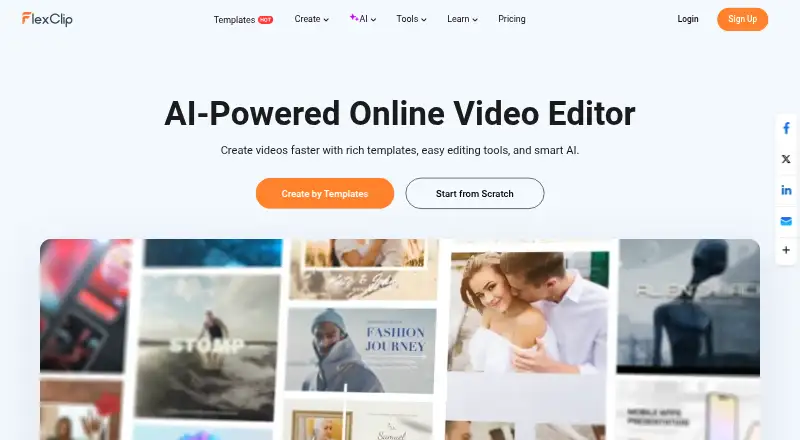
What FlexClip is
FlexClip is an online video creation platform that combines a video editor with AI tools. Its editor supports trimming, splitting, cropping, merging, rotation, resizing, speed changes, text, transitions, animations, overlays, stickers, music, sound effects, and voiceovers. AI options include avatars, long-video-to-shorts, text-to-speech, text-based editing, PPT-to-video, subtitles, text-to-video, voice cloning, and image tools. Media can be imported from a computer, phone, Google Drive, Google Photos, OneDrive, or Dropbox. Exports support aspect ratios including 16:9, 9:16, 1:1, 4:5, and 21:9, with resolutions up to 4K. Videos can be shared to YouTube and cloud storage services; generated short clips can be published to YouTube and LinkedIn. FlexClip is available on web and mobile, with Android, iOS, and Windows listed, but no desktop app. The free plan limits downloads to 720p and video length to 10 minutes.
Good
- Exports video at resolutions up to 4K.
- Imports media from several cloud storage services.
- AI tools include subtitles and text-to-video.
- Team plan includes management and collaboration.
- Created videos and uploaded assets are private by default.
Watch out
- Free downloads are limited to 720p.
- Free projects are limited to 10 minutes per video.
- Free users cannot use stock resources commercially.
- Online version is currently usable on Google Chrome.
Who it suits
FlexClip suits people who want to edit videos online or on mobile and use AI-assisted creation tools. Its collaboration plan may suit teams that need shared video work.
Verdict
FlexClip combines a broad set of editing controls with AI creation options and cloud imports. The free plan has export, project, and commercial-use limits; paid plans start at $19.99 per month.
Plans and prices
From FlexClip's own pricing page, checked 28 Sep 2026.
| Plan | Price | What it gives you |
|---|---|---|
| Free | Free | 720p HD export · 1 stock video/audio per project · free AI-tool trial · FlexClip watermark |
| Plus | $19.99 a month | 1080p Full-HD export · 5 stock videos/audio per project · 30GB cloud storage · 3,600 AI credits/year · no watermark · monthly |
| Business | $29.99 a month | 4K Ultra HD export · unlimited stock media · 100GB storage · 9,600 AI credits/year · no watermark · monthly |
| Team | $69.99 a month | 3 initial seats · additional seats available · team management · collaboration · monthly |
| Plus | $143.88 a year | 1080p Full-HD export · 5 stock videos/audio per project · 30GB cloud storage · 3,600 AI credits/year · no watermark · US$143.88/year |
| Business | $239.88 a year | 4K Ultra HD export · unlimited stock media · 100GB storage · 9,600 AI credits/year · no watermark · US$239.88/year |
| Team | $479.88 a year | 3 initial seats · additional seats available · team management · collaboration · annually |
The facts
Each one read from FlexClip's own pages, with the date it was checked.
What it does
- 4K export
- Yeschecked 20 Sep 2026
- AI tools
- AI features include AI avatars, long-video-to-shorts, AI text-to-speech, text-based editing, PPT-to-video, auto subtitles, text-to-video, voice cloning and AI image tools.checked 28 Sep 2026
- Cloud imports
- The editor can import media from a computer, phone, Google Drive, Google Photos, OneDrive and Dropbox.checked 28 Sep 2026
- Commercial use
- Plus, Business and Team subscribers may use FlexClip stock resources and AI-generated content commercially, while free users may not use stock resources or generated content commercially.checked 28 Sep 2026
- Compliance
- FlexClip states that it adheres to GDPR and describes rights for EEA users including access, correction, deletion, restriction and portability.checked 28 Sep 2026
- Editing
- Its editor supports trimming, splitting, cropping, merging, rotation, resizing, speed changes, text, transitions, animations, overlays, stickers, music, sound effects and voiceovers.checked 28 Sep 2026
- Export
- Users can export popular aspect ratios including 16:9, 9:16, 1:1, 4:5 and 21:9, with resolutions up to 4K.checked 28 Sep 2026
- Included cloud storage
- 30checked 20 Sep 2026
- Paid from
- 19.99checked 20 Sep 2026
- Payment security
- FlexClip says it does not store payment information on its servers and instead encrypts and sends payment details directly to a third-party processor.checked 28 Sep 2026
- Privacy
- Created videos and uploaded assets are private by default, and FlexClip says it accesses user content only with explicit permission to resolve an issue.checked 28 Sep 2026
- Product
- FlexClip is an all-in-one online video creation platform combining a video editor with AI tools.checked 28 Sep 2026
- Publishing integrations
- Exported videos can be shared directly to YouTube, Dropbox, Google Drive and OneDrive.checked 28 Sep 2026
- Social publishing
- AI Long-to-Shorts can publish generated clips directly to YouTube and LinkedIn with one click.checked 28 Sep 2026
- Support
- The FAQ says customer support replies within 2–4 business days.checked 28 Sep 2026
Where it runs
- Browser support
- FlexClip's FAQ says the online version is currently usable on Google Chrome and that its Windows desktop version is compatible with Windows 10.checked 28 Sep 2026
- Desktop app
- Nochecked 20 Sep 2026
- Mobile app
- Yeschecked 20 Sep 2026
- Web app
- Yeschecked 20 Sep 2026
Money
- Free limits
- The Free Plan provides 720p downloads, one stock video and one stock audio per project, up to 12 saved projects, video length up to 10 minutes and free trials of AI tools.checked 28 Sep 2026
- Free plan
- Yeschecked 20 Sep 2026
The company
- Headquarters
- Hong Kongchecked 28 Sep 2026
- Team collaboration
- Yeschecked 20 Sep 2026
The full review of FlexClip
Overview
FlexClip is an online video editor with AI tools for creating and reshaping video. It suits creators who want conventional editing and AI-assisted workflows in one place, but the free plan’s export and usage limits make it better for evaluation than regular commercial work.
Its mix of editing controls, cloud imports and AI features gives it range, while the paid tiers distinguish themselves largely through stock-media allowances, storage and collaboration. The browser version is currently usable on Google Chrome; there is no desktop app, despite a Windows desktop version being described as compatible with Windows 10.
Key features
The editor handles everyday changes such as trimming, splitting, cropping, merging, rotating, resizing and adjusting playback speed. Text, transitions, animations, overlays, stickers, music, sound effects and voiceovers add ways to finish a video without limiting users to AI-generated material.
AI options include avatars, text-to-video, text-to-speech, voice cloning, automatic subtitles, text-based editing, PPT-to-video, AI image tools and long-video-to-shorts conversion. That breadth suits users who want to start from either footage, text or a presentation; it does not remove the value of the manual editor when a project needs direct clip-level adjustments.
Exports cover 16:9, 9:16, 1:1, 4:5 and 21:9 aspect ratios, with resolution up to 4K on the service. Free users are capped at 720p, so the advertised 4K ceiling is a paid-user consideration, not a free-plan benefit. Media can be imported from a computer, phone, Google Drive, Google Photos, OneDrive or Dropbox; finished videos can be shared to YouTube and those cloud services. AI Long-to-Shorts can publish generated clips to YouTube and LinkedIn.
FlexClip says created videos and uploaded assets are private by default, and that it accesses content only with explicit permission to resolve an issue. It also says payment details are encrypted and sent to a third-party processor rather than stored on its servers. The company states that it adheres to GDPR and describes EEA users’ rights to access, correct, delete, restrict and port their data. Customer support replies within 2–4 business days.
Pricing
FlexClip has a free plan and three paid options, all priced monthly in the stated terms. There is no free trial. Commercial use is an important dividing line: Plus, Business and Team subscribers may use stock resources and AI-generated content commercially; free users may not.
- Free — free: 12 online projects, videos up to 10 minutes, one stock video and one stock audio per project, and 720p export. AI tools are available only as free trials. These caps make it a constrained way to explore the editor, not a good fit for sustained production or commercial use.
- Plus — $19.99 a month: five stock videos and five stock audio files per project, 30GB cloud space, 100GB video hosting space and 100 custom templates. It is the entry paid tier for creators who need commercial-use rights and more room for media than the free plan allows.
- Business — $29.99 a month: 100GB cloud space, 1TB video hosting space, 200 custom templates, and unlimited stock videos and audio per project. It makes more sense for heavier production or larger hosting needs; the larger quotas distinguish it from Plus.
- Team — $69.99 a month: three initial seats, with additional seats available, plus team management and collaboration. This is the clearest fit for teams that need shared workflows rather than an individual editor.
The free plan’s project, duration, stock and resolution caps are substantial trade-offs. Paid tiers add storage, hosting and media allowances, but only Team explicitly includes seats and collaboration.
Platforms
FlexClip supports web, Android, iOS and Windows. The Windows desktop version is described as compatible with Windows 10, but FlexClip has no desktop app; the product is an online editor, and its FAQ currently identifies Google Chrome as the supported browser for the online version.
Who it's for
FlexClip is a practical choice for solo creators who want a browser-based editor with several ways to make video, including AI tools, imported media and conventional clip editing. Plus is the more relevant plan when commercial use or higher-quality exports matter; Business suits projects that need substantially more storage or stock media. Teams should consider Team for its seats and collaboration. Users who need a free commercial workflow, more than 12 saved projects, videos longer than 10 minutes on the free tier, or a desktop application should look elsewhere.
Pros and cons
- Pro: Manual editing and a broad AI toolkit share one platform, giving creators several routes from source material to finished video.
- Pro: Cloud imports and direct sharing to YouTube and major storage services simplify moving media into and videos out of the editor.
- Pro: Paid plans allow commercial use of stock resources and AI-generated content, with Business offering unlimited stock video and audio per project.
- Con: Free exports stop at 720p, and the plan limits users to 12 projects and 10-minute videos.
- Con: Free users cannot use stock resources or generated content commercially, which rules out the free tier for many business uses.
- Con: The online version’s browser support is currently limited to Google Chrome, and there is no desktop app.
Alternatives
For a different emphasis, consider these options:
- Steve AI is another freemium video tool, with a free plan offering 1,200 seconds of AI videos and 200 credits; its Basic plan is priced at $120 a year.
- Animoto has a free plan with unlimited videos, 50+ music tracks, three standard fonts and 30 color swatches, but exports carry a watermark.
- Versely is a paid option with a free plan; its Standard tier is $27.08 a month, billed annually at $324.99, with 9,600 credits per year.
- Focal is a web-based freemium option; its Starter plan is $10 a month and includes 1,000 monthly credits and commercial use.
- Cinematic Slideshow Studio has a free plan with unlimited projects and 720p exports, but only three monthly exports and a watermark.
- InVideo AI is a freemium web and extension option whose free quota resets weekly.
- Lumen5 is a web-based freemium alternative with two AI voiceover minutes on its free plan.
- Pexo is a paid option with a free trial; its Pro plan costs $30 a month and includes 4,800 credits and watermark-free exports.
- For a broader comparison, browse AI Video Editors, AI Slideshow Makers, GIF Maker Software, AI Mockup Generators, AI Coloring Page Generators or Video Intro Maker Software.
Verdict
Choose FlexClip if you want a browser-based video editor that combines standard editing with a wide range of AI creation tools, plus cloud imports and publishing options. Its main appeal is that range in one workflow; look elsewhere if you need a capable free commercial tier, broad browser support or a desktop app.
Getting started
- Open the FlexClip website in Google Chrome
- Import media from a computer, phone, or a supported cloud service
- Edit with the video tools or AI features
- Use the Free plan or subscribe to Plus, Business, or Team
- Export in a supported aspect ratio and resolution
Limits worth knowing
The Free plan allows 720p downloads, videos up to 10 minutes, and up to 12 saved projects; each project can use one stock video and one stock audio file. Free users may not use stock resources or AI-generated content commercially.
Questions
Is FlexClip free?
Yes. Its Free plan provides 720p downloads, up to 12 saved projects, and videos up to 10 minutes.
What do paid plans cost?
Plus is listed at $19.99, Business at $29.99, and Team at $69.99.
Which platforms can I use?
FlexClip lists web, Android, iOS, and Windows. It has no desktop app; the online version is currently usable on Google Chrome, and its Windows desktop version is compatible with Windows 10.
Can FlexClip export 4K video?
Yes. Exports can reach resolutions up to 4K.
Can free users use content commercially?
No. Free users may not use stock resources or generated content commercially; Plus, Business, and Team subscribers may.
Who makes FlexClip?
The maker is FlexClip, with headquarters in Hong Kong.
Alternatives to FlexClip
- 1

CyberLink PowerDirector
Free planAndroidiOSmacOSWindows9.0From $59.99 a year - 2

Captions
Free planAndroidiOSWebAPI9.0From $4.99 a month - 3
Vizard
Free planAndroidiOSWebAPI8.9From $29 a month - 4

InVideo AI
Free planAndroidiOSWebAPI8.9From $4 a month - 5

Simplified
Free planAndroidiOSWebAPI8.8From $19 a month - 6
Wondershare Filmora
Free planAndroidiOSWebmacOS8.7From $49.99 a year