
Steve AI
Steve AI turns text, images, prompts, scripts, blogs, and audio into videos.
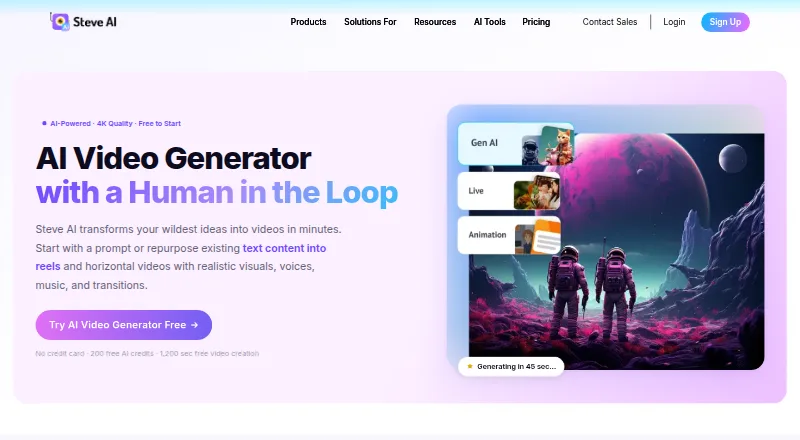
What Steve AI is
Steve AI turns text, images, prompts, scripts, blogs, and audio into videos. Users can adjust individual scenes without regenerating the whole video, and choose AI visuals, stock media, or animated explainer styles. Listed uses include marketing, social media, education, storytelling, and business training. Videos can be downloaded or shared to YouTube, Instagram, LinkedIn, and other channels. The web and iOS platform includes AI presenters, script-to-video, scene generation, brand kits, and subtitle generation. The free plan provides 200 AI credits and 1,200 seconds of AI video creation, but exports have limited downloads. The Basic plan is listed at $120 a year, billed yearly and shown as $10/month; it includes 100 minutes of AI videos per month and 720p resolution. Paid plans include commercial rights to videos; resell rights are exclusive to Enterprise. Steve AI says it encrypts data in transit and at rest, and that its processes comply with GDPR and CCPA. Enterprise is listed with SSO and AI data privacy and advanced security.
Good
- Converts text, images, scripts, blogs, and audio into video.
- Scene changes do not require regenerating the whole video.
- Videos can be shared to listed social channels.
- Free plan includes 200 AI credits.
Watch out
- Free exports have limited downloads.
- Resell rights are exclusive to Enterprise.
- Free trial is not offered.
Who it suits
Steve AI may suit people creating videos from written or audio material for marketing, social media, education, storytelling, or business training. Its scene editing and sharing options may also help users who want to revise individual visuals and publish to listed channels.
Verdict
Steve AI offers several inputs and scene-level editing for video creation, with a free plan that has export limits. Paid plans include commercial rights, while reselling rights require Enterprise.
Plans and prices
From Steve AI's own pricing page, checked 21 Oct 2026.
| Plan | Price | What it gives you |
|---|---|---|
| Free | Free | 200 AI credits · 1,200 seconds video creation · 10M+ stock library · watermark/download restrictions may apply |
| Basic | $10 a month | 720p · 100 minutes AI video/month · 800 AI images and premium stock/month · 120 seconds generative credits · unlimited exports · no watermark · $120 billed yearly |
| Starter | $30 a month | 1080p · 100 minutes AI video/month · 800 AI images and premium stock/month · 120 seconds generative credits · unlimited exports · no watermark · 300+ animated characters · $360 billed yearly |
| Generative AI | $40 a month | 400 minutes AI video/month · 3,200 AI images and premium stock/month · 15 minutes generative credits · 2K · 100% human-like voices · unlimited exports |
| Pro | $40 a month | 2K · 300 minutes AI video/month · 2,400 AI images and premium stock/month · 120 seconds generative credits · 95% human-like voices · unlimited exports · 300+ animated characters · $480 billed yearly |
| Enterprise | Priced on request | Custom limits · 6,000 minutes AI video/month · 48,000 AI images and premium stock/month · 50 minutes generative credits · 4K · team collaboration · dedicated infrastructure · commercial and reselling rights |
The facts
Each one read from Steve AI's own pages, with the date it was checked.
What it does
- API availability
- The pricing comparison lists a Steve AI API as a custom Enterprise capability; no public API reference or SDK documentation is provided on the cited official pages.checked 21 Oct 2026
- Audio and image inputs
- Users can create videos from uploaded audio or images, including image-to-video and motion effects workflows.checked 21 Oct 2026
- Characters and avatars
- The feature page lists more than 300 animated characters, while the product also offers talking-head avatars.checked 21 Oct 2026
- Commercial use
- Steve AI says paid plans include commercial rights to videos, while resell rights are exclusive to Enterprise.checked 29 Sep 2026
- Compliance
- The security FAQ says the service follows GDPR and California Consumer Privacy Act requirements.checked 21 Oct 2026
- Documentation and support
- The help center is organized into getting started, video creation, editing, exporting, team collaboration, billing and security collections.checked 21 Oct 2026
- Editing and publishing
- The workspace supports camera movements, transitions, auto-subtitles, one-click resizing and direct YouTube publishing.checked 21 Oct 2026
- Enterprise security
- The Enterprise plan lists AI data privacy and advanced security, while SSO is listed only for Enterprise.checked 29 Sep 2026
- Integrations
- Official pages state that videos can be shared directly to YouTube, Instagram and LinkedIn, and the pricing comparison lists custom integrations for Enterprise.checked 21 Oct 2026
- Legal terms
- Steve AI's terms identify the service as a product of Animaker Inc., a Delaware corporation with a principal address in San Francisco.checked 21 Oct 2026
- Licence
- The cited official terms grant use of the hosted Steve AI service and do not state an open-source licence.checked 21 Oct 2026
- Limit: Software Advice pricing and output
- Reviewers report that download allowances and extra charges feel expensive, themes may not persist reliably, generated images can contain visual defects and some renders take many hours.checked 21 Oct 2026
- Limit: Trustpilot reliability and refunds
- Negative Trustpilot reviews report video-settings or API errors, failed rendering or downloads, slow support, robotic voiceovers, short slideshow outputs and disputes over refunds or renewals.checked 21 Oct 2026
The company
- Company
- Steve AI is a product of Animaker Inc., a Delaware corporation whose stated principal address is in San Francisco, California.checked 29 Sep 2026
- Company founding
- LinkedIn lists Animaker Inc., the maker of Steve AI, as founded in 2015.checked 21 Oct 2026
- Company headquarters and size
- Crunchbase lists San Francisco, California as headquarters and 101–250 employees, while LinkedIn lists Animaker Inc. at 51–200 employees.checked 21 Oct 2026
- Company legal name
- Crunchbase lists Animaker Inc. as Steve AI's legal name and identifies RS Raghavan as a founder.checked 21 Oct 2026
- Founded
- 2014checked 28 Sep 2026
- Headquarters
- San Francisco, California, United Stateschecked 28 Sep 2026
Money
- Free plan
- Yeschecked 22 Sep 2026
- Free tier limits
- The free plan provides 200 AI credits and 1,200 seconds of AI video creation, and its exports have limited downloads.checked 29 Sep 2026
- Limit: G2 free access and editing
- G2 review summaries identify free-plan download limits, limited options, download issues and file-management issues; one reviewer could not upload a reference image for text-to-video.checked 21 Oct 2026
Where it runs
- Limit: Apple app complaints
- App Store reviewers report that publishing or downloading videos sometimes fails and that annual renewals were not refunded under the stated policy.checked 21 Oct 2026
- Mobile app pricing
- The iOS listing shows in-app purchases from $4.99 for five credits to $129.00 monthly for Generative AI, plus $19.00 Mobile iStock monthly and $59.00 MobilePro monthly subscriptions.checked 21 Oct 2026
The full review of Steve AI
Overview
Steve AI is a generative video platform for creators and teams turning source material into video. It is best suited to marketing, social, education, storytelling, and business training work where users want varied inputs and the ability to revise individual scenes. Its main appeal is flexible creation; its free exports are limited, and paid plans set firm monthly quotas and resolution ceilings.
Made by Animaker Inc., Steve AI offers AI visuals, stock media, and animated explainer styles. Users can download videos or share them to YouTube, Instagram, LinkedIn, and other channels. AI presenters, subtitles, script-to-video, AI scene generation, and a brand kit extend the core video workflow.
Key features
Multiple starting points, targeted edits
Steve AI can turn text, images, prompts, scripts, blog posts, and audio into videos. That flexibility suits teams repurposing existing material as well as creators starting from a prompt. Scene-level visual edits are a practical advantage when one part needs changing: users can adjust a scene without regenerating the entire video.
Styles, publishing, and integrations
AI visuals and stock media provide different ways to build a video, while animated explainer styles support instructional or business content. Direct sharing to YouTube, Instagram, LinkedIn, and other channels helps move finished work toward publication. Getty media, ElevenLabs voiceovers, and beta direct publishing to YouTube are among the integrations described by the maker; the YouTube integration is in beta, so it should not be treated as a settled workflow.
Security and rights
Steve AI says it encrypts data in transit with 256-bit encryption and at rest with AES-256, uses TLS/SSL for application endpoints, and follows GDPR- and CCPA-compliant processes. Enterprise adds AI data privacy, advanced security, and SSO. Paid plans include commercial rights to videos, but resell rights are reserved for Enterprise. That distinction matters to agencies or businesses that intend to resell video output, not just use it commercially.
Pricing
Steve AI is freemium, with no free trial. Its Free plan costs nothing and includes 200 AI credits and 1,200 seconds of AI video creation. Limited downloads make it useful for exploring the workflow, but less dependable for regular publishing.
Basic costs $120 a year, shown as $10/month and billed yearly. It includes 100 minutes of AI videos per month, 800 AI images and premium stock per month, 120 seconds of generative credits, and 720p video. It is the lowest-cost paid option, but 720p is a meaningful ceiling for viewers expecting sharper output.
Starter costs $360 a year, shown as $30/month and billed yearly. It keeps the same 100 monthly video minutes, 800 monthly AI images and premium stock, and 120 seconds of generative credits as Basic, while raising resolution to 1080p. Choose it when full HD matters more than minimizing annual spend; it does not increase those monthly quotas.
Pro costs $480 a year, shown as $40/month and billed yearly. It raises the allowance to 300 video minutes and 2,400 AI images and premium stock per month, with 120 seconds of generative credits and 2K video. This is the more suitable annual plan for higher-volume production, though its generative credit allowance remains the same as Starter.
Generative AI costs $40 a month and includes 400 minutes of AI videos, 3,200 AI images and premium stock per month, 15 minutes of generative credits, and 2K video. Its much larger generative credit allowance than the annual plans may suit work that depends heavily on generative output, while the monthly term avoids the annual billing commitment shown for Basic, Starter, and Pro.
Enterprise has custom pricing and provides 6,000 AI video minutes, 48,000 AI images and premium stock per month, and 50 minutes of generative credits. It is the plan for organizations needing the listed security features or resell rights, with Priority support. Support progresses from Basic on Free and Basic, to Advanced on Starter, Premium on Pro, and Priority on Enterprise.
Platforms
Steve AI is available on web and iOS. Its listed export capability reaches 4K, but plan-specific limits are lower on Basic, Starter, and Pro: 720p, 1080p, and 2K respectively. The listed platform and resolution options make it relevant to mobile and browser users, though not to those seeking a Windows or Android app.
Who it's for
Steve AI suits marketers, educators, and teams creating social, storytelling, or business training videos from material they already have or can describe. Scene-level editing favors users who expect to revise drafts rather than regenerate every change. Free is best treated as a limited starting point; teams with routine publishing needs should compare paid quotas and resolution carefully, and anyone who needs resell rights or Enterprise security features should look at Enterprise pricing.
Pros and cons
- Pros: Accepts scripts, blogs, prompts, images, and audio, giving varied creator workflows a route into video.
- Pros: Scene-level visual changes avoid regenerating the whole video when only one scene needs revision.
- Pros: Paid plans include commercial rights, with high monthly video and media quotas on Pro, Generative AI, and Enterprise.
- Cons: Free exports have limited downloads, so the free allowance is not a strong fit for ongoing publishing.
- Cons: Basic is capped at 720p and Starter at 1080p; higher listed plan resolutions cost more.
- Cons: Annual billing applies to Basic, Starter, and Pro, while resell rights and SSO require Enterprise.
Alternatives
For a broader comparison of category options, browse AI video generators, AI Explainer Video Makers, Explainer Video Software, or AI Slideshow Makers.
FlexClip is worth considering if platform coverage matters: it supports Android, iOS, web, and Windows, and its free plan allows 12 online projects with a 10-minute-per-video limit and one stock video per project.
Animoto may fit simpler free video needs: its free plan offers unlimited videos, 50+ music tracks, three standard fonts, and 30 color swatches, but includes a watermark.
Ambience AI is an alternative for API or web users who want a free trial: its Free plan includes 100 credits, one seat, a seven-day trial, and standard models.
Focal is a fit for slideshow-oriented work: its Starter plan costs $10 a month and includes 1,000 monthly credits, 50 daily credits, Veo and Seedance models, up to 1,000 seconds of video per month, and commercial use.
SlideLabs AI is more specifically geared to slideshows, with a free allowance of five per month and a Growth plan that allows 150 monthly and supports posting and scheduling to TikTok.
Cinematic Slideshow Studio suits users prioritizing project capacity and storage: its free plan offers unlimited projects, 1 GB cloud storage, 720p at 30 fps, and three watermarked exports per month, with no length cap.
InVideo AI is another web-based video option, with a free plan whose quota resets weekly.
Lumen5 is another web-based freemium option; its free plan includes two AI voiceover minutes.
Verdict
Choose Steve AI if you need to turn several kinds of source material into video and value changing scenes without rebuilding the whole piece. It is a credible fit for recurring marketing, education, and training output when a paid plan's quota and resolution match your workload. Look elsewhere if limited free downloads, annual billing on the lower paid tiers, or Enterprise-only resell rights do not fit your needs.
Getting started
- Open Steve AI on the web or use its iOS app.
- Choose text, images, prompts, a script, blog material or audio as the video input.
- Use AI visuals, stock media or animated explainer styles and edit scenes as needed.
- Use the free plan or select a listed paid plan.
- Download the video or share it to YouTube, Instagram, LinkedIn or another channel.
Limits worth knowing
The free plan includes 200 AI credits and 1,200 seconds of AI video creation, and its exports have limited downloads. Annual Basic costs $120.00 per year, shown as $10/month, and includes 100 minutes of AI videos monthly at 720p. Paid plans include commercial rights, while resell rights are exclusive to Enterprise.
Questions
Does Steve AI have a free plan or trial?
It has a free plan with 200 AI credits and 1,200 seconds of AI video creation. There is no free trial.
What does the Basic plan cost?
Basic costs $120.00 per year, billed yearly and shown as $10/month.
Which platforms can I use Steve AI on?
Steve AI is available on the web and iOS.
Can I use Steve AI videos commercially?
Paid plans include commercial rights to videos. Resell rights are exclusive to Enterprise.
Where can I publish videos?
Videos can be downloaded or shared directly to YouTube, Instagram, LinkedIn and other channels.
Who makes Steve AI?
Steve AI is a product of Animaker Inc., a Delaware corporation with a stated principal address in San Francisco, California.
Alternatives to Steve AI
- 1

HeyGen
Free planAndroidiOSWebAPI9.1From $24 a month - 2

PixVerse
Free planAndroidiOSWebAPI9.1From $8 a month - 3

Kling AI
Free planAndroidiOSWebAPI9.0From $6.99 a month - 4

InVideo AI
Free planAndroidiOSWebAPI9.0From $4 a month - 5

Pollo AI
Free planAndroidiOSWebAPI9.0Free plan - 6
Visla AI Video Agent
Free planAndroidiOSWebAPI8.9Free plan