
Pixlr
Pixlr is an image editing and design service available in a browser, on iOS and Android, and through desktop access with a Pixlr Account.
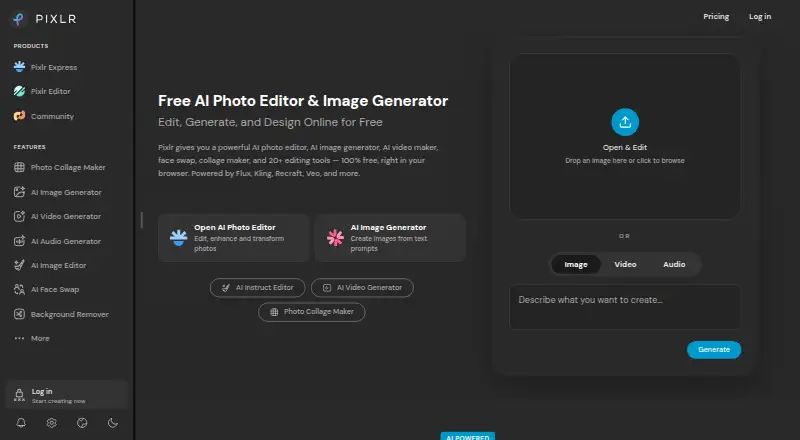
What Pixlr is
Pixlr is an image editing and design service available in a browser, on iOS and Android, and through desktop access with a Pixlr Account. Its browser editor provides free online editing, image generation, and design. Editing tools include layers, masking, batch editing, cloud sync, and AI retouching; the AI suite also offers image and video generation, face swap, generative fill, background removal, and object removal. Super Scale supports AI upscaling up to 25 megapixels. Pixlr integrates models including Flux, Kling, Recraft, Veo, Qwen, and Stable Diffusion, but does not support RAW photos. The free version has features, though premium content, advanced tools, and ad-free editing require paid options. Subscription credits reset on renewal or cancellation, while credit pack credits do not expire. Pixlr does not process subscription refunds after payment; mobile refunds go through the app store.
Good
- Free browser editing, generation, and design
- Batch editing, layers, and masking tools
- Cloud sync and AI retouching
- Available on web, iOS, and Android
- Super Scale upscales images up to 25 megapixels
Watch out
- RAW photo support is not available
- Premium content and advanced tools require paid options
- Subscription refunds are not processed after payment
- Subscription credits reset on renewal or cancellation
Who it suits
Pixlr suits people who want image editing and design in a browser or on mobile, including users who need batch editing, layers, masking, or AI tools. Its free plan is an option for basic access, while paid plans add premium content, advanced tools, and ad-free editing.
Verdict
Pixlr combines browser-based editing and design with mobile access and a broad set of AI tools. Check its RAW limitation, paid feature requirements, and credit and refund terms before choosing a plan.
Plans and prices
From Pixlr's own pricing page, checked 20 Sep 2026.
| Plan | Price | What it gives you |
|---|---|---|
| Plus | — | 1 concurrent AI generation · 80 monthly AI Credits |
| Premium | — | 4 concurrent AI generations · 1,000 monthly AI Credits |
| Ultra | — | 8 concurrent AI generations · Up to 10,000 monthly AI Credits |
| Ultra Max | — | 10,000 monthly AI Credits |
| Plus Yearly | $1.99 a month | Annual billing with 960 AI Credits valid for the year. · billed annually at $1.99 per month |
| Plus Monthly | $2.49 a month | Ad-free editing, unlimited saves, and 80 monthly AI Credits. · billed monthly at $2.49 |
| Premium Yearly | $7.99 a month | Annual billing with 12,000 AI Credits valid for the year. · billed annually at $7.99 per month |
| Premium Monthly | $9.99 a month | Premium features, all image, video, and audio models, and 1,000 monthly AI Credits. · billed monthly at $9.99 |
| Ultra Yearly | $19.99 a month | Annual billing with up to 120,000 AI Credits valid for the year. · billed annually from $19.99 per month |
| Ultra Monthly | $24.99 a month | Professional plan with expanded AI credits, priority queue, and high-resolution exports. · billed monthly from $24.99 |
| Ultra MAX Yearly | $39.99 a month | Annual Ultra MAX billing with doubled credits. · billed annually at $39.99 per month |
| Ultra MAX Monthly | $49.99 a month | Double the credits with Max, with 10,000 monthly credits instead of 5,000. · billed monthly at $49.99 |
The facts
Each one read from Pixlr's own pages, with the date it was checked.
What it does
- AI model integrations
- Pixlr integrates models including Flux, Kling, Recraft, Veo, Qwen, and Stable Diffusion.checked 28 Sep 2026
- AI retouching
- Yeschecked 20 Sep 2026
- AI tool suite
- Tools include image and video generation, face swap, generative fill, background removal, and object removal.checked 28 Sep 2026
- Batch editing
- Yeschecked 20 Sep 2026
- Cloud sync
- Yeschecked 20 Sep 2026
- Credit expiration
- Subscription credits reset on renewal or cancellation; credit pack credits do not expire.checked 28 Sep 2026
- Desktop access
- Pixlr supports browser, mobile, and desktop use through a Pixlr Account.checked 28 Sep 2026
- Education access
- Pixlr is free for Education and also offers paid education plans.checked 28 Sep 2026
- Layer editing
- Yeschecked 20 Sep 2026
- Masking tools
- Yeschecked 20 Sep 2026
- Payment methods
- Website payments accept Visa, Mastercard, or PayPal; mobile payments use the app store account.checked 28 Sep 2026
- RAW photo support
- Nochecked 20 Sep 2026
- Refund policy
- Pixlr does not process subscription refunds after payment; mobile refunds go through the app store.checked 28 Sep 2026
- Security track record
- Pixlr says it has more than 15 years online and emphasizes security and privacy.checked 28 Sep 2026
- Support contact
- Pixlr directs purchase assistance and some upgrade issues to [email protected].checked 28 Sep 2026
Money
- Billing flexibility
- Subscriptions can be paid monthly or yearly and cancelled whenever desired.checked 28 Sep 2026
- Enterprise plan
- An Enterprise plan is available for larger corporations across an entire domain.checked 28 Sep 2026
- Free browser editor
- Pixlr offers free online editing, generation, and design directly in a browser.checked 28 Sep 2026
- Free plan
- Yeschecked 20 Sep 2026
- Free tier limits
- The free version has robust features but premium content, advanced tools, and ad-free editing require paid options.checked 28 Sep 2026
- Starting price
- Paid plans start at $1.99 per month.checked 28 Sep 2026
The company
- Founded
- 2008checked 28 Sep 2026
- Headquarters
- Singaporechecked 28 Sep 2026
Where it runs
- Platform
- multi-platformchecked 20 Sep 2026
Alternatives to Pixlr
- 1

Picsart
Free planAndroidiOSWebAPI9.0From $10.50 a month - 2

Photoroom
Free planAndroidiOSWebAPI9.0From $7.50 a month - 3
PhotoPad
Free planAndroidiOSWebExtension8.8Free plan - 4

Adobe Photoshop
AndroidiOSWebmacOS8.7 - 5

Adobe Lightroom
AndroidiOSWebmacOS8.7 - 6

BeFunky
Free planAndroidiOSWeb8.7Free plan