SNS-HDR
SNS-HDR processes photo sequences and individual images with HDR techniques.
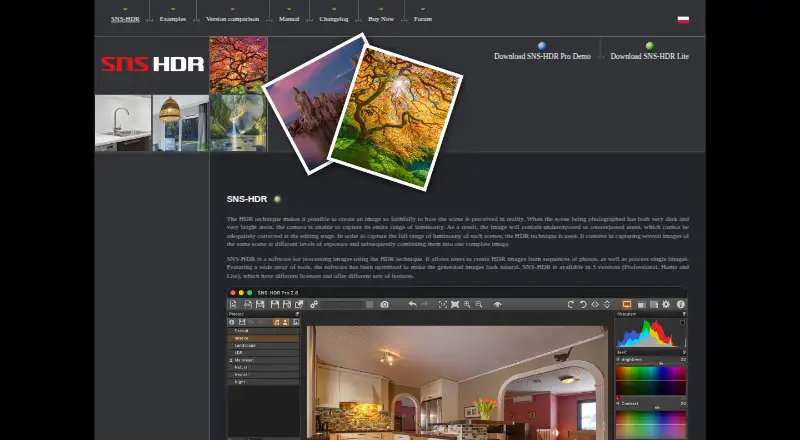
What SNS-HDR is
SNS-HDR processes photo sequences and individual images with HDR techniques. It reads JPEG, TIFF, RAW files including DNG, OpenEXR, and Radiance HDR, and can align exposures to reduce ghosting and chromatic aberration. Masks, presets, project saving and restoration, and batch processing are among its editing tools. It also supports 360° panorama processing, with controls and presets intended to produce natural-looking results. Listed output formats include JPEG, TIFF, TIFF-8, TIFF-16, SNSX, HEIC, and HEIC-10; HEIC output is available on macOS. SNS-HDR runs on Windows and macOS, with stated requirements of Windows 10 64-bit or newer, or macOS 14 or newer on Apple Silicon. It integrates with Adobe Lightroom Classic as a plug-in or external editor, but not cloud-based Lightroom. Lite is freeware with a commercial license. Home costs €30 a month with a non-commercial license, and Professional costs €85 a month with a commercial license.
Good
- Reads RAW files, including DNG
- Can align exposures and reduce ghosting
- Supports 360° panorama processing
- Lite is freeware with a commercial license
Watch out
- Cloud-based Lightroom is not supported
- Home plug-in handles one series at a time
- Batch processing is a Pro feature
Who it suits
SNS-HDR suits photographers who work with HDR sequences or individual images and need RAW support, panorama processing, or Lightroom Classic integration. The available licenses include freeware and paid options.
Verdict
SNS-HDR offers HDR processing, editing tools, and Lightroom Classic integration across Windows and macOS. Check the edition limits and operating-system requirements against your workflow before choosing a license.
Plans and prices
From SNS-HDR's own pricing page, checked 30 Sep 2026.
| Plan | Price | What it gives you |
|---|---|---|
| SNS-HDR Lite | Free | freeware · commercial license |
| SNS-HDR Home | €30, paid once | non-commercial · no batch processing · Lightroom plug-in processes one series at a time |
| SNS-HDR Professional | €85, paid once | commercial · batch processing · Lightroom plug-in supports series splitting and quiet mode |
The facts
Each one read from SNS-HDR's own pages, with the date it was checked.
What it does
- Demo
- The purchase page advises trying the Pro demo before buying, and the homepage links to a Pro demo download.checked 30 Sep 2026
- Editing tools
- The software supports masks, built-in presets, saving and restoring projects, and batch processing.checked 30 Sep 2026
- Edition limits
- The Home Lightroom plug-in handles one series at a time, while Pro adds splitting into series and quiet mode; batch processing is a Pro feature.checked 30 Sep 2026
- Formats
- It reads JPEG, TIFF, RAW including DNG, OpenEXR, and Radiance HDR images.checked 30 Sep 2026
- Image alignment
- SNS-HDR can align source exposures and reduce ghosting and chromatic aberration.checked 30 Sep 2026
- Lightroom integration
- SNS-HDR integrates with Adobe Lightroom Classic through a plug-in or as an external editor; cloud-based Lightroom is not supported.checked 30 Sep 2026
- Natural rendering
- The software includes image editing tools and presets and is optimized to make generated images look natural.checked 30 Sep 2026
- Operating systems
- The stated system requirements are Windows 10 64-bit or newer and macOS 14 or newer on Apple Silicon.checked 30 Sep 2026
- Output formats
- The homepage lists JPEG and TIFF output, and HEIC output on macOS.checked 30 Sep 2026
- Panoramas
- The software supports 360° panorama processing.checked 30 Sep 2026
- Purpose
- SNS-HDR processes images with HDR techniques, creating HDR images from photo sequences and processing single images.checked 30 Sep 2026
- RAW photo support
- Yeschecked 20 Sep 2026
- Security and compliance
- The maker pages opened describe image processing and local program options but do not state security certifications or compliance claims.checked 30 Sep 2026
- Support
- The maker provides a user forum with discussion, help, tutorials, and bug-report sections.checked 30 Sep 2026
Money
- Free plan
- Yeschecked 20 Sep 2026
The company
- Maker
- The site copyright identifies Sebastian Nibisz as the maker and provides [email protected] as a contact address.checked 30 Sep 2026
The full review of SNS-HDR
SNS-HDR is a Windows and macOS desktop application for building HDR images from exposure sequences or refining single photographs. It is aimed at photographers who want alignment, tone mapping, panoramas and a Lightroom Classic handoff in one focused workflow. The main decision is whether Lite’s free commercial license covers your needs or whether Pro’s batch and series-management tools justify its monthly cost.
Overview
The application combines HDR merging with single-image processing and editing tools designed to keep results natural rather than aggressively stylized. RAW support, exposure alignment and project saving make it suitable for repeatable photographic work, while 360° panorama processing broadens its use beyond ordinary bracketed stills.
SNS-HDR is a specialist tool, not a general device-spanning editor. Its Lightroom connection is specifically for Adobe Lightroom Classic, and photographers using cloud-based Lightroom will need another workflow.
Key features
SNS-HDR reads JPEG, TIFF, RAW files including DNG, OpenEXR and Radiance HDR images. It can merge a sequence or process one image, with multiple tone-mapping controls, masks and built-in presets for shaping the result. Presets and the emphasis on natural rendering are useful when you want HDR detail without an obviously overprocessed appearance, although the listed feature set does not position it as a complete replacement for a broad photo-editing suite.
Alignment of source exposures helps control ghosting and chromatic aberration, two frequent problems in bracketed captures. The software also handles 360° panoramas, giving landscape and virtual-tour photographers a dedicated HDR option. Projects can be saved and restored, which makes longer edits easier to revisit.
Batch processing is included in the Pro feature set. Output options cover JPEG, TIFF-8, TIFF-16, SNSX, HEIC and HEIC-10; HEIC output is specified for macOS. Lightroom Classic users can invoke SNS-HDR through a plug-in or as an external editor. Home’s plug-in processes one series at a time, whereas Professional can split images into series and adds quiet mode. Cloud Lightroom is not supported.
Pricing
SNS-HDR Lite costs nothing and is freeware with a commercial license. It is the sensible starting point for commercial photographers who need core HDR processing without a subscription, but it does not provide the Pro-only batch workflow or advanced series handling.
SNS-HDR Home costs €30 a month, billed monthly, with a non-commercial license. Its Lightroom plug-in handles one series at a time, making it appropriate for personal projects and smaller, sequential workflows. The non-commercial restriction rules it out for paid client work.
SNS-HDR Professional costs €85 a month, billed monthly, with a commercial license. It adds batch processing, splitting into series and quiet mode, so the premium is easiest to justify for commercial photographers processing recurring volumes or many bracket groups. Before purchasing, the maker recommends trying the Pro demo; a Pro demo download is provided.
A free trial is available through the demo route, but no trial duration or renewal terms are stated. The monthly plans therefore warrant checking against your expected workload before committing.
Platforms
SNS-HDR runs on Windows and macOS. The stated requirements are Windows 10 64-bit or newer, or macOS 14 or newer on Apple Silicon. That macOS requirement excludes older Macs and Intel-based systems, so hardware compatibility should be confirmed first.
Who it's for
Choose SNS-HDR if you shoot RAW brackets, need reliable exposure alignment, work with panoramas, or want a Lightroom Classic plug-in and external-editor route. Lite is particularly useful for commercial users testing a no-cost edition; Home fits non-commercial photographers who process one series at a time; Professional is for commercial production where batch jobs, series splitting and quiet operation save repeated manual work.
Look elsewhere if you depend on cloud-based Lightroom, need Linux, mobile or web support, or want a broad all-purpose editor rather than an HDR-centered application.
Pros and cons
Pros
- RAW, DNG, OpenEXR and Radiance HDR input supports serious capture workflows.
- Alignment that reduces ghosting and chromatic aberration addresses common HDR-merging defects.
- Natural-rendering presets, masks and multiple tone-mapping controls provide both speed and adjustment range.
- 360° panorama processing and Lightroom Classic integration extend it beyond basic exposure merging.
- Lite offers a free commercial license, lowering the barrier for paid photographers.
Cons
- Home is non-commercial, so businesses must use Lite or the substantially pricier Professional edition.
- Professional costs €85 a month, which is significant for occasional HDR work.
- Home’s Lightroom plug-in handles only one series at a time, and batch processing is reserved for Pro.
- Cloud-based Lightroom is unsupported.
- macOS support requires version 14 or newer on Apple Silicon.
Alternatives
HDR Software is the broader category to compare when you want to survey other HDR-focused tools.
Photo Editing Software is a better starting point if HDR is only one part of a wider editing workflow.
ColorForge is free across Android, iOS, Linux, macOS, web and Windows, with no account, watermarks or installation, making it preferable for broad platform coverage.
Instant Meshes is a free Linux, macOS and Windows option with no stated price or usage limits.
Luminance HDR is free and open source under GPLv2 for desktop HDR imaging on Linux, macOS and Windows.
PhotomatixCL offers paid monthly plans with free-plan access and trials for users who prefer a credit-based alternative.
HDRMerge is free GPL-3.0-or-later software for Linux, macOS and Windows.
MergeHDR targets iOS and macOS, with a free tier for trying merges and previews before paid yearly access.
easyHDR offers lifetime HOME and COMMERCIAL licensing options for Windows and macOS.
HDR Merge Master is a free Linux, macOS and Windows alternative.
Verdict
SNS-HDR is a strong choice for photographers who want focused HDR processing, natural-looking controls, panorama support and Lightroom Classic integration. Lite makes the workflow accessible to commercial users at no cost, while Professional is the right upgrade for batch-heavy production. Choose another application if you need cloud Lightroom, older Apple hardware, wider platform coverage or a general-purpose photo editor.
Alternatives to SNS-HDR
- 1

Fotor
Free planAndroidiOSWebAPI7.5Free plan - 2
Avidemux
Free planOpen sourceWebLinuxmacOSWindows7.3Free plan - 3

ColorForge
Free planAndroidiOSWebLinux7.3Free plan - 4
Luminance HDR
Free planOpen sourceLinuxmacOSSelf-hostedWindows7.3Free plan - 5
Photomatix Pro
iOSWebAPILinux6.8From $19 a month - 6
MergeHDR
Free planiOSmacOS6.7From $9.99 a year