
VSCO
VSCO is a photo editing service from VSCO, founded in 2011 and headquartered in San Francisco, California.
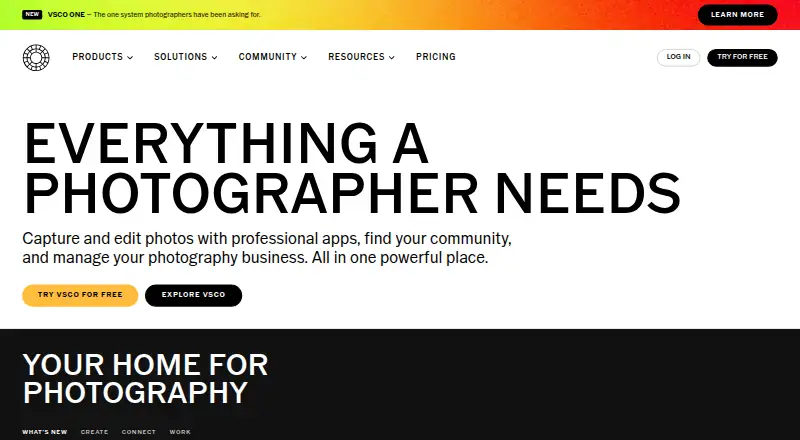
What VSCO is
VSCO is a photo editing service from VSCO, founded in 2011 and headquartered in San Francisco, California. It is available on the web, iOS, and Android. Listed tools include batch editing for applying changes across multiple images, RAW photo support, cloud sync, and AI retouching. VSCO uses a freemium model with a free Starter plan, paid tiers, and a listed seven-day trial. Starter costs 0.00 USD and includes 15 presets. Plus costs $29.99 billed annually and includes 200+ presets. Pro costs $59.99 billed annually and includes unlimited AI Lab and unlimited client galleries. VSCO One is annual only, costs $499.99 billed annually, and includes unlimited client galleries. These plans list distinct levels of preset access, AI Lab availability, and client-gallery capacity. Batch workflows, RAW handling, synchronization, and AI retouching are the core listed capabilities for editing and managing photographic work.
Good
- Available on web, iOS, and Android
- Supports RAW photo editing
- Batch editing for multiple images
- Cloud sync included
- AI retouching tools available
- Paid tiers add presets and client galleries
Watch out
- Free Starter plan includes 15 presets
- VSCO One is annual only
- The listed trial lasts seven days
Who it suits
VSCO suits photographers and creators who want editing on web, iOS, or Android with RAW support, batch tools, cloud sync, and AI retouching. The tiers also fit users who need more presets, unlimited AI Lab access, or unlimited client galleries.
Verdict
Choose VSCO if you want cross-platform photo editing with RAW support, batch tools, cloud sync, and AI retouching. Starter is suitable for a free beginning with 15 presets, while Plus and Pro expand presets and gallery or AI Lab access. Look elsewhere if you need a non-annual VSCO One option or more than the Starter preset allowance without upgrading.
Plans and prices
From VSCO's own pricing page, checked 20 Sep 2026.
| Plan | Price | What it gives you |
|---|---|---|
| Starter | Free | 15 presets · billed monthly |
| Plus | $29.99 a year | 200+ presets · $29.99 billed annually |
| Pro | $59.99 a year | Unlimited AI Lab · Unlimited client galleries · $59.99 billed annually |
| VSCO One | $499.99 a year | Unlimited client galleries · $499.99 billed annually; annual only |
The facts
Each one read from VSCO's own pages, with the date it was checked.
What it does
- AI retouching
- Yeschecked 20 Sep 2026
- Batch editing
- Yeschecked 20 Sep 2026
- Cloud sync
- Yeschecked 20 Sep 2026
- Paid from
- 2.49checked 20 Sep 2026
- RAW photo support
- Yeschecked 20 Sep 2026
The company
- Founded
- 2011checked 28 Sep 2026
- Headquarters
- San Francisco, California, United Stateschecked 28 Sep 2026
Money
- Free plan
- Yeschecked 20 Sep 2026
Where it runs
- Platform
- multi-platformchecked 20 Sep 2026
The full review of VSCO
VSCO is a cross-platform photo editor built around presets, with tools that extend into batch processing, RAW files, synchronization and AI retouching. It is best suited to photographers and creators who move between web and mobile and want editing plus image presentation in one service. The right tier depends heavily on how many presets, AI tools or client galleries your work requires.
Overview
VSCO combines preset-led editing with batch editing, RAW photo support, cloud sync and AI retouching. That combination gives it a broader role than a standalone preset collection: photographers can work from source files, apply changes across a group of images and keep the workflow available across supported devices. The free Starter tier is deliberately limited, so regular users will quickly need to decide whether a larger preset library or professional gallery and AI capabilities justify an upgrade.
Key features
- Presets: Starter provides 15 presets, enough to explore VSCO's look-based workflow but restrictive for anyone maintaining a broad style library. Plus expands access to 200+ presets and is the more practical choice for frequent preset-based editing.
- Batch editing: Applying edits to multiple images reduces repetitive adjustments when processing a shoot or other photo set. It is particularly useful when consistency matters more than fine-tuning every frame independently.
- RAW support: Working with RAW photos keeps VSCO relevant to photographers who edit original camera files instead of only compressed, finished images.
- Cloud sync: Synchronization supports continuity between the web, iOS and Android versions, making VSCO suitable for users who split editing across desktop and mobile devices.
- AI retouching and AI Lab: AI retouching is part of the product's feature set, while Pro specifies unlimited AI Lab access. Users who need sustained AI-assisted work should therefore look beyond Plus.
- Client galleries: Pro includes unlimited client galleries, and VSCO One also specifies unlimited client galleries. Those inclusions make the higher tiers more relevant to photographers delivering work to clients than to casual editors.
Pricing
VSCO uses a freemium model with a 7-day trial and paid access from $2.49/mo when billed annually. The free plan has no subscription charge, but Starter is capped at 15 presets and is billed monthly at $0.00 USD.
- Starter: free, billed monthly, with 15 presets. It is a sensible way to learn the workflow or edit occasionally, but the narrow preset allowance limits it as a long-term library.
- Plus: $29.99 a year, billed annually, with 200+ presets. This is the strongest fit for creators who primarily want a much wider preset selection without paying for the professional AI and gallery package.
- Pro: $59.99 a year, billed annually, with unlimited AI Lab and unlimited client galleries. It earns its premium when AI-assisted editing or client delivery is central to the workflow; otherwise Plus covers the stated preset expansion for less.
- VSCO One: $41.67 a year, billed $499.99 annually and annual only, with unlimited client galleries. The large annual commitment makes it a specialist option for users who specifically need this tier's gallery access and can accept no non-annual term.
The 7-day trial gives prospective subscribers a short evaluation window. Paid plans renew on their stated annual billing terms, while Starter remains the free monthly plan.
Platforms
VSCO runs on the web, iOS and Android. That multi-platform coverage suits photographers who alternate between a computer and mobile devices, with cloud sync supporting movement between those environments.
Who it's for
Choose VSCO for a preset-centered workflow that also handles RAW files, batch edits and synchronized access. Plus fits frequent creators who need 200+ presets; Pro is aimed at photographers who need unlimited AI Lab and client galleries. Starter suits occasional users and anyone evaluating the service. Look elsewhere if 15 presets is too restrictive and an annual upgrade is undesirable, or if you need a different kind of preset-only purchase.
Pros and cons
Pros
- RAW support, batch editing, cloud sync and AI retouching cover more of a photographer's workflow than a basic preset tool.
- Web, iOS and Android support makes the service accessible across desktop and mobile setups.
- Plus offers 200+ presets, while Pro adds unlimited AI Lab and unlimited client galleries.
- A free Starter tier and 7-day trial lower the cost of trying the service.
Cons
- Starter's 15-preset cap is restrictive for regular preset-led editing.
- Unlimited AI Lab and client galleries require the $59.99 annual Pro tier.
- VSCO One is annual only and carries a $499.99 annual charge, making it a substantial commitment.
Alternatives
For a broader catalog of preset resources, browse Photo Preset Libraries. If you want to compare complete editing applications, see Photo Editing Software; for publishing and discovery features, consider Photo Sharing Software. Creators prioritizing a presentation site can compare Portfolio Website Builders, while AI-focused workflows may suit AI Photo Editors.
- Mextures is a paid alternative for users wanting iOS, macOS and Windows access, with a $10.00 monthly X-Film Overlay Pack or an $89.00 yearly membership.
- DVLOP suits users seeking desktop and web preset packs, including free access to its Impossible Things Lightroom Classic plug-in for account holders.
- Lightroom Presets by peva3 is a free macOS and Windows option with 445 XMP presets under an MIT license.
- RNI Films is a freemium choice spanning Android, iOS, macOS and Windows.
- Signature Edits offers one-time paid preset collections for users who prefer buying packs rather than subscribing.
- Greater Than Gatsby provides a one-time Complete Presets Bundle with 641 Lightroom presets across desktop and mobile environments.
- LightroomPresets by lucamauri offers free Lightroom presets for macOS and Windows.
- REFINED Co sells one-time mobile presets and an AI toolbox for Lightroom users across major platforms.
Verdict
VSCO is a strong choice for photographers who want cross-platform editing built around presets, with RAW handling, batch tools, synchronization and a path to AI and client galleries. Starter is useful for a free introduction, and Plus is the sensible upgrade for a larger preset collection. Choose Pro when unlimited AI Lab or galleries matter; otherwise, the annual commitments and Starter's 15-preset ceiling are good reasons to consider a more focused preset or editing alternative.
Getting started
- Open the VSCO website or select the iOS or Android app
- Choose the free Starter plan or review the paid Plus, Pro, and VSCO One tiers
- Use the listed seven-day trial if selecting a trial-based start
- Begin editing with batch tools, RAW support, cloud sync, or AI retouching
- Upgrade when you need more presets, unlimited AI Lab, or unlimited client galleries
Limits worth knowing
Starter is free and includes 15 presets. Plus includes 200+ presets, while unlimited AI Lab and unlimited client galleries are listed on Pro; VSCO One is annual only.
Questions
Is VSCO free?
Yes. VSCO has a free Starter plan that includes 15 presets. A seven-day trial is also listed.
How much do the paid plans cost?
Plus costs $29.99 billed annually. Pro costs $59.99 billed annually.
Which platforms support VSCO?
VSCO is available on the web, iOS, and Android.
Does VSCO support RAW photos and batch editing?
Yes. RAW photo support and batch editing are listed features.
Which plan includes unlimited AI Lab?
The Pro plan includes unlimited AI Lab and unlimited client galleries.
Who makes VSCO?
VSCO makes the service. The company was founded in 2011 and is headquartered in San Francisco, California, United States.
Alternatives to VSCO
- 1
DVLOP
Free planAndroidiOSWebmacOS8.0$39 one-time - 2
Mextures
Free planiOSmacOSWindows7.2From $89 a year - 3
Lightroom Presets by peva3
Free planOpen sourcemacOSWindows7.0Free plan - 4
The Luxe Lens
AndroidiOSWebmacOS6.9$14 one-time - 5
Mastin Labs
AndroidiOSmacOSWindows6.7$15 one-time - 6
Pat Kay Presets
AndroidiOSWebmacOS6.7$39 one-time