Mextures
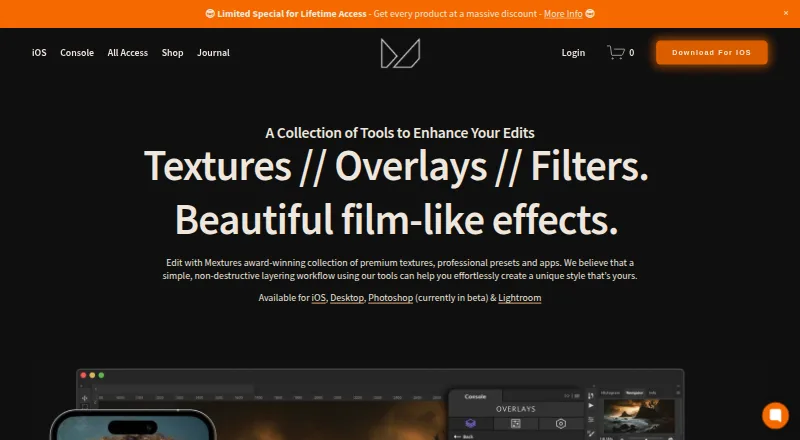
Mextures offers photo-editing textures, overlays, film presets, and apps for creating film-like effects.
What Mextures is
Mextures offers photo-editing textures, overlays, film presets, and apps for creating film-like effects. Its iOS editor supports unlimited layers that users can move, hide, rotate, and adjust for opacity. The product page lists more than 200 stackable textures, including grain, dust, light leaks, and color gradients, alongside 30 film presets and more than 300 Formulas. With Formula Manager, users can import Formulas from other Mextures users and export their own. The maker also offers Console, a free Photoshop plugin, and Film Presets compatible with Console, Lightroom CC 2021/2022, Final Cut Pro, and Adobe Premiere, with separate software-specific versions required for separate purchases. Film Presets are not conversion LUTs, so RAW or LOG footage needs normalization first. The maker warns that the current Console version crashes with the latest Photoshop and macOS Sonoma. The iOS app is listed at 1.99 USD once, and an overlay pack at $10 a month. Commercial projects are permitted, but resale or redistribution requires written consent.
Good
- iOS editor supports unlimited layers.
- Includes more than 200 stackable textures.
- Includes 30 film presets and 300-plus Formulas.
- Users can import and export Formulas.
- Commercial client projects are permitted.
Watch out
- Current Console version crashes with latest Photoshop and macOS Sonoma.
- RAW or LOG footage needs normalization first.
- Separate software-specific preset versions require separate purchases.
- Resale or redistribution requires written consent.
Who it suits
Mextures suits photographers, filmmakers, and designers looking for textures, overlays, or film-style treatments. Its listed use cases include landscape and portrait work, album art, social media, and blogs.
Verdict
Mextures combines a layered iOS editor with textures, presets, and shareable Formulas, while Console offers a free Photoshop plugin. Check the stated Console compatibility issue and the preset limitations before choosing a workflow.
Plans and prices
From Mextures's own pricing page, checked 20 Sep 2026.
| Plan | Price | What it gives you |
|---|---|---|
| X-Film Overlay Pack | $10 a month | 11 overlays · 4000 x 4000 pixels |
| Mextures Yearly Membership | $89 a year | all products during subscription · packs released during subscription · beta Console access · desktop purchase does not unlock iOS in-app purchases · Per Year |
| Console | Free | Photoshop plugin · currently in beta · maker notes crash issue with latest Photoshop and macOS Sonoma |
| Mextures Photo Editor | $1.99, paid once | iOS app · in-app purchases also offered |
| Mextures Lifetime Membership | $139, paid once | all Mextures products for life · future overlay and color grade packs · beta Console access · desktop purchase does not unlock iOS in-app purchases · Pay Once |
The facts
Each one read from Mextures's own pages, with the date it was checked.
What it does
- Audience
- The maker describes the collection as suitable for photographers, filmmakers, and designers, including landscape, portrait, macro, album art, matte painting, social media, and blogs.checked 29 Sep 2026
- Commercial use
- The terms permit using the textures in personal projects and projects for commercial or paid clients, while prohibiting resale or redistribution without written consent.checked 29 Sep 2026
- Current beta issue
- The maker warns that the current Console version crashes with the latest Photoshop and macOS Sonoma and says it is working on a fix.checked 29 Sep 2026
- Desktop compatibility
- Console works with Photoshop CC 2016–2023 on Windows 10 or newer and macOS 11 or newer, according to its compatibility page.checked 29 Sep 2026
- Editing workflow
- The iOS app supports unlimited layers that can be moved, hidden, rotated, and adjusted for opacity.checked 29 Sep 2026
- Formula sharing
- The Formula Manager lets users import Formulas from other Mextures users and export their own to share.checked 29 Sep 2026
- Integrations
- The maker says Film Presets are compatible with Console, Lightroom CC 2021/2022, Final Cut Pro, and Adobe Premiere, with software-specific versions required for separate purchases.checked 29 Sep 2026
- Preset limitation
- Film Presets are not conversion LUTs, so RAW or LOG footage needs to be normalized first.checked 29 Sep 2026
- Presets
- The iOS product page says the app includes 30 film presets and more than 300 professionally created Formulas.checked 29 Sep 2026
- Privacy
- The website privacy policy says it collects analytics such as browser, network, device, referring pages, and IP address, and shares this information with Squarespace for analytics.checked 29 Sep 2026
- Product
- Mextures offers photo editing textures, overlays, film presets, and apps for creating film-like effects.checked 29 Sep 2026
- Support
- The Console page directs questions to [email protected].checked 29 Sep 2026
- Textures
- The iOS product page describes more than 200 stackable textures, including grain, dust, light leaks, color gradients, and other textures.checked 29 Sep 2026
The company
- Founded
- 2012checked 28 Sep 2026
Money
- Free plan
- Nochecked 20 Sep 2026
- Free product
- Console is described as a free Photoshop plugin, and the maker says future plugin updates will remain free.checked 29 Sep 2026
The full review of Mextures
Mextures is a photo-effects collection and iOS editor for photographers and visual creators who want to build film-like images from layered textures and presets. Its appeal is strongest when that tactile look matters more than a conventional RAW or video-grade workflow.
Overview
Mextures pairs an iOS photo editor with textures, film presets and shareable editing recipes called Formulas. The editor’s unlimited, adjustable layers give fine control over how effects combine, while Console extends part of the collection to Photoshop as a free plugin. The split between paid iOS content and free-but-beta desktop access is important: Console currently has a crash issue with the latest Photoshop and macOS Sonoma.
Key features
- Layered editing: iOS layers can be moved, hidden, rotated and adjusted for opacity, making it practical to build a look in stages and revise individual effects rather than flattening the image early.
- Texture library: More than 200 stackable textures span grain, dust, light leaks and color gradients. This variety suits stylized photography and artwork, but the collection is oriented toward overlays rather than general-purpose image editing.
- Presets and Formulas: The app includes 30 film presets and over 300 professionally created Formulas. Formula Manager also imports other users’ recipes and exports your own, useful for reusing or sharing a look without rebuilding its settings from scratch.
- Desktop reach: Film Presets work with Console, Lightroom CC 2021/2022, Final Cut Pro and Adobe Premiere, with software-specific versions sold separately. These presets are not conversion LUTs: RAW photos or LOG footage need normalization before applying them.
- Commercial licensing: Textures may be used in personal work and projects for commercial or paid clients. Reselling or redistributing them requires written consent.
Pricing
Mextures has a free plan and paid options, but the products and entitlements differ. The Mextures Photo Editor costs $1.99, paid once for the iOS app, with additional in-app purchases. It is the lower-commitment route for someone who mainly wants the editor; it does not include desktop purchases or unlock iOS in-app purchases through a desktop membership.
The X-Film Overlay Pack costs $10 a month and includes 11 overlays at 4000 x 4000 pixels. That is a focused asset purchase rather than access to the broader collection. The Mextures Yearly Membership costs $89 a year, billed per year, and covers all products and packs released during the subscription, plus beta Console access. The Mextures Lifetime Membership is $139 a month, billed once, and includes lifetime access to Mextures products and future overlay and color-grade packs, without a yearly subscription.
Console costs free as a Photoshop plugin, and future plugin updates are also free. It is the sensible no-cost desktop starting point, but beta status and the current crash warning make it a less dependable choice for work that relies on the latest Photoshop and macOS Sonoma.
Platforms
Mextures is listed for iOS, macOS and Windows. Console compatibility is narrower: Photoshop CC 2016–2023 on Windows 10 or newer, or macOS 11 or newer. The current crash warning specifically concerns the latest Photoshop and macOS Sonoma. Console questions can be sent to [email protected].
Who it's for
Photographers, filmmakers and designers working on landscapes, portraits, macro images, album art, matte paintings, social posts or blogs can use Mextures to add a deliberate film-like finish. It is a better fit for creative surface treatment than for users seeking a standalone RAW or LOG normalization solution. The website privacy policy says it collects analytics including browser, network, device, referring-page and IP information and shares that information with Squarespace for analytics.
Pros and cons
- Pro: Unlimited editable layers allow nuanced combinations and revisions without committing to one flat effect.
- Pro: A large texture set plus presets and shareable Formulas supports both quick looks and repeatable custom treatments.
- Pro: The textures’ stated license covers paid client work, a useful allowance for working creatives.
- Con: Console’s current crash issue with the latest Photoshop and macOS Sonoma is a real reliability concern for desktop workflows.
- Con: Film Presets do not normalize RAW or LOG material, so users must handle that step separately.
- Con: A desktop membership does not unlock iOS in-app purchases, so people moving between platforms should account for separate buying.
Alternatives
For texture-focused browsing, start with Texture Libraries; for ready-made photographic looks, compare Photo Preset Libraries. Readers seeking broader editing tools can browse Photo Editing Software.
- ambientCG is a better fit for free downloadable assets under CC0, with access across web, desktop and API platforms.
- Poly Haven suits readers who want a no-paywall, no-signup public asset library, including 16k+ HDRIs and textures at least 8k under CC0.
- Architextures is a web option when standard texture downloads for personal or educational use are enough, with a Pro tier for high-resolution downloads.
- CGBookcase offers a free web library of 566 CC0 1.0 PBR textures and a free, open-source tiling tool.
- FreePBR is another freemium web option for free PBR textures.
- FreePBRTextures provides a free CC0 library of 30+ textures at 4K without signup.
- GameTextures.com is an alternative texture service with paid subscription tiers.
- OPETURE is a free web option with no account requirement and no fixed download limits within processing capacity.
Verdict
Mextures is a strong choice for iOS-focused creatives who want layered control over textured, film-like images and value reusable, shareable recipes. Its extensive overlays and commercial-use allowance are the central reasons to choose it. Look elsewhere if your workflow depends on reliable latest-version Photoshop support, built-in RAW or LOG normalization, or a single purchase that covers both desktop and iOS in-app content.
Getting started
- Visit the Mextures website and choose the iOS editor, Console, an overlay pack, or a membership.
- For the iOS editor, use the iOS app option listed at 1.99 USD once.
- For Console, use the free Photoshop plugin and check its listed Photoshop and operating system compatibility.
- For Film Presets, select the version for the editing software you use; separate software-specific purchases are required.
- Use textures in personal or commercial projects, and get written consent before resale or redistribution.
Limits worth knowing
Console is currently in beta, and the maker warns that its current version crashes with the latest Photoshop and macOS Sonoma. Film Presets are not conversion LUTs, so RAW or LOG footage needs to be normalized first.
Questions
How much does Mextures cost?
The iOS Photo Editor is listed at 1.99 USD once, and the X-Film Overlay Pack at $10 a month. The Yearly Membership is $89 a year, and the Lifetime Membership is 139.00 USD with a one-time payment.
Is there a free Mextures product?
Console is described as a free Photoshop plugin, and future plugin updates will remain free. The maker currently warns of a crash issue with the latest Photoshop and macOS Sonoma.
Which platforms are supported?
Mextures is listed for iOS, macOS, and Windows. Console compatibility is specified for Photoshop CC 2016–2023 on Windows 10 or newer and macOS 11 or newer.
Can I use Film Presets with video or desktop editing software?
Film Presets are compatible with Console, Lightroom CC 2021/2022, Final Cut Pro, and Adobe Premiere, with software-specific versions requiring separate purchases. They are not conversion LUTs, so RAW or LOG footage needs normalization first.
Can I use Mextures textures for commercial work?
The terms permit use in personal projects and projects for commercial or paid clients. Resale or redistribution requires written consent.
Who makes Mextures?
Mextures is made by Mextures, founded in 2012.
Alternatives to Mextures
- 1
DVLOP
Free planAndroidiOSWebmacOS8.0$39 one-time - 2

VSCO
Free planAndroidiOSWeb7.4From $29.99 a year - 3
Lightroom Presets by peva3
Free planOpen sourcemacOSWindows7.0Free plan - 4
The Luxe Lens
AndroidiOSWebmacOS6.9$14 one-time - 5
Mastin Labs
AndroidiOSmacOSWindows6.7$15 one-time - 6
Pat Kay Presets
AndroidiOSWebmacOS6.7$39 one-time