PhotoKit Background Remover
PhotoKit Background Remover is an online tool for removing image backgrounds and preparing images in an editor.
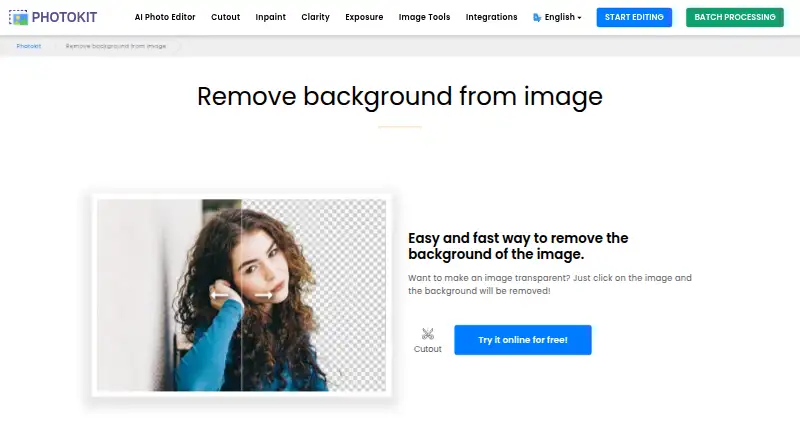
What PhotoKit Background Remover is
PhotoKit Background Remover is an online tool for removing image backgrounds and preparing images in an editor. Clicking an image can remove its background and leave it transparent; the tool also describes cutout, a magic eraser for continuous-color areas, and shape clipping that removes pixels outside a selected form. Images can be saved as transparent PNG files. PhotoKit's editor also includes enhancement, portrait retouching, effects, collage creation, and basic crop, resize, and rotate tools. Replacement backgrounds are available, but batch processing is not. The free plan includes limited image downloads and advertising, and the background-removal page offers an online free trial. The listed platforms include web, Android, iOS, Windows, macOS, Linux, API, and extension. PhotoKit describes embedding the editor in websites and interacting with it through JavaScript postMessage. Its homepage says the server does not save user pictures and data, while its privacy policy says personal data may be transferred to and stored in Hong Kong or another jurisdiction. Commercial use is not included.
Good
- Can make an image background transparent.
- Exports transparent PNG files.
- Includes shape clipping and a magic eraser.
- Editor offers crop, resize, and rotate tools.
- Replacement backgrounds are available.
Watch out
- Batch processing is not available.
- Commercial use is not included.
- Free plan limits image downloads and includes ads.
- VIP plans exclude API and batch cutout.
Who it suits
PhotoKit may suit people who need to remove image backgrounds, prepare transparent PNGs, or make basic edits in an online editor. It is not a fit for buyers who require batch processing or commercial use.
Verdict
PhotoKit combines background removal with a broader set of online editing tools and multiple listed platform options. Check the download limits, commercial-use restriction, and lack of batch processing before choosing it.
Plans and prices
From PhotoKit Background Remover's own pricing page, checked 14 Oct 2026.
| Plan | Price | What it gives you |
|---|---|---|
| Free | Free | all functionalities · future AI tools · ads · limited image downloads |
| VIP — 30 days | $9.99, paid once | Full access to all functionalities · Future AI tools · Ad free · Unlimited image downloads · 24/7 premium support · 30 days |
| VIP 30 days | $9.99 a month | all functionalities · future AI tools · ad-free · unlimited downloads · 24/7 premium support · 30 days |
| VIP — 365 days | $29.99, paid once | Full access to all functionalities · Future AI tools · Ad free · Unlimited image downloads · 24/7 premium support · 365 days |
| VIP 365 days | $29.99 a year | all functionalities · future AI tools · ad-free · unlimited downloads · 24/7 premium support · 365 days |
| VIP — Lifetime | $99.99, paid once | Full access to all functionalities · Future AI tools · Ad free · Unlimited image downloads · 24/7 premium support · Lifetime |
| VIP Lifetime | $99.99, paid once | all functionalities · future AI tools · ad-free · unlimited downloads · 24/7 premium support · Lifetime |
The facts
Each one read from PhotoKit Background Remover's own pages, with the date it was checked.
What it does
- API
- The integrations page documents editor interaction through JavaScript postMessage and lists allowed image formats including PNG, JPG, GIF, WebP, BMP, TIFF, ICO, SVG, and JSON.checked 11 Oct 2026
- API access
- Yeschecked 23 Sep 2026
- API embedding
- PhotoKit documents a free iframe editor that can be embedded in CMS, digital-media and site-builder projects.checked 14 Oct 2026
- API formats
- The integration accepts PNG, JPG, GIF, WebP, BMP, TIFF, ICO, SVG and JSON image payloads.checked 14 Oct 2026
- Availability limitation
- Terms allow suspension without notice, provide no uptime guarantee and advise users to keep backups.checked 14 Oct 2026
- Background removal
- The maker claims one-click background removal with fine edge recognition and a five-second result.checked 14 Oct 2026
- Batch formats
- The site lists batch processing for PNG, JPG, GIF, BMP, TIFF and RAW images.checked 14 Oct 2026
- Batch processing
- PhotoKit lists batch processors for PNG, JPG, GIF, BMP, TIFF, and RAW images and says it can process multiple images at once.checked 11 Oct 2026
- Commercial use
- Nochecked 23 Sep 2026
- Connected services
- The integrations page links Google Drive use and a Chrome extension.checked 14 Oct 2026
- Data handling
- The privacy policy describes collection of account, device, usage, transaction and cookie data, with possible storage in Hong Kong or elsewhere.checked 14 Oct 2026
- Editor features
- The online editor includes photo enhancement, portrait retouching, effects, collage creation, and crop, resize, rotate, and basic editing tools.checked 11 Oct 2026
- Enhancement tools
- PhotoKit provides clarity enhancement and one-click exposure repair.checked 14 Oct 2026
- Export formats
- PNGchecked 23 Sep 2026
- Extensibility
- The maker describes customizable UI and tools, JSON state save/load, layers, undo/redo and HTML5 operation.checked 14 Oct 2026
- Integrations
- PhotoKit describes embedding its editor on a website through an iframe and integrating it into CMS, digital media, site-builder, or other content projects.checked 11 Oct 2026
- JavaScript SDK method
- The documented integration uses iframe JavaScript postMessage calls to load base64 images and save locally or return base64 data.checked 14 Oct 2026
- Licence
- AlternativeTo classifies PhotoKit as free to use but proprietary rather than open source.checked 14 Oct 2026
- Limit: background framing
- Shotkit reported fixed background aspect ratios and insufficient cropping controls, sometimes requiring another editor.checked 14 Oct 2026
- Limit: cutout edges
- Shotkit found hair and clothing edges often rough, requiring manual cutout work and smoothing.checked 14 Oct 2026
Where it runs
- Browser delivery
- The editor runs in modern browsers without a conventional download or installation.checked 14 Oct 2026
The company
- Company location
- Trustpilot lists the PhotoKit company location as China.checked 14 Oct 2026
Money
- Free plan
- Yeschecked 23 Sep 2026
- Free use
- The background-removal page offers an online free trial of the tool, and the pricing page lists a free plan with limited image downloads and ad support.checked 11 Oct 2026
The full review of PhotoKit Background Remover
PhotoKit Background Remover is an online cutout tool bundled with a broader photo editor. It suits people handling occasional image edits or adding editing capabilities to a content project. Its range of cleanup and editing tools is useful, but PNG-only export, no batch processing, and a ban on commercial use constrain it.
Overview
PhotoKit combines background removal with an editor for enhancement, portrait retouching, effects, collage creation, and basic adjustments. That can keep a one-off cutout and its follow-up edits in one place. For repeated production work, the absence of batch processing is a meaningful bottleneck.
Key features
Cutouts and editing
PhotoKit says a click can remove an image background and leave the subject on transparency. A magic eraser targets continuous-color areas, and a clipping tool clears pixels outside a chosen shape. Replacement backgrounds are supported, but PNG is the stated export format; workflows that depend on other export formats will need another tool.
The online editor adds enhancement, portrait retouching, effects, collages, cropping, resizing, rotation, and basic editing. Those extras suit occasional image work, though they do not compensate for the lack of batch cutouts when processing many images.
Embedding and API
PhotoKit describes embedding its editor in a website through an iframe and integrating it into CMS, digital media, site-builder, and other content projects. It also connects with Google Drive and offers a Chrome extension. API access is available, with JavaScript postMessage interaction documented for the editor and support for image formats including PNG, JPG, GIF, WebP, BMP, TIFF, ICO, SVG, and JSON. The VIP plans do not include API access or batch cutout, so those needs point away from a VIP subscription.
Pricing
PhotoKit uses a freemium model. The Free plan costs nothing and has limited image downloads with ad support. It is a sensible way to try the online tool, but the download cap limits sustained use.
VIP comes in 30-day, 365-day, and Lifetime plans with custom pricing. VIP does not include API access or batch cutout, and a VIP code can be used on only one device at a time. These plans may suit someone seeking a paid PhotoKit option for individual use, but they do not remove two important workflow limits. Commercial use is not permitted.
The background-removal page also offers an online free trial. PhotoKit's homepage says its server will not save user pictures and data; its privacy policy says personal data may be transferred to and stored in Hong Kong or another jurisdiction, and names Google Analytics, Google Adsense, PayPal, and Funnelll as third-party services.
Platforms
PhotoKit is available on Android, iOS, Linux, macOS, Windows, and the web, with API and extension options also listed. That breadth gives users several ways to access the tool, while website embedding and the Chrome extension are particularly relevant to content workflows.
Who it's for
Choose PhotoKit for occasional transparent PNG cutouts, especially when you also want basic photo editing or a way to embed an editor in a content project. It is a poor fit for commercial production, large batches, or workflows requiring a different export format. Developers should also note that the VIP plans exclude API access.
Pros and cons
Pros
- Cutout, magic eraser, and shape clipping offer several ways to isolate and refine an image.
- The editor includes enhancement, retouching, effects, collages, and basic adjustments for follow-up work.
- Website embedding, Google Drive integration, a Chrome extension, and API access broaden its use in content projects.
- A free plan and online trial let users try the service before committing.
Cons
- Limited image downloads on the ad-supported Free plan restrict ongoing free use.
- No batch processing makes repeated cutouts inefficient.
- PNG is the stated export format, narrowing output choices.
- Commercial use is not allowed, and VIP excludes both API and batch cutout.
- A VIP code works on one device at a time.
Alternatives
PixiFixi is worth considering if you want a paid option with a free Starter plan offering welcome credits, no card, and no commitment; its other plan details are not needed to distinguish that entry point.
PhotoBoost may suit someone who wants a free trial and a free tier with two introductory credits, cloud output up to 3 MP, and core editing tools. YouCam Online Editor is another freemium choice, with paid Plus at $9.99 a month billed monthly and 100 credits, or Pro at $69.99 a year billed annually.
PhotoPad is an alternative freemium editor with Android, extension, iOS, Linux, macOS, web, and Windows platforms. Photopea offers a free editor account and a School ad-free access plan at $450 a year billed for the whole school. Airbrush has a free plan and free trial, with limited access to several editing and export features on its free tier. PhotoQuill has a free plan with five credits per day and 10 bonus credits, as well as a Lite plan at $9.90 a month with 2,000 credits per month and 1024×1024 output. BeautyPlus offers a free tier with limited AI feature access and a Pro plan with monthly credits, video enhancement, and AI object removal.
For broader browsing, see AI Photo Editors, AI Background Removers, and Photo Editing Software.
Verdict
PhotoKit is a good fit for occasional cutouts and follow-up edits, or for projects that benefit from an embeddable online editor. Its free entry point and varied cleanup tools are appealing, but the limited downloads, PNG export, lack of batch processing, and commercial-use restriction make it the wrong choice for professional or high-volume image production.
Getting started
- Open the PhotoKit background-removal website
- Use the online free trial or sign up for the Free plan
- Upload an image and apply cutout, eraser, or shape clipping
- Add a replacement background or edit the image
- Save the result as a PNG
- For integrations, connect Google Drive, install the Chrome extension, or embed the editor with an iframe
Limits worth knowing
The Free plan costs nothing and has limited image downloads with advertising. VIP plans do not include API access or batch cutout, and a VIP code can be used on one device at a time.
Questions
Is there a free plan?
Yes. The Free plan is listed as free, with limited image downloads and advertising. The background-removal page also offers an online free trial.
Which platforms are supported?
Listed platforms are Android, API, extension, iOS, Linux, macOS, web, and Windows.
Can it replace backgrounds?
Yes, replacement backgrounds are supported.
Does it support batch processing?
No. Batch processing is not available, and VIP plans also exclude the batch cutout function.
Can it be embedded in a website?
Yes. PhotoKit describes iframe embedding and JavaScript postMessage interaction, with integrations for CMS, digital-media, site-builder, and other content projects.
Is commercial use included?
No. Commercial use is not included.
Alternatives to PhotoKit Background Remover
- 1
Phot.AI
Free planAndroidiOSWebAPI8.3From $9 a month - 2

Photoroom
Free planAndroidiOSWebAPI8.3From $7.50 a month - 3

Picsart
Free planAndroidiOSWebAPI8.3From $10.50 a month - 4

Pixelcut
Free planAndroidiOSWebAPI8.3From $8 a month - 5
LightX AI Cartoon Generator
Free planAndroidiOSWebAPI8.2From ₹408.33 a month - 6
PhotoBoost
Free planAndroidiOSWebLinux8.2From $39.99 a year