AI Ease
AI Ease is an image and video creation and editing platform available in a web browser, on iOS and on Android.
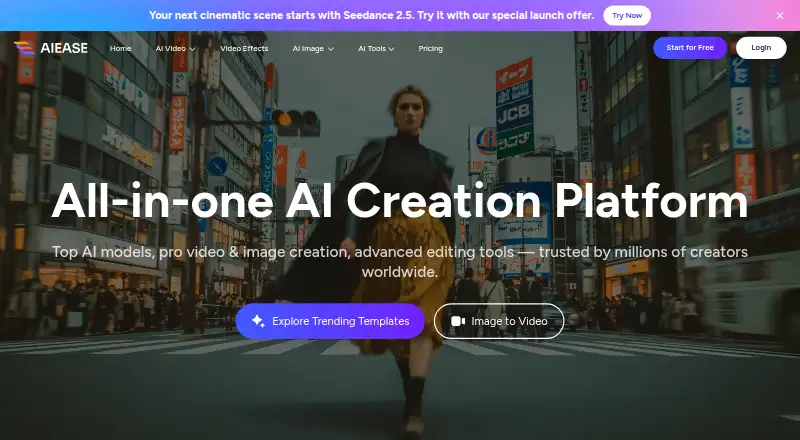
What AI Ease is
AI Ease is an image and video creation and editing platform available in a web browser, on iOS and on Android. It generates images from text or other images, and creates videos from text, images or video effects. Its listed editing tools include photo enhancement, object and watermark removal, background removal, restoration, image extension, replacement and recoloring. The site lists image and video models including Veo, Sora, Kling and Seedream.
Batch editing is available with a limit of 50. AI Ease says several basic features are free, while its yearly membership allows unlimited use of image-related features except advanced watermark removal, Headshot Pro and video features. Purchased credits expire after one year if unused. The privacy policy says face images submitted for headshot or passport-photo tools are used to produce the requested result and are not stored or used to train models. It also describes encryption for sensitive information and physical, electronic and administrative safeguards. The pricing FAQ says refunds are not offered and recommends trying features with free credits before purchasing.
Good
- Generates images from text or images
- Creates videos from text, images or effects
- Batch editing supports up to 50
- Basic features are available for free
- Face images for specified tools are not retained
Watch out
- Membership excludes some image and video features
- Unused purchased credits expire after one year
- Refunds are not offered
Who it suits
AI Ease may suit people looking for image generation and editing tools alongside video creation in a browser or mobile app. Its limits and separate credit or membership terms matter to users planning sustained use.
Verdict
AI Ease combines image creation, editing and video tools across web and mobile. Review the membership exclusions, credit expiry and refund policy before purchasing.
Plans and prices
From AI Ease's own pricing page, checked 3 Oct 2026.
| Plan | Price | What it gives you |
|---|---|---|
| Free | Free | Several basic features are free |
| Credits | — | Unused credits expire one year from purchase · Purchased credits are valid for one year |
| Membership | — | Unlimited image-related features except advanced watermark removal, Headshot Pro, and video features · Monthly |
| Membership | — | Unlimited image-related features except advanced watermark removal, Headshot Pro, and video features · Yearly |
The facts
Each one read from AI Ease's own pages, with the date it was checked.
What it does
- AI models
- The site lists multiple supported image and video models, including Veo, Sora, Kling, and Seedream.checked 3 Oct 2026
- Batch editing
- Yeschecked 23 Sep 2026
- Batch limit
- 50checked 23 Sep 2026
- Biometric data
- The privacy policy says face images submitted for headshot or passport-photo tools are used to generate the requested output and are not stored or used for model training.checked 3 Oct 2026
- Credit expiration
- Purchased credits expire one year after purchase if unused.checked 3 Oct 2026
- Editing tools
- Listed tools include photo enhancement, object and watermark removal, background removal, restoration, image extension, replacement, and recoloring.checked 3 Oct 2026
- Generative editing
- Yeschecked 23 Sep 2026
- Image creation
- The platform offers text-to-image and image-to-image generation.checked 3 Oct 2026
- Layers and masks
- Yeschecked 23 Sep 2026
- Product
- AI Ease describes itself as an AI creation platform for image and video generation and editing.checked 3 Oct 2026
- Refunds
- The pricing FAQ says refunds are not offered and points users to free credits to try features before purchase.checked 3 Oct 2026
- Security
- The privacy policy says sensitive information such as credit card numbers is encrypted using SSL and describes physical, electronic, and administrative safeguards.checked 3 Oct 2026
- Subscription limits
- Members can use image-related features without limitation, except advanced watermark removal, Headshot Pro, and video features.checked 3 Oct 2026
- Support
- The terms list [email protected] for questions and say Grand Vision Tech Software Limited provides regional support for Stripe and PayPal transactions.checked 3 Oct 2026
- Video creation
- Its video generator creates videos from text, images, or video effects.checked 3 Oct 2026
The company
- Company
- AI Ease says it was developed by Grand Vision Tech Software Limited.checked 3 Oct 2026
- Headquarters
- Kowloon, Hong Kongchecked 28 Sep 2026
Money
- Free access
- AI Ease says several basic features are available for free.checked 3 Oct 2026
- Free plan
- Yeschecked 23 Sep 2026
Where it runs
- Mobile app
- Yeschecked 23 Sep 2026
- Mobile apps
- The maker’s site links to AI Ease apps on the App Store and Google Play.checked 3 Oct 2026
- Supported platforms
- Web browser, iOS, Androidchecked 23 Sep 2026
The full review of AI Ease
AI Ease is a web and mobile service for generating, editing and animating visual content. It is best suited to people who want a broad set of image tools alongside video creation in one platform. Its appeal depends on whether the features you need fall within the membership’s image-use allowance.
Overview
AI Ease combines prompt-based and image-based creation with tools for refining existing pictures and generating video. That range makes it a reasonable fit for general creative work across formats, rather than a focused editor for one task. The platform names models including Veo, Sora, Kling and Seedream.
Its editing tools cover enhancement, object and watermark removal, background removal, restoration, image extension, replacement and recoloring. Users working across these jobs can keep a varied workflow in one service; someone who needs only a single function may be better served by a more specialized option.
Key features
Image and video creation
Text-to-image generation suits users starting with a prompt, while image-to-image generation provides a route for transforming an existing picture. Video generation accepts text, images or video effects, offering several ways to begin a video task. The range is useful for experimentation across formats, but membership does not make video features unlimited.
Editing and batch work
Enhancement, removal, restoration, extension, replacement and recoloring cover both cleanup and alteration. Generative editing, layers and masks support more involved image work, while batch editing can process up to 50 items. That batch ceiling can help with repeated edits, but it is a bounded workflow rather than an unlimited batch queue.
Pricing
AI Ease is freemium. The Free plan costs nothing, and several basic features are available without payment. This is the sensible starting point for occasional use or for trying features before deciding whether to buy; it does not promise full access to every tool.
Membership has custom pricing and is billed Yearly. It provides unlimited image-related feature use except advanced watermark removal and Headshot Pro; video features are excluded as well. This suits regular image users whose work stays within those terms, but it is a poor match for someone expecting unlimited access across the whole platform.
The Credits plan also has custom pricing. Purchased credits remain valid for one year, then unused credits expire. That expiry makes credits less attractive for occasional users who may not spend them in time. AI Ease says refunds are not offered, so using free credits to try features before purchase is the prudent choice.
Platforms
AI Ease works in a web browser and has mobile apps for iOS and Android. The combination suits users who want access on desktop and phone, though the platform range alone does not establish that every tool behaves identically across devices.
Who it's for
Choose AI Ease if you want image generation, editing and video creation gathered in one service, especially if you regularly use image-related features that fit the membership exceptions. Its free access also gives occasional users a way to try basic tools. Look elsewhere if video is central to your workflow, if you require unlimited advanced watermark removal or Headshot Pro, or if you need a specialist tool rather than a broad creative platform.
Pros and cons
- Pros: Text-to-image and image-to-image generation sit alongside video creation, making one service useful across multiple visual formats.
- Pros: The editing selection spans enhancement, removal, restoration and recoloring, with layers, masks and batch editing up to 50 items for more involved work.
- Pros: Free access to several basic features lets users try the service before paying.
- Cons: Membership’s unlimited-use promise excludes video, advanced watermark removal and Headshot Pro, so the headline allowance does not cover every tool.
- Cons: Purchased credits expire after one year, which risks waste for infrequent users.
- Cons: Refunds are not offered, raising the stakes of a purchase beyond the free trial access.
Alternatives
For a different credit-based option, Remaker AI has a free plan, supports a wider set of listed platforms, and offers one-time credit purchases; its credits do not expire. Pick it if lasting purchased credits matter more than AI Ease’s broader described mix of image and video tools.
YouInMeme offers two free creations per day and a one-time Day Boost for three additional creations. It is the more relevant choice if that clearly stated daily creation allowance fits your use.
Picsi.Ai has a free tier with 10 daily credits and single-face swaps, while GIF and video are locked; its Basic plan is $9.99 a month. Choose it when face swapping is the specific job, rather than a wider image-and-video toolkit.
Facy AI offers unlimited image processing on its free plan, with medium quality and slow processing times. That may suit users willing to trade quality and speed for unlimited free image processing.
Morphiqo is an iOS and macOS alternative.
SwapFace is an alternative with a 9.99 USD one-time Basic purchase, valid for 30 days.
Vidwud AI Face Swap is a web-based alternative.
AIFaceSwap offers a free trial and a Pro plan at $9.99 a month.
For narrower category comparisons, see AI Face Swap Tools, AI Coloring Page Generators, Image Background Removal Software, AI Photo Editors, AI Background Removers and Image Upscaling Software.
Verdict
AI Ease is a good fit for people who want a varied image-generation and editing toolkit with video creation alongside it, and who can work within the membership exclusions. Its main reason to choose it is breadth across creative tasks; its main reason to look elsewhere is that video and named image exceptions are outside unlimited membership use, while credits expire and purchases are nonrefundable.
Getting started
- Open https://www.aiease.ai/ in a web browser
- Install the AI Ease app from the App Store or Google Play
- Use the available free basic features
- Choose yearly Membership for unlimited eligible image-related features
- Purchase credits when needed, noting their one-year validity
Limits worth knowing
The free plan includes several basic features. Yearly Membership excludes advanced watermark removal, Headshot Pro, and video features from its unlimited image-related use; purchased credits expire one year after purchase if unused.
Questions
Is AI Ease free?
Yes. The Free plan is listed as free, and several basic features are available without payment.
Which platforms support AI Ease?
AI Ease supports web browsers, iOS, and Android, with mobile apps linked through the App Store and Google Play.
What does Membership include?
Membership is billed yearly and allows unlimited image-related features except advanced watermark removal, Headshot Pro, and video features.
Do purchased credits expire?
Yes. Purchased credits are valid for one year and expire one year after purchase if unused.
Are refunds available?
The pricing FAQ says refunds are not offered and directs users to free credits before purchasing.
How are headshot images handled?
Face images submitted for headshot or passport-photo tools are used to generate the requested output and are not stored or used for model training.
Alternatives to AI Ease
- 1

Remaker AI
Free planAndroidiOSWebAPI8.2Free plan - 2
YouInMeme
Free planAndroidiOSWebExtension8.2From $39.99 a year - 3
DeepFace
Free planOpen sourceWebAPILinuxmacOS7.8Free plan - 4
iSamurai
Free planAndroidiOSWebAPI7.3From $9.90 a month - 5
SwapFace
AndroidiOSWebAPI7.3$9.99 one-time - 6
Vidwud AI Face Swap
Free planWeb7.3From $9.99 a month