
Picsi.Ai
Picsi.Ai is software for swapping and morphing faces in images and videos, with a web Studio and apps and integrations across extension, iOS, and macOS.
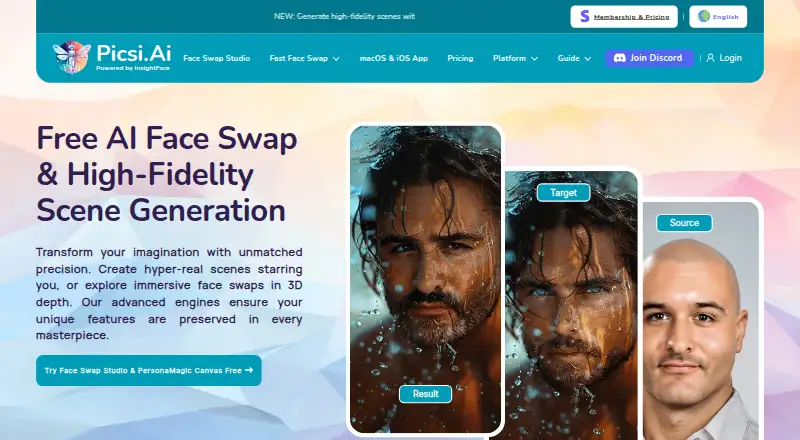
What Picsi.Ai is
Picsi.Ai is software for swapping and morphing faces in images and videos, with a web Studio and apps and integrations across extension, iOS, and macOS. The Studio handles image, video, and GIF swaps, batch processing for up to 10 target files, and advanced controls. Its default model, Inswapper Dax, is available to free and paid users and is described as preserving resolution, realism, texture, and detail. The macOS app supports real-time camera and screen-capture swaps with on-device processing; the iOS app adds real-time camera swapping and image, video, and GIF creation. The Chrome extension adds right-click swapping on sites including MidJourney, Leonardo.ai, Facebook, Google Image Search, and X.com. A Photoshop plugin puts swaps on a new editable layer and requires paid membership. Free access includes 10 daily credits for single-face image swaps, with watermarks; GIF and video swaps are locked. Web swap images and results are deleted seconds after delivery.
Good
- Studio supports batch processing for up to 10 target files.
- macOS app processes live camera and screen capture on-device.
- Web swap images and results are deleted after delivery.
- Paid membership grants commercial use with attribution and clear source rights.
Watch out
- Free plan limits users to 10 daily credits.
- Free swaps are watermarked.
- GIF and video swaps are locked on the free plan.
- Photoshop plugin requires paid membership.
Who it suits
Picsi.Ai suits people who want face swaps across images, video, and GIFs, or real-time camera and screen capture options. Its free plan fits single-face image swaps; Photoshop access requires paid membership.
Verdict
Picsi.Ai offers several ways to create face swaps, including a web Studio and device-specific tools. Check the free plan’s credit and media limits, and the commercial-use conditions, before choosing a paid plan.
Plans and prices
From Picsi.Ai's own pricing page, checked 1 Oct 2026.
| Plan | Price | What it gives you |
|---|---|---|
| Free | Free | 10 daily credits · single-face image swaps · watermarked creations · GIF/video locked |
| Basic | $9.99 a month | 200 daily credits · 10-minute macOS video processing · watermark-free swaps · commercial use with attribution · $9.99 / month |
| Pro | $19.99 a month | 400 daily credits · 20-minute macOS video processing · lossless PNG · Photoshop plugin and Chrome extension access · $19.99 / month |
| Ultra | $34.99 a month | 800 daily credits · 40-minute macOS video processing · lossless PNG · Discord video swaps up to 45 seconds · $34.99 / month |
The facts
Each one read from Picsi.Ai's own pages, with the date it was checked.
What it does
- Chrome integration
- The Chrome extension adds right-click face swapping on sites including MidJourney, Leonardo.ai, Facebook, Google Image Search and X.com.checked 1 Oct 2026
- Commercial rights
- Paid membership grants commercial use of results when source-image rights are clear and Picsi.Ai is attributed.checked 1 Oct 2026
- Content restrictions
- Sexual or sexually suggestive content is prohibited, with removal and possible permanent suspension for violations.checked 1 Oct 2026
- Core function
- Picsi.Ai provides AI-powered face swapping and morphing for images and videos using InsightFace technology.checked 1 Oct 2026
- Discord integration
- The Legacy Picsi.Ai Discord bot supports single- and multi-face image swaps, video swaps, GIF swaps and advanced face controls.checked 1 Oct 2026
- Face Swap Studio
- The web Studio supports image, video and GIF face-swap modes, batch processing of up to 10 target files, and advanced controls.checked 1 Oct 2026
- Local storage
- The iOS app stores saved source faces and gallery creations locally on the device.checked 1 Oct 2026
- Photoshop integration
- The Photoshop plugin creates each swap on a new editable layer and requires a paid membership.checked 1 Oct 2026
- Privacy retention
- For web image swaps, source images, target images and results are immediately and permanently deleted seconds after delivery.checked 1 Oct 2026
- Security measures
- Picsi.Ai says it uses industry-standard encryption in transit and at rest, access controls, audits and firewalled servers.checked 1 Oct 2026
- Support
- Users can get real-time help from the team and community through the Picsi Discord support server.checked 1 Oct 2026
Where it runs
- Inswapper Dax
- Inswapper Dax is the default face-swap model for free and paid users and is described as offering higher resolution, realism, texture and detail preservation.checked 1 Oct 2026
- iOS app
- The iOS app supports on-device real-time camera face swapping plus image, video and GIF creation.checked 1 Oct 2026
- macOS app
- The macOS app offers real-time Live Camera and exclusive Live Screen Capture face swapping with on-device processing.checked 1 Oct 2026
The full review of Picsi.Ai
Overview
Picsi.Ai is a face-swapping and morphing service for images and video, built around InsightFace. It best suits people who want several ways to make swaps—from a browser Studio to real-time camera tools on iOS and macOS. Its range is appealing, but the free tier is narrow and paid commercial use comes with attribution and source-rights conditions.
Key features
The web Face Swap Studio handles image, video and GIF swaps, with batch processing for up to 10 target files and advanced controls. Inswapper Dax is the default model for free and paid members; Picsi.Ai describes it as preserving resolution, realism, texture and detail. That makes the Studio the broadest general-purpose option, though free users are limited to single-face image swaps and cannot use GIF or video modes.
The macOS app adds real-time Live Camera and Live Screen Capture swapping, processed on-device. On iOS, users can make real-time camera swaps and create image, video and GIF results, while saved source faces and gallery creations stay locally on the device. The Chrome extension brings right-click swapping to sites including MidJourney, Leonardo.ai, Facebook, Google Image Search and X.com. The Photoshop plugin puts each swap on a new editable layer, but requires paid membership. The Legacy Picsi.Ai Discord bot supports single- and multi-face image swaps, video and GIF swaps, and advanced face controls.
For web image swaps, source images, target images and results are permanently deleted seconds after delivery. Picsi.Ai also says it uses encryption in transit and at rest, access controls, audits and firewalled servers. Its Discord support server offers real-time help from the team and community. Sexual or sexually suggestive content is prohibited; violations can result in removal and possible permanent suspension. Paid members may use results commercially only if they have clear rights to the source image and attribute Picsi.Ai.
Pricing
The free plan costs nothing and provides 10 daily credits for single-face image swaps. Creations carry a watermark, and GIF and video swaps are locked. It is useful for occasional basic images, but not for evaluating the full range of formats or producing clean exports.
Basic costs $9.99 a month, billed $9.99 / month. It raises the allowance to 200 daily credits, removes watermarks, permits commercial use with attribution and allows 10-minute macOS video processing. This is the entry point for regular watermark-free use; it does not include the lossless PNG export or Photoshop and Chrome access included at higher tiers.
Pro costs $19.99 a month, billed $19.99 / month. It includes 400 daily credits, 20-minute macOS video processing, lossless PNG, and access to the Photoshop plugin and Chrome extension. It suits users who need those integrations or higher-quality exports, rather than occasional swaps.
Ultra costs $34.99 a month, billed $34.99 / month. Its 800 daily credits and 40-minute macOS video processing target heavier use, and it adds Discord video swaps up to 45 seconds. That Discord limit is distinct from the stated maximum video length of 10 minutes. Across the tiers, the daily credit allowance and platform-specific processing limits matter more than a single headline video cap.
Platforms
Picsi.Ai is available as a web app, iOS app, macOS app and extension, with additional Photoshop and Discord integrations. The web Studio is the most flexible place for image, video and GIF work; iOS and macOS add on-device and real-time options. Access to particular integrations and formats depends on membership.
Who it's for
Choose Picsi.Ai if you want a mix of batch web editing, mobile creation, real-time Mac or iPhone swapping, and browser or Photoshop workflows. It is less suitable if you need unrestricted free video or GIF creation, commercial use without attribution, or a workflow that avoids content restrictions.
Pros and cons
- Pros: The Studio combines three media types, batch processing of up to 10 targets and advanced controls.
- Pros: On-device real-time camera tools on iOS and macOS, plus macOS Live Screen Capture, offer workflows beyond browser-based swaps.
- Pros: Web image inputs and results are deleted seconds after delivery, and iOS saves creations locally.
- Cons: The free plan limits users to 10 daily credits and single-face images, with watermarks and no GIF or video swaps.
- Cons: The Photoshop plugin requires paid membership, while lossless PNG and Chrome extension access begin at Pro.
- Cons: Commercial use requires both clear source-image rights and attribution, and sexual or sexually suggestive content is prohibited.
Alternatives
AI Face Swap Tools is the category directory for comparing more options. Choose Remaker AI if a credit purchase that does not expire and broader listed platform coverage, including Android and Windows, better fits your workflow; its 200-credit purchase is $5.99, paid once. AI Face Swap is worth considering for web or API access and a free allowance that includes daily photo, head, video and GIF swaps, though video and GIF outputs are watermarked. FaceFusion suits readers seeking self-hosted and desktop platform options, with lifetime Windows and macOS installers priced at $20, paid once and 30.00 respectively. AIFaceSwap is a web-only alternative with a free trial and a Pro plan at $9.99 a month that includes unlimited swaps, HD output, no watermark and video swaps up to 30 seconds. Vidwud AI Face Swap is another web option with a free plan, though its stated allowance is 0 credits and video uploads are capped at 100 MB. Deep-Live-Cam is a desktop and self-hosted alternative across Linux, macOS and Windows. Ravana is a free, MIT-licensed option for Linux, macOS, Windows and self-hosted use; third-party model licenses apply to downloaded weights. LiveFaceSwap AI is an alternative for readers seeking a live face-swap workflow.
Verdict
Picsi.Ai is a strong fit for people who want one service spanning batch Studio work, real-time device swapping and multiple integrations. Its clearest advantage is that breadth, backed by on-device options and a free tier for basic image swaps. Look elsewhere if free video and GIF access, unwatermarked free output or commercial use without attribution is essential.
Alternatives to Picsi.Ai
- 1

Remaker AI
Free planAndroidiOSWebAPI8.2Free plan - 2
YouInMeme
Free planAndroidiOSWebExtension8.2From $39.99 a year - 3
DeepFace
Free planOpen sourceWebAPILinuxmacOS7.8Free plan - 4
AI Ease
Free planAndroidiOSWeb7.4Free plan - 5
iSamurai
Free planAndroidiOSWebAPI7.3From $9.90 a month - 6
SwapFace
AndroidiOSWebAPI7.3$9.99 one-time