Acta
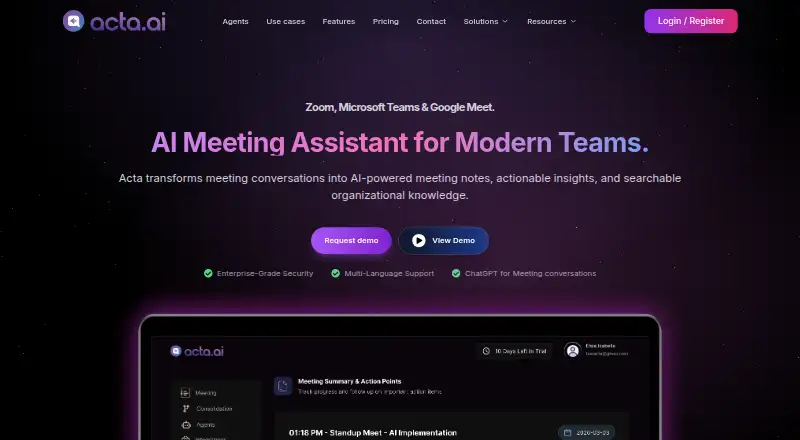
Acta records Zoom, Google Meet, and Microsoft Teams meetings and produces transcripts, summaries, and action items.
What Acta is
Acta records Zoom, Google Meet, and Microsoft Teams meetings and produces transcripts, summaries, and action items. Meetings can be captured by a bot, or the desktop app and Chrome extension can record from a user's computer without a notetaker joining. Ask Acta searches selected transcripts and answers questions across those meetings. Role-specific templates create outputs such as sales reports, interview scorecards, product requirements, tickets, and clinical notes. Listed integrations include Google Calendar, Microsoft Outlook, Jira, Asana, ClickUp, Monday.com, and Gmail. Acta says recordings and notes belong to the user's account and are shared only if the user shares them; meeting data is encrypted in transit and at rest. The Free plan has 600 minutes of storage and limited AI summaries and action points. Pro lists unlimited transcription, AI summaries, and storage. Enterprise includes options such as on-premise deployment, SSO, APIs, private storage, and custom data retention. Pricing is available on request, and a 15-day trial is listed.
Good
- Records meetings across three listed meeting platforms.
- Can record without a notetaker joining the meeting.
- Ask Acta searches selected transcripts for answers.
- Enterprise lists on-premise deployment and private storage.
Watch out
- Free storage is limited to 600 minutes.
- Free AI summaries and action points are limited.
- Paid pricing is available on request.
Who it suits
Acta may suit teams that need meeting transcripts and summaries alongside role-specific outputs. Its listed templates address sales, product, engineering, recruiting, finance, and customer support teams.
Verdict
Acta offers meeting capture, transcript search, and outputs shaped for different roles. The Free plan has storage and AI limits; paid plan pricing requires an inquiry.
Plans and prices
From Acta's own pricing page, checked 21 Sep 2026.
| Plan | Price | What it gives you |
|---|---|---|
| Free | Free | 600 mins of storage |
| Pro | — | unlimited transcription, AI summaries and storage · unlimited integrations · per seat/month; billed monthly or annually |
| Free (15 days) | Free | 15 days · 600 mins of storage · limited AI summarization & action points · unlimited recordings & transcriptions |
| Enterprise | Priced on request | on-premise deployment · SSO · APIs · private storage · custom data retention · dedicated account manager · priced on request |
The facts
Each one read from Acta's own pages, with the date it was checked.
What it does
- Ask Acta
- Ask Acta searches selected meeting transcripts and answers questions across those meetings.checked 11 Oct 2026
- Calendar integrations
- Yeschecked 21 Sep 2026
- Encryption
- Acta says meeting data is encrypted in transit and at rest.checked 11 Oct 2026
- Enterprise controls
- The Enterprise plan lists on-premise deployment, SSO, APIs, private storage and custom data retention.checked 11 Oct 2026
- Integrations
- The site lists Zoom, Google Meet, Microsoft Teams, Google Calendar, Microsoft Outlook, Jira, Asana, ClickUp, Monday.com and Gmail.checked 11 Oct 2026
- Meeting capture
- botchecked 21 Sep 2026
- No-bot recording
- The desktop app and Chrome extension can record from the user's computer without a notetaker joining the meeting.checked 11 Oct 2026
- Privacy
- Acta says recordings and notes belong to the user's account and are shared only if the user shares them.checked 11 Oct 2026
- Role-specific templates
- Templates produce role-specific outputs such as sales reports, interview scorecards, product requirements, tickets and clinical notes.checked 11 Oct 2026
- Summaries and action items
- Yeschecked 21 Sep 2026
- Support
- The pricing page says users can change or cancel their plan from the dashboard at any time and lists a dedicated account manager for Enterprise.checked 11 Oct 2026
- Transcription
- Yeschecked 21 Sep 2026
- What it does
- Acta records Zoom, Google Meet and Microsoft Teams meetings and creates transcripts, summaries and action items.checked 11 Oct 2026
The company
- Company location
- Acta identifies its location as T-Hub, Knowledge City, Hyderabad, Telangana, India.checked 11 Oct 2026
- Intended teams
- Acta describes templates and solutions for teams including sales, product, engineering, recruiting, finance and customer support.checked 11 Oct 2026
Money
- Free plan
- Nochecked 21 Sep 2026
- Plan limits
- The Free plan includes 600 minutes of storage and limited AI summaries and action points; Pro lists unlimited storage and AI summaries.checked 11 Oct 2026
Where it runs
- Meeting platforms
- Google Meet,Zoom,Microsoft Teamschecked 21 Sep 2026
The full review of Acta
Acta is a meeting assistant for teams that need conversations turned into searchable records and role-specific work outputs. It is best suited to sales, product, engineering, recruiting, finance and support groups with recurring meeting workflows. The main decision is whether its flexible capture and enterprise controls justify asking for a custom quote.
Overview
Acta records meetings from Zoom, Google Meet and Microsoft Teams, then produces transcripts, summaries and action items. It can either join as a bot or record from the user’s computer through its desktop app and Chrome extension. That makes it a practical fit for organizations with different policies about notetakers in calls, although bot-free recording depends on using those computer-based tools.
Key features
Bot capture covers the three major meeting platforms, while calendar integrations connect with Google Calendar and Microsoft Outlook. Ask Acta searches selected meeting transcripts and answers questions across them, turning an archive of conversations into a source for follow-up context rather than a collection of files to reread.
Role-specific templates shape meeting content into sales reports, interview scorecards, product requirements, tickets and clinical notes. This is a meaningful advantage for teams that need consistent downstream deliverables; users wanting only a general recap may gain less from the template system. Integrations with Jira, Asana, ClickUp, Monday.com and Gmail can connect those outputs to common work and communication tools.
Acta says recordings and notes belong to the user’s account and are shared only when the user shares them. It also says meeting data is encrypted in transit and at rest. Enterprise adds on-premise deployment, SSO, APIs, private storage and custom data retention, giving organizations with stricter governance a route beyond the standard hosted setup.
Pricing
Acta has no permanent free plan, but a 15-day trial is offered. The trial costs 0.00 USD and includes 600 minutes of storage, unlimited recordings and transcriptions, plus limited AI summarization and action points. That allowance is enough to evaluate the workflow, but the storage cap and limited AI outputs make it unsuitable as a continuing team tier.
The Pro plan has custom pricing, billed per seat per month, with monthly or annual billing. It includes unlimited transcription, AI summaries, storage and integrations. Pro is the logical fit for teams that need sustained, unrestricted meeting processing, but the lack of a published price means seat-level budgeting requires an inquiry. Users can change or cancel a plan from the dashboard at any time.
Enterprise also uses custom pricing. It adds on-premise deployment, white-label solutions, APIs, SSO, private storage and custom data retention, and includes a dedicated account manager. Those provisions target organizations with deployment, identity and data-governance requirements rather than small teams seeking the lowest-cost meeting assistant.
Platforms
Acta supports Android, iOS, macOS and Windows, along with web access, a browser extension, an API and self-hosted deployment. The broad client coverage suits mixed-device teams, while self-hosting is especially relevant to Enterprise customers with infrastructure or retention requirements.
Who it's for
Acta fits teams that need meeting information to become structured work: sales groups can use reports, recruiters can use interview scorecards, and product or engineering teams can turn discussions into requirements and tickets. It is also a strong candidate for organizations that need both bot-based capture and computer-recorded meetings. It is less compelling for an individual who only wants occasional notes and does not need searchable cross-meeting answers or role templates.
Pros and cons
Pros
- Two recording methods: bot capture and desktop or Chrome recording accommodate meetings where a visible notetaker is either acceptable or unwelcome.
- Outputs beyond summaries: Ask Acta and role templates make transcripts useful for retrieval and repeatable team processes.
- Broad workflow coverage: Calendar, email, project-management and meeting-platform integrations reduce the need to move content manually.
- Enterprise controls: On-premise deployment, SSO, private storage and custom retention address stricter operational requirements.
Cons
- Custom-priced paid tiers: Pro and Enterprise costs cannot be assessed from a published rate, complicating comparisons and budgeting.
- Limited trial allowance: The 600-minute storage cap and restricted AI summaries and action points make the trial a test period, not a lasting free workflow.
- Bot-free capture is device-dependent: Recording without a notetaker requires Acta’s desktop app or Chrome extension.
Alternatives
Choose Circleback instead if you want a freemium option with AI notes, action items and online or in-person meeting support on its Free plan.
Fellow is a better starting point for teams that want a free tier, although its Free plan limits each user to five lifetime AI notes.
Pick VOMO if a low-cost paid option and mobile, desktop and web coverage matter; its Free plan includes 60 signup minutes and a 30-minute limit per audio file.
Notta suits readers seeking a free tier with one seat and 120 transcription minutes per month.
Choose Laxis for a free plan offering 300 transcription minutes monthly, 30 days of conversation history and a 45-minute maximum recording.
Mem Agent is an alternative for users who prefer a note-centered assistant with a free Mem plan.
OLVA is another meeting-assistant alternative with a free trial and Basic and Plus tiers.
Grain is worth considering for a freemium notetaker with a free seat, 45-minute meetings and 20 bot-recorded meetings for personal-email users.
For broader category comparisons, see Meeting Intelligence Software, Meeting Notes Software and AI Meeting Assistants.
Verdict
Acta is a strong choice for teams that need searchable meeting knowledge, structured outputs and flexible recording across major conferencing platforms. Its main reason to look elsewhere is financial uncertainty: paid plans require a quote, and the trial’s 600-minute storage allowance is limited.
Getting started
- Open the Acta website and create an account
- Choose the Free plan or start the listed 15-day trial
- Connect Zoom, Google Meet, or Microsoft Teams for meeting capture
- Optionally use the desktop app or Chrome extension for computer recording without a bot
- Connect calendars, project tools, or Gmail from the listed integrations
- Select templates for the role-specific outputs you need
Limits worth knowing
The Free plan includes 600 minutes of storage and limited AI summaries and action points. Pro lists unlimited transcription, AI summaries, storage, and integrations; Enterprise adds the listed deployment and administration controls.
Questions
Which meeting platforms does Acta support?
Acta records Zoom, Google Meet, and Microsoft Teams meetings.
Is there a free plan or trial?
Yes. The Free plan includes 600 minutes of storage, and a 15-day trial is listed. There is no free plan separate from these listed options.
What does Pro include?
Pro lists unlimited transcription, AI summaries, storage, and integrations. It is billed per seat monthly or annually, with pricing available on request.
What does Enterprise add?
Enterprise lists on-premise deployment, white-label solutions, APIs, SSO, private storage, custom data retention, and a dedicated account manager.
Can Acta record without a meeting bot?
Yes. The desktop app and Chrome extension can record from the user’s computer without a notetaker joining.
What platforms and integrations are listed?
Platforms include Android, iOS, macOS, Windows, web, API, extension, and self-hosted deployment. Integrations include Google Calendar, Microsoft Outlook, Jira, Asana, ClickUp, Monday.com, and Gmail.
Alternatives to Acta
- 1

Fellow
Free planAndroidiOSWebAPI9.1From $7 a month - 2

Fathom
Free planiOSWebAPIExtension9.1From $15 a month - 3
tl;dv
Free planAndroidiOSWebAPI9.1From $18 a month - 4

Avoma
Free planAndroidiOSWebAPI9.1From $19 a month - 5

Notta
Free planAndroidiOSWebExtension9.0From $8.17 a month - 6

Read AI
Free planAndroidiOSWebAPI9.0From $15 a month