VOMO
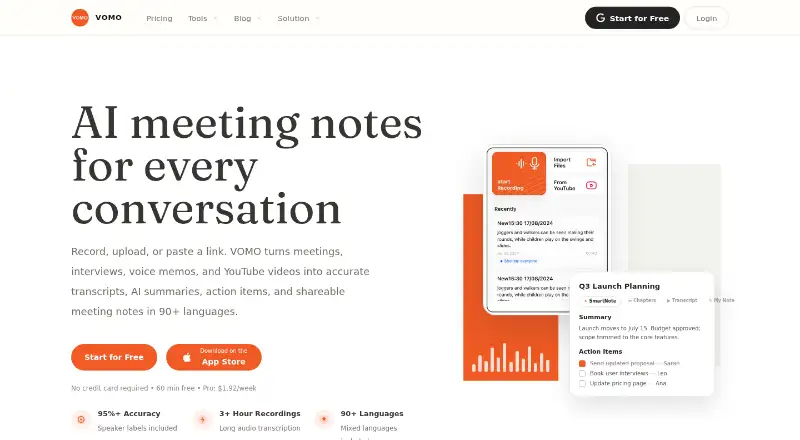
VOMO turns uploaded meetings, interviews, voice memos, and YouTube videos into transcripts, AI summaries, action items, and shareable notes.
What VOMO is
VOMO turns uploaded meetings, interviews, voice memos, and YouTube videos into transcripts, AI summaries, action items, and shareable notes. Its Smart Notes can organize material into summaries, takeaways, decisions, chapters, and action items; you can edit them and make custom templates. Meeting capture is by upload, with Zoom, Google Meet, Microsoft Teams, and Webex listed as meeting platforms. Transcription is available in 90 languages, and the service runs on Android, iOS, Linux, macOS, web, and Windows. VOMO allows up to 10 audio or video uploads at once. YouTube transcription requires captions to be available. Notes and transcripts can be shared through public links or exported as PDF, HTML, or TXT. A command-line interface can connect notes to Claude Code, Codex, OpenCode, and MCP clients, but it is read-only and limited to the signed-in user's notes. The Free plan provides 60 minutes at signup, with a 30-minute per-file limit. Pro costs $1.92 a month, billed weekly, and allows unlimited minutes with files up to three hours.
Good
- Transcribes in 90 languages.
- Smart Notes include decisions and action items.
- Exports include PDF, HTML, and TXT.
- Supports uploads of up to 10 files at once.
Watch out
- YouTube transcription requires available captions.
- Free plan allows 60 signup minutes.
- Free files are limited to 30 minutes each.
- No calendar integrations are listed.
Who it suits
VOMO suits people and teams who need to turn recordings or videos into organized, shareable notes and action items. The Free plan may fit occasional use within its signup and per-file limits.
Verdict
VOMO combines transcription with editable summaries and practical note-sharing options. Check the Free plan's limits against your file lengths and transcription needs before choosing a plan.
Plans and prices
From VOMO's own pricing page, checked 15 Oct 2026.
| Plan | Price | What it gives you |
|---|---|---|
| Free | Free | 60 free minutes at signup · 30-minute audio file limit · web, iOS and Android |
| Pro | $99.99 a year | Unlimited transcription minutes · 3 hours per file · Billed $99.99 USD every year |
The facts
Each one read from VOMO's own pages, with the date it was checked.
What it does
- Agent extensibility
- The VOMO CLI connects notes to Claude Code, Codex, OpenCode and other shell-based workflows.checked 15 Oct 2026
- Ask AI
- Ask AI answers questions from a transcript or Smart Note and can save the response back into the note.checked 15 Oct 2026
- Audience
- VOMO describes itself as helping teams turn voice and video into structured, actionable notes.checked 9 Oct 2026
- Audio transcription
- The service transcribes recordings with speaker labels, timestamps and a claimed accuracy of 95% or more.checked 15 Oct 2026
- Calendar integrations
- Nochecked 20 Sep 2026
- CLI installation
- The documented installation is npm install -g @vomoai/cli followed by VOMO authentication commands.checked 15 Oct 2026
- CLI limitations
- The CLI is read-only, has no shared team library, lacks bulk-export pagination and is dependable for roughly 50 notes per listing.checked 15 Oct 2026
- CLI limits
- The CLI accesses only the signed-in user's notes, is read-only, and listing is dependable up to about 50 notes at a time.checked 9 Oct 2026
- CLI requirements
- The CLI requires a VOMO account, Node.js 18 or later and a terminal, and is documented for macOS, Linux and Windows.checked 15 Oct 2026
- Desktop availability
- A dedicated Mac application is listed as coming soon; the current desktop access is through the web app or CLI.checked 15 Oct 2026
- Documentation depth
- The CLI page includes installation, MCP configuration, command examples, filtering, authentication, privacy behavior and troubleshooting guidance.checked 15 Oct 2026
- File handling
- The homepage says users can upload up to 10 audio or video files at once and supports formats such as MP3, WAV, M4A and MP4.checked 15 Oct 2026
- Founder
- A July 6, 2026 PR Newswire release identifies Zhuang Wang as VOMO's founder.checked 15 Oct 2026
- Input limits
- Users can upload up to 10 audio or video files at once, and YouTube transcription requires captions to be available.checked 9 Oct 2026
- Input methods
- Users can record live, upload audio or video files, or submit YouTube links.checked 15 Oct 2026
- Integrations
- The VOMO CLI can connect notes to Claude Code, Codex, OpenCode, and MCP clients such as Claude Desktop and Cursor.checked 9 Oct 2026
- Language support
- VOMO advertises transcription in more than 90 languages, including mixed-language meetings.checked 15 Oct 2026
- Licence
- The terms grant only a limited, revocable, non-transferable licence for personal, non-commercial use and prohibit reverse engineering.checked 15 Oct 2026
- Limit: AI output quality
- The tl;dv tester found some summaries generic or contextually wrong and described Ask AI answers as sometimes vague.checked 15 Oct 2026
The company
- Company headquarters
- The Google Play developer listing gives EverGrow Tech Inc.'s address as 710 Lakeway Dr Ste 138, Sunnyvale, California 94085-4013, United States.checked 15 Oct 2026
- Company legal name
- The maker identifies itself as EverGrow Tech Inc.checked 15 Oct 2026
- Company size
- Crunchbase lists EverGrow Tech as a private company with 1–10 employees.checked 15 Oct 2026
Money
- Free plan
- Nochecked 20 Sep 2026
- Limit: free usage
- The tl;dv reviewer reported exhausting the free allowance after one recording and needing another account to test further recordings.checked 15 Oct 2026
The full review of VOMO
Overview
VOMO turns uploaded audio and video into searchable transcripts and structured notes, making it a practical choice for people who work from recordings rather than need an assistant to join meetings live. Its strongest case is the combination of editable follow-up notes, broad language support, and flexible sharing; the upload-first workflow and short free-plan file limit narrow its fit.
Key features
VOMO transcribes in 90 languages and can turn meetings, interviews, voice memos, and YouTube videos into Smart Notes with summaries, key takeaways, action items, chapters, and decisions. Users can edit the notes and make custom templates, which helps teams shape follow-up to their own process instead of relying on one fixed format.
Meeting capture means uploading recordings, not connecting a calendar or relying on a live meeting bot. VOMO accepts up to 10 audio or video files at once and supports recordings from Zoom, Google Meet, Microsoft Teams, and Webex. YouTube transcription works only when captions are available, so it is not a dependable route for every video.
Users can share notes and transcripts by public link or export them as PDF, HTML, or TXT. The VOMO CLI connects notes to Claude Code, Codex, OpenCode, and MCP clients such as Claude Desktop and Cursor. It is read-only, accesses only the signed-in user's notes, and dependable listing is limited to about 50 notes at a time. That makes it useful for accessing notes from coding tools, but not for managing or editing them there.
VOMO says recordings and transcripts are encrypted in transit and at rest, and recordings can be deleted at any time. Deleted notes and associated content remain in retained archives and corresponding backups for 30 days before being cleared.
Pricing
The Free plan costs nothing and provides 60 free minutes at signup, with a 30-minute maximum per audio file. That is enough to try short recordings, but longer interviews or meetings will exceed the file cap even if signup minutes remain.
Pro costs $1.92 a month, billed weekly, and includes unlimited transcription minutes with a three-hour per-file limit. The page also displays “Save 75%”. Pro removes the free plan's small minute pool and raises the file ceiling substantially, making it the better fit for regular users with longer recordings. Weekly billing is the term to weigh against the displayed monthly price.
Platforms
VOMO is available on Android, iOS, Linux, macOS, web, and Windows. Its download page says a dedicated Mac desktop app is coming soon. The CLI instructions support macOS, Linux, and Windows and require Node.js 18 or later.
Who it's for
VOMO suits individuals and teams who already have recordings and want transcripts, consistent summaries, action items, and shareable notes afterward. Its templates, exports, and coding-tool connections add useful flexibility for teams that move notes into other workflows. It is a weaker match for teams that require calendar integrations or automatic live meeting capture.
Pros and cons
- Pro: Smart Notes combine several useful follow-up elements, and editable content plus custom templates let teams tailor the result.
- Pro: Public links and PDF, HTML, and TXT exports make notes straightforward to share beyond VOMO.
- Pro: Ninety transcription languages support conversations across a broad range of languages.
- Con: Upload-based capture and no calendar integrations leave live, calendar-led meeting workflows unsupported.
- Con: The Free plan's 30-minute file limit excludes longer recordings, while YouTube transcription depends on captions.
- Con: The CLI is read-only and dependable listing is limited to about 50 notes at a time, so it is not a full notes-management interface.
Alternatives
For broader meeting workflows, compare Meeting Intelligence Software and AI Meeting Assistants.
- Circleback is worth considering if its free plan's AI meeting notes, action items, online and in-person meeting support, and limited automations better match your workflow.
- Fellow may suit users who want a free starting point and can work within five lifetime AI notes per user.
- Acta is an option for readers considering a paid tool with a free trial and broad platform support.
- Notta is a reasonable alternative if a free plan with one seat and 120 transcription minutes per month is a better fit.
- Laxis may suit users who can work within 300 monthly transcription minutes, 30 days of conversation history, and a 45-minute recording limit on its Basic plan.
- Mem Agent is another freemium option to consider.
- OLVA is another paid option with a free trial to consider.
- Grain is another freemium option with a free trial to consider.
Verdict
Choose VOMO if your priority is turning recordings into editable, structured notes that you can share or carry into coding tools. Its 90-language transcription, templates, and export options make that workflow appealing, but the free file cap and absence of live or calendar-connected capture are decisive drawbacks for longer recordings and teams that want an assistant present in meetings.
Getting started
- Open the VOMO website
- Choose the Free or Pro plan
- Upload audio or video files, up to 10 at once
- Select a supported meeting source or upload a YouTube video with captions
- Generate transcripts and Smart Notes
- Export notes or transcripts, or share them with a public link
- Install the CLI on macOS, Linux, or Windows with Node.js 18 or later
Limits worth knowing
The Free plan costs nothing and provides 60 free minutes at signup, with a 30-minute maximum per audio file. Pro costs $1.92 a month and allows unlimited transcription minutes with files up to three hours.
Questions
What does VOMO cost?
The Free plan costs nothing. Pro costs $1.92 a month, with weekly pricing shown and a displayed “Save 75%” message.
Which platforms can I use?
VOMO is available on Android, iOS, Linux, macOS, the web, and Windows. Its download page says a dedicated Mac desktop app is coming soon.
How many languages are supported?
VOMO lists 90 transcription languages.
What are the Free plan limits?
Free includes 60 minutes at signup and limits each audio file to 30 minutes.
What does the CLI do?
The CLI connects notes to Claude Code, Codex, OpenCode, and MCP clients such as Claude Desktop and Cursor. It is read-only, accesses the signed-in user’s notes, and lists dependably up to about 50 notes at a time.
Alternatives to VOMO
- 1

Fellow
Free planAndroidiOSWebAPI9.1From $7 a month - 2

Avoma
Free planAndroidiOSWebAPI9.1From $19 a month - 3
tl;dv
Free planAndroidiOSWebAPI9.1From $18 a month - 4

Notta
Free planAndroidiOSWebExtension9.0From $8.17 a month - 5

Laxis
Free planAndroidiOSWebAPI9.0From $9.99 a month - 6

Fathom
Free planiOSWebAPIExtension9.0From $15 a month