
XWiki
XWiki is an open-source enterprise wiki and knowledge-management platform for collaboration, document management, and structured data organization.
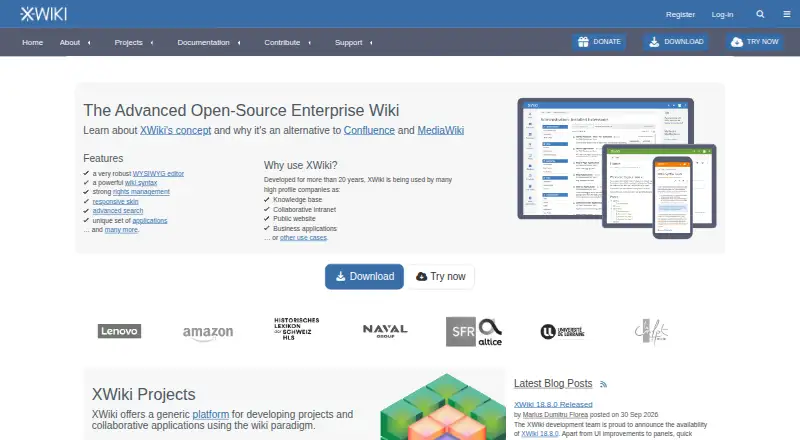
What XWiki is
XWiki is an open-source enterprise wiki and knowledge-management platform for collaboration, document management, and structured data organization. The maker lists knowledge bases, collaborative intranets, public websites, and business applications as uses, with support for both internal and external publishing. Users can edit with wiki syntax or a WYSIWYG editor, and version control allows them to compare or restore earlier page versions. Page rights can govern viewing, editing, and deleting content at a page, child-page, or whole-wiki level. More than 900 extensions include applications, macros, skins, plugins, and themes. Connectors include Active Directory, Office 365, Google Apps, and OnlyOffice, alongside collaborative tools such as meetings, forums, calendars, and task management. A RESTful remote API supports integration with other applications. XWiki can be self-hosted or used through XWiki Cloud, with Linux, Tomcat, Jetty, Docker, and Debian among the listed installation environments. The freemium offering includes a self-hosted open-source Community edition and a 10-day cloud demo trial that can be extended twice. The maker recommends using a supported version and reviewing monthly security updates.
Good
- Supports internal and external publishing.
- Page rights can be set across pages and wiki levels.
- More than 900 extensions are available.
- Provides a RESTful API and several listed connectors.
- Self-hosted open-source Community edition is available.
Watch out
- Cloud storage over the plan allowance may restrict actions to viewing.
- Community support is forum-based.
- Security updates require keeping instances on a supported version.
Who it suits
XWiki may suit organizations building shared knowledge bases, intranets, public sites, or business applications. It offers both self-hosted and cloud options, with access controls and version history for shared content.
Verdict
XWiki brings editing, permissions, version history, integrations, and extensibility to wiki and knowledge-management projects. It offers a self-hosted open-source route and a cloud trial, while cloud users should account for storage limits and teams should keep instances supported.
Plans and prices
From XWiki's own pricing page, checked 11 Oct 2026.
| Plan | Price | What it gives you |
|---|---|---|
| Community | Free | Free · on-premises · community support with no guarantees |
| Basic | Priced on request | Up to 1,000 users · cloud or on-premises · 1 support contact · 1 sub-wiki · Pricing page displays “/ year” and “/ user / month” without numeric amounts |
| Business | Priced on request | Up to 10,000 users · cloud or on-premises · 2 support contacts · 25 sub-wikis · Pricing page displays “/ year” and “/ user / month” without numeric amounts |
| Enterprise | Priced on request | Unlimited users · cloud or on-premises · 4 support contacts · 100 sub-wikis · Pricing page displays “/ year” and “/ user / month” without numeric amounts |
| Starter | Priced on request | Up to 25 users · XWiki Cloud only · online ordering · Pricing page displays “/ year” and “/ user / month” without numeric amounts |
The facts
Each one read from XWiki's own pages, with the date it was checked.
What it does
- API
- XWiki provides a RESTful remote API for integrating it with other applications.checked 11 Oct 2026
- Cloud security
- XWiki Cloud is hosted in France on OVHcloud and includes automated backups, proactive monitoring, antivirus scanning, and regular security maintenance.checked 11 Oct 2026
- Content analytics
- Yeschecked 20 Sep 2026
- Custom domain
- Yeschecked 20 Sep 2026
- Editing and history
- XWiki supports wiki syntax and a WYSIWYG editor, and saves changes under version control so users can compare or restore prior page versions.checked 11 Oct 2026
- Extensibility
- The maker describes more than 900 extensions, including applications, macros, skins, plugins, and themes.checked 11 Oct 2026
- Hosting and deployment
- XWiki can be self-hosted or used through XWiki Cloud; the maker lists Linux, Tomcat, Jetty, Docker, and Debian among supported installation environments.checked 11 Oct 2026
- Integrations
- The maker lists Active Directory, Office 365, Google Apps, and OnlyOffice connectors, plus collaborative apps such as meetings, forums, calendar, and task manager.checked 11 Oct 2026
- Notable limits
- If a cloud instance exceeds the storage included in its plan, actions on the wiki may be limited to viewing pages.checked 11 Oct 2026
- Permissions
- Page rights can control who may view, edit, or delete pages, and can apply to a page, its child pages, or an entire wiki.checked 11 Oct 2026
- Publishing audience
- bothchecked 20 Sep 2026
- Purpose
- XWiki is an open-source enterprise wiki and knowledge-management platform for collaboration, document management, and structured data organization.checked 11 Oct 2026
- Security updates
- The maker publishes security updates and recommends keeping instances on a supported version and reviewing monthly security updates.checked 11 Oct 2026
- SSO support
- Yeschecked 20 Sep 2026
- Support
- Community users receive forum-based help, while paid Pro offerings include professional technical support and support levels with SLA coverage.checked 11 Oct 2026
- Use cases
- The maker lists knowledge bases, collaborative intranets, public websites, and business applications as XWiki use cases.checked 11 Oct 2026
- Version history
- Yeschecked 20 Sep 2026
The company
- Company
- XWiki SAS is an independent company founded in France in 2004.checked 11 Oct 2026
Money
- Free plan
- Yeschecked 20 Sep 2026
- Trial
- The maker says users can create a free XWiki Cloud demo instance with a 10-day trial, extendable two additional times.checked 11 Oct 2026
The full review of XWiki
XWiki is an open-source enterprise wiki and knowledge-management platform for teams organizing shared documents and structured information. It is best suited to organizations that need granular access controls, extensibility, or deployment choice. Its flexibility is a strength, but teams must account for hosting and maintenance or cloud storage limits.
Overview
XWiki can support knowledge bases, collaborative intranets, public websites, and business applications. Users can edit in wiki syntax or with a WYSIWYG editor, then compare or restore earlier versions. That combination suits evolving shared content where teams need a record of changes, rather than a simple collection of static pages.
Page rights govern who can view, edit, or delete content, and can apply to an individual page, its child pages, or a whole wiki. This gives organizations useful control across different audiences, though it calls for deliberate permission design. XWiki SAS is an independent company founded in France in 2004 and based in Paris.
Key features
Control and publishing
Version history and fine-grained rights are central strengths: teams can track revisions while limiting access at the level their content requires. XWiki also supports custom domains, SSO, and content analytics, which make it better suited to managed organizational publishing than an informal shared notebook.
Extensions and integrations
The extension catalog spans more than 900 applications, macros, skins, plugins, and themes. That breadth offers room to adapt a wiki to specific workflows, but organizations should expect to choose and manage the components they rely on. Listed connectors include Active Directory, Office 365, Google Apps, and OnlyOffice; collaborative applications include meetings, forums, calendars, and a task manager. A RESTful remote API supports integration with other applications.
Hosting and upkeep
Organizations can run XWiki themselves or use XWiki Cloud. Supported installation environments include Linux, Tomcat, Jetty, Docker, and Debian, giving technical teams several deployment routes. Cloud hosting is in France on OVHcloud and includes automated backups, proactive monitoring, antivirus scanning, and regular security maintenance. Self-hosters retain control over deployment but need to keep an instance on a supported version and review monthly security updates. Community users can seek forum help; paid Pro offerings include professional technical support and SLA-covered support levels.
Pricing
XWiki has a free plan and a 10-day cloud trial. The trial lets users create a demo instance and can be extended two additional times. Plan prices are custom pricing.
| Plan | What it includes | Best suited to |
|---|---|---|
| Community | Open-source self-hosted community edition | Teams able to host and maintain their own instance |
| Starter | 25 users | Smaller teams |
| Basic | 1,000 users | Organizations with broader user groups |
| Business | 10,000 users | Large organizations |
| Enterprise | Unlimited users | Organizations without a fixed seat ceiling |
The Community edition avoids a paid-plan seat tier but puts hosting and upkeep on the organization. The paid tiers scale by user count, with Enterprise removing the stated user cap; professional support is part of paid Pro offerings. Cloud users should plan around their chosen plan's storage allowance: exceeding it can restrict wiki actions to viewing pages.
Platforms
XWiki supports web, Linux, Windows, API, and self-hosted use. The variety of installation environments is useful for teams with infrastructure preferences, while the self-hosted route is less suitable for organizations without capacity to maintain a server.
Who it's for
XWiki is a strong fit for organizations building a knowledge base, intranet, public site, or business application that needs controlled access and a configurable content model. It is less compelling for teams seeking a minimal setup with little administration: self-hosting brings update responsibilities, while the cloud option has storage limits that can affect editing when exceeded.
Pros and cons
- Pros: Page rights can be scoped from one page to an entire wiki, useful for content shared across audiences.
- Pros: Version comparison and restoration help teams manage changing documentation.
- Pros: More than 900 extensions, connectors, and a REST API provide multiple ways to adapt and integrate the platform.
- Cons: Self-hosted users must maintain a supported version and review monthly security updates.
- Cons: Cloud storage overages can leave users able only to view pages, interrupting content work until the limit is addressed.
- Cons: The trial lasts 10 days at a time, even though it can be extended twice, so it is a short evaluation window.
Alternatives
For a broad comparison, browse Knowledge base software.
- Nuclino is worth considering if a small team wants a free plan capped at 50 items, three canvases, and 2GB of storage, with Android and iOS apps among its supported platforms.
- ProProfs Knowledge Base may suit a solo author who can work within its free allowance of one author and 25 pages.
- Confluence is an option for teams that want a free plan for up to 10 users, with 2GB file storage and three active whiteboards per user.
- Zoho Learn may fit a small team seeking both manuals and courses in a free plan for five users, with 1GB storage.
- BlueSpice is a self-hosted alternative whose free distribution includes a visual editor, performance search, templates, and PDF export.
- GitBook is an option for individuals who want a free account with one user, unlimited page views, and 10 GitBook Agent messages per week.
- Slab may appeal to teams that can work within a free plan capped at 10 users, 10MB attachments, and 90 days of version history.
- Wiki.js is another self-hosted wiki alternative.
Verdict
Choose XWiki if your organization needs a configurable wiki with precise permissions, version history, and multiple deployment options. Its strongest reason to choose it is the combination of access control and extensibility; look elsewhere if you want to avoid ongoing instance maintenance or need cloud storage without the risk of overage restrictions.
Alternatives to XWiki
- 1

Confluence
Free planAndroidiOSWebSelf-hosted9.0From $5.42 a month - 2

ProProfs Knowledge Base
Free planAndroidiOSWebAPI9.0From $0.99 a month - 3

Zendesk Guide
AndroidiOSWebAPI8.6From $19 a month - 4

Scalar
Free planOpen sourceWebAPILinuxmacOS8.6From $150 a month - 5

Mintlify
Free planWebAPILinuxmacOS8.5From $450 a month - 6

Lark
Free planAndroidiOSWebAPI8.5From $6 a month