
WhenToWork
WhenToWork is online employee scheduling software for creating and updating team work schedules.
What WhenToWork is
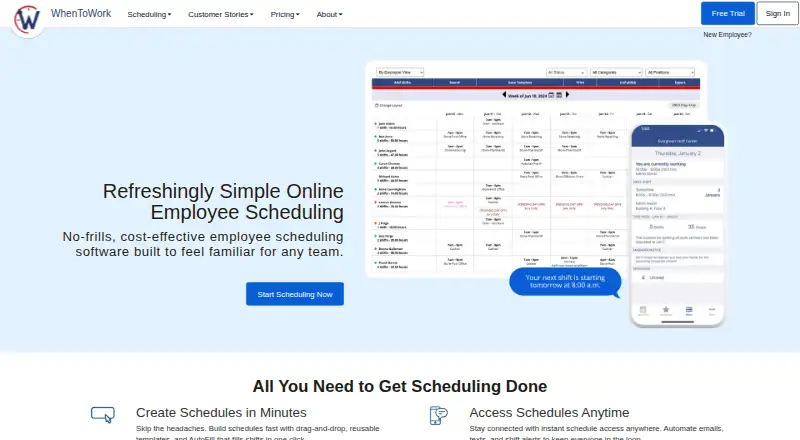
WhenToWork is online employee scheduling software for creating and updating team work schedules. Managers can build schedules with drag-and-drop tools and templates, set shift limits, check overtime and track schedules. AutoFill uses employee availability, preferences and skills to create schedules while aiming to avoid conflicts. Employees can request time off, trade shifts and claim open shifts, subject to manager controls. The service offers 12 schedule views and supports schedules across locations and departments. Updates and notifications can be sent by email, text and mobile app. Managers can export schedule data for other programs or send schedules to Google Calendar and Outlook. The company says the service has no API, bidirectional queries or direct connection to customer software or networks. It also does not provide a time clock, though schedule data can be exported for time clock and payroll programs. WhenToWork is available on Android, iOS, macOS, web and Windows. A 30-day trial is available, and there is no free plan.
Good
- AutoFill considers availability, preferences and skills.
- Employees can request time off and trade shifts.
- Offers 12 schedule views.
- Notifications can arrive by email, text or app.
- Schedules can be sent to Google Calendar and Outlook.
Watch out
- No free plan is offered.
- Subscriptions listed cover up to 10 employees.
- No time clock is provided.
- No API or bidirectional queries are available.
Who it suits
It suits teams that need employee scheduling, shift exchanges and time-off requests, including the universities, clinics and seasonal businesses named by the company. Its listed subscription covers up to 10 employees.
Verdict
WhenToWork covers schedule creation, employee self-service and notifications, with exports for calendars and other programs. Teams needing a built-in time clock or direct software integration should note those omissions.
Plans and prices
From WhenToWork's own pricing page, checked 8 Oct 2026.
| Plan | Price | What it gives you |
|---|---|---|
| WhenToWork subscription — up to 10 employees, 1 month | $38 a month | up to 10 employees · includes all features · access for managers and employees via computer or mobile device · 1 MONTH |
| WhenToWork subscription — up to 10 employees, 3 months | $100, paid once | up to 10 employees · includes all features · access for managers and employees via computer or mobile device · 3 MONTHS |
| WhenToWork subscription — up to 10 employees, 6 months | $164, paid once | up to 10 employees · includes all features · access for managers and employees via computer or mobile device · 6 MONTHS |
| WhenToWork subscription — up to 10 employees, 1 year | $273 a year | up to 10 employees · includes all features · access for managers and employees via computer or mobile device · 1 YEAR |
The facts
Each one read from WhenToWork's own pages, with the date it was checked.
What it does
- AutoFill
- AutoFill builds schedules using employee availability, preferences, and skills, with the aim of avoiding conflicts.checked 8 Oct 2026
- Calendar and data exports
- Managers can export schedule data for other programs and send schedules to Google Calendar and Outlook.checked 8 Oct 2026
- Employee self-service
- Employees can request time off, trade shifts, and claim open shifts, subject to manager controls.checked 8 Oct 2026
- Integration limitation
- The company says it does not directly connect to customer software or networks and does not offer an API or bidirectional queries.checked 8 Oct 2026
- Intended users
- The company describes WhenToWork as scheduling software for teams including universities, libraries, government departments, clinics, parks, and seasonal businesses.checked 8 Oct 2026
- Notable limit
- WhenToWork does not provide a time clock, though it says schedule data can be exported for time clock and payroll programs.checked 8 Oct 2026
- Notifications
- The service sends schedule updates and notifications by email, text, and mobile app.checked 8 Oct 2026
- Product
- WhenToWork is online employee scheduling software for creating and updating team work schedules.checked 8 Oct 2026
- Schedule tools
- Managers can use drag-and-drop scheduling, templates, shift limits, overtime checks, and schedule tracking.checked 8 Oct 2026
- Security
- The privacy policy says accounts are password-protected, data transmissions use industry-standard SSL encryption, and payment card details are handled by a third-party processor.checked 8 Oct 2026
- Support
- The company provides support by email at [email protected] and says it usually responds within minutes.checked 8 Oct 2026
- Views and locations
- The service offers 12 schedule views and supports viewing schedules across locations and departments.checked 8 Oct 2026
The company
- Company
- WhenToWork says it was founded in 2000 and is now part of TCP.checked 8 Oct 2026
- Founded
- 2000checked 28 Sep 2026
- Headquarters
- San Angelo, Texas, United Stateschecked 28 Sep 2026
Alternatives to WhenToWork
- 1

7shifts
Free planAndroidiOSWebAPI8.4From $39.99 a month - 2

Connecteam
Free planAndroidiOSWebAPI8.3From $29 a month - 3

Homebase
Free planAndroidiOSWebAPI8.2From $30 a month - 4

Sling
Free planAndroidiOSWebAPI8.2Free plan - 5

ClockOn
Free planAndroidiOSWebAPI8.1From $8.80 a month - 6

Shiftbase
Free planAndroidiOSWebAPI8.1From €0.50 a month